1
[键入文字]
11
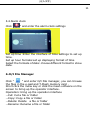
5.4 Alarm clock
Click "
" and enter the alarm clock settings
Set up time :Enter the interface of time settings to set up
time.
Set up hour formate:set up displaying format of time
Select the formate of date: choose different format to show
date.
6.O/I File Manager
" and enter O/I File manager, you can browse
Click "
the files in the e-pad and T-Flash memory card .
Short click the menu key or click the mean software on the
screen to bring up the operator interface.
Operation: bring up the operation interface
--Cut: Cut a file or folder
--Copy: Copy a file or folder
--Delete: Delete a file or folder
--Rename: Rename a file or folder