1
Albarry
Music
MCA11 User Manual
MCA11 User Instructions
Your new Albarry Music MCA moving coil amplifier has been
designed and manufactured to give you the finest and most
accurate reproduction and a musical listening experience.
The following guide will allow you to fully enjoy all the benefits of
your new MCA11.
Your new MCA11 moving coil amplifier operates using a 9-volt
battery fitted into the battery holder at the back of the unit.
When installing the battery, use the small lip at the bottom of the
battery holder draw. Pull upwards and outwards to release the
draw.
Take care to install the battery to ensure that the correct polarity is
observed. The polarity is indicated in the base of the draw.
+
-
Not inserting the battery correctly may lead to failure of the unit.
Please ensure that expired or dead batteries are removed from the
unit.
This is to ensure that corrosion does not occur in the battery
holder.
Production and Test Certificate
Serial Number
Week Manufactured
Tested by
Audio tested
Final Test and
Inspection
Packed by
Designed and hand built in the UK
Albarry Engineering
Staffordshire. England 01782 507253
All Albarry Music products comply with the directives laid out in IEC 60065
Copyright Albarry Engineering 2010 - 2012
User Notes
Albarry Engineering
Staffordshire. England 01782 507253
All Albarry Music products comply with the directives laid out in IEC 60065
Copyright Albarry Engineering 2010 - 2012
When the MCA11 is switched on, the power on LED will be
illuminated.
A battery condition LED will be illuminated when the battery is in
the correct useable voltage range.
9 volts for a battery in new condition - Lithium or Alkaline.
8.4 volts for a fully charged ni-cad.
When the battery voltage reduces to a voltage lower than 7.5 volts,
the battery condition LED will fail to illuminate.
When this happens or the battery condition LED starts to dim, fit a
new battery.
The power on LED and the battery condition LED use only a few
micro amps to operate.
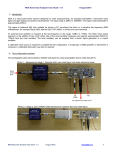
Battery condition LED
Power on LED
Connecting the MCA11
The phono socket connections are clearly indicated on the backplate.
The input from the tone-arm are the bottom sockets, the output to
the pre-amp moving magnet input are the top sockets.
Connect the ground lead from the tone-arm to the MCA11 ground
terminal.
Connect the black ground lead provided to the pre-amp ground
terminal.
Positioning the unit
To realise the finest reproduction from the unit, the MCA11 uses a
non-magnet type of case and construction.
When positioning the unit in your system, site the unit away from
any AC magnetic fields such as transformers etc.
Site the unit to minimise the effects of AC magnetic fields.
Installation hints and tips
Whenever possible, use a high quality locking type phono plug
when connecting to the pre-amplifiers input/output audio sockets.
Avoid continually rotating the plug whilst it is being inserted into
the sockets, this can lead to the possibility of the phono sockets
being loosened on the back plate.
Case Care
To care for the MCA11 metal case and perspex, use a good quality
silicon based polish applied directly to a soft cloth.
Do not spray polish directly onto the amplifier.
Minor scratches or blemishes to the Perspex (Acrylic) can be
removed with a liquid metal polish or a purpose made propriety
brand perspex polish.
Note* Do not use a metal polish on the front perspex lettering, this
can soften the screen print and remove the writing
Albarry Engineering
Staffordshire. England 01782 507253
All Albarry Music products comply with the directives laid out in IEC 60065
Copyright Albarry Engineering 2010 - 2012
Specifications
Battery………………………………….9 volt PP3/6LF22 or equivalent.
Battery life…………………………… Dependant on type and usage cycles
Lithium typically 100-140 Hours.
Alkaline typically 70-90 hours.
Monitoring LED's ………………….Less than 100 micro amps
Gain …………………………………….30dB's
Frequency response ……………2Hz - 170KHz
Output impedance ………………500 Ohms.
Input loading ………………………Internally switchable
100 Ohms - 50 Ohms - 25 Ohms
(set at factory to 100 Ohms)
Dimensions ………………………….L 175mm W 105mm H 65mm
Changing the input load
It is advisable that the dealer performs this operation
1/ Remove the four back-plate M3 socket screws.
2/ Carefully withdraw the back-plate together with the PCB
outwards by 50mm
(do not exceed 60mm otherwise damage may occur)
3/ The loading switches should now be exposed.
4/ Select the loading that you require, switch off the unused
loadings.
5/ If you are unsure which loading to use, consult your moving coil
cartridge handbook or contact the manufacturer
Right channel load switches
Battery Holder
Left channel load switches