1
FRONT/BACK CONNECTIONS OF LCD TV
6. FRONT/BACK CONNECTIONS OF LCD TV
Front View
4
English
VOL+
VOL-
3
CH+
CH-
2
MENU
1
SOURCE
5
POWER
1. Press“SOURCE”to select the input source.
2. Press “MENU”to bring up the main menu on
the screen.
3. Press“CH+”or “CH-”to scan through channels.
4. Press“VOL+”or “VOL-”to increase or decrease
the volume.
5. Press“POWER” button to turn the TV on or off.
6. POWER INDICATOR: Shows amber in standby mode.
Shows amber or blue when your TV is switched on.
7. REMOTE SENSOR: infrared sensor for the
remote control.
7
6
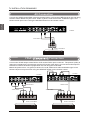
Back View and Control Connections
1. AC IN: Main power input.
2. HDMI1/HDMI2/DMI3: Connect the HDMI output
jack of DVD.
3. PC AUDIO: Connect the Audio output jack of PC.
4. VGA ( PC ) : Connect the PC-RGB output jack of PC.
5. YPbPr1/YPbPr2: Connect the YPbPr output jack of DVD or VCR.
6. Y-L/R1,Y-L/R2: For YPbPr audio.
7. VIDEO: Connect the Video input jack of DVD or VCR.
L/R: For VIDEO audio.
8. AUDIO OUT: Connect to the audio equipment.
9. PHONE: Connect the headphone.
10.RF IN: Connect the antenna.
11. USB SERVICE: USB Port for Factory Use Only.
12. COAX out: Connect the COAX receiver.
1
3
2
4
5
8
6
9
5
AC IN
Pb1
Y1
11
8
5
Pr1
Y-R1
6
Y-L1
7
VIDEO
COAX
12
10