1
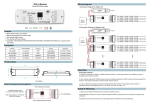
DALI dimmer
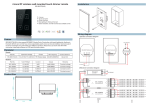
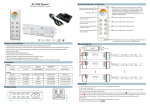
Wiring diagram
N
Model:SR-2303xx series
Power Supply
12-36VDC
110V-230VAC
1
L
3
GND
2
SR-2303B
DALI
Master
4
RGB or single color LED strip
N
Power Supply
12-36VDC
L
V+
CH1
OUTPUT
12/36VDC
DC INPUT
V+
V-
AC110-230V
DALI Master
CH2
D L1
DL 2
SR-2303BEA
CH3
D L1
CH4
DL 2
Operation
Setting DALI address
a. Manual:Long press any one button---digital address will flicker---short press button to set address we want---long press any button to confirm.
Feature
Match all DALI system in the market
Manual /automatically DALI address setting
DALI address digital indicate
Four channels, can set addresses from one to four.
Compatible with SR-2400TL,SR-2400TG,SR-2400TS,SR-2400LC,SR-2400GC,SR-2400SC and any good quality
DALI Master
Parameter
1
Part No.
Input Voltage
Output Current
SR-2303B
12-36VDC
SR-2303BEA
12-36VDC
12-36VDC
4x350mA
SR-2315B
SR-2317B
c. DALI master setting: SR-2303B Series can also be setting address by all DALI masters which
possesses this function. The specific operation can refer to DALI master manual.
Output Power
Remarks
4x5A
4x(60-180)W
Constant voltage
4x8A
4x(96-288)W
Constant voltage
4x(4.2-12.6)W
Constant current
1) The product shall be installed and serviced by a qualified person.
Constant current
2) IP20.Please avoid the sun and rain. When installed outdoors, please ensure it is mounted in a water proof
4x700mA
12-36VDC
2
b. Long press two button together we can change the address from 1A to 4A of the four channels
For example, when we set address to 22
When select 1A, all four channels will be same address 22.
When select 2A, channel one and channel three will same address 22, channel two and channel
four will be 23.
When select 3A, channel 1,2,3 will be address 22, 23, 24, and channel 4 address is also 24
When select 4A, channel 1, 2, 3,4 will be address 22,23,24,25.
4x(8.4-25.2)W
Safety & Warnings
enclosure.
Product Size
3) Always be sure to mount this unit in an area with proper ventilation to avoid overheating.
178.9
4) Please check if the output voltage of any LED power supplies used comply with the working voltage of the
product.
SR-2303B
45.5
5) Never connect any cables while power is on and always assure correct connections to avoid short circuits
before switching on.
18.6
6) Please ensure that the cable is secured tightly in the connector
7) For update information please consult your supplier.
170.4
Brief introduction of buttons
DALI addresses indicate
1
12-36VDC power input
or connect next DALI dimmer
3
For LED lighting
4
GND
DALI signal input or connect to
next DALI dimmer
2
SR-2303B
DALI addresses adjust button
Warranty Agreement
1) We provide lifelong technical assistance with this product:
3-year warranty. We print date on every products, for example :1125 means year 2011,week 25.The
warranty is for free repair or replacement and covers manufacturing faults only.
For faults beyond the 3-year warranty we reserve the right to charge for time and parts.
2) Limited Warrenty
Any defects caused by wrong operation.
Any damages caused by unauthorized removal, maintenance, modifying, incorrect connection and
replacement of chips.
Any damages due to transportation, vibration etc. after purchase.
Any damages caused by earthquake, fire, lightning, pollution and abnormal voltage.
Any damages caused by negligence, inappropriate storing at high temperatures and humidity or near
harmful chemicals.
Product has been updated
3) Repair or replacement as provided under this warranty is the exclusive remedy to the customer.