1
HDC1601M / HDC801F-PD / HDC801H
1.
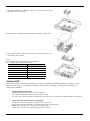
Tighten the both side of HDD bracket using screws.
2. Install HDD bracket with HDD into DVR then hold it with screw to
fix it to the bottom part of DVR.
<Note>
Socket arrangement of SATA cable in main b’d is as follows.
Two HDDs can be installed in DVR.
Main b’d socket
Disk manager
INT A
INT A
INT B
INT B
eSATA
eSATA
HD1600F-PDR / HD1600F-R
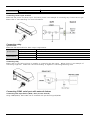
1. Unscrew bracket screws that are fixing it to a DVR..
2. Push HDD bracket to a direction shown in the right picture and
separate from fixtures.
20