1
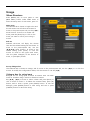
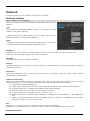
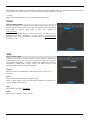
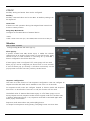
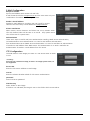
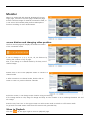
Network Configure network info when DVR is connected to a network. Network settings menu network network Ethernet used to configure the relevant network info when DVR is connected to network. type Select Network type(Ethernet/xDSL). If DVR is connected to cable modem or lan, select “Ethernet. If DVR is connected to xDSL, PPPoE type, select xDSL. But if it is not PPPoE type, even if it is xDSL, select ‘Ethernet’. DHCP If Network to which DVR is connected has a DHCP server, it, assuming it is enabled, will automatically assign IP address to DVR. IP address IP Address is for the connection between DVR and Control Center and also for web connection from Webviewer. (But, Net Mask, Gateway should be configured.). Net Mask Net Mask makes range of IP address available. Gateway Gateway address must be entered for DVR to connect to external network and gateway address is given by network administrator. DNS server DNS must be entered in order to use various networks such as, WRS, NTP, e-mail, and twitter. Contact network administrator for DNS address. UPnP Port Forwarding When using Internet Sharing device supporting UPnP, this function eable all connected DVR to do Port forwarding and they can be connected to Internet with IP address of Internet Sharing device. (1) Configure two DVRs with DHCP On. (2) Please, check if DVRs which are connected to Internet Sharing Device are allocated with official IP. (3) Configure DVR port of DVR(A) and DVR(B) as 81 and 82 individually. (4) Configure UPnP function of Internet Sharing Device as “ON”. (5) Configure UPnP Port Forwarding function of DVR as “ON”. (6) Please, check if Port Forwarding Status message is changed from “Not Available” to “Port Mapping is OK”. (7) Finally, if user accesses DVR(A) with the IP address with port number 81 or DVR(B) with the IP address with port number 82, user can access DVRs. Port Register port # in DVR and use it to connect to control center or webviewer. Default port is 80 and be careful in entering the port # when used with PPPoE modem and router. Bandwidth limitation. 50