1
GTCO CalComp Products
CADPro
by CalComp
More Information...
Small-Format Graphics Tablet
Product Features
What's in the Box
Compare Models
Specifications
Productivity is critical for CAD designers. With the CADPro small format
digitizer and TemplateWorks productivity-boosting software, power and
performance are incomparable. The optimal desktop size and
programmable pointing devices provide a comfortable environment and
enable the swift execution of commands. Utilizing CADPro and
TemplateWorks, the demanding CAD professional will produce
high-precision, quality designs–faster.
Press Release
Brochure (.pdf)
Get Acrobat Reader
to view .pdf files.
Similar Products...
Digicad Plus
DrawingBoard III
SummaSketch III
Features
Top of Page
- Compatible with Windows and Mac platforms.
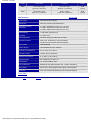
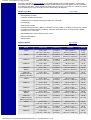
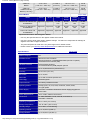
- Industry’s highest resolution and accuracy at 4,000 lines per inch / 150 lines per mm resolution and
accuracy to ± 0.008 in / 0.203 mm with standard configuration.
- Ergonomic, programmable 16-button cursor.
- Cordless transducer options–4-button cursor, 5-button mouse, click tip pressure-sensing pen.
- Easy set-up and configuration–no power supply, plug-and-play design, easy-to-install driver, RS-232
and USB interfaces.
- Complete with TemplateWorks software–the CAD productivity tool.
- Programmable button macros and tablet mapping for speed and efficiency.
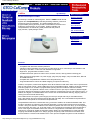
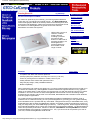
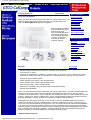
CADPro, the superior, small-format digitizer offers all the features CAD users value most in input devices.
With an active area of 6"x9", native USB support and a small tablet footprint, CADPro is ideal for desktop
CAD and graphics use. CADPro’s programmable pointing devices include the standard cordless
16-button cursor, and optional 4-button cursor, 5-button mouse or pen stylus. CADPro’s patented digital
technology delivers the industry’s highest input resolution of 4,000 lines-per-inch and 0.008" accuracy. In
addition, the digital, no-trackball feature of the cursor and mouse eliminates cleaning, skipping and loud
clicking to ensure smooth fast tracking..
The CADPro does not require a power supply and set-up is simple with easy-to-use tablet drivers,
plug-n-play design and dual interface support (RS-232 and USB). The customization and performance
specifications are optimal for the serious CAD professional.
TemplateWorks software is included with every purchase of CADPro for AutoCAD Release 2000. Two
modes of operation are offered in this powerful application, including button assignment and template
creation. Using the 16-button cordless cursor and the keyboard <alt> and <ctrl> keys, up to 60 regularly
used commands, like zoom, cut, snap and render, can be assigned to the buttons and executed with a
touch of the finger! Consolidate actions and macros to a single button to eliminate time-consuming
searches for commands. Utilize the template creation feature of TemplateWorks for advanced tablet
mapping and labeled template icons. Simply program frequently used commands to the tablet menu
block and define a mouse-mode selection area. Then print the template and place it under CADPro’s
http://www.gtco.com/productcadpro.htm (1 of 3) [16/09/2000 02:13:01]