Download Quickly set up Stream-it!

Transcript
March 2015
Stream it!
Hardware set-up Quick Start Guide
4.
Fixed IP appendix
If your network configuration does not support DHCP or if you wish to directly connect the board to your PC, you will
need to allocate a fixed IP for your PC to test the Stream it! kit.
1.
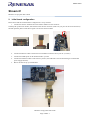
Please follow the procedure below.
a)
Disconnect your PC from
the network.
b) Open your network
properties.
c)
Select IPV4 properties.
d) Set or make a note of the
fixed IP address. This
example uses 192.168.0.1).
5.
Board usage limitations

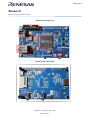
When a Camera module is mounted, the external bus cannot be used (don't activate the SDRAM => Keep P2.0
to input or driven high).

When using the second QSPI (U16 or U17) make sure R1 is populated and don't use the SDRAM.

When SDRAM is used the second QSPI cannot be used, make sure R1 is not populated.

When using an external TFT (thru CN7) the SD card as well as the Ethernet cannot be used. Please make sure
no SD card is in the slot if you use the TFT.
Summary:
6.

To disable Ethernet PHY keep P2.7 as input or driven low (pull-down on board to keep PHY reset active).

To disable SDRAM keep P2.0 as input or driven high (pull-up on board to keep CS3 inactive).

To disable second QSPI (if it is mounted on the board) remove R1 or don't populate either U17 or U16.
What next
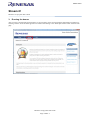
Please review the documentation, schematics and project source code from the “Project source files and documentation”
link on each demo page.
Hardware setup Quick Start Guide
Page number 5