1
Table of Contents
Click on a title to jump to that section.
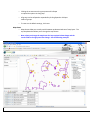
The Layout………………………………………………………………3
The Toolbar…………………………………………………………………...4
a. Advanced Tools
b. Mark Up Tools
Search (left) Panel………………………………………………………………….6
III.
a. Quick Search
b. Advanced Search
IV.
Results (bottom) Panel…………………………………………………………………..7
a. Changing how your results are displayed
b. Clearing Results
c. Exporting to Excel
Layers (right) Panel………………………………………………………………..9
V.
a. Layer Options
b. Map Themes
c. Information tab
d. Legend tab
Using The Basic Tools…………………………………………………....11
VI.
a. Zooming in and out
b. Moving around the same extent
c. Identify Database
d. Print Screenshot
e. Email a Map Screenshot
VII.
Using the Mark Up Tools……………………………………………………14
a. Add a line segment
b. Add text
Using the Advanced Tools ……………………………………………………………………..14
VIII.
a. Downloading GIS data or Georeferenced Screenshots
b. Using the Buffer Tool (Ajoiner Tool)
c. Using the Measure Tool
d. Zoom to Scale
I.
II.
2