1
10
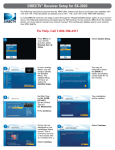
1. Input the zip code of your current location. (If using a 311 or previous model
receiver, select “Peak Angles” to enter your satellite and zip code.)
Searching for Satellites
2. Select “Dish 300” for the dish system.
Once powered on, the antenna will begin searching for satellites. The antenna will cycle through qualifying signals
before returning to the correct satellite.
3. Select “21” for the transponder.
4. Select the satellite that you want to point at. The 72° satellite is recommended
as a single satellite solution for DISH HD programming. See “Compatible
Satellites” for help.
With all information entered, an elevation angle* should be displayed. You will need this angle to set the elevation.
*Elevation angles may not be displayed for satellites 72° and 129°. In this case, refer to the provided elevation and coverage maps for an elevation angle.
Setting the Elevation
Align the antenna so that the cable connections are pointing approximately North.
Turn the rotating housing until the elevation mark aligns with the elevation
angle given by the receiver or provided elevation maps. If the unit is not level,
the elevation may be slightly off.
TIP
If a first search does not
successfully find the
desired satellite, simply adjust the
elevation for another search. See
“Searching for Satellites.”
After setting the elevation, tighten the elevation lock until fingertight. Do
not overtighten.
Watch the signal meter on the receiver to confirm when the appropriate satellite is found; the signal bar should be
green and indicate “LOCKED” on the desired satellite. Upon finding a satellite, the unit will make adjustments to finetune the signal.
If pointed at the desired satellite, make sure the unit has finished fine-tuning
the signal, and disconnect the power from the power source. Once power
has been removed, do not move the satellite dish, or the signal may be lost.
NOTE
If not pointed at the correct satellite, the Anser antenna will move to the next
strongest satellite after 45 seconds of inactivity. If the Anser antenna cycles
through all satellites but the desired satellite has not been found, disconnect
the power from the power source, set the elevation for 2–3 degrees higher or
lower, and connect the power to the power source again.
NOTE
When fine-tuning, the
antenna will make slow
movements back and forth.
If the power is not
disconnected from the
source quickly enough, the antenna
will cycle to other satellites.
Minimum signal strength should be at least 15–20. If signal is inadequate, an elevation adjustment may be necessary.
When adjusting the elevation, the azimuth will also be adjusted. To compensate for the azimuth adjustment, either
complete a new search or (manually) slightly rotate the unit.
DISH Receiver Setup
After the unit has locked onto the desired satellite and the power has been disconnected, complete receiver setup below.
Hooking up the Antenna
Connect a coaxial cable from the
main port of the base to the “Sat In”
port on the back of the receiver that
will be used most often. The main
port should always be connected
when the Anser antenna is in use.
Coax cable connected to main port
TIP
TIP
If applicable, remove the cap
from the secondary port, and run
a second coaxial cable from the
secondary port on the base to the
“Sat In” port on a second receiver
(or second input on dual tuner).
Coax cable connected to sec. port
Run the coaxial cable directly from the satellite receiver to the Anser
antenna when searching for signal.
If the receiver is used for DIRECTV HD programming, check that the
B-Band converter has been removed prior to connecting the antenna.
11
12
13
Select “Check Switch.”
Select “Test.”
The receiver will go through a
number of steps to detect your
satellite settings.
14
15
16
Press “Cancel” to exit the Point
Dish menu.
The receiver will acquire signal.
A program guide may download.
You are now ready to watch TV!
Plug one end of the power cable into
the quick disconnect socket. The
cable should click into place. Then,
plug the other end into a 12 V outlet
or into a 110 V to 12 VDC converter,
such as Winegard Model GM-1200
power converter (sold separately).
Power cable connected to quick
disconnect socket
NOTE
The 12 VDC power source
or 110 V to 12 VDC
converter must meet power supply
specifications. See “Parts of the
Antenna” for specifications.