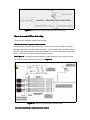
1
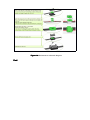
The fourth time press
Full white
The fifth time press
Chase(white)
Operation steps:
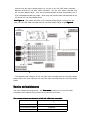
1. Connect Flex dot strip to signal port 1,2,3,4 on HC-105 LED video controller, turn on
the power for controller.
2.
Press Test mode button. With every press, Flex dot strip will change a effect. If the
result of auto test of some LED dot strip or some dots is not consistant with effect
described above, so such Flex Dot Strip is out of order, which need to check and maintain,
sign marks on the bad Flex Dot.
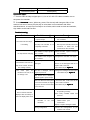
Troubleshooting
Problem
Probable cause(s)
Remedy
The controller have not signal
Check controller,repair or change a
or power output
new controller
The whole Flex dot strip is
The connector between Flex
Check the connector between Flex
not working
dot strip and controller is not
Dot strip and controller, fasten the
completely contacted
connector or check the wire
connection on the connector
The color of the whole Flex
dot strip without changing
The mistake of output signal of
the controller
Check controller,repair or change a
new controller
The mistake of the configure of
Configure the controller once again
the controller
The color of One dot or
several dot in one Flex dot
The LED panel of this dot is
Check wire connection and all the
damaged
device on the damaged LED dot, or
strip is out of order, remains
replace with a new one,
are working correctly
From
some
point,
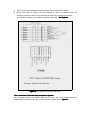
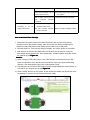
The method as per Figure 10
the
remains is not work, or do
not change color
This dot is damaged, without
Change the damaged dot LED panel
The method as per Figure 10
signal or power out
The former dot is damaged,
without signal or power output
The Flat cable and LED panel
Check this Dot, make sure all the
is not well contacted, the signal
wire is well contacted
or power cannot be transmitted
The method as per Figure 10
to the next Dot
Flex Dot strip controlled by
Controller defective
Replace with a Controller known to
be operating correctly.
One or several controller
Have faulty controller tested and
displays video incorrectly or
serviced.
does not display video at all.
The
LAN
cable
controller
is
contacted
between
not
well
Inspect connections and LAN
cables.Correct
poor
connections.
Repair or replace damaged cables
Wrong configuration
Correct the confuguration as per
software user manual