1
PSi - GPS, DATA LOGGING AND TRANSFER
1.
HARDWARE SETUP
1.1
1.2
1.3
Hardware requirements ........................................................................................................................................ 5
Head Unit Configuration - Port Settings ............................................................................................................... 6
Internal Data Card Module.................................................................................................................................... 7
1.3.1
PC Card reader - transferring data ......................................................................................................... 7
GPS Receiver........................................................................................................................................................ 7
1.4.1
General Installation Guidelines for GPS Receivers ................................................................................ 7
1.4.2
‘GPS 16’ GPS Receiver .......................................................................................................................... 8
1.4.3
Third-party GPS Receivers ..................................................................................................................... 8
Printer Setup ......................................................................................................................................................... 9
Data Transfer - Pro-Series to PC Link Cable ........................................................................................................ 9
1.6.1
Creating a HyperTerminal Shortcut on Windows XP Desktop................................................................ 9
1.6.2
Setting up HyperTerminal in XP .............................................................................................................. 9
1.4
1.5
1.6
5
2.
LOGGING / P.F. FUNCTIONS - SOFTWARE CONFIGURATION
2.1
2.2
2.3
Logging Interval .................................................................................................................................................... 11
Tag Names............................................................................................................................................................ 11
Edit Function Names and Values ......................................................................................................................... 12
2.3.1
Clear Store function................................................................................................................................ 12
Set GPS Antenna Offset ....................................................................................................................................... 12
GPS Baud Rate ..................................................................................................................................................... 13
2.4
2.5
11
3.
THE LOG SCREEN - LOGGING OPTIONS
3.1
3.2
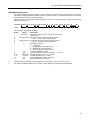
MAIN Screen Information ..................................................................................................................................... 14
Running a Variable Rate Treatment plan.............................................................................................................. 15
3.2.1
Overriding the VRT application rate ....................................................................................................... 16
3.2.2
Stop a VRT job ........................................................................................................................................ 16
3.2.3
Tagging................................................................................................................................................... 16
3.2.4
Extended Data Functions ....................................................................................................................... 16
3.2.5
Display vehicle track - "MAP".................................................................................................................. 17
3.2.6
Display GPS Status................................................................................................................................. 17
Dynamic Data Logging ......................................................................................................................................... 18
3.3.1
Start recording a Dynamic Job............................................................................................................... 18
3.3.2
Stop recording a Dynamic Job............................................................................................................... 18
Field Data Logging................................................................................................................................................ 19
3.4.1
Start recording Field Data....................................................................................................................... 19
3.4.2
Stop recording Field Data ...................................................................................................................... 19
Review / Reset / Print or Download Summary Data............................................................................................. 20
3.5.1
Select Summary Data to Reset or Download ......................................................................................... 20
3.5.2
Downloading Data to HyperTerminal ..................................................................................................... 21
3.5.3
Downloading Data to the Data Card....................................................................................................... 21
3.5.4
Printing Data to a Printer......................................................................................................................... 22
3.3
3.4
3.5
4.
SYSTEM ERIS SETUP
14
23
4.1
Sending Rate instructions to Kverneland controllers - Vicon (EDW) / Berthoud (Bertronic) /Lely (Centronic) Tive
(Tivetronic)........................................................................................................................................................................... 24
4.2
Sending Rate instructions to Bogballe Calibrator 2002 / 2003 ............................................................................ 24
4.3
Sending Rate instructions to Amazone Amatron Plus ......................................................................................... 24
4.4
Sending Rate instructions to Fieldstar (or via Fieldstar to Väderstad / Horsch (Agtron)) .................................. 25
4.5
Receiving Rate instructions from Fieldstar ........................................................................................................... 25
4.6
Sending Rate instructions to Väderstad............................................................................................................... 25
4.7
Receiving Rate instructions from Agrocom ACT.................................................................................................. 25
4.8
Receiving Rate instructions from Yara-N Sensor ................................................................................................. 26
4.9
Sending Rate instructions to LH5000 V4.............................................................................................................. 26
4.10
Sending Rate instructions to Raven SCS Console .............................................................................................. 26
4.11
Receiving Rate instructions from John Deere Greenstar/ Greenstar 2 (GS2) ..................................................... 27
3