1
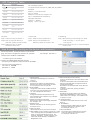
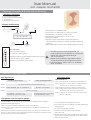
IVR Command Table
Char
0.@:
+ -
Char Mapping
00 01 02 03 04 05 06
1 Space "
10 11 12
2 abc ABC
20 21 22 23 24 25 26
3 def DEF
30 31 32 33 34 35 36
4 ghi GHI
40 41 42 43 44 45 46
5 jkl JK L
50 51 52 53 54 55 56
6 mno MNO
60 61 62 63 64 65 66
7 pqrs PQRS
70 71 72 73 74 75 76
77 78
8 tuvTU V
80 81 82 83 84 85 86
9 wxyz WXYZ
90 91 92 93 94 95 96
97 98
IVR Char Mapping Table
Configure IVR item with type IVR_CMD_TYPE_SET_STRING
Examples:
Example 1, user name is abc.
Input : 212223#
Example 2, user name is [email protected]
Input : 1020300243747101236361#
Playing IVR examples:
Example 1, " aBcDef "
Playing : " a up b c up d e f "
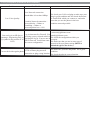
Call Hold:
Call Transfer:
Call Waiting:
Step1: Flash hook (key) and press "1"
Step1: Flash hook (key) and press "2"
Step1: When hearing a call waiting tone. Press
Step2: Then you will hear dial tone.
Step2: Then you will hear dial tone.
Press the number you want to dial.
Press the number you want to dial.
" Flash hook (key)+1" to pick up the
Coming call.
Step2: Press" Flash hook (key) " to switch between
Step3: Flash hook (key) to switch
the two calls.
Between the two calls.
Web Setting (To configure the device with browser)
The access buttons, located across the top of the web
page, are used to configure the IP Phone for operation.
For example: 192.168.1.3
1.Please enter IVR Menu "16881688#"
-->"100#" to get your IP address
2.Please open MSIE(Win98,Win2000 and XP)
And input your IP address--http://xxx.xxx.xxx.xxx:8080
3. Input user name and password
user name is : normal
password is : 1234
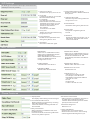
SIP Settings
1. Network Type
Specify the Network type to connect to
Internet
2. IP Address
Assign the IP address of WAN interface
Effective only when network type is static
IP; for example: 220.130.187.221
3. Subnet Mask
Assign the subnet mask of WAN interface
Effective only when network type is static
IP; For example:255.255.255.0
4. Gateway
Assign the default route.Effective only
when network type is static IP; For example
220.130.187.254
5. PPPoE User Name/ Password
Effective only when network type is PPPoE
For example: 123
6. NTP Server IP
Network Time Server IP. Used to get time
Form this server
7. NTP Time Zone
Global Time Zone of your current location
8. NAT Traversal(none stun static)
If "None" is selected,no stun operation in SIP
activities
If "Stun"is selected,the device will detect the
NAT type automatically and get the result to
modify SIP activities
Be aware to set the"Stun URL"when "Stun"is
selected.
If "Static" is selected, specify the "NAT"
external IP
9. STUN URL
STUN server domain name or IP address.
When NAT TRAVERSAL is "Stun", you must
set this item. For example, "stun.fwdnet.net"
or "80.67.17.102".
10. NAT External IP
IP address of the NAT device in front of the
Device
11. First DNS IP
Primary Domain in Name Server used to
lookup IP address form domain name
For example:"168.95.1.1"
12. Second DNS IP
13. Band Width Control: used to control the traffic Second Domain in Name Server used to
lookup IP address form domain name
rate flooding between LAN/WAN interface, in
For example:"168.95.1.2"
order to reserve bandwidth for VoIP. For
example,1000kbps, It means that the max
traffic rate will be limited to 1000kbps in
Bridge/NAT mode