1
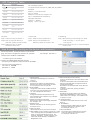
SIP Settings
SIP Settings are needed under the phone bundled with a
number(from service provider)
1. Using Proxy Server
Choose to use proxy server or not
6. Using Outbound Proxy Server
Specify to enable or disable outbound
Proxy server
2. Proxy URL
If "Using Proxy Server" is selected
this item must be identify
For example:
"210.202.244.130:7890"
When the SIP server does not use
the default port number, you can
specify the port number by the
format "IP:Port Number"
For example,
" 210.202.244.130:7890 "
7. Outbound Proxy URL
Effective only when "Using outbound
Proxy server" is on
8. Domain Name
Used when "Using Proxy Server"is on
3. Proxy user
The SIP account name when"Using
Proxy Server" is on.
9. Expire Time
The period of registering time in
second
10. RTP Port
Specify the RTP port number. If "0" or
bland is set, the system will choose
one Port at random
4. Proxy password
The SIP account password when
"Using Proxy Server" is on
5. User Name
User name of SIP user agent
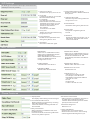
NAT Relative
1.NAT Enable
Select "On" to enable NAT function;
Select "Off" to disable NAT function
and Enable bridge function;
When "NAT Enable" the DHCP server
function is disabled even that
Configured it at "On" .
4.DHCP Server Enable
Select "On" to enable DHCP server on
LAN Interface. Select " Off" to disable
this function.DHCP server will
automatically shut down when NAT is
disabled .
2.LAN IP Address
Default Value:192.168.111.1
5.DHCP Server Start IP
Default value:192.168.111.100
3.LAN Subnet Mask
Default Value:255.255.255.0
6.DHCP Server IP Count
Default value: 30
7.Virtual Server 1~ 5
Virtual servers setting for NAT.
For example, one FTP server
behind NAT router with IP address:
"192.168.111.100"
Port:21
Protocol:TCP
Local IP:192.168.111.100
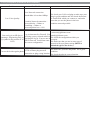
Phone Features
1.Display Name
The display name setting on SIP user agent
2.Unconditional Call Forward
Setting this item to forward every incoming
call to the specified URL.
If the item is blank, incoming calls will not
be forwarded
3.Busy Call Forward
Setting the item to forward the calls ,then
the phone is busy
If the item is bland, the incoming calls when
You are busy will be rejected
4.No Answer Call Forward
Setting the item to forward the call when no
one pick up the calls in some times.
The item "No Answer Ring Time"is used to
specify the time in second
5.No Answer Ring Time
Reference 4.4
6.Using Call Waiting
Select to turn on or off this feature
When the item is turned on, the incoming
call will signal the alerting tone to you.