1
Application Note
Network Management
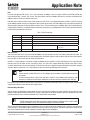
Network Management (NMT) is used by the CANopen Master to control the operating status of all CANopen slave devices using the
Network Management commands and state machine. Support for this state machine is mandatory for all conformant CANopen devices. Certain objects are only active in certain modes. This allows devices to be configured before switching into operational state.
INITITALIZATION
only the BOOT UP object is active in this state
PRE-OPERATIONAL
NMT and SDO are active to allow device configuration and state control. SYNC is active, although it will have no effect as PDO is not
yet active. EMERGENCY is also active and will be transmitted if an error occurs.
OPERATIONAL
PDO becomes active to allow cyclic data transfer.
STOPPED
unable to communicate with object dictionary in this state, only NMT is active to allow device to be switched to another state.
For information about CANopen protocol as well as complete network planning and installation guides refer to the 'CAN in Automation'
website at: http://www.can-cia.org.
The Physical Network
PLC/PC
CANopen Master
GND
LO
HI
PositionServo
CANopen Slave
PositionServo
CANopen Slave
GND
LO
HI
CAN Network
HI
GND
LO
CAN Network
120Ω
120Ω
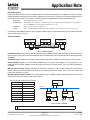
Figure 1: CANopen Network
Recommended cable: Various cables are offered by manufacturers for CANopen communication according to the type of environment/
application that the cable will be used in. One example from Belden is the Belden 9842. Check with your cable manufacturer for applications
compatibility.
Termination: CANopen networks are terminated at either end of the network with a 120 Ohm 1% ¼ Watt resistor as shown in Figure 1.
Network topology: CANopen uses a linear topology. CANopen nodes can be daisy-chained together or run from drop lines or any
combination of these methods. CANopen masters do not need to be located at any particular point. They can be installed anywhere on
the network.
Maximum number of nodes: CANopen allows up to 127 nodes to be connected to a single network, however, this is under specific
network loading and messaging conditions. For practicality, limit usage to 64 nodes per network. These can be a mix of slaves and
masters (also referred to as scanners).
Maximum network length and baud rate: The maximum length of cable in a CANopen network is dependent upon the baud rate used.
The faster the baud rate, the shorter the cable. Refer to Table 2.
Table 2: Baud Rate and Maximum Cable Length
20kbps
2500m
50kbps
1000m
125kbps
500m
250kbps
250m
500kbps
100m
800kbps
50m
1000kbps
25m
CAN
Module
CAN Network
CANopen
CANopen
CAN
Module
PositionServo Drive
CAN
Module
PositionServo Drive
I/O
. . . to 64 nodes
I/O
Motor
Feedback
Sensor
CANopen
Node 1
Sensor
Motor
Feedback
5000m
Status
Maximum Cable Length
10kbps
Control
Baud Rate
Master Controller
Node 2
Figure 2: Nodes on a Network
Note: Each device on the CANopen network must be set to the same baud rate.
Copyright © 2007 by AC Technology
AN 0022/A1
www.actech.com
For general information only. Content subject to change without notice.
May 2007
1-508-278-9100