1
Tools and Calendar
Alarms
The Clock application also allows you to set alarms.
To set an alarm:
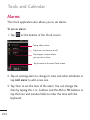
1. Tap
at the bottom of the Clock screen.
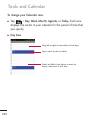
Tap to add an alarm.
Tap to turn an alarm on or off.
Tap to open a screen where
you can set an alarm.
Tap to return to the main Clock screen.
2. Tap an existing alarm to change its time and other attributes or
tap Add alarm to add a new one.
3. Tap Time to set the time of the alarm. You can change the
time by taping the + or -buttons and the AM or PM buttons or
tap the hour and minutes fields to enter the time with the
keyboard.
254