1
Integrated Circuits Inc.
APR9600-4081A DB
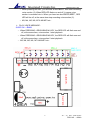
¾ PLAY VOICE MESSAGE :
SLIDE SW. = PLAY
→ When PRESSING—RELEASING TACT SW., the RED LED will flash on
and off, at the same time sounds(1) start playback. When you want to stop
sounds(1) palyback, please press then release TACT SW again.
→ When PRESSING—RELEASING TACT SW., the RED LED will flash on
and off, at the same time sounds(2) start playback. When you want to stop
sounds(2) palyback, please press then release TACT SW again.
→ Voice section (3)~ last etc..
B.
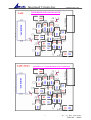
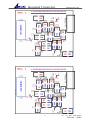
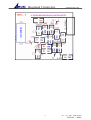
TAPE-NEXT : ( USE SLIDE SW. + M1 + M2 KEYS )
(Please adjust jumper”J1,J2,J3” according to TAPE-NEXT MODE application note)
MESSAGE MANAGEMENT MODES : SETUP TAPE-NEXT MODE
¾ RECORDING VOICE MESSAGE :
SLIDE SW. = REC
→ When pressing TACT SW=M1., you will hear a short “ BEEP” then you
can start recording voice section (1). When you are recording sounds,
please keep your fingers in pressing position of TACT SW=M1, the RED
LED will flash on and off and it means the voice section (1) is recorded into
ic. When releasing TACT SW=M1., you will hear a short “BEEP”then stop
recording sounds(1)
→ If you are going to record voice section (2), firstly press-release
“M2” then re-press TACT SW=M1., you will hear a short “ BEEP” then
you can start recording a voice section (2). When you are recording
sounds, please keep your fingers in pressing position of TACT SW=M1,
the RED LED will flash on and off and it means a voice section (2) is
recorded into ic. When releasing TACT SW=M1., you will hear a short
“BEEP”then stop recording a voice section(2)
→ If you are going to record a voice section (3), firstly press-release
“M2” then re-press TACT SW=M1., you will hear a short “ BEEP” then
you can start recording a voice section (3). When you are recording
sounds, please keep your fingers in pressing position of TACT SW=M1,
the RED LED will flash on and off and it means a voice section (3) is
recorded into ic. When releasing TACT SW=M1., you will hear a short
“BEEP”then stop recording a voice section(3)
→ Voice section (4)~ last etc..
¾
PLAY VOICE MESSAGE :
SLIDE SW. = PLAY
→ When PRESSING—RELEASING TACT SW., the RED LED will flash on
and off, at the same time sounds(1) start playback.
3
Ver : 2.0 Date: APR.04,2005
PCB NO. : 4081A