1
MODEL: AstroStart RSS-5224
2-Way LCD (XRT) Remote Start and Security System with One Mile of Range
Rev.: 20091103
Page 3
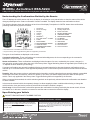
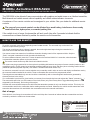
Understanding the Confirmations Emitted by the Remote
The LCD displays the vehicle status at all time, the display is refreshed on every transmission or when the status of the vehicle
changes pertaining that the “Status confirmation” function is enabled. The display shows the last confirmation received.
The following diagram shows the usefulness of each icon of the display. Descriptions in CAPITAL letters show confirmations
pertaining to the security system’s functions.
1
2
3
4
5
6
7
1
Transmission
14
2
Vehicle out of range
15
Battery charge indicator
Auxiliairy outputs status
3
Reception
16
Sentinel mode status*
25
8
4
Unlocking
17
SECURITY SYSTEM STATUS*
24
9
5
Locking
18
ULTRASONIC SENSOR*
23
10
6
PRE-ALERTMD *
19
IGNITION STATUS SENSOR
22
11
7
20
TILT SENSOR*
21
12
8
Panic / PRE- ALERTMD * / ALARM**
ALARM
21
Remote starter status
20
13
9
SHOCK SENSOR*
19
18
14
17
22
HOOD STATUS
10 FIELD DISTURBANCE SENSOR*
23
TRIGGERED ZONES
11
24
Valet mode status*
25
Vehicle identification
TRUNK LID STATUS
12 GLASS BREAKAGE SENSOR*
16
15
13 DOORS STATUS
* These features are not available with the XL202 module.
** Only if the Factory Alarm Trigger Monitoring feature is supported by the firmware.
Two types of confirmations are displayed on the remote:
Command confirmation: These confirmations are command acknoledgement, the icon corresponding to the command is
displayed to confirm reception of the command.
Status confirmations: These confirmations are displayed when the status of a zone, monitored by the system, changes (i.e.:
door openning, security system alarm state (only if the Factory Alarm Trigger Monitoring feature is supported by the firmware), etc.
- it depends on which firmware you are using).
Command confirmations are returned immediatly following a command transmission whereas the status confirmations may be
returned up to 12 seconds after the event appened depending on the communication protocol between the hand-held unit and the
vehicle.
Remarks: When the remote receives a confirmation that is intended to a vehicle other that the one actually selected, most audible
confirmations are made more descret, vehicle icon flashes (1-4) to warn you that the display reflect the status of that specific
vehicle. This is only applicable if the Factory Alarm Trigger Monitoring feature is supported by the firmware.
When a command is transmitted, the vehicle selection gets back to the previously selected unless the confirmation was related to
an alarm condition.
In that case the selected vehicle is temporarely changed, to allow stopping the alarm condition without having to change the
vehicle selection, then gets back to previously selected when the alarm condition is stopped.
Out of range: In the event that the environement prevents the confirmation from being received by the remote control, all icons
are cleared out. In this case, resend the command or send the status command to refresh the display.
Upon Entering your Vehicle
DO NOT TURN IGNITION KEY TO START POSITION.
Automatic transmission vehicles
Manual transmission vehicles
To avoid turning the engine off when taking place behind the
steering wheel, do not apply the brakes until you have placed
the key in the ignition and turned it to the RUN position.
To avoid turning the engine off when taking place behind the
steering wheel, do not apply the brakes and do not remove the
parking brake until you have placed the key in the ignition and
turned it to the RUN position.
Drive as usual.
Drive as usual.
© 2009 Directed Electronics. All rights reserved.