1
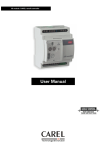
I/O module: Carel retrofit controller
User Manual
We wish to save you time and money!
We can assure you that the thorough reading of this manual will guarantee correct installation and
safe use of the product described.
IMPORTANT WARNINGS
BEFORE INSTALLING OR OPERATING ON THE APPLIANCE, CAREFULLY READ THE INSTRUCTIONS IN
THIS MANUAL.
This equipment has been designed to operate without risks for the specifiied purpose, as long as:
the installation, operation and maintenance are performed according to the instructions in this manual and
the environmental conditions and supply voltage fall within the values indicated here below.
Any other use or changes which have not been previously authorised by the manufacturer, are considered improper.
Liability for injures or damage caused by improper use lies exclusively with the user.
Note some electrical components of this instrument are live, thus all service or maintenance operations must be performed
by expert and skilled personnel only, aware of the necessary precautions to be taken.
Before accessing internal parts, disconnect the power supply.
Disposal of the parts of the controller:
The controller is made up of metal and plastic parts. All these components must be disposed of according to the local
legislation in force on waste disposal.
General warnings - operating environments and connections
The following conditions represent correct installation:
1.
2.
3.
4.
5.
6.
avoid installing the instrument in environments featuring: wide and rapid fluctuations in room temperature, temperature
and relative humidity values near the limits, exposure to any jets of pressurised water high levels of electromagnetic
and/or radio-frequency interference (e.g. transmitting antennae);
use cable terminals that are suitable for the terminals being used. Loosen each screw and insert the cable ends, then tighten
the screws. Once this operation has been completed, lightly tug the cables to check that they are sufficiently tight;
To avoid electromagnetic disturbance separate as much as possible probe and digital input cables from cables carrying
inductive loads and power cables, . Never lay power cables and probe cables in the same conduits (including those for
electrical cables). Do not install probe cables in the immediate vicinity of power devices (contactors, circuit breakers or
the like);
reduce the distance of sensor cables as much as possible and avoid laying spiral paths around power devices. To extend
probe cables, use cables with a minimum cross-section of at least 0.5 mm²;
the cables to be connected to the contacts of the controller must be resistant to the maximum operating temperature,
determined by summing the maximum room temperature envisaged to the heat produced by the controller, equal to 20°C;
protect the power supply to the loads connected to the controller (compressor, defrost, fan, etc.) using suitable devices
(thermal-magnetic overload switches, circuit breakers), rated according to the corresponding loads connected.
Safety for operators and precautions when handling the controller.
To protect the safety of operators and safeguard the controller, before performing any operations on the board, disconnect the
power supply. Electrical damage to the electronic components is almost always due to electrostatic discharges caused by the
operator. Adequate measures must be adopted for these types of components, in particular:
! before handling the controller, touch an earthed part (simply not touching a component is not sufficient, as a 10,000V
discharge, a voltage that can easily be reached by static electricity, causes an arc of around 1 cm.);
! the parts must remain, where possible, inside their original packaging. If the controller needs to be removed from the
packaging, transfer the product to antistatic packaging without touching the rest of the controller;
! avoid in all circumstances the use of non-antistatic plastic, polystyrene or sponge bags;
! avoid in all circumstances handing the material from one operator to another (to avoid electrostatic induction and
consequent discharges).
CONTENTS:
1.
Introduction --------------------------------------------------------------------------------------------------------- 3
1.1 Main characteristics--------------------------------------------------------------------------------------------- 3
1.2 User interface ---------------------------------------------------------------------------------------------------- 4
2.
Installation----------------------------------------------------------------------------------------------------------- 5
2.1 Warnings for installation --------------------------------------------------------------------------------------- 6
2.2 Assembling and securing the instrument--------------------------------------------------------------------- 7
2.3 Power supply to the instrument-------------------------------------------------------------------------------- 7
2.4 Connecting the digital inputs ---------------------------------------------------------------------------------- 8
2.5 Connecting the analogue inputs ------------------------------------------------------------------------------- 8
2.6 Local serial network -------------------------------------------------------------------------------------------- 10
3.
Programming-------------------------------------------------------------------------------------------------------- 11
3.1 Analogue and digital input configuration (MOD parameter)---------------------------------------------- 11
3.2 Relay operating mode (OUT)---------------------------------------------------------------------------------- 11
3.3 List of parameters ----------------------------------------------------------------------------------------------- 13
3.4 Description of the parameters --------------------------------------------------------------------------------- 17
3.5 Alarms ------------------------------------------------------------------------------------------------------------ 23
3.6 Signals ------------------------------------------------------------------------------------------------------------ 24
3.7 Setting the parameters (via the serial connection or hardware key) -------------------------------------- 25
3.8 Default configuration --------------------------------------------------------------------------------------------- 27
4.
Operation ------------------------------------------------------------------------------------------------------------ 28
4.1 Analogue inputs ------------------------------------------------------------------------------------------------- 28
4.2 Digital inputs----------------------------------------------------------------------------------------------------- 28
5.
Practical examples-------------------------------------------------------------------------------------------------- 31
5.1 Multiplexed cabinets-------------------------------------------------------------------------------------------- 31
5.2 Cold rooms ------------------------------------------------------------------------------------------------------- 32
5.3 Compressor Racks----------------------------------------------------------------------------------------------- 33
6.
Meaning of the LEDs ---------------------------------------------------------------------------------------------- 34
7.
Control parameter database --------------------------------------------------------------------------------------- 35
8.
Dimensions ---------------------------------------------------------------------------------------------------------- 39
9.
Technical specifications ------------------------------------------------------------------------------------------- 39
I/O Module
1. Introduction
The Carel IOM* is a compact, versatile and easy-to-install instrument, (din rail mounting - 4 DIN modules), used to acquire the
operating parameters from an installation, and make them available to a supervisory/monitoring system.
Especially suitable for the supervision of systems with electromechanical controllers or non-Carel electronic controllers, the I/O
module completes the range of Carel Retrofit Solutions, designed to satisfy the needs of leading manufacturers in the sector, with
the purpose of reducing installation costs.
1.1
Main characteristics
Power supply
Models are available with 230Vac / 115Vac / 24Vac power supply, respectively: IOM0023000; IOM0011500; IOM0002400.
Installation
All models feature DIN rail installation.
Applications
The programmability of the Carel I/O module ensures maximum flexibility in its application. The same standard hardware can be
used to measure data from:
•
chillers and heat pumps;
•
roof-top units;
•
small / medium air handling units;
•
refrigerated cabinets;
•
cold rooms;
•
maturing rooms;
•
compressor packs.
Inputs
The I/O module can manage:
•
NTC probes
•
4-20mA transducers (pressure, temperature, relative humidity...);
•
0-5V ratiometric transducers (pressure, temperature, relative humidity...);
•
Voltage-free digital contacts;
•
Optically-isolated digital contacts with voltage signals.
Output
Digital relay output (signal or remote alarm...).
Serial connection
The I/O module can manage RS485 serial communication using the Carel standard protocol and baudrate, for the development of
supervisory and telemaintenance systems.
The ideal application is together with PlantWatch and PlantVisor.
Accessories
The controller can be configured via a serial connection or using the programming key (code PSOPZKEY00. Specific software
must be obtained from Carel).
RS485 serial data converter + power supply + connection cable.
Reading/programming key for Carel controllers PSOPZKEY00.
Programming key kit with serial connection PSOPZPGR00.
Software for programming the key.
Approval
The quality and the safety of the I/O module are guaranteed by the ISO 9001-certified design and production system.
The modules conform to the EN 60730-1, EN 60730-2-9 and EN61010-1 safety standards.
The CE mark confirms the quality and the safety of the plug-in series, guaranteed by the Carel ISO 9001 certified design
and production system.
Carel code +030220241 Rel 1.0 dated 19 September 03
3
I/O Module
1.2
User interface
• POWER LED (Green)
On when the I/O module is powered correctly.
• SERIAL LINE LED (Yellow)
When on, indicates connection to the supervisory system.
• ALARM LED (Red)
If off, normal operation.
If on, signals that the alarms are disabled.
If flashing, indicates a current alarm.
• Key
The connector is used to connect the programming
key for reading/writing the controller’s operating
parameters.
PSOPZKEY00
• 2 rotary switches (BCD 0-9)
Adjustable from 0 to 99, used to set the serial address of the
controller (Network ADdRess) in the monitoring system.
• RESET button
The button on the instrument is used to mute the built-in buzzer (see the paragraph on “Alarms”).
Carel code +030220241 Rel 1.0 dated 19 September 03
4
I/O Module
2. Installation
The I/O module can manage analogue inputs, optically-isolated digital inputs with a voltage signal, and voltage-free contacts.
Specifically:
•
DI1, DI2
optically-isolated digital input with voltage signal.
•
S1, S2
inputs that can be configured as NTC probe inputs or digital inputs with voltage free contacts (DI5, DI6).
•
S3, S4
inputs that can be configured as NTC probe inputs, 4-20mA inputs or 0-5V ratiometric inputs
•
Vcc
power supply to the 4-20mA probes (approx 13Vdc) or the 0-5 ratiometric probes (approx 5Vdc)
•
Vac
power is supplied to the instrument via the corresponding POWER terminals (Vac)
•
RS485
serial communication to the Carel supervisory network via the terminals SHLD,+, -
•
Relay
the relay output on the I/O module is available at terminals C, n.c., n.o.
Carel code +030220241 Rel 1.0 dated 19 September 03
5
I/O Module
2.1
Warnings for installation
To install the controller, proceed as follows, with reference to the connection diagrams shown in this manual.
1)
Programming the instrument: for a more detailed description, see the chapter on “Programming”.
2)
Connecting the probes and digital inputs: the probes and digital inputs can be installed at a maximum distance of 10
metres from the controller, as long as wires with a minimum cross-section of 1mm are used. To improve immunity to
disturbance, shielded cables should be used (connect only one end of the shield to the earth on the electrical panel).
3)
Connecting the actuator?????: carefully calculate the maximum capacity of the relay, as indicated in the “technical
specifications”.
4)
Serial network connection: if the connection is provided to the Carel supervisory network via the RS485 line, make sure
that the polarity of the cables is correct.
5)
Power supply: make sure that the instrument is not connected to a power supply other than the one described in the
technical specifications.
Avoid installing the module???in environments with the following characteristics:
•
relative humidity higher than the value specified in the technical specifications;
•
heavy vibrations or knocks;
•
exposure to continuous jets of water;
•
exposure to aggressive and polluting elements (e.g.: sulphur and ammonia gases, saline mist, smoke) which may cause corrosion
and/or oxidation;
•
high magnetic and/or radio-frequency interference (thus avoid installation near transmitting antennae);
•
exposure of the I/O module to direct sunlight and atmospheric elements in general;
•
large and rapid fluctuations in ambient temperature;
•
environments where explosives or mixes of flammable gases are present;
•
exposure to dust (formation of corrosive patina with possible oxidation and reduction of insulation).
Connecting the controllers:
- use cable terminals that are suitable for the terminals being used;
- each screw and insert the cable ends, then tighten the screws;
- once this operation has been completed, lightly tug the cables to check that they are sufficiently tight;
- separate as much as possible the probe, digital input and supervisory network cables from cables carrying inductive loads and
power cables, to avoid any electromagnetic disturbance;
- never lay power cables and probe, digital input or supervisory network cables in the same conduits (including those in
the electrical panels).
- do not install the probe digital input or supervisory network cables in the immediate vicinity of power devices (contactors,
circuit breakers or the like);
- avoid powering the controller directly from the main power supply in the panel, if this source of power also supplies other
devices, such as contactors, solenoid valves, etc.
Caution: the incorrect connection of the power supply may seriously damage the system.
Fit all electromechanical safety devices on the unit that are necessary to ensure the safety of the system.
Carel code +030220241 Rel 1.0 dated 19 September 03
6
I/O Module
2.2
Assembling and securing the instrument
The I/O module is installed on a DIN rail inside the electrical panel.
To secure the module to the DIN rail, simply press the device lightly, after having rested it on the rail.
When the rear tabs click into place, the device is secured to the rail.
To remove the controller, simply use a screwdriver to release and raise the tabs.
The tabs are kept in the locked position by a return spring.
2
1
2.3
Power supply to the instrument
The power supply to the instrument depends on the model, according to the table below:
MOD
IOM0023000
IOM0011500
IOM0002400
POWER SUPPLY
230Vac
115Vac
24Vac
POWER SUPPLY
Carel code +030220241 Rel 1.0 dated 19 September 03
7
I/O Module
2.4
Connecting the digital inputs
Digital 1-2 (optically-isolated):
Terminals DI1, DI2 and COM can be used to connect two digital inputs with voltage signals.
The power supply to the inputs depends on the model of the instrument, as per the table below:
MOD
IOM0023000
IOM0011500
IOM0002400
POWER SUPPLY
230Vac
115Vac
24Vac
Warning: other devices should not be connected to inputs ID1 and ID2 (for example, relay coils).
In the specific case of the 230Vac inputs, if necessary, install the dedicated RC filter in parallel with the coil.
RC filter
1
2
Characteristics
0.5 µF 100R 250Vac
0.5 µF 100R 400Vac
Voltage supported
24-115V
230V
Digital 5-6 (free contacts):
If configured as digital inputs using the instrument operating parameters, digital inputs with voltage free contacts can be connected
to terminals DI5, GND, DI6, GND, according to the diagram below:
Warning: Check that the configuration of the inputs on the instrument corresponds to the number and the type of the probes and digital
inputs that will be connected.
2.5
Connecting the analogue inputs
2.5.1 NTC probes
If the inputs are configured using the instrument operating parameters for NTC probes , standard Carel NTC probes can be
connected to terminals S1-GND, S2-GND, S3-GND and S4-GND, according to the diagram below:
The two NTC probe wires are identical: no special polarity is required when connecting these to the terminal block.
Carel code +030220241 Rel 1.0 dated 19 September 03
8
I/O Module
2.5.2 4-20mA probes:
If configured using the instrument operating parametersas current inputs , 4-20mA probes can be connected to terminals S4-GND,
S3-GND and Vcc, according to the diagram below:
Active probes with 3 wires:
Note: for the power to the active probes, the three wires each have a different polarity:
OUT probe, corresponds to Sy on I/O module terminal block
+ (probe), corresponds to VCC on I/O module terminal block
- (probe), corresponds to GND on I/O module terminal block
Active probes with 2 wires:
Nota: con “+” si indica il filo di alimentazione della sonda, con “OUT” il filo di uscita della sonda (segnale 4-20mA)
Italian picture – change to English
2.5.3 0-5V ratiometric probes
If configured using the instrument operating parametersas ratiometric inputs , 0-5V ratiometric probes can be connected to
terminals: S4-GND; S3-GND and Vcc, according to the diagram below:
NOTE: “+”indicates the probe power wire, “OUT” the probe output (5V rat. signal) and “-“ the reference wire.
Carel code +030220241 Rel 1.0 dated 19 September 03
9
I/O Module
2.6
Local serial network
As previously mentioned, the I/O modules are designed to be connected to the Carel RS485 local network, thus allowing the
communication and supervision of data by the supervisor.
The supervisory system can monitor the operation of the refrigeration circuits controlled by the instruments: eg temperature,
pressure, alarms, faults, defrosts etc.
The Carel supervisory system can be used to modify the I/O module’s operating parameters
I/O
I/O
I/O
To supervisor
The figure shows a diagram of a series of I/O modules connected in an RS485 network + printer for the alarm log.
All versions of the I/O module can be connected in a local network.
All devices connected to the network are identified by a unique serial address.
The address is set on the devices using the rotary switches on the user interface.
The supervisory system must be used to configure all the instruments connected in parallel and the Ident according to the value
set on each instrument. If the same address is assigned to more than one unit, the network will not work; consequently, more than
one I/O module cannot have the same serial address.
The serial connection between the I/O module and the RS485 converter must be made using a AWG20/22 twisted pair + shielded cable;
the shield must be connected to GND. The wiring of the RS485 network uses removable three-way connectors. The serial address of the
instrument may be between 1 and 99. The value 0 assigns the instrument address 200 (not supported in the basic version).
If more than one device detects an alarm and there is no serial communication for more than 5 minutes, a built-in buzzer will sound.
Warnings:
1.
carefully observe the polarity of the TX+ and TX- wires;
2.
the maximum length of the network must not exceed 1000m; branches must not exceed 5m;
3.
do not use star-type connections in the line;
4.
all the instruments in the network must be powered by their own insulated power supply. The secondary must not be
earthed;
5.
the terminal furthest away from the RS232 / RS485 serial converter must be fitted with the 120Ω, ¼W resistor supplied,
between the TX+ and TX- contacts;
6.
never lay the network cables near, or worse, in the same conduit as the power cables.
Carel code +030220241 Rel 1.0 dated 19 September 03
10
I/O Module
3. Programming
There are two parameters that determine the operating modes of the instrument: MOD and OUT
3.1
Analogue and digital input configuration (MOD parameter)
The first operation to be performed if the default configuration is not suitable for the specific application is to set the operating
mode.
The setting of the MOD parameter is fundamental for establishing the configuration required by the operator.
In fact, the MOD parameter is used to establish the type of analogue and digital inputs read by the instrument, according to the
table below:
Value
0
1
2
3
4
5
6*
7*
Configuration
1 NTC, 2 NTC, 3 NTC, 4 NTC
1 DI5, 2 DI6, 3 NTC, 4 NTC
1 NTC, 2 NTC, 3 (4-20mA), 4 (4-20mA)
1 DI 5, 2 DI 6, 3 (4-20mA), 4 (4-20mA)
1 NTC, 2 NTC, 3 5Vrat (with range 0.5-4.5), 4 5Vrat (with range 0.5-4.5)
1 DI 5, 2 DI 6, 3 5Vrat (with range 0.5-4.5), 4 5Vrat (with range 0.5-4.5)
1 NTC, 2 NTC, 3 5Vrat (with range 0.5-4.5), 4 5Vrat (with range 0.5-4.5)
1 DI 5, 2 DI 6, 3 5Vrat (with range 0.5-4.5), 4 5Vrat (with range 0.5-4.5)
*=In these two configurations, the probe fault alarms AS3 and AS4 referring to the 5V rat. probes are not active!
Example: If MOD=0, the configuration of the instrument will correspond to this value, that is, 4 NTC.
The recommended configuration for the monitoring of a multiplexed supermarket cabinet is 4 NTC temperature probes relating to
the respective sections of the multiplexed unit, and two digital inputs used to detect the defrost status of the evaporator and the
operating status of the compressor or solenoid.
The recommended configuration for the control of a cold room is 2 NTC probes, one that measures the inside temperature and one
that measures the evaporator temperature for the defrost function, plus 4 digital inputs for detecting: the status of the compressor;
the defrost status; the activation of the fans and, as an auxiliary function, detecting when the door is open.
The recommended configuration for a compressor pack is two 4-20mA pressure probes, one suction and one condensing pressure,
and 4 digital inputs for the status of the compressors (up to 3) and the fourth input for an auxiliary application, such as a remote
alarm (condensers).
NOTE: The #PROBES parameter can be used to establish the analogue probes that are present.
3.2
Relay operating mode (OUT)
The OUT parameter defines whether the relay on the instrument is activated in the event of internal alarms, or alternatively
whether it can be controlled by the remote supervisory system.
There are three operating modes:
Value of OUT
0
1
2
Configuration
Relay set via serial connection, not linked to an internal alarm, can be used as an auxiliary
Relay linked to the high/low alarms ATy*H/ ATyL, probe faults ASy /digital input errors AFx*
and end defrost by timeout TDx
Relay linked to the alarms ATyH, ATyL, ASy, AFy, TDx with Ny=x ( for future models)
(*) =x index of the digital input, y = index of the analogue input
Carel code +030220241 Rel 1.0 dated 19 September 03
11
I/O Module
3.2.1 Configuring the relay as an auxiliary
Set the parameter OUT=0 (relay not linked to internal alarms).
The relay can now be used as an auxiliary, activated and deactivated by the supervisory system.
In this mode, the instrument works as a remote I/O module.
With this setting a certain status can be assigned to the relay, according to the alarms detected.
This status will have priority over the setting made by the supervisory system.
In this way, the I/O module can be made to promptly react to a number of alarms that are considered important, independently from
the speed and the traffic on the supervisory network.
One such example is a compressor thermal overload switch that must immediately stop the compressor.
The parameters LINK 1 and LINK 2 can be used to “link” the relay output to the sources of the alarm.
The status of the relay, according to the alarms assigned by LINK 1 and LINK 2, is determined by the parameters OUTL 1 and
OUTL 2.
If more than one alarm is activated, linked to the same relay, with a different output status, the PRIORITY parameter can be used
to define the priority of the output status.
For example, a condenser fan may be linked to a high condensing pressure alarm and a fan thermal overload alarm. The high
pressure alarm starts the fan, and the thermal overload alarm stops it. PRIORITY can be used to establish that stopping the fan is
the preferential status when both alarms occur.
The ALCOMM parameter, on the other hand, can be used to establish the status of the relay if OFF-LINE is detected for more than
5 minutes.
The status of the relay can also be decided when starting the instrument, depending on the device that will be connected:
RELÈ PWUP=0 (Open) ; RELÈ PWUP=1 (Closed)
3.2.2 Configuring the relay as being linked to the internal alarms:
Set the parameter OUT=1 (relay linked to internal alarms). The relay is now is able to be automatically activated/deactivated when
the controller detects an alarm:eg high/low temperature, probe fault, digital input error etc.
This function is linked to the MODE parameter (status of the relay at rest): = 0 normally open; = 1 normally closed
If the relay is activated during an alarm, the status of the digital variable in the supervisory system varies according to the setting of
the MODE parameter: 0 (contact closed), 1 (contact open).
For further details, refer to the paragraph “Description of the parameters”.
Carel code +030220241 Rel 1.0 dated 19 September 03
12
I/O Module
3.3
List of parameters
Parameter
A1
D1
DK1
MTD1
A2
D2
DK2
MTD2
A5
D5
DK5
MTD5
A6
D6
DK6
MTD6
Values
Min.
Max.
Def.
UOM
0= normal input (read-only)
1= alarm with input open
2= alarm with input closed
3= detect defrost
4= disable general alarms
5= detect cleaning cycle
Alarm delay, seconds (dig. input 1):
If:
alarm delay
A1= 1, 2 0= immediate alarm
defrost timeout
A1= 3
0= infinite
alarm disable time
A1= 4
0= infinite
maximum cleaning cycle time
A1= 5
0= immediate timeout
Alarm maintenance time, seconds, dig. input If A1= 1, 2
1
Signal in the event of defrost timeout from 0= signal to supervisor only
input 1
1= alarm + signal to supervisor
DIG. INPUT 2
0
5
0
----
0
30000
20
seconds
0
30000
20
seconds
0
1
0
----
Type of dig. input 2
0=normal input (read-only)
1= alarm with input open
2= alarm with input closed
3=detect defrost
4=disable general alarms
5=detect cleaning cycle
Alarm delay, seconds (dig. input 2):
If:
alarm delay
A1= 1, 2 0= immediate alarm
defrost timeout
A1= 3
0= infinite
alarm disable time
A1= 4
0= infinite
maximum cleaning cycle time
A1= 5
0= immediate timeout
Alarm maintenance time, seconds, dig. input If A2= 1, 2
2
Signal if defrost timeout from input 2
0= signal to supervisor only
1= alarm + signal to supervisor
DIG. INPUT 5(valid for MOD=1,3,5)
0
5
0
----
0
30000
20
seconds
0
30000
20
seconds
0
1
0
----
Type of dig. input 5
0= normal input (read-only)
1= alarm with input open
2= alarm with input closed
3= detect defrost
4= disable general alarms
5= detect cleaning cycle
Alarm delay, seconds (dig. input 5):
If:
alarm delay
A1= 1, 2 0= immediate alarm
defrost timeout
A1= 3
0= infinite
alarm disable time
A1= 4
0= infinite
maximum cleaning cycle time
A1= 5
0= immediate timeout
Alarm maintenance time, seconds, dig. input If A5= 1, 2
5
Signal if defrost timeout from input 5
0= signal to supervisor only
1= alarm + signal to supervisor
DIG. INPUT 6 (valid for MOD=1,3,5)
0
5
0
----
0
30000
20
seconds
0
30000
20
seconds
0
1
0
----
Type of dig. input 6
0
5
0
----
0
30000
20
seconds
0
30000
20
seconds
0
1
0
----
Type of dig. input 1
0= normal input (read-only)
1= alarm with input open
2= alarm with input closed
3= detect defrost
4= disable general alarms
5= detect cleaning cycle
Alarm delay, seconds (dig. input 6):
If:
alarm delay
A1= 1, 2 0= immediate alarm
defrost timeout
A1= 3
0= infinite
alarm disable time
A1= 4
0= infinite
maximum cleaning cycle time
A1= 5
0= immediate timeout
Alarm maintenance time, seconds, dig. input If A6= 1, 2
6
Signal if defrost timeout from input 6
0= signal to supervisor only
1= alarm + signal to supervisor
Carel code +030220241 Rel 1.0 dated 19 September 03
13
I/O Module
ANALOGUE INPUT FUNCTIONS
Type of instrument (configuration of digital 0= 1NTC, 2NTC, 3NTC, 4NTC
and analogue inputs)
1= DI 5, DI 6, 3NTC, 4NTC
2= 1NTC, 2NTC, 3 (4-20mA), 4 (4-20mA)
3= DI 5, DI 6, 3 (4-20mA), 4 (4-20mA)
4= 1NTC, 2NTC, 3 5Vrat.4 5Vrat with range (0.5-4.5)
5= DI 5, DI 6, 3 5Vrat.4 5Vrat with range (0.5-4.5)
6* =1NTC, 2NTC, 3 5Vrat, 4 5Vrat with range (0.5-4.5)
7* = DI 5, DI 6, 3 5Vrat.4 5Vrat with range (0.5-4.5)
* = The probe fault alarms AS3, AS4 are not active for
the 5V ratiometric. probes
0= No probe
#PROBES Number of probes present
1= Probe
1
2= Probe
2
3= Probe
2
1
4= Probe
3
5= Probe
3
1
6= Probe
3
2
7= Probe
3
2
1
8= Probe
4
9= Probe
4
1
10= Probe
4
2
11= Probe
4
2
1
12= Probe
4
3
13= Probe
4
3
1
14= Probe
4
3
2
15= Probe
4
3
2
1
Temperature in degrees centigrade or
0=centigrade
CF
Fahrenheit (NTC only)
1=Fahrenheit
ANALOGUE INPUT 1 (valid for MOD
0,2,4)
MOD
N1
H1
L1
R1
F1
O1
Probe 1 associated with digital input 1, 2, 3, 1=dig. input 1
4
2=dig. input 2
3=not associated
4=not associated
High alarm threshold for probe 1 (Max. end
scale alarm disabled)
Low alarm threshold for probe 1 (FS min
alarm disabled)
Alarm delay, minutes (high and low
thresholds) probe 1
Filter for probe 1
0= fast response
……
15= slow response
Offset probe 1 (calibration)
DS1
Variation in readings, probe 1, for
transmission to the supervisor
ANALOGUE INPUT 2 (valid for MOD
0,2,4)
N2
Probe 2 associated with digital input 1, 2, 3, 1=dig. input 1
4
2=dig. input 2
3=not associated
4=not associated
High alarm threshold for probe 2 (Max. end
scale alarm disabled)
Low alarm threshold for probe 2 (Min. end
scale alarm disabled)
Alarm delay, minutes (high and low
thresholds) probe 2
Filter for probe 2
0= fast response
……
15= slow response
Offset probe 2 (CALIBRATION)
H2
L2
R2
F2
O2
DS2
Variation in readings, probe 2, for
transmission to the supervisor
Carel code +030220241 Rel 1.0 dated 19 September 03
14
0
7
0
----
0
15
15
----
0
1
0
----
1
4
1
----
L1
1000.0 100.0
°C/°F
-200.0
H1
-100.0
°C/°F
0
255
20
minutes
0
15
8
----
-10.0
10.0
0.0
°C/°F
0.1
5.0
0.5
°C/°F
1
4
2
----
L2
1000.0 100.0
°C/°F
-200.0
H2
-100.0
°C/°F
0
255
20
minutes
0
15
8
----
-10.0
10.0
0.0
°C/°F
0.1
5.0
0.5
°C/°F
I/O Module
ANALOGUE INPUT 3
N3
H3
L3
R3
F3
O3
DS3
Probe 3 associated with digital input 1, 2, 3, 1=dig. input 1
4, 5, 6
2=dig. input 2
3=not associated
4=not associated
5=dig. input 5 (if MOD 1, 3, 5, 7)
6=dig. input 6 (if MOD 1, 3, 5, 7)
High alarm threshold for probe 3 (Max. end
scale alarm disabled)
Low alarm threshold for probe 3 (Min. end
scale alarm disabled)
Alarm delay, minutes (high and low
thresholds) probe 3
Filter for probe 3
0= fast response
……
15= slow response
Offset probe 3 (calibration)
Variation in readings, probe 3, for
transmission to the supervisor
Minimum value for probe 3 as 4-20mA or
10% of 5V ratiometric signal
V3L
(MOD
2,3,4,5,6,7)
Maximum value for probe 3 as 4-20mA or
V3H
(MOD 90% of 5V ratiometric signal.
2,3,4,5,6,7)
1
L3
6
3
----
1000.0 100.0 °C/°F/bar/…
-100.0 °C/°F/bar/…
-200.0
H3
0
255
20
minutes
0
15
8
----
-10.0
10.0
0.0
°C/°F/bar/…
0.1
5.0
0.5
°C/°F/bar/…
-200.0
V3H
0.0
bar/…
1000.0 30.0
bar/…
V3L
ANALOGUE INPUT 4
N4
H4
L4
R4
F4
O4
DS4
Probe 4 associated with digital input 1, 2, 3, 1=dig. input 1
4, 5, 6
2=dig. input 2
3=not associated
4=not associated
5=dig. input 5 (if MOD 1, 3, 5, 7)
6=dig. input 6 (if MOD 1, 3, 5, 7)
High alarm threshold for probe 4 (Max. end
scale alarm disabled)
Low alarm threshold for probe 4 (Min. end
scale alarm disabled)
Alarm delay, minutes (high and low
thresholds) probe 4
Filter for probe 4
0= response slow
……
15= response fast
Offset probe 4
Variation in readings, probe 4, for
transmission to the supervisor
Minimum value for probe 4 as 4-20mA or
10% of 5V ratiometric signal
V4L
(MOD
2,3,4,5,6,7)
Maximum value for probe 4 as 4-20mA or
V4H
(MOD 90% of 5V ratiometric signal.
2,3,4,5,6,7)
1
L4
6
4
----
1000.0 100.0 °C/°F/bar/…
-100.0 °C/°F/bar/…
-200.0
H4
0
255
20
minutes
0
15
8
----
-10.0
10.0
0.0
°C/°F/bar/…
0.1
5.0
0.5
°C/°F/bar/…
-200.0
V4H
0.0
bar/…
1000.0 30.0
bar/…
V4L
RELAY OPERATING MODES
OUT
Select relay operating mode
MODE Relay status at normal condition
(OUT ≠ 0)
Carel code +030220241 Rel 1.0 dated 19 September 03
0=Relay set via serial
1=Relay linked to alarms ATy*H, ATyL, ASy,
AFx*, TDx (if alarm selected)
2=Relay ‘y’ linked to alarms ATyH, ATyL, ASy,
AFx, TDx (with Ny=x). Envisaged on future
models.
*= x (index of digital input 1-2-5-6)
y (index of probe input 1-2-3-4
0=Relay 1 N.O.
1=Relay 1 N.C.
2-15=not managed
15
0
2
1
----
0
15
0
----
I/O Module
LINK1 Matrix for assigning alarms to outputs (1/2) RELAY 1
AF1=4096;
(OUT=0) (*)
AF2=256
0
65536
0
----
LINK2 Matrix for assigning alarms to outputs (2/2) RELAY 1
AF5/AS1/AT1L/AT1H=4096;
(OUT=0)
AF6/AS2/AT2L/AT2H=256;
(*)
AS3/AT3L/AT3H=16;
AS4/AT4L/AT4H=1;
0
65536
0
----
OUTL1 matrix of output status according to the
(OUT=0) alarm (1/2)
(*)
RELAY 1
AF1=4096;
AF2=256
0
65536
0
----
OUTL2 matrix of output status according to the
(OUT=0) alarm (2/2)
(*)
RELAY 1
AF5/AS1/AT1L/AT1H=4096;
AF6/AS2/AT2L/AT2H=256;
AS3/AT3L/AT3H=16;
AS4/AT4L/AT4H=1;
0
65536
0
----
RELAY 1=1 (energised)
RELAY 1=0 (de-energised)
0
15
0
----
0
----
PRIORITY Priority of output status in the event of
(OUT=0) multiple alarms
RELAY 1= from 0 to 15 (save last status)
0
31
ALCOMM Status of the outputs in the event of
ENABLE=16 (relay de-energised)
(OUT=0) communication alarms
ENABLE=16+1=17 (relay energised)
(*)
(*) the value to be set is obtained by adding the numbers corresponding to the individual alarms
BUZZER
BUZ
BUZZPWUP
Select buzzer operating mode:
Status of the buzzer output at power-up
0= buzzer set by serial
1= buzzer linked to the alarms ATy*H, ATyL,
ASy, AFx*, TDx (if alarm selected) and if
communication is interrupted for more than 5
min
*= x (index of digital input 1-2-5-6)
y (index of probe input 1-2-3-4 )
0=off
1=active
0
1
0
----
0
1
0
----
0
1
0
----
STATUS OF RELAY OUTPUTS AT
POWER-UP
RELÈ 1- Status of output 1 at power-up
PWUP
0=energised
1=de-energised
COMMANDS FROM THE SUPERVISOR
BUZZER Variable that activates/deactivates the buzzer 0= buzzer deactivated
1= buzzer activated
[(ON/OFF)] from the supervisor
RELÈ 1 Variable that opens/closes the relay contact 0= relay contact de-energised
1= relay contact energised
[(ON/OFF)] from supervisor if OUT=0
Carel code +030220241 Rel 1.0 dated 19 September 03
16
I/O Module
3.4
Description of the parameters
Table of alarms:
ATyH
ATyL
AFx
ASy
TDx
High temperature alarm probe y
Low temperature alarm probe y
Alarm, digital input x
Fault alarm, probe y
Defrost timeout, digital input x
A (1/2/5*/6*)
This parameter is used to select the function of the digital inputs.
Functions available: normal input (=0), alarm with input open (=1)/closed (=2), detect defrost (=3), disable general alarms (=4) and
cleaning cycle (=5).
D (1/2/5*/6*)
The meaning of this parameter depends on the value of the corresponding parameter A (1,2,5*,6*).
If Ax=1/2, that is, digital input x is configured as an alarm (normally closed or open), the parameter Dx establishes the alarm delay time
(in seconds), between the physical activation of the alarm and the activation of AFx (see the description in the table of alarms above).
If Ax= 3, that is, digital input x has the function of detecting the defrost status, the parameter Dx establishes the defrost timeout (in
seconds), that is, the time after which the timeout TDx is signalled and the monitoring of the temperature is reset, even if the
defrost is still active.
If Ax=4, that is, digital input x has the function of disabling the alarms [ATyH], [ATyL], [AFx], [TDx], the parameter Dx
establishes the disabling time (in seconds):
Dx=0
Dx <>0
Undetermined time, while the input is closed
Disable for the time Dx
If Ax=5, that is, digital input x has the cleaning cycle function, the parameter Dx establishes the cleaning cycle time (in seconds)
over which the controller sends the signal [CT].
In any case, the alarms [ATyH], [ATyL], [AFx], [TDx] are ignored while digital input x remains closed.
DK (1/2/5*/6*)
If an alarm from digital input is detected (Ax=1.2), this is maintained, after deactivation, for a time (in seconds) equal to DKx.
The function is not active if applied to the defrost, the disable alarm function and the cleaning cycle.
MTD (1/2/5*/6*)
This is a digital variable whose setting defines whether to enable the alarm signal after the defrost timeout.
1= defrost timeout alarm enabled on supervisor
0= defrost timeout alarm not enabled on supervisor
MOD
Configures the analogue and digital inputs.
0=
1=
2=
3=
4=
5=
[ 6 ]=
[ 7 ]=
1NTC, 2NTC, 3NTC, 4NTC
DI 5, DI 6, 3NTC, 4NTC
1NTC, 2NTC, 3 (4-20mA), 4 (4-20mA)
DI 5, DI 6, 3 (4-20mA), 4 (4-20mA)
1NTC, 2NTC, 3 5Vrat.4 5Vrat with range (0.5-4.5)
DI 5, DI 6, 3 5Vrat.4 5Vrat with range (0.5-4.5)
1NTC, 2NTC, 3 5Vrat.4 5Vrat with range (0.5-4.5)
DI 5, DI 6, 3 5Vrat.4 5Vrat with range (0.5-4.5)
[ 6 ], [ 7 ]= For these two types of configuration, the probe alarms AS3, AS4 corresponding to the 5V rat. probes are not active (see
table T3 corresponding to the probes with voltage signals).
* = inputs configured as digital
Carel code +030220241 Rel 1.0 dated 19 September 03
17
I/O Module
#PROBES
Used to configure set the probes connected to the instrument.
0=
1=
2=
3=
4=
5=
6=
7=
8=
9=
10=
11=
12=
13=
14=
15=
No probe
Probe
Probe
Probe
Probe
Probe
Probe
Probe
Probe
Probe
Probe
Probe
Probe
Probe
Probe
Probe
- - - 1
- - 2 - - 2 1
- 3 - - 3 - 1
- 3 2 - 3 2 1
4 - - 4 - - 1
4 - 2 4 - 2 1
4 3 - 4 3 - 1
4 3 2 4 3 2 1
NOTE: In the event of a probe error or if the probe is not present, the value sent to the supervisor will be –250.0°C or –418.0 F.
CF
Used to set the reading in degrees centigrade or Fahrenheit (digital variable).
N (1/2/3/4)
Parameter that associates the instrument probes y (1/2/3/4) with the digital inputs x (1/2/5/6).
This parameter is important in the disable alarms during defrost function.
If the probe y is associated with digital input x, (Ny=x) and digital input x has the function of detecting the defrost status (Ax=3),
during the defrost (digital input x closed), the high and low temperature alarms are ignored on input y.
At the end of the defrost, the high and low temperature alarms are enabled again, with the high and low temperature alarm delay time.
Warning: probes 1 and 2 and digital inputs 5 and 6 share the same terminals and are mutually exclusive.
Therefore, associating digital inputs 5 and 6 with probes 1 and 2 has no meaning.
H (1/2/3/4 )
This sets the high alarm threshold, relating to probes 1, 2, 3, 4.
When the high alarm threshold is exceeded, the signal ATyH is activated, with y = 1, 2, 3, 4
Max. end scale: alarm disabled.
L (1/2/3/4 )
Sets the low alarm threshold, relating to probes 1, 2, 3, 4.
When the low alarm threshold is exceeded, the signal ATyL is activated, with y = 1, 2, 3, 4
Min. end scale: alarm disabled.
R (1/2/3/4 )
This sets the high and low alarm delay time (in minutes).
The alarm is signalled after the time Ry from when the high or low threshold is exceeded.
F (1/2/3/4 )
This sets the digital filtering on the values measured.
The value 0 corresponds to low filtering, and therefore high sensitivity, the value 15 means more filtering and greater stability.
An intermediate value is recommended (default=8) so as to achieve suitable stability.
O (1/2/3/4 )
This sets the offset value for the probes, used for the calibration performed by the user. The value assigned to this parameter is added to
(positive value) or subtracted from (negative value) the value measured by the probes (e.g.: to lower the reading by 2.3ºC, set Oy =-2.3 ºC).
DS (1/2/3/4 )
This sets the minimum difference between two successive readings of the analogue probes required to send the reading to the Carel
Supervisory System.
If, for example, DS1=0.3, the value read by probe 1 will be sent to the Carel Supervisor System when the new reading has varied
by at least ± 0.3 units.
This parameter establishes the hysteresis for the detection of the high and low alarms, equal to 3xDSy.
V (3/4 )L
This represents the value corresponding to 4mA or to 10% of the 5V ratiometric signal, for analogue inputs 3 and 4.
MOD
MOD=2,3
MOD=4,5,6,7
V(3.4)L
Value corresponding to 4mA
Value corresponding to 10% of the 5V ratiometric signal
Carel code +030220241 Rel 1.0 dated 19 September 03
18
I/O Module
V (3/4 )H
This represents the value corresponding to 20mA or to 90% of the 5V ratiometric signal, for analogue inputs 3 and 4.
MOD
MOD=2,3
MOD=4,5,6,7
V(3.4)H
Value corresponding to 20mA
Value corresponding to 90% of the 5V ratiometric signal
4-20mA probes: MOD=2,3
Table of alarms for 4-20mA probes (T 1):
(T1)
Set Alarm
3.25mA
Lower threshold
3.5mA
Reset Alarm
3.75mA
Reset Alarm
20.25mA
Upper threshold
20.5mA
Set Alarm
20.75mA
5 V ratiometric probes: MOD=4,5,6,7
Table of alarms for 5V ratiometric probes, scale 0.5V- 4.5V (T2/T3):
(T2) MOD = 4, 5
Set Alarm
0.25V
Lower threshold
0.375V
Reset Alarm
0.5V
Reset Alarm
4.5V
Upper threshold
4.625V
Set Alarm
4.75V
(T3) MOD = 6*, 7*
Set Alarm
Lower threshold
none
none
Reset Alarm
none
Reset Alarm
none
Upper threshold
none
Set Alarm
none
*= For these two values of MOD, the probe alarms AS3 and AS4 corresponding to the 5V rat. probes are not active.
Table of alarms for NTC probes (T4):
NTC: MOD=0,1,2,4
Set Alarm
-52.5°C
Lower threshold
-50°C
Reset Alarm
-47.5°C
Reset Alarm
87.5°C
Upper threshold
90°C
Set Alarm
92.5°C
Probe errors: These are signalled if the probe is present according to [MOD] and [#PROBES]. The activation and the
deactivation of the probe error considers the hysteresis, according to the value measured (see tables T1, T2, T3, T4).
In the event of a probe error or if the probe is not present, the value sent to the supervisor will be –250.0°C or –418.0 F.
OUT.
Carel code +030220241 Rel 1.0 dated 19 September 03
19
I/O Module
The OUT parameter defines whether the RELAY on the instrument is activated by the alarms detected internally, or alternatively
whether it can be controlled by the remote supervisory system.
There are three operating modes:
Value of OUT
0
1
Configuration
Relay set via serial connection, not linked to any internal alarm, can be used as an auxiliary
Relay linked to the high/low alarms ATy*H/ ATyL, probe faults ASy / digital input errors
AFx* and end defrost by timeout TDx
2
Relay y linked to the alarms ATyH, ATyL, ASy, AFy, TDx with Ny=x (envisaged for future
models)
(*)=x digital input index, y = analogue input index
Configuring the relay as an auxiliary:
Set the parameter OUT=0 (relay not linked to the internal alarms).
The relay can now be used as an auxiliary, activated and deactivated by the supervisory system.
In this mode, the instrument works as a remote I/O module.
With this setting a certain status can be assigned to the relay, according to the alarms detected.
This status will have priority over the setting made by the supervisory system.
In this way, the I/O module can be made to react to a number of alarms that are considered important, independently from the
speed and the traffic on the supervisory network.
One such example is a compressor thermal overload switch that must immediately stop the compressor.
The parameters LINK 1 and LINK 2 can be used to “link” the relay output to the sources of the alarm.
The status of the relay, according to the alarms assigned by LINK 1 and LINK 2, is determined by the parameters OUTL 1 and
OUTL 2.
If more than one alarm is activated linked to the same relay, with a different output status, the PRIORITY parameter can be used to
define the priority of the output status.
For example, a condenser fan may be linked to a high condensing pressure alarm and a fan thermal overload alarm. The high
pressure alarm starts the fan, and the thermal overload alarm stops it. PRIORITY can be used to establish that the stopping of the
fan is the preferential status when both alarms occur.
The ALCOMM parameter, on the other hand, can be used to establish the status of the relay if OFF-LINE is detected for more than
5 minutes.
The status of the relay can also be decided when starting the instrument, depending on the remote that will be connected:
RELÈ PWUP=0 (Open) ; RELÈ PWUP=1 (Closed)
Configuring the relay as linked to the internal alarms:
Set the parameter OUT=1 (relay linked to the internal alarms). The relay is now able to be automatically activated/deactivated
when the controller detects an alarm: high/low temperature, probe fault, digital input error etc.
This function is linked to the MODE parameter (status of the relay at rest): = 0 normally open; = 1 normally closed
If the relay is activated during an alarm, the status of the digital variable in the supervisory system varies according to the setting of
the MODE parameter: 0 (contact closed), 1 (contact open).
MODE
Establishes the relay status a rest, normally energised or de-energised, if OUT=1 or 2
Mode
=0
=1
Relay status at rest
Normally de-energised
Normally energised
LINK1/LINK2
If OUT=0, the matrices are active, that is, the values used to establish which alarms the relay changes status for.
This function therefore allows the relay to be activated/deactivates only for the alarm/alarms desired by the user.
As regards any other alarms detected by the instrument, the relay will remain in the status set via the serial connection and can be
displayed only by the supervisory system.
The alarms are selected using the matrices, that is, the series of values set for the parameters LINK1 and LINK2:
RELAY 1
AF1
AF2
AF3
AF4
AF5 or AS1, AT1L, AT1H
AF6 or AS2, AT2L, AT2H
AS3 or AT3L, AT3H
AS4 or AT4L, AT4H
Carel code +030220241 Rel 1.0 dated 19 September 03
RELAY
2
4096
256
RELAY
3
RELAY
4
Variable
LINK1
4096
256
16
1
LINK2
20
I/O Module
LINK1
This parameter refers to the matrices for alarms AF1 and AF2, that is, the alarms relating to the digital inputs with voltage signal 1
and 2.
To activate the relay for the alarm AF1 only, set the value 4096 (value defined for this type of alarm).
To switch the status of the relay only when the alarm AF2 is activated, set the value 256.
To activate the relay if both alarms are activated, simply sum the two values: 4096+ 256= 4352.
LINK2
This refers to the alarms from the digital inputs with voltage free contacts AF5 and AF6, if selected in place of probe S1 and S2.
The same configuration procedure used for LINK 1 is also used for this parameter.
For AF5, the value to be set is 4096, for AF6 256 and for both the sum of the two values.
If S1 and S2 are configured in the place of DI 5 and DI 6, setting the value 4096 enables the probe 1 “threshold exceeded” (AT1H
and AT1L) and probe 1 fault alarms (AS1).
On the other hand, setting the value 256 enables the probe 2 “threshold exceeded” (AT2H and AT2L) and probe 2 fault alarms (AS2).
As regards probe S3, to activate the relay for the alarms AS3 and AT3L or AT3H, set the value 16, and set the value 1 for AS4 and
AT4L or AT4H, relating to probe S4.
As in the case of the previous parameter, the sum of the values set will enable the relay with the corresponding alarms.
Example 1:
To activate the internal relay only when an alarm from digital input DI1 and DI2 (AF1 and AF2) is activated and when a probe 3
“threshold exceeded” error occurs (AT3L or AT3H):
for the parameter LINK1, set the value 4096+256=4352 to activate AF1 and AF2, while for the parameter LINK2, set the value 16.
OUTL1/OUTL2
If OUT=0, and after having correctly set the parameters LINK1/ LINK2, the parameters OUTL1 and OUTL2 can be used to establish the
status of the relay for each type of alarm, at the moment of activation.
RELAY 1
AF1
AF2
AF3
AF4
AF5 or AS1, AT1L, AT1H
AF6 or AS2, AT2L, AT2H
AS3 or AT3L, AT3H
AS4 or AT4L, AT4H
4096
256
RELAY
2
RELAY
3
RELAY
4
Variable
OUTL1
4096
256
16
1
OUTL2
OUTL1
This parameter refers to the alarms configured by LINK 1 (those corresponding to the digital inputs with voltage signal).
What is the status of the relay when one or more than one alarm is activated?
By assigning a value to this parameter (see the table above), the status of the relay can be defined (energised/de-energised) when an
alarm AF1 or AF2 is activated.
To set the open or de-energised status of the relay corresponding to the alarm AF1, do not enter any value (that is, 0) for the
parameter OUTL1; on the other hand, to set the closed or energised status, enter the value (listed in the table above) 4096 for the
parameter OUTL1.
The same procedure is used for the alarm AF2: the value 0 for the parameter OUTL1 this means that relay will be de-energised
when this alarm is activated; if, as per the table, the value 256 is set, the relay will be energised when the alarm AF2 is activated.
In the event where the alarms AF1 and AF2 are activated at the same time, in order to energise the relay for both the alarms, simply
sum the values: 4096+256=4352 and enter this value for the parameter OUTL1.
OUTL2
This parameter refers to the alarms configured by LINK 2 (those corresponding to the digital inputs with voltage free contacts
and/or the probes on the analogue inputs).
The same configuration procedure used for OULT1 is also used for this parameter.
For AF5, the value to be set in order to energise the relay is 4096, for AF6 256, and for both the sum of the two values.
If S1 and S2 are configured in the place of DI 5 and DI 6, when setting the value 4096 the relay will be energised for the probe 1
“threshold exceeded” (AT1H and AT1L) and probe 1 fault alarms (AS1).
On the other hand, when setting the value 256 the relay will be energised for the probe 2 “threshold exceeded” (AT2H and AT2L)
and probe 2 fault alarms (AS2).
As regards probe S3, to energise the relay for the alarms AS3 and AT3L or AT3H, set the value 16, and set the value 1 for AS4 and
AT4L or AT4H, relating to probe S4.
As in the case of the previous parameter, the sum of the values set will energise the relay with the corresponding alarms.
Carel code +030220241 Rel 1.0 dated 19 September 03
21
I/O Module
Example 2:
Looking back at example 1, when the alarm AF1 is activated the relay is in the open or de-energised status, and when the alarm
AF2 is activated the relay is in the closed or energised status. According to the values shown in the table and the explanation of the
parameter OUTL 1, the following will be true:
0 = (AF1 relay de-energised) + 256 (AF2 relay energised) = 256 [the value to be set for parameter OUTL1 to achieve the
desired result]
As regards the “threshold exceeded” alarm AT3x, the relay is set to switch to the open status:
1 (AT3x relay open) x 16 =16 [the value to be set for parameter OUTL2 to achieve the desired result]
PRIORITY
In the event where more than one?alarm occurs simultaneously, as previously set with LINK1/2, and there is a conflict between the
settings of OUTL1/2, the priority of the relay status can be defined by setting the PRIORITY parameter.
The [PRIORITY] variable used to establish the priority of the output in the event of alarms with different settings.
Value
0
1
RELAY 1
RELAY 2
Contact
deenergised
Contact energised
RELAY 3
RELAY 4
Variable
PRIORITY
Example 3:
Continuing with example 2, we now need to set the priority in the event where AF1, AF2 and AT3L or AT3H occur
simultaneously. To set the status of the relay as closed: enter the value 1 for the Priority parameter. On the other hand, to set the
open status: assign Priority the value 0.
ALCOMM
The parameter ALCOMM can be used to establish the relay status if OFF-LINE is detected for more than 5 minutes
The [ALCOMM] variable established the status of the outputs in the event of communication errors.
Value
RELAY 1
Up to 15
16
17
Status maintained at the last setting
Relay de-energised when OFF-LINE
Relay energised when OFF-LINE
RELAY
2
RELAY
3
RELAY 4 Variable
ALCOMM
For values less than 16, the I/O module maintains the last status before going off-line from the supervisor. To use the ENABLE
function, enter the value 16 (relay de-energised when OFF-LINE), while 16+1=17 (relay energised when OFF-LINE).
BUZ
Used to modify the operating modes of the buzzer.
0=the buzzer can be activated via the serial connection;
1=the buzzer is activated if there is no communication for more than 5 minutes and the alarms ATyH, ATyL, ASy, AFx, TDx (set
as an alarm) are active.
BUZ-PWUP (output)
This parameter is used to establish the status of the buzzer at power up.
0=off
1=activated
RELÈ-PWUP (output)
This parameter is used to establish the status of the relay at power up if OUT= 0
0=relay de-energised at power up
1=relay energised at power up
COMMANDS FROM THE SUPERVISOR:
BUZZER [(ON/OFF)]
This variable is used to activate/deactivate the buzzer from the supervisory system (in the event of no communication, to mute the
buzzer use the RESET button directly on the instrument).
0=buzzer deactivated
1=buzzer activated
RELÈ 1 [(ON/OFF)]
This variable is used to energise or de-energise the relay from the supervisory system.
0=relay de-energised
1=relay energised.
Carel code +030220241 Rel 1.0 dated 19 September 03
22
I/O Module
3.5
Alarms
[AG] General alarm: this indicates that one? of the following alarms is active: high ATyH, low ATyL, probe ASy, delayed or
immediate AFx, and defrost timeout TDx (if selected as an alarm).
The general alarm AG is reset automatically.
0 =no alarms active
1 =one or more alarms active
[ATyH/ATyL]
The high and low alarms are activated after the alarm delay Ry.
The hysteresis for the variation in the high and low alarms is 3xDSy.
The high and low alarms feature automatic and manual reset. In the case of manual reset (alarms reset from the supervisor), the
delay times corresponding to the alarms are also reset, and the monitoring cycle starts again.
AT1H high alarm, probe 1: this means that probe 1 has exceeded the alarm threshold H1.
This is monitored by the supervisory system inside the alarm window.
AT1L low alarm, probe 1: this means that probe 1 has exceeded the alarm threshold L1.
This is monitored by the supervisory system inside the alarm window.
AT2H high alarm, probe 2: this means that probe 2 has exceeded the alarm threshold H2.
This is monitored by the supervisory system inside the alarm window.
AT2L low alarm, probe 2: this means that probe 2 has exceeded the alarm threshold L2.
This is monitored by the supervisory system inside the alarm window.
AT3H high alarm, probe 3: this means that probe 3 has exceeded the alarm threshold H3.
This is monitored by the supervisory system inside the alarm window.
AT3L low alarm, probe 3: this means that probe 3 has exceeded the alarm threshold L3.
This is monitored by the supervisory system inside the alarm window.
AT4H high alarm, probe 4: this means that probe 4 has exceeded the alarm threshold H4.
This is monitored by the supervisory system inside the alarm window.
AT4L low alarm, probe 4: this means that probe 4 has exceeded the alarm threshold L4.
This is monitored by the supervisory system inside the alarm window.
[AFx]
The digital alarms are delayed by the time Dx from when detected, and maintained for the time DKx when the conditions are no
longer present.
The digital alarms feature automatic and manual reset. In the case of manual reset (alarms reset from the supervisor), the delay
times corresponding to the alarms are also reset, and the monitoring cycle starts again.
AF1 input 1 alarm: indicates that an alarm from digital input 1 is present
AF2 input 2 alarm: indicates that an alarm from digital input 2 is present
AF3 input 3 alarm: not managed
AF4 input 4 alarm: not managed
AF5 input 5 alarm: indicates that an alarm from digital input 5 is present
AF6 input 6 alarm: indicates that an alarm from digital input 6 is present
[ASy]
AS1 probe 1 fault alarm: this occurs when probe 1, as configured, is disconnected or faulty, and can therefore
temperature correctly.
0=alarm not present
1=probe 1 alarm active
AS2 probe 2 fault alarm: this occurs when probe 2, as configured, is disconnected or faulty and can therefore
temperature correctly.
0=alarm not present
1=probe 2 alarm active
AS3 probe 3 fault alarm: this occurs when probe 3, as configured, is disconnected or faulty and can therefore
temperature correctly.
0=alarm not present
1=probe 3 alarm active
AS4 probe 4 fault alarm: this occurs when probe 4, as configured, is disconnected or faulty and can therefore
temperature correctly.
0=alarm not present
1=probe 4 alarm active
Carel code +030220241 Rel 1.0 dated 19 September 03
23
not measure the
not measure the
not measure the
not measure the
I/O Module
[TDx]
This is a digital variable that signals the defrost timeout status on the configured input .
0 = no defrost timeout
1= defrost timeout
If the variable MTD (digital) is selected as “signal + alarm” at end defrost by timeout, that is MTD=1, after the time Dx (defrost
duration), as well as the signal sent to the supervisor, the general alarm will also be activated.
[AHW] Hardware alarm (signal): this occurs when the fault detected is an EPROM error or A/D conversion error.
0= hardware alarm inactive
1= hardware alarm active
RESET button
This button on the instrument is used to mute the internal buzzer: the buzzer is sounded when the serial communication lacks for
more than 5 minutes.
Irrespective of the setting of BUZ, which establishes whether the buzzer is controlled via the serial connection or linked to the
alarms on the instrument (after 5 minutes of no serial communication), pressing the button mutes the buzzer The buzzer muting
function stops if the buzzer has been switched off via the serial control or because communication has returned. After that, if the
conditions require the buzzer to sound again, it will be activated and the button can be used to mute it again.
3.6
Signals
[Sy]
This is a read-only parameter used to constantly monitor the values measured by the probes (1/2/3/4/)
[TDx]
This is a digital variable that signals the status of defrost timeout on the input configured.
0 = no defrost timeout
1= defrost timeout
If the variable MTD (digital) is selected as “signal only” for end defrost by timeout, that is MTD=0, after the time Dx (defrost
duration), a signal will be sent to the supervisor.
[DIx]
This is a read-only digital variable that indicates the status of the digital inputs configured on the instrument.
0 =digital input open
1 =digital input closed
[CT] cleaning cycle timeout (signal):
This is a signal that refers to the end of the cleaning cycle.
0 = no cleaning cycle timeout
1 = cleaning cycle timeout
This can be set via the serial connection.
This function is linked to the parameter A for the association of the function with the digital input, and to the parameter D for the
duration of the cycle.
[BUZZ] status
This is a digital variable used to identify the status of the buzzer.
0=buzzer inactive
1=buzzer active
This is a read-only parameter.
[RELE 1] status
This is a digital variable used to identify the status of the relay.
0=relay contact open
1=relay contact closed
This is a read-only parameter.
Carel code +030220241 Rel 1.0 dated 19 September 03
24
I/O Module
3.7
Setting the parameters (via the serial connection or hardware key)
3.7.1 Access from the supervisory system (PlantVisor)
To program the parameters directly on the instrument, the Carel PlantVisor supervisory system must be installed correctly on a PC
with the necessary system requirements.
After setting the serial address in the software to the same value as set on the instrument (using the two rotary switcheson the user
interface), click the mouse on the ”parameters icon on the top right to access the window with the complete list of e parameters in
the instrument; the configuration can be modified by placing the cursor directly on the desired parameter.
Each item features an explanation of the possible values that can be set.
When modifying the values, it is recommended to refer to the list of parameters and their description in the user manual supplied
with the product, or the section “Description of the parameters” in this manual.
Once the most suitable configuration has been selected, click the mouse on the grey “SEND” button at the bottom of the PlantVisor
start page.
The parameters have now been successfully modified.
For further details refer to the PlantVisor technical manual.
3.7.2 Hardware key
The hardware key is used to program the instruments simply and quickly, without needing to connect it to the power supply.
Programming the instrument with the Carel hardware key[PSOPZKEY00]
1.
2.
3.
4.
5.
open the rear cover on the key and place dipswitch no. 2 in the ON position. Close the cover again (this needs to be only
be performed once, to configure the programming mode of the instrument on the key);
connect the key to the Key port on the instrument;
press and hold the button on the key, checking the sequence of the LEDs: red, and after a few seconds green;
if the signalling sequence is as described above, the write operation to the I/O module has been completed correctly (green
LED on), the button can be released and the key disconnected from the instrument;
in the event of different signals (the green LED does not come on or the LED flashes), a problem has occurred (see the
key instruction sheet PSOPZKEY00).
Copying the parameters from the instrument to the Carel hardware key [PSOPZKEY00]
Reading the parameters on the instrument with the key:
1. open the rear cover on the key and place the two dipswitches in the OFF position. Close the cover;
2. connect the key to the port on the instrument;
3. press and hold the button on the key, checking the sequence of the LEDs: red, and after a few seconds green;
4. if the signalling sequence is as described above, the reading and copy operation to the key has been completed correctly
(green LED on), the button can be released and the key disconnected from the instrument;
5. in the event of different signals (the green LED does not come on or the LED flashes), a problem has occurred (see the
key instruction sheet PSOPZKEY00).
Carel code +030220241 Rel 1.0 dated 19 September 03
25
I/O Module
3.7.3 Optional software for programming the key
The key programming software (OPTIONAL) and programming interface can be used to write the instrument operating parameters
to the key. The specific software for programming the key needs to be installed on a PC.
Installation of the additional software for programming the key:
• Connect the programming interface to the parallel port LPT on the PC (using the flat cable supplied).
• Insert the connector on the key into the connector on the interface.
• Install the program by running the file setup.exe on the installation CD.
• Open Excel 2000 and set “medium” level of protection for macros (TOOLS-MACRO-PROTECTION), in this way, the macros (if
present) can be activated as desired by the user, in response to the message shown when the worksheet is opened.
• Now open the Excel sheet from the START menu, as follows: START- ALL PROGRAMS- CAREL- I/OM configurator
(click the left mouse button), or alternatively double clicking the icon on the desktop.
• Once the sheet for programming the system has been opened, the system will prompt the user whether to activate or deactivate
the “macro”: to use all the functions, choose ACTIVATE MACRO.
•
Select the address of the parallel port used (see “config” sheet): the numbers are expressed in hexadecimal format, and the
default value is 378.
The path for saving the files generated can also be defined; if the directory is not already present it is created automatically.
Writing the parameters to the key using the programming software:
1.
2.
3.
4.
Insert the key in the special connector (4 pin AMP) on the programming card connected to the PC.
Run the programming software supplied by Carel; when prompted to activate the macro, click OK to proceed.
Modify the parameters according to the desired configuration, making sure not to exceed the pre-set range of values.
Select the WRITE button; the system will automatically copy the selected parameters to the key. When the LED on the
key is red, the data transfer is in progress. Once the key has been programmed, the LED will be green. The key can now
be removed from the connector and used to program the instruments.
Carel code +030220241 Rel 1.0 dated 19 September 03
26
I/O Module
Reading the parameters on the key using the programming software:
1.
2.
3.
Insert the key in the special connector (4 pin AMP) on the programming card connected to the PC.
Run the programming software supplied by Carel; when prompted to activate the macro, click OK to proceed.
Select the READ button; the program will automatically read the parameters on the key. When the LED on the key is
red, the data transfer is in progress. Once the parameters have been read from the key, the LED will be green. The key
can now be removed from the connector.
•
LETT: Read the parameters saved on the key (previously read from the I/O module); these are displayed in the blue column.
•
SCRI: Write the parameters to the key (values previously set in the yellow column).
•
DEFAULT: Load the default values of the parameters into the write column.
•
CONF: Create the file used to configure the I/O module via Dtest, PlantVisor or Modi (check the name and the path in the
“CONFIG” sheet).
The drop-down toolbar allows access directly to the various groups of parameters, without needing to use the PG-UP or PGDOWN keys.
3.8 Default configuration
The I/O module’s are supplied preprogrammed with default parameters, providing for applications that require four NTC probes
and two digital inputs with voltage signals: for example, the control of a refrigerated cabinet with multiple evaporators.
PARAMETER
MOD
DEFAULT
0
PROBES
CF
OUT
MODE
RELÈ PWUP
BUZ
BUZZ-PWUP
A1
D1
DK1
MTD1
A2
D2
DK2
MTD2
N1
N2
N 3/4
H(1/2/3/4)
L(1/2/3/4)
R(1/2/3/4)
F(1/2/3/4)
O(1/2/3/4)
DS(1/2/3/4)
15
0
1
0
0
0
0
0
20
20
0
0
20
20
0
1
2
3/4
100
-100
20
8
0.0
0.5
Carel code +030220241 Rel 1.0 dated 19 September 03
NOTE
(1 NTC; 2NTC; 3 NTC; 4NTC) + DI1 and DI2
optically-isolated
1,2,3,4
Centigrade
Relay linked to internal alarms
Relay N.O. at rest
Open at power up
Set via serial
Muted at power up
Read-only function
Alarm delay, seconds
Alarm maintenance time, seconds
End defrost signal only
Read-only function
Alarm delay, seconds
Alarm maintenance time, seconds
End defrost signal only
Probe 1 associated with input DI 1
Probe 2 associated with input DI 2
Not associated to any DI
High alarm threshold
Low alarm threshold
Alarm activation delay, minutes
Filter for probes
Offset probes
Variation in probe reading for transmission to master
27
I/O Module
4. Operation
The Carel I/O module is a device used to monitor the operating parameters of an installation (with electromechanical or non-Carel
electronic controller) and make them available to the Carel PlantWatch or PlantVisor supervisory systems.
4.1
Analogue inputs
The device can acquire up to 4 analogue inputs of various kinds: NTC temperature probes, 4-20mA probes (pressure, relative
humidity…) and 5V ratiometric probes (pressure…).
The physical value depends on the type of probe connected: pressure, temperature, relative humidity…
Each analogue input is associated with a high threshold (Hy) and low threshold (Ly). The high and low alarms are signalled by the
variables ATyH and ATyL.
The high and low alarm signals can be delayed to avoid “false” signals, using the parameter Ry.
The instrument can also signal probe errors, using the variables ASy.
The reading of the probes can be filtered to allow a more stable measurement in noisier environments, using the parameter Fy. The
reading of the probes can also be compensated using an offset Oy.
4.2
Digital inputs
The instrument can read , according to the parameter MOD, 2 digital inputs with voltage free contacts and 2 optically-isolated
digital inputs. The status of the inputs digital (variable DIx) is sent, via the serial line, to the supervisory system for monitoring.
4.2.1 Configuration of a digital input as read-only:
DI1 and DI2 are always active. In the case of DI5 and DI6, set MOD=1, 3, 5 or 7 to enable the reading of the digital input.
Set the parameter corresponding to digital input Ax=0.
No probe needs to be associated with the digital input.
The delay time Dx and maintenance time DKx are not enabled.
4.2.2 Digital input as normally open or normally closed alarm
The status of the digital input is monitored as a normally open or normally closed alarm.
The physical status of the digital input is monitored using the variable DIx.
If the alarm status is present for a time greater than Dx, the alarm signal AFx is activated.
If the alarm conditions are not longer present, the alarm signal AFx remains for the time DKx.
Configuring a digital input as an alarm:
1. DI1 and DI2 are always active. To enable the reading of DI5 and DI6, set MOD=1, 3.5 or 7.
2. Set the parameter Ax=1 or 2.
3. Set the alarm delay time Dx.
4. Set the alarm maintenance time DKx.
5. No probe needs to be associated with the digital input.
4.2.3 Digital input for detecting the defrost status
The digital input used to monitor the defrost status of the evaporator and disable during defrost the high and low temperature
alarms,
The alarms are disabled for all the probes where Ny=x.
The defrost status is determined when the digital input is closed.
When the defrost ends, the high and low temperature alarms are enabled again, using the set alarm delay Ry. If the defrost status
lasts longer the time set for Dx, the instrument generates the signal TDx (defrost ended by timeout); in addition, if selected using
the parameter MTD, a local alarm is generated and the high and low temperature alarms are enabled again.
The signal is automatically reset at the start of the following defrost.
If Dx=0, the defrost timeout is infinite; in this case digital input represents the means for disabling the alarms corresponding to the
associated probe inputs.
The physical status of the input is monitored using the variable DIx.
The high and low alarms, corresponding to the probes where Ny=x, are monitored using the variables ATyH and ATyL.
Carel code +030220241 Rel 1.0 dated 19 September 03
28
I/O Module
Configuring a digital input for detecting defrost status:
1)
Install a temperature control probe on the cabinet or in the cold room.
Set the high and low temperature thresholds, above and below which the alarm signals are to be activated:
H(y) =…; L(y) = -…
To set a delay time if the probe exceeds the high/low thresholds, modify the parameter R(y).
(Modify the probe offset by setting parameter O(y) and the probe reading variation by setting parameter DS(y), as required).
2)
Set the parameter Ax=3.
3)
Associate the digital input with the probe y, by setting Ny=x; in this way, during the defrost the high and low temperature
alarms will not be signalled.
4)
Set the maximum defrost time using parameter D(x).
5)
Set the defrost timeout signal mode using parameter MTD(x):
0=signal only
1=alarm + signal
6)
The time DKx is not active in this function.
Diagram of normal defrost operation:
Dx
Ry
Temperature
Return below the
threshold before
the delay time, the
probe alarm delay
time is reset
Exceeding of the
threshold ignored,
as defrost in
progress
DIx
TDx
ATyH
Diagram with defrost timeout and alarm:
If a probe alarm delay has also been set (R 1/2/3/4), the high/low temperature alarm will be disabled for the time D(x)+R(y).
Carel code +030220241 Rel 1.0 dated 19 September 03
29
I/O Module
4.2.4 Digital input for disabling the general alarms
When the input is closed, the alarms ATyH, ATyL, AFx, TDx are disabled.
If the parameter Dx=0, the alarms are disabled for an undetermined time, while the input is closed.
If Dx<>0, the alarms are disabled for the time Dx from when the contact is closed. The opening of the contact does not stop the
disabling function, while the closing of the contact again resets the disable time.
The status of the digital input for disabling the alarms is monitored using the variable DIx.
Configuring a digital input to disable the general alarms:
1. Configure the presence of the digital inputs: digital inputs 1 and 2, always present; 5 and 6 present if MOD=1/3/5/7.
2. Set the parameter Ax=4.
3. Set the disable alarm time Dx.
4. No probe needs to be associated to the digital input.
5. The time DKx is not enabled.
4.2.5 Digital input for activating the cleaning cycle
When the digital input is closed, the alarms ATyH, ATyL, AFx, and TDx are disabled.
When the time Dx has elapsed, the controller sends the warning signal CT, and alarms remain disabled while the digital input not is
closed. If the parameter Dx=0, the cleaning cycle timeout signal is sent immediately.
The physical status of the input is monitored using the variable DI(x).
Configuring a digital input to activate the cleaning cycle:
1.
2.
3.
4.
5.
Configure the presence of the digital inputs: digital inputs 1 and 2, always present; 5 and 6 present if MOD=1/3/5/7.
Set the parameter Ax=5.
Set the cleaning cycle time Dx.
When the cleaning cycle is active, the status of the digital input associated with this function can be displayed on the
supervisory system. The cleaning cycle status parameter is CT: 0= cleaning cycle active; 1= cleaning cycle timeout.
This differs from the defrost function in the following ways:
- the timeout is accompanied by a signal only to the supervisory system;
- the alarms are disabled during the cycle without having to associate any probe, and consequently on all those previously
configured on the instrument;
- the alarms are disabled until the contact is switched, and not only after D(x).
Carel code +030220241 Rel 1.0 dated 19 September 03
30
I/O Module
5. Practical examples
The following paragraphs describe some typical applications and configuration solely as examples for the user. Due to the variety
ofpplications and the various different requirements, these cannot be copied entirely but rather used as a starting point.
5.1
Multiplexed cabinets
The instrument is used to monitor a refrigerated cabinet on one line only,
with four different evaporators featuring simultaneous defrosts.
Configuration for the cabinet
Setting the I/O module to the control a multiplexed island:
1)
Configure the type of the inputs using the parameter MOD, as
required. As regards the cabinet, the appropriate configuration is
4 NTC and 2 optically-isolated DI (MOD=0). Declare which
probes are present: #PROBES (1/2/3/4)=15 and the desired
temperature scale : (CF = Centigrade/Fahrenheit).
2)
Apply probe 1 to the first unit to measure the temperature of the
cabinet.
Set the high and low temperature thresholds above and below
which the alarm signals are activated : H(1) =…; L(1) = -…
To set a delay time if the probe exceeds the high/low thresholds, modify parameter R(1).
Modify the probe offset by setting parameter O(1) and the probe reading variation by setting parameter DS(1), as required..
3)
Apply probe 2 to the evaporator on the second unit to measure the temperature of the cabinet.
Set the high and low temperature thresholds above and below which the alarm signals are activated : H(2) =…; L(2) =…
To set a delay time if the probe exceeds the high/low thresholds, modify parameter R(2).
Modify the probe offset by setting parameter O(2) and the probe reading variation by setting parameter DS(2), as required
4)
Apply probe 3 to the evaporator on the third unit to measure the temperature of cabinet 3. Set the high and low
temperature thresholds above and below which the alarm signals are activated : H(3) =…; L(3) =…
To set a delay time if the probe exceeds the high/low thresholds, modify parameter R(3).
Modify the probe offset by setting parameter O(3) and the probe reading variation by setting parameter DS(3), as required.
5)
6)
Apply probe 4 to the evaporator on the fourth unit to measure the temperature of cabinet 4. Set the high and low
temperature thresholds above and below which the alarm signals are activated : H(4) =…; L(4) =…
To set a delay time if the probe exceeds the high/low thresholds, modify parameter R(4).
Modify the probe offset by setting parameter O(4) and the probe reading variation by setting parameter DS(4), as required.
It is very important to associate each probe with the same digital input (parameter N1/2/3/4) so as to correctly
monitor the simultaneous defrost on all the evaporators. In this way, the high and low temperature alarms will be
disabled during the defrost time [D(1)], for all the probes.
Connect digital input 1 to the evaporator defrost status signal.
In general, when the defrost is in progress on the cabinet, the digital input of the I/O module is closed.
Using the parameter A1, (type of input 1), configure the input for the function “DEFROST=3”.
Associate all the temperature probes with input(1), using the parameter N(1/2/3/4)=1 to ensure that the probe alarms are disabled.
Set the defrost duration time using the parameter D(1), relating to this input.
During this period, the high and low temperature alarms detected by the probes associated with this digital input, will be
automatically disabled.
If a probe alarm delay has also been set (R 1/2/3/4), the high/low temperature alarm will be disabled for the time D(1) +
R(1/2/3/4).
The mode for signalling the end of the defrost can be selected: for the signal to the supervisor only, set the parameter
MTD(1)= 0 (signal only); to activate an alarm at the end of the defrost, select the parameter MTD(1)= 1 (signal +
alarm).
The alarm maintenance time, in seconds, for digital input 1: DK(1), is not considered even if set, as for this function the signal/alarm is
automatically reset at the start of the following defrost.
Carel code +030220241 Rel 1.0 dated 19 September 03
31
I/O Module
7)
Connect digital input 2 to the compressor or solenoid status signal. In general, when the chiller is in operation, the digital
input is closed.
Using the parameter A2 (type of input 2), configure the input for the function “READ ONLY=0”.
This function is used to display the status of this input on the supervisory system (ON/OFF).
This function disables the delay times D(2), the maintenance time DK(2), and the alarms: (general alarm AG and input
2 alarm AF2). It is in fact a read-only function!
8)
Configure the relay for use as an auxiliary (from the supervisor):
Set the parameter OUT=0 (relay not linked to the internal alarms). The relay can now be used to activate/deactivate a
remote alarm, the fans, a siren, a light, or only for the alarms enabled by the matrices LINK1 and LINK2.
This function is linked to the parameter RELÈ ON/OFF (relay energised/de-energised at rest): = 0 normally open; =1
normally closed.
The status of the relay can also be decided when starting the instrument, depending on the remote that will be connected:
RELÈ PWUP=0 (Open) ; RELÈ PWUP=1 (Closed).
5.2
Cold rooms
The instrument can be used to monitor a cold room, and in
particular the temperature inside the cold room, the correct
operation during defrost of the circuit, the status of the fans and
the status of an auxiliary function, such as opening the door.
Configuration for cold rooms
To set the I/O module to monitor the operation of a cold room,
1)
Configure the type of the inputs using the parameter
MOD, as required. As regards the cold room, the most
suitable configuration is 2 NTC, 2 DI and 2 opticallyisolated DI (MOD=1). Declare which probes are present:
#PROBES (3/4)=12 and the desired temperature scale :
(CF = Centigrade/Fahrenheit)
2)
Apply probe 3 to the thermostat sensor to monitor the inside temperature.
Set the high and low temperature thresholds above and below which the alarm signals are activated : H(3) =…; L(3) = -…
To set a delay time if the probe exceeds the high/low thresholds, modify parameter R(3).
Modify the probe offset by setting parameter O(3) and the probe reading variation by setting parameter DS(3), as required.
3)
Apply probe 4 to the evaporator on the cold room to measure the temperature before, during and after defrosting.
Set the high and low temperature thresholds above and below which the alarm signals are activated : H(4) =…; L(4) = -…
To set a delay time if the probe exceeds the high/low thresholds, modify parameter R(4).
Modify the probe offset by setting parameter O(4) and the probe reading variation by setting parameter DS(4), as required.
It is very important to associate this probe with a digital input (parameter N1/2/3/4) so as to monitor the progress
of this function. In this way, the high and low temperature alarms will be disabled during the defrost for this
probe.
4)
Connect digital input 1 to the evaporator defrost status signal.
In general, when the defrost is in progress in the cold room, the digital input of the I/O module is closed.
Using the parameter A1 (type of input 1), configure the input for the function “DEFROST=3”.
Associate a temperature probe (probe 4) with input (1) using the parameter N(4)=1 to disable the alarms for that probe.
Set the defrost duration time using the parameter D(1) relating to this input.
During this period, the high and low temperature alarms detected by probe 4 associated with this digital input, will be
automatically disabled.
If a probe 4 alarm delay has also been set (R4), the high/low temperature alarm will be disabled for the time
D(1)+R(4).
The mode for signalling the end of the defrost can be selected: for the signal to the supervisor only, set the parameter
MTD(1)= 0 (signal only); to activate an alarm at the end of the defrost, select the parameter MTD(1)= 1 (signal +
alarm).
The alarm maintenance time, in seconds, for digital input 1: DK(1), is not considered even if set, as for this function the signal/alarm is
automatically reset at the start of the following defrost.
Connect digital input 2 to the compressor or of the solenoid status signal. In general, when the chiller is in operation the
digital input is closed.
Using the parameter A2 (type of input 2), configure the input for the function “READ ONLY=0”. This function is used
to display the status of this input on the supervisory system (ON/OFF).
This function disables the delay times D(2), the maintenance time DK(2), and the alarms: (general alarm AG and input
2 alarm AF2). It is in fact a read-only function!
5)
Carel code +030220241 Rel 1.0 dated 19 September 03
32
I/O Module
6)
Connect digital input 5 to the fan start and stop contact.
In general, when the fans are on, the digital input on the I/O module is closed.
Using the parameter A5 (type of input 5), configure the input for the function “READ ONLY=0”.
This function is used to display the status of this input on the supervisory system (ON/OFF).
This function disables the delay times D(5), the maintenance time DK(5), and the alarms: (general alarm AG and alarm
input 5 AF5). It is in fact a read-only function!
7)
Connect digital input 6 to the auxiliary contact (switch), for example the door to the cold room .
Using the parameter A6 (type of input 6), configure the input for the function “READ ONLY=0”.
This function is used to display the status of this input on the supervisory system (ON/OFF). This function disables the
delay times D(6), the maintenance time DK(6), and the alarms: (general and input 6). It is in fact a read-only function!
ALTERNATIVELY
connect digital input 6 to the auxiliary contact of the cold room or the door, configuring it as an “ALARM WITH
INPUT OPEN” (A6=1) or “ALARM WITH INPUT CLOSED” (A6=2).
This function is used to display the status of this input on the supervisory system (ON/OFF), and can activate an alarm.
An alarm delay time can be set, D(6), which starts after the opening (if A6=1) or the closing (if A6=2) of the digital input.
The parameter DK(6), on the other hand, is the alarm maintenance time, that is, the period that the alarm remains on for
when the input returns to the initial status (closed A6=1; open A6=2).
8)
Configuring the relay for use as an auxiliary (from the supervisor):
Set the parameter OUT=0 (relay not linked to the internal alarms). The relay can now be used to activate/deactivate a
remote alarm, the fans, a siren, a light or alternatively only for the alarms enabled by the matrices LINK1 and LINK2.
This function is linked to the parameter RELÈ ON/OFF (relay energised/de-energised at rest): = 0 normally open; =1
normally closed
The status of the relay can also be decided when starting the instrument, depending on the remote that will be connected:
RELÈ PWUP=0 (Open) ; RELÈ PWUP=1 (Closed)
5.3
Compressor Racks
COMPRESSOR RACKS
Configuration for compressor packs.
To set the I/O module as an instrument for monitoring the operation
of a compressor Rack:
1)
Configure the type of the inputs using the parameter MOD, as
required. As regards the compressor rack, the most suitable
configuration is 2 probes (4-20mA), 2 DI with voltage free
contacts and 2 optically-isolated DI (MOD=3). Define which
probes are present: #PROBES (3/4)=12 and the desired
temperature scale : (CF = Centigrade/Fahrenheit).
2)
Apply the pressure probe 3 to the intake of the compressors connected in parallel, so as to control the suction pressure.
Set the maximum (V3H) and minimum end scale values (V3L), in reference to the technical specifications of the current
or pressure probes connected to the instrument.
To set a delay time if the probe exceeds the high/low thresholds, modify parameter R(3).
Modify the probe offset by setting parameter O (3) and the probe reading variation by setting parameter DS(3), as required.
3)
Apply probe 4 to the outlet of the compressors connected in parallel, so as to control the delivery pressure.
Set the maximum (V4H) and minimum end scale values (V4L), in reference to the technical specifications of the current
or pressure probes connected to the instrument.
To set a delay time if the probe exceeds the high/low thresholds, modify parameter R(4).
Modify the probe offset by setting parameter O(4) and the probe reading variation by setting parameter DS(4), as required.
For this type of application, the association of the probes with the digital inputs has no meaning.
Carel code +030220241 Rel 1.0 dated 19 September 03
33
I/O Module
4)
Connect digital input 1 to the compressor 1 or solenoid 1 status signal. In general, when in operation, the digital input is
closed.
Using the parameter A1 (type of input 1), configure the input for the function “READ ONLY=0”. This function is used
to display the status of this input on the supervisory system (ON/OFF).
This function disables the delay times D(1), the maintenance time DK(1), and the alarms: (general alarm AG and input
1 alarm AF1). It is in fact a read-only function!
5)
Connect digital input 2 to the compressor 2 or solenoid 2 status signal.
In general, when in operation, the digital input is closed.
Using the parameter A2 (type of input 2), configure the input for the function “READ ONLY=0”. This function is used
to display the status of this input on the supervisory system (ON/OFF).
This function disables the delay times D(2), the maintenance time DK(2), and the alarms: (general alarm AG and input
2 alarm AF2). It is in fact a read-only function!
6)
Connect digital input 5 to the compressor 3 or of the solenoid 3 status signal.
In general, when in operation, the digital input is closed.
Using the parameter A5 (type of input 5), configure the input for the function “READ ONLY=0”. This function is used
to display the status of this input on the supervisory system (ON/OFF).
This function disables the delay times D(5), the maintenance time DK(5), and the alarms: (general alarm AG and input
5 alarm AF5). It is in fact a read-only function!
7)
Connect digital input 6 to the main electrical panel or an alarm device linked to the compressor pack.
Using the parameter A6 (type of input 6), configure the input for the function “ALARM WITH INPUT OPEN=1” or
“ALARM WITH INPUT CLOSED=2”.
This function is used to display the status of this input on the supervisory system (ON/OFF), as well as to activate an
alarm. An alarm delay time or disable time can be set, D(6), which starts after the opening (if A6=1) or the closing (if
A6=2) of the digital input.
The parameter DK(6), on the other hand, is the alarm maintenance time, that is, the period that the alarm remains on for
when the input returns to its initial status (closed A6=1; open A6=2).
8)
Configuring the relay as linked to the internal alarms:
Set parameter OUT=1 (relay linked to internal alarms). The relay will now be activated/deactivated by an alarm detected
by the instrument.
This function is linked to the MODE parameter (relay energised/de-energised at rest): = 1 normally energised; = 0
normally de-energised.
6. Meaning of the LEDs
Green LED on = device correctly powered.
Green LED off = device not powered: check if the power supply is inserted correctly or if the instrument is properly connected to
the cable.
Yellow LED on = data communication in progress.
Yellow LED off = no communication with the supervisory system.
Red LED off = no alarms present.
Red LED flashing = alarm active (probe fault, alarm thresholds exceeded, alarms, timeout).
Red LED on = alarms disabled
Buzzer = Activated according to settings of the corresponding parameters.
Other types of alarms are sent via RS 485 to the master (CAREL device or supervisory software).
Carel code +030220241 Rel 1.0 dated 19 September 03
34
I/O Module
7. Control parameter database
Normal
analogue
1
2
3
4
5
6
7
8
Read/write Description
R/W
R/W
R/W
R/W
R/W
R/W
R/W
R/W
[H1] high alarm threshold for probe 1
[L1] low alarm threshold for probe 1
[H2] high alarm threshold for probe 2
[L2] low alarm threshold for probe 2
[H3] high alarm threshold for probe 3
[L3] low alarm threshold for probe 3
[H4] high alarm threshold for probe 4
[L4] low alarm threshold for probe 4
9
10
11
12
R/W
R/W
R/W
R/W
[V3L] low value probe 3 (only valid for models 2/3/4/5)
[V3H] high value probe 3 (only valid for models 2/3/4/5)
[V4L] low value probe 4 (only valid for models 2/3/4/5)
[V4H] high value probe 4 (only valid for models 2/3/4/5)
13
14
15
16
17
18
19
20
R/W
R/W
R/W
R/W
R/W
R/W
R/W
R/W
[O1] offset for probe 1
[O2] offset for probe 2
[O3] offset for probe 3
[O4] offset for probe 4
[DS1] reading variation for probe 1
[DS2] reading variation for probe 2
[DS3] reading variation for probe 3
[DS4] reading variation for probe 4
Status
analogue
21
22
23
24
Read/write Description
R
R
R
R
Management
Management
[S1] value probe 1
[S2] value probe 2
[S3] value probe 3
[S4] value probe 4
Normal Read/write Description
integer
1
R/W
[MOD] type of instrument
Management
2
R/W
[#PROBES] number of probes present
3
4
5
6
7
8
R/W
R/W
R/W
R/W
R/W
R/W
[A1] type of input 1
[A2] type of input 2
[A3] type of input 3
[A4] type of input 4
[A5] type of input 5
[A6] type of input 6
9
R/W
10
R/W
[D1] seconds, alarm delay, defrost timeout, alarm disable time or maximum cleaning cycle
time for input 1
[D2] seconds, alarm delay, defrost timeout, alarm disable time or maximum cleaning cycle
time for input 2
11
R/W
12
R/W
Not man.
Not man.
[D3] seconds, alarm delay, defrost timeout, alarm disable time or maximum cleaning cycle Not man.
time for input 3
[D4] seconds, alarm delay, defrost timeout, alarm disable time or maximum cleaning cycle Not man.
time for input 4
Carel code +030220241 Rel 1.0 dated 19 September 03
35
13
R/W
[D5] seconds, alarm delay, defrost timeout, alarm disable time or maximum cleaning cycle
time for input 5
[D6] seconds, alarm delay, defrost timeout, alarm disable time or maximum cleaning cycle
time for input 6
14
R/W
15
16
17
R/W
R/W
R/W
[N1] probe 1 associated with input x
[R1] alarm delay time, in minutes, for probe 1
[F1] filter for probe 1
18
19
20
R/W
R/W
R/W
[N2] probe 2 associated with input x
[R2] alarm delay time, in minutes, for probe 2
[F2] filter for probe 2
21
22
23
R/W
R/W
R/W
[N3] probe 3 associated with input x
[R3] alarm delay time, in minutes, for probe 3
[F3] filter for probe 3
24
25
26
R/W
R/W
R/W
[N4] probe 4 associated with input x
[R4] alarm delay time, in minutes, for probe 4
[F4] filter for probe 4
27
28
29
30
31
32
33
34
R/W
R/W
R/W
R/W
R/W
R/W
R/W
R/W
[OUT] selection of the RELAY operating modes
[MODE] selection of the status of the alarm relay at stable state
[LINK1] matrix for assigning the alarms to the outputs (1/2)
[LINK2] matrix for assigning the alarms to the outputs (1/2)
[OUTL1] matrix of output status according to the alarms (1/2)
[OUTL2] matrix of output status according to the alarms (1/2)
[PRIORITY] output priority in the event of multiple alarms
[ALCOMM] output status in the event of communication alarms
35
36
37
38
39
40
R/W
R/W
R/W
R/W
R/W
R/W
[DK1] alarm delay time, in seconds, for digital input 1
[DK2] alarm delay time, in seconds, for digital input 2
[DK3] alarm delay time, in seconds, for digital input 3
[DK4] alarm delay time, in seconds, for digital input 4
[DK5] alarm delay time, in seconds, for digital input 5
[DK6] alarm delay time, in seconds, for digital input 6
Carel code +030220241 Rel 1.0 dated 19 September 03
36
I/O Module
Not man.
Not man.
I/O Module
Normal Read/write Description
digital
1
R/W
[BUZ] selection of the buzzer operating modes
2
R/W
[CF] Centigrade / Fahrenheit selection
3
4
5
6
7
8
R/W
R/W
R/W
R/W
R/W
R/W
[MTD1] defrost timeout mode input 1
[MTD2] defrost timeout mode input 2
[MTD3] defrost timeout mode input 3
[MTD4] defrost timeout mode input 4
[MTD5] defrost timeout mode input 5
[MTD6] defrost timeout mode input 6
9
10
11
12
R/W
R/W
R/W
R/W
[RELÈ 1 PWUP] output
[RELÈ 2 PWUP] output
[RELÈ 3 PWUP] output
[RELÈ 4 PWUP] output
13
R/W
[BUZZ-OUT] output
Carel code +030220241 Rel 1.0 dated 19 September 03
Management
Not man.
Not man.
Not man.
Not man.
Not man.
37
I/O Module
Status
digital
14
15
16
17
18
19
Read/write Description
Management
R
R
R
R
R
R
[DI1] status of input 1
[DI2] status of input 2
[DI3] status of input 3
[DI4] status of input 4
[DI5] status of input 5 (only valid if selected instead of probe 1)
[DI6] status of input 6 (only valid if selected instead of probe 2)
Not man.
Not man.
20
R
[AG] general alarm
21
22
23
24
25
26
27
28
R/W
R/W
R/W
R/W
R/W
R/W
R/W
R/W
[AT1H] high alarm, probe 1
[AT1L] low alarm, probe 1
[AT2H] high alarm, probe 2
[AT2L] low alarm, probe 2
[AT3H] high alarm, probe 3
[AT3L] low alarm, probe 3
[AT4H] high alarm, probe 4
[AT4L] low alarm, probe 4
29
30
31
32
33
34
R/W
R/W
R/W
R/W
R/W
R/W
[AF1] input 1 alarm
[AF2] input 2 alarm
[AF3] input 3 alarm
[AF4] input 4 alarm
[AF5] input 5 alarm
[AF6] input 6 alarm
35
36
37
38
R
R
R
R
[AS1] probe 1 fault alarm
[AS2] probe 2 fault alarm
[AS3] probe 3 fault alarm
[AS4] probe 4 fault alarm
39
R
[AHW] hardware alarm (signal)
40
41
42
43
44
45
46
R/W
R/W
R/W
R/W
R/W
R/W
R/W
[TD1] defrost timeout input 1 (signal or alarm)
[TD2] defrost timeout input 2 (signal or alarm)
[TD3] defrost timeout input 3 (signal or alarm)
[TD4] defrost timeout input 4 (signal or alarm)
[TD5] defrost timeout input 5 (signal or alarm)
[TD6] defrost timeout input 6 (signal or alarm)
[CT] cleaning cycle timeout (signal)
47
R
[BUZZ] status
48
49
50
51
52
53
54
55
56
R
R
R
R
R/W
R/W
R/W
R/W
R/W
[RELE 1] status
[RELE 2] status
[RELE 3] status
[RELE 4] status
BUZZER[ON/OFF] from serial
RELE 1 [ON/OFF] from serial
RELE 2 [ON/OFF] from serial
RELE 3 [ON/OFF] from serial
RELE 4 [ON/OFF] from serial
Carel code +030220241 Rel 1.0 dated 19 September 03
Not man.
Not man.
Not man.
Not man.
Not man.
Not man.
Not man.
Not man.
Not man.
Not man.
38
I/O Module
8. Dimensions
9. Technical specifications
Power supply
model: IOM**230**: 230Vac +10/-10% 50/60 Hz;
model: IOM**115**: 115Vac +10/-10% 50/60 Hz;
model: IOM**024**: 24Vac +10/-10% 50/60 Hz;
power input 4VA.
rated power: 2.7VA
Digital inputs
DI1,DI2 voltage contacts:
230Vac for model: IOM**230**
115Vac for model: IOM**115**
24Vac for model: IOM**024**;
maximum distance <10 m
DI5,DI6 (on S1,S2):
voltage-free contacts (10mA)
maximum distance <10 m
Analogue inputs
S1, S2, S3, S4: Carel standard NTC 10k at 25°C (range of measurement -50 to +90°C).
maximum distance <10 m
S3,S4: 4-20mA or 0-5Vrat. probes
maximum distance <10 m
Analogue input resolution
NTC probe: 0.1°C
4-20mA probe: maximum resolution in relation to set range, 10 bit.
0-5Vrat probe: maximum resolution in relation to set range, 10 bit.
Analogue input precision (excluding probe error)
NTC error:
± 0.5°C range -30 to +60°C;
± 1.5°C range -50 to -30 / +60 to +90°C
4-20mA error:
± 1% full scale in specified range
5Vrat range:
± 0.5% full scale in specified range
Relay output
2000VA, 250Vac
UL873: 8A resistive, 2A FLA, 12A LRA
EN 60730-1: 2A resistive, 2A inductive cos.=0.4, 2(2) A
Carel code +030220241 Rel 1.0 dated 19 September 03
39
I/O Module
Power supply to additional probes S3, S4
S3, S4 as NTC Vcc=14.64V
S3, S4 as 5Vrat: Vcc=5.02V
S3, S4 as 4-20mA: Vcc=14.64V
RESET button
Mutes the internal buzzer activated in the event of no serial communication for more than 5 minutes.
Connections
Screw terminals for power supply, digital inputs, analogue inputs, relay output, power supply output to probes:
max cross-section of the wires 1.5mm2.
Removable connector for LAN 485 connection: max. cross-section of wires 1.5mm2, max. number of connections/disconnections
50 (use shielded cable with shield connected to GND).
Vertical 4-pin connector for programming key: max. number of connections/disconnections 10.
Assembly
In electrical panel on standard DIN rail.
Display / configuration
Read and write parameters via LAN 485 (from CAREL devices or supervisory software).
Configuration is also possible using a programming key, code: PSOPZKEY00.
Operating conditions
Operating temperature: 0 to +50°C
Operating humidity: 20 to 80% RH non-condensing
Storage temperature: -20 to +70°C
Storage humidity: 0 to 80% RH non-condensing
Environmental pollution:
normal
Category of resistance to fire and heat:
UL 94 V0
PTI of insulating materials:
≥250V
Classification according to protection against electric shock:
to be integrated into class I and II devices
Software class and structure:A
Warning:
the adjustments on the front panel should be carried out with the operator “earthed”, to avoid creating
electrostatic discharges.
Carel code +030220241 Rel 1.0 dated 19 September 03
40
NOTES:
_________________________________________________________________________________________________________
_________________________________________________________________________________________________________
_________________________________________________________________________________________________________
_________________________________________________________________________________________________________
_________________________________________________________________________________________________________
_________________________________________________________________________________________________________
_________________________________________________________________________________________________________
_________________________________________________________________________________________________________
_________________________________________________________________________________________________________
_________________________________________________________________________________________________________
_________________________________________________________________________________________________________
_________________________________________________________________________________________________________
_________________________________________________________________________________________________________
_________________________________________________________________________________________________________
_________________________________________________________________________________________________________
_________________________________________________________________________________________________________
_________________________________________________________________________________________________________
_________________________________________________________________________________________________________
_________________________________________________________________________________________________________
_________________________________________________________________________________________________________
_________________________________________________________________________________________________________
_________________________________________________________________________________________________________
_________________________________________________________________________________________________________
_________________________________________________________________________________________________________
_________________________________________________________________________________________________________
_________________________________________________________________________________________________________
_________________________________________________________________________________________________________
_________________________________________________________________________________________________________
_________________________________________________________________________________________________________
_________________________________________________________________________________________________________
_________________________________________________________________________________________________________
_________________________________________________________________________________________________________
CAREL S.p.A.
Via dell’Industria, 11 - 35020 Brugine - Padova (Italy)
Tel. (+39) 049.9716611 Fax (+39) 049.9716600
http://www.carel.com - e-mail: [email protected]
Cod: +030220241
Rel. 1.0 dated 19 September 2003
Agency: