1
AW58100HTM
User’s Manual
click
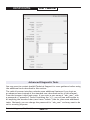
Step 5. Log In to the radio: The default login name is “admin” and the password is
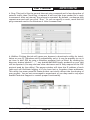
“password.” If your login is successful, you should see the “Quick Set” page similar
to this:
(You may need to scroll around in the page to see all the elements, particularly if
you have a lower resolution monitor or are using Firefox as your browser.)
Step 6. To determine if your wireless mesh network is functioning correctly, you will
need to give each AW58100HTM Mesh Node a unique IP address. There is a box near
the upper right corner of the “Quick Set” page that displays the current value and
allows you to change it. A special notation is used for this entry: Use /x at the end
of the IP Address to specify the subnet mask: /8 for 255.0.0.0, /16 for 255.255.0.0,
/24 for 255.255.255.0 and /32 for 255.255.255.255. Enter a new IP Address and
subnet making sure you will be able to browse to the new address with your computer. Also, make sure that the new IP address is unique on your LAN subnet. Click
the “Apply Configuration” button to make the change. Nothing appears to happen,
but you have been disconnected and will need to browse to the new IP Address to
login again.
Step 7. Repeat the above steps for each Mesh Node in your network, giving them
each a unique IP address. You may wish at the same time to perform the other
Digital Configuration steps beginning on Page 5. Each radio must have a unique IP
address with the other configuration parameters set alike.
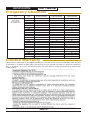
Utilizing state of the art MIMO technology, the AW58100HTM achieves very high data
rate through a combination of dual spacial streams and higher level OFDM modulation.
Technical Support (650) 384-0000
PAGE 4
www.avalanwireless.com