1
2-Notice Sweepy UK.qxd
8/12/08
16:30
Page 19
5 / ADJUSTING THE BALLAST
It might be necessary to adjust the ballast in order to enhance the efficiency of
the robot.
Important: the filter-bag must be clean, the swimming pool water must be
properly balanced and there must be no algae on the swimming pool walls
before proceeding with adjusting the ballast of the swimming pool cleaner.
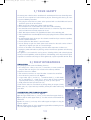
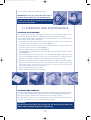
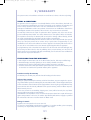
Figure 19
If the robot floats too high above the waterline and takes in air, move the ballast
(2 plates) from position 3 to position 2 and add another ballast (2 plates) to
position 4 so that the ballast remains balanced.
If the robot does not float up to the waterline, remove the ballast (2 plates) situated
under the motor casing.
To adjust the ballast:
> Carefully turn the robot on to its back.
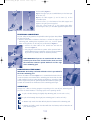
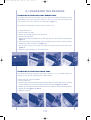
> Remove the filter-support plate. Figure 19.
> Unscrew and remove the casing protection grid. Figure 20.
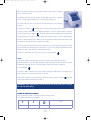
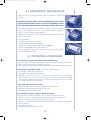
> Adjust the ballast. Figure 21 (5 cable outlet side).
> Put the grid back into place and screw it onto the casing, then put the filtersupport plate back into place.
Figure 20
1
2
3
4
5
Figure 21
6 / POTENTIAL PROBLEMS
The robot does not stay on the bottom of the swimming pool:
There is air trapped in the robot casing. Repeat the immersion procedure, following the instructions
under the section “Immersion of the robot” step by step.
Turn the robot upside down whilst keeping it under water to release the air trapped in the casing.
The robot does not climb the walls. There can be 3 reasons for this:
> the filter bag is full or dirty: simply clean it.
> the ballast is not adapted. Adjust the ballast.
> although the water may seem clear, there can be microscopic algae in your swimming
pool, invisible to the eye, that make the wall slippery and prevent the robot from climbing.
Give the pool a chlorine shock treatment and lower the pH slightly. Do not leave the robot
in the water during the shock treatment.
Upon starting the robot does not move:
Check that the power cable to which the control box is properly connected.
Check that you have correctly initiated cleaning cycles I or II.
If the problem persists, contact your retailer.
The 2 indicators for Cycle I and Cycle II blink alternately:
Your robot has encountered a problem or an error occurred during its operation.
Unplug the power cord, wait 10 seconds minimum then reconnect the power cord.
Check that the cable is correctly connected to the control box.
Check there are no debris preventing brush rotation and/or that there is no debris near the propeller.
Clean the filter-bag.
Start a new cleaning cycle.
If the problem persists, contact your retailer.
19