1
USER MANUAL
(Includes:
AICPA Professional
AICPA Technical
Accounting
Practice
Guides,
Aids;
including
Standards;
AICPA Audit
Audit
and
Risk Alerts)
Copyright
Notice
COPYRIGHT @2001, AMERICAN INS1TnJIE OF CERl~frlliD PUBLIC
ACCOUNTANTS, INC., ALL RIGHTS RESERVED. Printed in the United
Statesof America.
This User's Manual may not be copied, reproduced, disclosed, transferred, or
reduced to any form, including electronic medium or machine-readable form,
or transmitted or publicly performed by any means, electronic or otherwise,
unless AICPA consents in writing.
Use of the software contained in this package has been provided under a
Software License Agreement included with the materials in this package
(please read in full). In summary, you may use the software only on a single
computer and single terminal. YOU MA y NOT COPY the software, except
to place it in your computer's memory for use as permitted by the license
agreement. You are permitted to make one copy of the software as your
working copy. You may not grant sublicenses nor transfer the software or
related materials in any form to any person unless AICP A consents in writing.
The software contains valuable trade secrets and proprietary information and
is protected by federal copyright laws. Unauthorized use of the software or
this User's Manual can result in civil damages and criminal prosecution.
EXCEPT FOR nlE
LIMrrED
W ARRANrY
DESCRIBED
IN nlE
SOFIW ARE UCENSE AGREEMENT, nlERE ARE NO WARRANTIES,
EXPRESSED OR IMPUED, INCLUDING BUT NOT LIMrrED TO mE
IMPUED W ARRANTIES OF MERCHANT ABll..ITY AND FITNESS FOR
A PARllCULAR
PURPOSE, AND ALL SUCH WARRANTIES
ARE
EXPRESSLY AND SPECIFICALLY
DISCLAIMED.
IN NO EVENT
SHALL AICPA BE RESPONSmLE FOR ANY INDIRECT, SPECIAL,
INCmENTAL,
OR CONSEQUEN11AL
DAMAGES OR LOST PROmS
TO YOU OR ANY O1HER PERSON OR ENmY
REGARDLESS OF mE
LEGAL nlEORY,
EVEN IF AICPA HAS BEEN ADVISED OF nlE
POSSmll..ITY OF SUCH DAMAGE.
Some states do not allow the limitation on implied warranties or on how long
they last, or the exclusion or limitation of liability for incidental or
consequential damages, so these limitations or exclusions may not apply to
you.
No person is authorized to expand or alter either these warranties or this
agreement; any such representation will not bind AICPA.
T ABLE
OF
CONTENTS
License Agreement
Introduction
3
6
System Requirements
Installation
Local Installation (CD-ROM
6
7
8
Part A-Installing
Part B-Installing
Opening a File
Familiarizing
Yourself
Using the Features
Contents
Jump Links
and/or Hard Drive)
Folio Views Software:
Your Infobases:
8
9
10
10
12
12
13
With the Features
Searching
Simple Query:
Advanced Query:
"Word" Versus "Phrase" Searches
Viewing Your Hits in the Table of Contents
13
13
14
14
15
Printing
Copying
Bookmark
Creating a Bookmark:
Removing a Bookmark:
Notes
Creating a Note:
Deleting a Note:
15
16
16
16
16
17
17
17
Highlighter
Creating a Highlighter:
Applying a Highlighter:
Clearing a Highlighter:
17
17
18
18
Obtaining
Appendix
Appendix
Appendix
Appendix
Help
A-Quick
Keystrokes
B-Query
Summary
C-Network
Installation
D-Ordering
Additional
Products
on This CD-ROM
18
19
20
21
25
1
License Agreement
AMERICAN INSTITUTE OF CERTIFIED PUBLIC
ACCOUNTANTS CD-ROM LICENSE AGREEMENT
READ TInS AGREEMENT CAREFUIL Y NOW, BEFORE INSTALLING,
USING OR OTHERWISE ACCESSING THE PRODUCT SOFTW ARE OR
CONTENT.
YOU AGREE mAT
BY INSTALLING,
USING OR
OTHERWISE ACCESSING THE CD-ROM SOFTWARE OR CONTENT
YOU HA YE SHOWN AGREEMENT TO THE UCENSE TERMS BY YOU
AND ANY OTHER USER OF THIS CD-ROM. IF YOU DON'T WISH TO
ENTER THIS AGREEMENT, IMMEDIATELY
RETURN THE CD-ROM
PACKAGE AND THE MANUAL TO THE AICP A FOR A FUlL REFUND
OF THE UNUSED PORnON OF YOUR SUBSCRJlYrION.
1.
What's In This CD-ROM Package? A copy of the electronic
version of the AICPA's reSource bound with the Folio Views
Software contained in the CD-ROM and the associated
documentation (the "Product") which are proprietary products of
the AICP A, except for the Folio Views Software and any other
software which are proprietary products of a third party ("Third
Party Suppliers') who have made their software available under
licenseto AlCP A, all of which proprietaryproducts areprotectedby
the United States Copyright Act. AICP A and the Third Party
Suppliersretain ownership of the copyright to their materials.
2.
Grant of Limited Use License. AICP A gnmts you a paid-up, personal
license to use the enclosed copy of the Product on a single or subsequent
(but not additional) microcomputer, subject to the license tenIls. You
agree not to, without our prior written consent (a) rent, lease, lend,
sublicense, or otherwise tnlnsfer the materials or your rights hereunder;
(b) remove or obscure our proprietaIYrights notices; (c) alter, decompile,
or disassemble the programs; (d) utilize the Product on any service
bureau, time-sharing, or interactive cable system; or (e) use the Product
on more than one terminal or workstation of a network of single-user
microcomputers or!l multi-user computer, unless licensed to do so, and
then limited to the number of authorized conCUIrentusers for whom you
have paid Notwithstanding the foregoing, you are not licensed to use the
Pnxluct to provide on-line or similar databaseservicesto third parties.
3.
AICPA's Rights. By accepting this license, you receive the right
to use the Product as specified herein, but you do not become the
owner of the Product. The Product is protected by copyright, trade
secrets, and trademark law. You acknowledge that the Product is
AICPA's property, and contains valuable confidential, unpublished
infonnation developed or acquired by AICP A at great expense. You
agree to use your reasonable best efforts to protect the materials from
unauthorized reproduction, distribution, disclosure, use, or publication.
4.
5.
Third Party Rights. You agreethat a Third party Supplier of any
portion of the Product may enforce any right it may have which is
violated by your breach of any of the restriction or other provisions
of this Agreement. Please also note that you are restricted from
using InfoApps as a source of Folio components for purposes of
internal distribution of the Productunlesspurchasedform NextPage.
Limited Warranty and Liability. We warrant that the media upon
which the Product resides will be free of defects in materials and
workmanship under normal use for a period of sixty daysfollowing
delivery of the Product to you. The AICP A's sole obligation under
this warranty is to replaceany defectivemedia or correct substantial
software errors at no charge, provided that you have given the
AICP A notice of the defect within such sixty-day period. If AICP A
is unable to replace defective media or correct substantial software
errors within a reasonableperiod of time, AICPA will refund the
unused portion of the license fee. The Product is licensed "as is"
without any warranty of any nature. We cannot guarantee you
unintefl1lpted service or the correction of any errors. No company
or person i.sauthorizedto expand or alter either these warranties or
this agreement; and such representation will not bind AICP A.
EXCEVf FOR THE LIMITED W ARRANTY DESCRIBED
ABOVE, mERE ARE NO W ARRANfIES TO YOU OR ANY
OTHER PERSON OR ENTrrY FOR THE PRODUCT,
EXPRESSED OR IMPLIED, INCLUDING BUT NOT LIMITED
TO THE IMPLIED W ARRANfIES OF MERCHANTABllXfY
AND FffNESS FOR A PARncULAR pURPOSE; ALL SUCH
w ARRANfIES ARE EXPRESSLY AND SPECIFICALL Y
DISCLAIMED. Some statesdo not allow the exclusion of implied
warranties or limitation on how long they last, so the above
exclusion and limitation may not apply to you. This limited
warranty gives you specific legal rights, and you may also have
other rights which vary from stateto state. IN NO EVENT SHAlL
AICPA OR ANY THIRD PARTY SUPPLIER BE RESPONSmLE
FOR
ANY
INDIRECT,
SPECIAL,
INCrnENTAL,
CONSEQuENTIAL. OR sIMll..AR DAMAGES OR LOST DATA
OR PRoms TO YOU OR ANY onrnR PERSON OR ENTrrY
ARISING OUT OF mE VSE OF mE PRODUCT REGARDLESS
OF mE LEGAL mEORY, EVEN IF WE HA VE BEEN
ADVISED OF mE POssmn..rrY OF SUCH DAMAGE. IF mE
FOREGOING
LIMff A noN
IS
HELD
TO
BE
UNENFO RCEAB LE, mE AI CPA'S AND ANY THIRD PARTY
sUPPLIER'S MAXIMUM UABll.JfY TO YOU SHAlL BE mE
AMOUNT OF THE UCENSE FEES PAID BY YOU FOR THE
PRODUCT. THE REMEDIES A v All..ABLE TO YOU ARE
EXCLUSIVE. SOME STATES DO NOT ALLOW THE
EXCLUSION OR LIMffAnON
OF INCrnENTAL
OR
CONSEQUENnAL DAMAGES, SO mE ABOVE LIMffAnON
OR EXCLUSION MA Y NOT APPLY TO YOU .
6.
Tenn. This license and your right to use the Product, receive
subsequent issues of the Product and renew the subscription
automatically terminate if your invoice is not paid in a timely
manner, or if you fail to comply with any provision of this
agreement.Upon termination of this licenseagreementor expiration
of the subscription you agreeto destroy all copies of the Product.
7.
General. This agreement will be governed by New York law
(exceptthat federal law governscopyrights). If any provision hereof
is finally held to contravene that jurisdiction's law, that provision
will be deemed deleted, but will not affect any other provision's
validity; the parties expresslyagreethat every limitation of liability,
disclaimer of warranties, or exclusion of damagesis intended to be
severableand independent of any other such provision and to be
enforcedas such, and shall remain in effect even if a remedyis held
to have failed of its essential purpose. If either party brings an
action to enforce or interpret this agreement,the prevailing party
will be entitled to recover reasonableattorneys' fees and litigation
expensesin addition to other appropriate relief. This agreement
covers any updates, backups, and merged or partial copies of the
programs, and constitutes our entire understandingand agreement
regarding the Product. This license may only be modified in a
written amendment signed by an authorized AICPA officer. No
action for any warranty breach or otherwise arising under this
license may be commencedmore than one year following warranty
expiration. Either party's failure or delay to enforce any provision
hereof will not waive that party's rights. You acknowledgethat you
have read, understood, and agreedto the license terms.
5
Introduction
Welcome to the reSOURCE: AICPA's Accounting and Auditing
Literature CD-ROM. This valuable researchtool is being distributed with
Folio Views,@to give you powerful search and retrieval capabilities that
are easy to use. The following AICP A products (referred to as
"infobases") are available on a subscription basis:
Professional Standards
Technical Practice Aids
AICP A Audit and Accounting Guides (including Audit Risk Alerts)
[The Audit and Accounting Guides are available as a set and also as
.
.
individual products.]
To order additional products, please call 1 (888) 777- 7077. A complete
listing of the products available on this CD-ROM can be found in
Appendix D of this manual.
System Requirements
Personal computer with a 486 or higher
recommended) and a CD-ROM drive
processor
(pentium@
Microsoft Windows@ 3.1, Microsoft Windows 95TM, Microsoft
Windows 98TM,Microsoft Windows NT@Workstation 3.51 or later
4 MB memory for use on Windows
Windows
.
8 MB
VGA
of available
NT
hard disk space
or higher-resolution
recommended)
6
3.1; 8 MB memory for use on
95/98; 12 MB memory for use on Windows
video
adapter (SVGA
256-color
IDstallation
The publications on this CD-ROM can be run in a number of ways:
From
the CD-ROM
Local
installation
Network
installation
(certain necessary files will be installed on your hard drive)
on your
(Administrator)
instructions
hard drive
installation
[refer
to Appendix
C for
]
The initial installation of the publications for any of the above methods is
a two-part installation. First you will need to install the Folio Views
software followed by installation of the publications that you have
subscribed to.
The Folio Views software needonly be loaded once. Upon receipt of
the updated infobasesyou will only need to load the infobases.
~
'7
Local Installation (CD-ROM and/or Hard Drive)
Part
A--lnstalling
Folio
Views
Software:
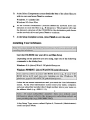
Insert the CD-ROM into your drive and Run Setup.
Depending on the platfornl you are using, type one of the
following commands in the dialog box:
Windows 3.1: [drive]\Win3-1WCPA\Setup.exe
Windows 95/98/NT: [drive]\Win95NT\AICPA\Setup.exe
.
Follow the on-screen instructions until you reach the Setup Type
screen. At the Setup Type screen, select the type of installation you
want to perfonn and press Next:
1.
Insta11-Typical
(copies the Folio
Software
to the local
2.
drive)
Insta1l-Compact
(copies the Folio Software except the help
3.
4.
files to the local drive)
Install to Run from CD
Network (Administrator)
[Proceed to Appendix C for NetWork
Installation.]
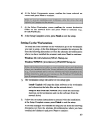
At the ChooseDestination Location for Folio VIEWS screen,accept
the default location and press Next [or Browse to select another
location (be sure to indicate ~adirectory to install to [ e.g., C:\Program
Files\aicparsc]), press OK and press Next] to continue.
At the Select Program Folder screen press Next to accept the
default, AICPA reSOURCE Library [or select or type a new folder
name and press Next].
At the Setup Complete screen, press Finish and then install the
infobases of the publications you have purchased [refer to Part B
below].
Part B-Installing
Your lnfobases:
Insert the CD-ROM into your drive and Run Setup.
Depending on the platfonn you are using, type one of the
following commands in the dialog box:
Windows 3.1: [drive ]\ Win3-1 \Updnfo\Setup.exe
Windows 95/98/NT: [ drive ]\ Win95N1\Updnfo\Setup.exe
.
Follow the on-screeninstructions until you reach the User Information
screen. At the U ser Information screen enter your name, company,
and your subscriber number (the 8 digit number above your name on
the addresslabel (e.g., 00011111).
At the Select Setup Type screen, select the type of setup you would
like to perform and press Next. [For Network installations proceed
to Appendix C.]
At the Select Components screen, confirm the items selected are
correct and press Next to continue.
At the Select Destination screen,indicate whether you would like to
access your infobases from your local hard drive or from the CDROM drive.
If you selectlocal hard drive, confirm the correct installation location
at the Select Destination Folder screen, and press Next to continue
(C:\Program Files \aicparsc\nfo is set as the default directory).
9
At
the
Setup
Complete
screen,
press
Finish
to
exit
the
setup.
Opening a File
You may open an infobase by double-clicking on the icon on your desktop
(which is automatically created when you first install) or by selecting
Start, Programs, AICPA reSOURCE Library, Product Name (e.g.,
Professional Standards) from the Windows Menu (on the bottom left-hand
comer of your screen).
This will launch the Folio Views 4.2 application and open the selected
infobase.
You may open another infobase by doing the following:
1.
2.
3.
Choose File, Open; Or press CTRL+O; Or click the OPEN
button on the Toolbar at the top of your screen.
Browse for the location of the infobase ("nfo") file.
Choose OPEN to open the infobase.
Title
Bar-At
the top of your screenis the title bar containing the name
of the infobase that you are in (e.g., AICPA reSOURCE-Professional
Standards).
Main Menu-Directly
under the title bar is the Main menu. Access any
of the items in the Main menu by 61icking-on the item.
Toolbar-The
Toolbar appears underneath the Main menu. It allows
one-click mouse access to several features.
Reference Window
PaneThe Reference Window pane follows
the Toolbar. This window displays where you are in the infobase. You
may change the size of this window as desired.
Contents Pane- The Contents pane is on the left side of your screen.
By clicking on any item in the Contentspane, you will automatically move
to the selected section in the Document pane.
Document
Pane-This
pane is on the right side of your screen and
displays the body of the document.
Hit List-A1lows
you to view your search results. By double-clicking
on any reference in the Hit List, you will be taken to the appropriate
section in the Document pane.
Infobase View Tabs-These
are located underneath the Document
pane. They allow you to display the infoffilation in the infobase in
different ways. Some of the most important icons are:
AU:
Displays the Contents, Reference, Document, and Hit List
panes. Use this View when searching the infobase or when
you need to see all of the related information at once.
Search:
Displays the Reference, Document, and Hit List panes.
Use this View when you are searching to find the most
relevant information. (The Hit List can help you identify
the most relevant sections in the infobase to begin reading
once your search is completed.)
Browse:
Displays the Contents, Reference, and Document panes. Use this
View when you are browsing the infobase for infonnation-it
gives you the best access to the Table of Contents while
maximizing the space allocated for the infobase text.
Document:
Displays the Reference and Document panes. Use this
View when you need as much of the body of the infobase
on the screen as possible.
Contents:
Displays
the
Contents
,
pane.
Double-clicking
on
a
heading
will take you to the selected section in the document. Use
this View when you are navigating or scanning the Table
of Contents and need to see the full name of the headings
in the Table of Contents.
Hit List:
Displays the Hit List pane. Use this View after performing
a search to View as many references in the hit list as
possible.
11
Displays the Object pane. The Object pane is activated
Object:
whenever an object link is followed.
Query TooI-This
is located underneath the Infobase View Tabs.
Some of the most important icons are:
Advanced
Query:
Opens the Advanced
Query dialog box to
enable you to search the infobase. You can also press F2.
Clear
Query:
Removes
the highlights
from
the last query
performed.
Query Tool: A small window which allows you to enter simple
queries. You can also press F3.
Previous
Hit:
Returns the cursor to the previous query hit
can also press SHIFT
Next Hit:
You
+ F4.
Advances the cursor to the next query hit. You can
also press F4.
Using the Features
Certain features that you will be utilizing are described below. For more
in-depth discussion of a particular feature press Fl or choose Help from
the Main menu.
Contents
The Table of Contents,with its expandableandcollapsiblebranches,allows you
to quickly and easily browse through the infob~, accessa desiredsection,or
select a particular sectionfor searchingand printing. There are a number of
different ways to view the Contents pane. (See lnfobase View Tabs under
the "Familiarizing Yourself With the Features" section above.)
To easily access a given sectipn of the document from the Table of
Contents, be sure that the Synchronize Contents feature is turned on. You
can accessit from the View menu when the Document pane is selected or
by clicking on the Synchronize Contents button in the Toolbar. This
convenient feature enables you to see the section of the document as you
scroll through the Contents (and vice versa).
To expand or collapse the Table of Contents, simply click on plus ( + ) or
minus (-) sign, respectively.
12
Each heading in the Table of Contents is linked to its location in the
infobase. By double-clicking on the heading (or by selecting it and
pressing Enter), you will be taken immediately to that location.
Jump Links
Jump links take you from one point in the infobase to another. They can
be identified by the green text and when you point your mouse on them a
white hand with a pointing finger will appear. A jump link is used to
connect related information. To jump to a link location; click on the link.
To return, choose Go Back on the Toolbar (or F6 on your keyboard).
Searching
You may search infonnation
toolbar .
by using the Search
menu or the Search
Simple Query:
.
Type in the query you wish to perform in the Query Tool at the
bottom of your screen. [Or, choose Query from the Search menu or
press F3.]
.
Press Enter. The seafth hits are displayed in the Document pane.
.
UsetheNext mt (or pressF4), Previous mt (or pressSmFT + F4)
and/or Clear Query iconsto navigatethrough your searches.
13
~
Copying
Occasionally, you may need to use certain of the infonnation contained in
this infobase in other documents. To perform this function:
Select the desired text.
Choose Copy from the Edit menu or press CTRL + C.
Switch to the application you are copying to (e.g., your word
processing software).
Choose Paste from the Edit menu or press CTRL + V.
Bookmark
Creating a Bookmark:
.
Place the cursor at the location where you want to place the
bookmark.
Choose Bookmark from the Tools menu, click on the Bookmark
icon, or press CTRL + M.
Type a name for the bookmark.
Choose
Set.
To turn to a bookmark at a later time, choose Bookmark from the Tools
menu, click on the Bookmark icon, or press CTRL + M. Select the
bookmark and choose Go To.
Removing a Bookmark:
~
Choose Bookmark from the Tools menu, click on the Bookmark
icon, or press CTRL + M.
Scroll to the bookmark you wish to remove.
Choose Delete.
16
Notes
Creating a Note:
.
Select the text where you wish to attach a note.
Choose Note from the Tools menu, click on the Note icon, or press
CTRL + N.
Type in the text you wish to include in the note.
.
Press ESC and then YES to save and close the note. A small not.e
icon is placed to the left of the paragraph.
To open the Note. click on the note icon next to the paragraph. Press ESC
to close the note.
Deleting a Note:
Place the cursor in the paragraph which contains the note you are
deleting.
.
Choose Remove Note from the Tools menu or press CTRL + SHIFT
+N.
Highlighter
Creating a Highlighter:
Choose Highlighter from the Tools menu, click on the Highlighter
icon, or press CTRL + H.
Choose
New.
Type a name for the highlighter .
Choose the backgrouHd color you wish to use.
.
Choose
.
Choose Close to close the initial highlighter dialog box.
OK.
~..
-=-
Applying a Highlighter:
Select the text you want to apply the highlighter to.
.
Choose ffighlighter from the Tools menu, click on the ffighlighter
icon or press CTRL + H.
.
Select the highlighter you wish to apply.
Choose
Apply.
Clearing a Highlighter :
.
Select the text you wish to clear the highlighter from.
.
Choose Remove Highlighter
Obtaining
from the Tools menu.
Help
You may obtain additional help by using the pull-down Help menu from
the main menu or by pressing Fl.
Support may also be obtained by calling AICP A Software Connection at
1 (888) 843-5577.
.
Appendix
A-Quick
Keystrokes
Collapse TOC*
branch one level
.Copy
.Exit Folio
Expand TOC*branch
one level
CTRL+C
Copy
CTRL+C
ALT+F4
+
CTRL+G
CTRL+O
CTRL+P
A
CfRL+T
Tag Record
1-9
crRL+V
Paste
F6
CTRL+HOME
Go to top of
infobase
Previous Hit
Previous Partition
Hit
Go Forward
Expand all TOC*
~
~
branches
Expand roc*
branches to specific
level
Go Back
.-00
.Go
I smFI'+F6
IC1RL+G
ForwarQ
To
Go to top of
infobase
Hel
Next Hit
Next Partition Hit
n
Paste
Previous Hit
Previous Partition
Hit
Print
slnFr+F4
slnFr+FS
C1RL+HOME
smFr+F6
Fl
F4
FS
CI'RL+Q
CI'RL+V
slnFr+F4
slnFr+FS
ALT+F4
Fl
F2
F3
F4
.FS
F6
CTRL+P
Query Advanced
F2
+
Query Simple
F3
A
CTRL+T
1-9
Tag Record
..
ced
le
ext
Next
t
Partition
Hit
GoBack
Collapse TOC*
branch one level
Expand TOC*
branch one level
Expand all TOC*
branches
Expand TOC*
branches to
specific level
~
* TOC
= Table
of Contents
10
Appendix
B-Query
Summary
Press F2 to invoke the Query Dialogue. For more details
on Query , press Fl from the Query Dialogue.
20
~
Appendix
C-Network
Installation
Installing the Folio Views Software
(In the instructions below, the letter "R:\" is used as an example to
designate the network drive.)
I.
Insert the CD-ROM into your drive and Run Setup.
Depending on the platform you are using, type one of the following
commands in the dialog box:
Windows 3.1: [drive]\Win3-1\AICPA\Setup.exe
Windows 95/98/NT: [drive]\Win95NT\AICPA\Setup.exe
2.
Follow the on-screen instructions until you reach the Setup Type
screen. At the Setup Type screen, select Option 4, Network
(Administrator) Install and press Next.
21
~
3.
At the Select Components screen check the box of the client files you
wish to copy and press Next to continue.
Windows 3-1 clients files
Windows 95 client files
4.
At the Choose Destination Location select the network drive and
directory to store the files (e.g., R:\aicparsc). The program will copy
the directory structure of the CD-ROM to the destination path chosen
on the network drive and press Next to continue.
5.
At the Setup Complete screen, press Finish to exit the setup.
Installing Your Infobases
Insert the CD-ROM into your drive and Run Setup.
Depending on the platform you are using. type one of the following
commands in the dialog box:
Windows 3.1: [drive]\Win3-1\Updnfo\Setup.exe
Windows 95/98/NT: [drive]\Win95NT\Updnfo\Setup.exe
Follow the on-screen instructions until you reach the User Infonnation
screen. At the User Information screen enter your name, company,
and your subscriber number (the 8 digit number above your name on
the address label (e.g., 00011111).
:;.
At the Setup Type screen, select Option 4, Network (Administrator)
Install and press Next.
4. At the Select Components screen, confirm the items selected are
correct and press Next to continue.
5.
At the Select Destination screen confirm the correct destination
folder on the network drive and press Next to continue (e.g.,
R:\AICP ARS\nfo ).
6. At the Setup Complete screen, press Finish to exit the setup.
Setting Up the Workstations
To install the Folio software on the workstation go to the workstation
you want to setup. At the Run dialogue box execute the setup.exefile
from the following directories (or from the alternate drive/directories
where you have installed the program) and press Next to continue:
Windows 3.1: [drive\directory]\Win3-1\Setup.exe
Windows 95/98/NT: [drive\directory]\Win95N1\Setup.exe
2.
The workstation
setup will allow for two setup types:
Install- Typical (will copy the client software to the workstation
and referencing the help files on the network drive)
Setup to Run from the Network (will create the necessary
shortcuts on the'Workstation and run the software from the
network drive)
3.
Follow the on-screen instructions to proceed with the installation;
at the Setup Complete screen, press Finish to exit the setup.
At the Run dialogue box execute the setup.exefile from the following
directories (or from the alternate drive/directories where you have
installed the Infobases) and press Next to continue:
23
~
Windows 3.1: [drive\directory ]\Win3-1 \Updnfo\Setup.exe
Windows 95/98/NT: [ drive\tiirectory ]\ Win95N1\Updnfo\Setup.exe
4. Follow the on-screen instructions to proceed with the installation; at
the Setup Complete screen, press Finish to exit the setup.
You may now open your infobase by double-clicking on the icon on the
desktop.
.
Appendix
D-Ordering
This CD-ROM
Additional
Products
on
To order additional products from this CD-ROM, please callI (888)
777-7077. Upon ordering additional products, you will be given a
password that will enable you to immediately access the product on
your CD-ROM.
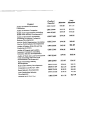
The prices listed below represent single-user prices. Multi-user pricing
is available by calling I (888) 777-7077.
Product
Product
Number
Non
Member
Member
Professional Standards
G80100AM
$230.00
Technical Practice Aids
G80l01AM
$181.00
$226.00
Audit and Accounting Guides Set
{includes all Audit and Accounting
Guides and all Audit Risk Alerts)
G80l02AM
$465.00
$581.00
Individual
$288.00
Audit and Accounting Guides and Audit Risk Alerts:
Consideration of Internal Control in a
Financial Statement Audit
G80l04AM
$45.00
Personal Financial Statements Guide
G80l05AM
$45.00
$51.25
Guide for Prospective Financial
Infonnation
G80l06AM
$45.00
$51.25
Guide for the Use of Real Estate
Appraisal Information
G80l07AM
$45.00
Audits of Agricultural Producers and
G80l08AM
$45.00
$51.25
Agricultural Cooperatives
Audits of Airlines
G80l09AM
$45.00
$51.25
Banks and Savings Institutions
{including Depository Institutions and
Lending Industry Developments)
G80ll0AM
$54.00
$68.00
Brokers and Dealers in Securities
{including Securities Industry
G80lllAM
$54.00
Developments)
~
Audits of Casinos
G80ll2AM
$45.00
$51.25
Common Interest Realty Associations
{including Common Interest Realty
Associations Industry Developments)
G80ll4AM
$54.00
$68.00
Construction Contractors {including
Construction Contractors Industry
G80ll5AM
$54.00
G80ll6AM
$54.00
G80ll7AM
$54.00
Developments)
Audits of Credit Unions {including
Depository Institutions and Lending
Industry Developments)
Audits of Employee Benefit Plans
{including Employee Benefit Plans
Industry Developments)
Product
Product
Number
Non
Member
Member
G80118AM
$45.00
$51.25
Audits of Finance Companies
GSOl19AM
$45.00
$51.25
Health Care Organizations (including
Health Care Industry Developments)
GSO120AM
$54.00
$68.00
Audits of Investment Companies
(including Investment Companies
GSO121AM
$54.00
$68.00
G80122AM
$54.00
$68.00
G80124AM
$45.00
$51.25
G80125AM
$54.00
$68.00
GSO126AM
$54.00
$68.00
High- Technology Industry
GSO129AM
$19.95
$24.95
Developments
Real Estate Industry Developments
GSO130AM
$19.95
$24.95
Compilation and Review Alert
GSO131AM
$21.50
$27.00
G80132AM
$19.95
$24.95
Auto Dealerships Industry
GSO137AM
$19.95
$24.95
Developments
General Audit Risk Alert
GSO133AM
$21.50
$27.00
Audits of Federal Government
Contractors
Industry Developments)
Not-for-Profit Organizations (including
Not-for-Profit Industry Developments)
Audits of Entities With Oil and Gas
Producing Activities
Audits of Property and Liability
Insurance Companies (including
Insurance Industry Developments)
Audits of State and Local Governmental
Units (including State and Local
Governmental Developments)
Retail Industry Developments
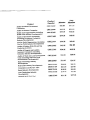
Member
Non
Member
G80118AM
$45.00
$51.25
Audits of Finance Companies
GSOl19AM
$45.00
$51.25
Health Care Organizations (including
Health Care Industry Developments)
GSO120AM
$54.00
$68.00
Audits of Investment Companies
(including Investment Companies
GSO121AM
$54.00
$68.00
G80122AM
$54.00
$68.00
G80124AM
$45.00
$51.25
Audits of Property and Liability
Insurance Companies (including
Insurance Industry Developments)
G80125AM
$54.00
$68.00
Audits of State and Local Governmental
Units (including State and Local
GSO126AM
$54.00
$68.00
High- Technology Industry
GSO129AM
$19.95
$24.95
Developments
Real Estate Industry Developments
G80130AM
$19.95
$24.95
Compilation and Review Alert
G80131AM
$21.50
$27.00
G80132AM
$19.95
$24.95
Auto Dealerships Industry
G80137AM
$19.95
$24.95
Developments
General Audit Risk Alert
GSO133AM
$21.50
$27.00
Product
Audits of Federal Government
Product
Number
Contractors
Industry Developments)
Not-for-Profit Organizations (including
Not-for-Profit Industry Developments)
Audits of Entities With Oil and Gas
Producing Activities
Governmental Developments)
Retail Industry Developments