1
DIR-615
Quick Installation Guide
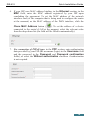
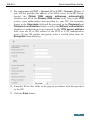
11. For connection of PPTP + Dynamic IP or L2TP + Dynamic IP type: if
your ISP has provided the address of the DNS server, in the IP section,
deselect the Obtain DNS server addresses automatically
checkbox and fill in the Primary DNS server field. Then in the VPN
section, enter authorization data provided by your ISP (the username
(login) in the Username field and the password in the Password and
Password confirmation fields), or select the Without authorization
checkbox if authorization is not required. In the VPN server address
field, enter the IP or URL address of the PPTP or L2TP authentication
server. If your ISP applies encryption, select a needed value from the
Encryption drop-down list.
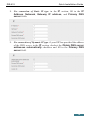
12. If needed, fill in other fields on the page in accordance with data provided
by the ISP.
13. Click the Save button.
21