1
PROOFMATE (PROOFREADY) PLUGIN FOR EPSON STYLUS PRO 7800/9880
1.6 Allocating additional memory to the RIP
To process jobs with the plugin you may need to allocate additional memory to the RIP printer buffer. The precise amount of memory required depends upon the nature of the job to be processed. Large, high quality jobs
will require more memory than small, low quality jobs.
The basic memory requirements for the RIP is to provide sufficient memory to prevent the operating system
from page buffering, which has the undesired effect of slowing the RIP down. At the other end of the scale, the
more memory you can make available to the RIP the better it will process the job. Figures of 500 MB and above
may be needed to process some large jobs, especially if options such as in-RIP trapping and screening are being
used. In general, the more memory the RIP has available to use, the better it performs.
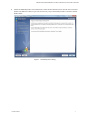
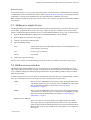
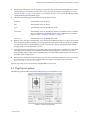
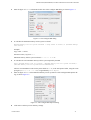
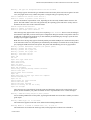
To set the printer buffer memory allocation, open the Configure RIP dialog (Figure 1.5) and enter a value into
the Printer Buffer box. Suggested settings are:
•
Low/medium resolution prints on standard size pages: 20000 KB
•
High resolution prints on standard size pages: 40000 KB
•
Low/medium resolution prints on large size pages: 40000 KB
•
High resolution prints on large size pages: 60000+ KB
Any other RIP memory settings should be configured according to the recommendations given in your Harlequin RIP User Manual, since these vary according to the RIP release you are running.
Figure 1.5 Setting the printer buffer size in the RIP
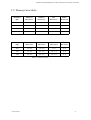
See also, Appendix C, “Memory Requirements” for more information on the specific memory requirements of
the plugin.
1.7 Related documentation
For more details about the printer you are using, see the manufacturer’s documentation supplied with the printer
or the relevant product support section of the manufacturer’s web site.
For more information on installing the Harlequin RIP, see the ECRM WorkMates Getting Started Guide.
For more information about the RIP, see the ECRM RIPMate User Guide.
For more information about Harlequin ColorPro, see the Colormate (ColorPro) User Guide.
AG50567 REV. 5
7