1
• Some basic logo instructions, as described in Appendix A
• Workspace management: Users should be able to define and use subroutines. Users
should also be able to define and use global variables.
• Control structures: loops and conditionals
• Error handling: Simple Logo should gracefully handle any errors that may occur while
parsing and interpreting user-given commands. This includes providing appropriate
error messages (we’ll leave it up to you to define appropriate).
• File I/O: The user should be able to load logo files into the interpreter and should be able
to save the current working environment (composed of user-defined subroutines,
variables, as well as turtle and pen information) to a file.
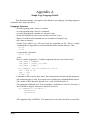
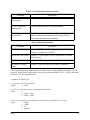
Refer to the table of commands at the end of this handout for a full list of the built in commands which you will need to support.
“Don, This sounds great! Where do I start?”
The Simple Logo project can be broken down into two parts, all of which you are responsible for writing:
• Command parsing, interpretation and maintenance of the global environment
• Turtle Graphics Library (TGL), consisting of a display window and methods to move the
turtle and draw with the pen.
Parsing involves processing commands token by token and checking for syntactical errors.
Interpretation means executing the code as it is understood by the parser. The execution is likely
to require graphical manipulation, which is where the TGL comes in. It should utilize X graphics
calls and should be simple and well-defined.
Remember that having a good design is key. You should work with your partner to come
up with a solid program design. Hammer out interface specifications and know how the different
parts interact and what functionality they will need from one another. Before you start writing
code, it might be a good idea to write header files with empty code blocks and compile them
together. To move the turtle and draw with the pen you will need to have the parser-interpretergraphics library interaction in place, so you will need to know exactly how all three parts fit
together. As has been said a bazillion times, there is no single perfect design. Feel free to be creative. Express yourself. However, keep in mind that functionality is essential, and simplicity is
beauty.
Plan this project in stages. It may be helpful to build complete individual components
before attempting to integrate them. For the parser/interpreter, be sure that you can handle simple
logo commands, such as the math operations and turtle motion commands. You could also write
a test driver for the turtle graphics interface. Then you should concentrate on getting Simple Logo
to work with input from a terminal before you start to worry about getting file input/output functional. This program is not an all or nothing project: you can and should get smaller components
working before you put everything together.
“That’s fantastic! It sounds so easy! How does it work and is it legal?”
The Simple Logo language has been restrictively defined to make writing it a reasonable
project. In particular, the limited definition should make it easier to do parsing and error checking.
Slogo
3