1
21
5.2. ACCOUNTS
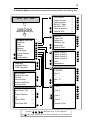
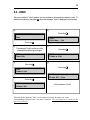
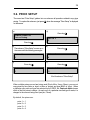
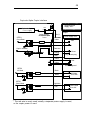
The menu element "Accounts" gathers into one submenu all operations related to accounts.
when the message "Accounts" is displayed on the
To explore this submenu, just press
screen.
a)
e)
Press key
ADMINISTRATION
Accounts
ACCOUNTS:
Edit ACC. Pass
Press key
b)
f)
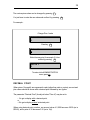
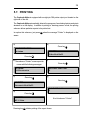
The submenu "Accounts" comes up on
the screen with the following messages:
Press key
ACCOUNTS:
View Account
c)
ACCOUNTS:
Edit Max. ACC.
g)
Press key
Press key
ACCOUNTS:
Create Account
d)
Press key
ACCOUNTS:
Delete Account
ACCOUNTS:
Clear an Account
h)
Press key
ACCOUNTS:
Clear All ACC.
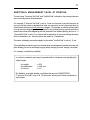
End of submenu "Accounts"
Each item of the "Accounts" submenu is described in the following pages. To exit this submenu, strike
. This will return you to the ADMINISTRATION menu.