1
ImageSkill Software
Translucator v1.0
User’s Manual
Table of Contents
Introduction ...................................................................................................................................................... 2
Features at glance ....................................................................................................................................... 2
System Requirements.................................................................................................................................. 2
Registering ImageSkill Translucator ............................................................................................................ 2
Getting Technical Support............................................................................................................................ 3
Getting Started ................................................................................................................................................. 4
Masking process overview ........................................................................................................................... 4
Installing and uninstalling ............................................................................................................................. 4
User interface ............................................................................................................................................... 5
A. Toolbar................................................................................................................................................. 6
B. Processing parameters........................................................................................................................ 6
C. Brush parameters ................................................................................................................................ 7
D. View ..................................................................................................................................................... 7
Working with Translucator................................................................................................................................ 8
Source data .................................................................................................................................................. 8
Starting Translucator.................................................................................................................................... 8
Extracting translucent objects .................................................................................................................... 11
FAQ and Troubleshooting .............................................................................................................................. 16
I can not run Translucator or Translucator is grey out in graphic host’s effect menu. ............................... 16
Why my marked zone disappears?............................................................................................................ 16
What does happen if my image already has transparent area? ................................................................ 16
How does plug-in process selection? ........................................................................................................ 16
What to do when object too much is erased .............................................................................................. 17
What to do when background not enough is erased ................................................................................. 17
ImageSkill Translucator: User’s Manual
Introduction
Translucator is a Photoshop-compatible plug-in for Windows designed by ImageSkill Software
that can work with Adobe Photoshop, Adobe Photoshop Elements, Corel (Jasc) Paint Shop Pro,
Microsoft Digital Image Suite etc.
Translucator extracts translucent objects (like glass, smoke, fog, fur etc.) from images in a few
mouse clicks with a perfect result. The Translucator unmixs object and background colors in
processed areas, so you can then place result on other background properly. The cutting objects
may be used for collage, scrap-book and greeting card creation.
Using Translucator you can make a result that is unavailable with other masking programs like
Adobe Magic Extractor, Corel Knock-Out, Microsoft Expression and so on.
You do not need accurately draw out an object. Mark translucent area and press Apply. The
efficiency of background removing is adjusted by moving one slider only. There are addition tools
for result tuning. You can receive attractive results and it takes less time and efforts.
You can use erase/restore brush for the manual correction of the resulting image.
In order to check result you can switch between original image and result one and preview the
extracted object against a colored matte background.
Features at glance
•
Ability to cut translucent objects like glass, fog, smoke, fur etc
•
Color unmixing for future background replacing
•
There are tools for debris removing and holes filling within received mask
•
You can switch between original image and result one and preview the extracted object
against a colored matte background for result checking.
•
16-bit mode support
System Requirements
Computer
Pentium 400MHz
Operation System
Win98, Win200, Win2003, Win XP, Win NT3, Win NT4
Hard Drive
you must have free space about 3 Mb
RAM
64Mb
Miscellaneous
mouse or other pointing device
You must have suitable graphic host software (see below)
Registering ImageSkill Translucator
You can order full version of this plug-in via ShareIt and RegNow services (the latest accept
PayPal). If you buy Translucator through these services you receive user name and unlock key.
Please, enter their carefully without additional blanks. Use copy-paste method.
If you have any trouble with unlock key, write [email protected]
© ImageSkill Software 2006
2
ImageSkill Translucator: User’s Manual
Registered users receive our email newsletter containing information about new product releases
and updates, free downloads, articles, tips, and special offers.
Just now, we upgrade our products for registered customer free of charge.
Getting Technical Support
If you have any trouble, questions, feature requests or notes, you can get help in one of the
following ways:
E-Mail: [email protected]
Web site: http://forum.imageskill.com
© ImageSkill Software 2006
3
ImageSkill Translucator: User’s Manual
Getting Started
Masking process overview
In order to extract translucent object you must set areas where these objects are placed. You can
do it using “Mark translucent zone” brush and “Flood Fill” tool. Marked parts after extraction will
have some opacity values; the unmarked parts will be transparent completely.
Extracting process is started by pressing “Apply” button. You can adjust strength of extraction by
“Strength” parameter. Algorithm always takes source image as starting point. So, if after
extraction you lost object’s part decrease “Strength” parameter and press “Apply” again. Or if
you do not erase background completely - decrease “Strength” parameter and press “Apply”.
Often, the extracted objects look desaturated after extraction. You can control saturation of the
extracted objects by “Saturation” control.
You can clean received mask by debris removing and holes filling. Check corresponded flags and
run extracting process.
You can use “Manual Eraser” tool to correcting final mask. NOTE: The all translucent zone
marks are dropped after “Manual Eraser” applying.
Check result of extraction using preview the extracted object against a colored matte background.
Installing and uninstalling
Run setup file. Installer finds suitable graphic hosts. Choose one of them from list. If you want to
install plug-in in other folder, select item "Other path" and set path. In this case you must set
"Plug-ins path" of your graphic host to setup folder.
Plug-in can work under the following graphics host properly
•
Adobe Photoshop 7, CS, CS2
•
Adobe Photoshop Elements 3, 4, 5
•
Jasc Paint Shop Pro 7, 8, 9
•
Corel Paint Shop Pro (Photo) X, X1
•
Corel Photo Paint 11,12
•
Xara Xtreme
•
Microsoft Digital Image Suite 2006
•
XnView 1.8 and older
Plug-in may be compatible with other graphic hosts as well.
In order to uninstall plug-in run uninstaller (file uninstall.exe) or use Add and Remove Programs
item in the Control Panel or Start Menu.
© ImageSkill Software 2006
4
ImageSkill Translucator: User’s Manual
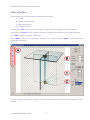
User interface
Translucator has 4 main sections (see description below):
A: Toolbar
B: Extracting parameters
C: Brush parameters
D: View parameters
Pressing the “OK” button causes returning to graphic host with applying object extracting.
Pressing the “Cancel” button causes returning to graphic host without source image changing.
The ”Help” button runs short HTML help.
The “Apply” button runs extracting process. You need to press “Apply” button after any
parameter’s changing.
Current image zoom factor, progress bar and prompting line are placed into bottom of main
window.
© ImageSkill Software 2006
5
ImageSkill Translucator: User’s Manual
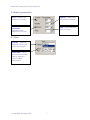
A. Toolbar
Zoom – zoom in and out
of the image when
working with fine details
Pan – let you scroll image
in any direction
Mark translucent zone
brush –use the brush to
mark semi-transparent
areas
Flood Fill – use the tool
to flood filling semitransparent area
Manual Eraser – use the
brush to removes/restores
image
Delete all marks –
deletes all marked zone
Reset – reverts all
operations
B. Processing parameters
Strength – increases /
decreases strength of
background erasing
Saturation –
increases/ decreases
saturation of extracted
objects
Transparency –
increases / decreases
transparency of
extracted objects
Clean up – check this
flag to remove debris
within received mask
Default – resets
Fill Holes – check this
parameters to default
values
Apply – process an
image with set
parameters
© ImageSkill Software 2006
6
flag to fill holes within
received mask
ImageSkill Translucator: User’s Manual
C. Brush parameters
Size – Determines
Opacity - Determines
the opacity of a brush
brush size in pixels
Step - Determines the
step of a brush
Hardness Determines the
hardness of a brush
D. View
Display – Switches
between source and
processed images
Show Mat – Use to
preview the extracted
objects against a
colored matte
background.
© ImageSkill Software 2006
7
ImageSkill Translucator: User’s Manual
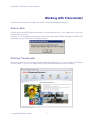
Working with Translucator
All example commands and image are valid for Adobe Photoshop Elements 4.
Source data
Plug-in can process RGB layer data with 8 or 16 bits/channel only. If your image has no layer you
must create one at first.
If you try to run ImageSkill Translucator under other image data (CMYK, Background RGB, LAB,
Grayscale etc) you receive the following message
Starting Translucator
Run your graphic host (for example Adobe Photoshop Elements 4 – run it in “Edit and Enhance
Photos mode”. If you run it in other mode, a few possibilities like layers will be locked. )
.
© ImageSkill Software 2006
8
ImageSkill Translucator: User’s Manual
Open an image (for example camera shot in JPG graphic format). This is background image in
RGB graphic format 8-bit/channel. This image has no layer data yet. You can check it by “Layers”
window. (Use menu item “Window->Layers”).
You must create layer (i.e. add a channel for transparency) in order to run Translucator. Use
menu item “Layers->New->Layer form Background…”
You can check layer creation using the “Layers” window.
© ImageSkill Software 2006
9
ImageSkill Translucator: User’s Manual
Before layer creation
After layer creation
Now you can run the Translucator plug-in. (use "Filter->Image Skill->Translucator" menu item).
ImageSkill Translucator is stared now.
© ImageSkill Software 2006
10
ImageSkill Translucator: User’s Manual
Extracting translucent objects
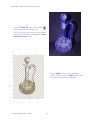
In order to extract translucent object you have to mark it using “Mark translucent zone” brush
and/or “Flood Fill” tool. After extraction marked parts will have some opacity values; the
unmarked parts will be transparent completely. Marked areas are shown by semi-transparent blue
color. So, unmarked areas will be fully transparent (or will be erased) after pressing “Apply”
button.
Choose “Mark translucent zone” brush
from toolbar.
Click and drag to mark object’s place.
You can change brush size using “Brush
size” parameter.
You can drop all marks using “Delete All
Marks” tool.
© ImageSkill Software 2006
11
ImageSkill Translucator: User’s Manual
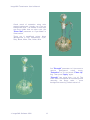
Choose “Flood Fill” tool from toolbar
and click to flood fill marked area.
This tool flood filling wide area bounded
image size and marks, prepared by “Mark
translucent zone” brush.
Press “Apply” button to start extraction.
NOTE: You must press “Apply” button after
all parameters have been changed.
© ImageSkill Software 2006
12
ImageSkill Translucator: User’s Manual
Check result of extraction using color
matted background. Usually use Cyan as
background color – all defects on this color
are more visible than on other color. Set
“Show Mat” parameter to “Cyan Matte” in
View section.
There are 8 predefined colors: None
(Background is fully transparent), Cyan,
Gray, Black, White, Red, Green, Blue.
Set “Strength” parameter to 9 (we want to
remove
background
colors
more),
“Saturation” to 10, and check “Clean Up”
flag. Then press “Apply” again.
“Strength” has range from 1 to 10. The
lower value corresponds to less background
removing, the larger value – more
background removing. Default value is 5.
© ImageSkill Software 2006
13
ImageSkill Translucator: User’s Manual
You can make glass “more transparent” if
set “Saturation” parameter to -50 (i.e. you
desaturate the decanter at all).
Often after background removing your
transparent object looks desaturated. You
can adjust saturation of your object by
“Saturation” control. It has range from -50
to 50. The lower value corresponds to less
saturation, the larger value – more
saturation. Default value is 0.
You can also adjust opacity of extracted
object by “Transparency” control. The
lower
value
corresponds
to
less
transparency, the larger value – more
transparency. Default value is 2.
Press “OK” button to return into
Photoshop Elements.
Our extraction result looks like as fully
transparent object.
© ImageSkill Software 2006
14
ImageSkill Translucator: User’s Manual
You can put your extracted object into other image for collage creation. The image below is
combined from 3 images: background image (boat in coast), waterfall and decanter, extracted
on previous steps.
Using Translucator you can extract glass, smoke, fog, water, clouds, wool, fur etc and even
not– transparent objects.
© ImageSkill Software 2006
15
ImageSkill Translucator: User’s Manual
FAQ and Troubleshooting
I can not run Translucator or Translucator is grey out in
graphic host’s effect menu.
Graphic hosts disable the plug-in if the current image is not suitable for use with Translucator.
Image must be in RGB format with 8 or 16 bit/channel and must have a layer (i.e. image must
have 4 channels: R, G, B, and Alpha). If image has CMYK, LAB, Grayscale or something other
format, you have to convert it to RGB. If image has no layer you have to create it at first.
Why my marked zone disappears?
All marks are removed when you select “Manual Erasing” tool
extraction.
. Use this tool at final stage of
What does happen if my image already has transparent area?
When you process image with transparent areas, the final transparency in such points will not less
than source transparency. I.e. plug-in does not increase alpha value in transparent areas.
How does plug-in process selection?
The Translucator affects to selected area only. The unselected area is still unchanged. The
unselected area is shown a red semi-transparent color in main plug-in window. Plug-in deals with
the bounding box selection.
Image with selection
© ImageSkill Software 2006
The unselected areas is filled
by semi-transparent red color
16
Result of processing
ImageSkill Translucator: User’s Manual
What to do when object too much is erased
Try to decrease “Strength” parameter and press “Apply” button again. Check flag “Fill Holes” in
order to fill small holes into extracted object.
What to do when background not enough is erased
Try to increase “Strength” parameter and press “Apply” button again. Uncheck flag “Clean Up”
in order to remove debris within received mask. Try to correct marks of translucent zone.
Translucator unmixs object’s and background’s colors for calculation alpha value in each point.
When you mark translucent zones, do not afraid of mark background. It is better than unmark
translucent object.
NOTE:
If you did not find answer on your questions, write your questions to [email protected]
or send them to support forum http://forum.imageskill.com
© ImageSkill Software 2006
17