1
Micrel Serial Programmer (MICUSB) − User Guide
Micrel, Inc.
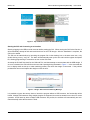
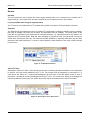
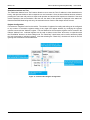
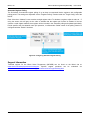
Some examples of several operating modes are shown in Figure 18. The leftmost image shows a single register
being used to program or read from a single address location. The middle image shows three consecutive
writable registers starting at a non-zero address. The rightmost image shows an example for a device with five
registers, of which only the first three are writeable.
Figure 18. Examples of Register Configuration
Reading and Writing Registers
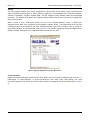
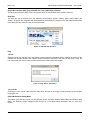
Again, select the “Registers” tab of the tab list. After configuring the register address and range, pressing the
2
“Read” button will issue I C command to read all of the registers that are displayed. Once read, the register
contents are displayed in the associated register “Data” text boxes. Any errors will be reported by the message
status bar at the bottom of the screen.
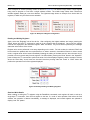
Register write can be performed in two ways depending on the mode. For both modes, the selected “Data” text
boxes should be updated with the required data to be written entered in hexadecimal format. In direct access
mode, a register write will be issued immediately following the editing of the data text box, when the enter key is
pressed or focus is moved away from the register. If in Offline Mode, pressing the “Write” button in the “Operation”
2
pane will issue the I C commands to perform the write of all of the displayed registers, with the exception of those
where the “Read Only” check boxes are checked. Note that pressing either the “Read” or “Write” button will
perform the operation on all of the registers displayed.
Figure 19. Manually Reading and Writing Registers
Read and Write Details
2
When reading or writing the I C registers using the Read/Write commands, each register will read or write as a
2
single-byte I C instruction, from the first register to the last. If a read or write operation fails before the final
address, the operation is aborted immediately, a message is displayed, and unread registers are updated to
display a red “XX” pattern.
June 4, 2014
14
Revision 1.0