1
Micrel Serial Programmer (MICUSB) − User Guide
Micrel, Inc.
Destination Address and Test
2
The “Destination Address” and “Test” buttons allow the user to enter the 7-bit I C address in either hexadecimal or
binary, and then test whether a device responds to a read command. Once the slave address has been selected,
pressing the Test button will perform a simple read operation and test the ACK response to determine if the slave
device responds to the communication. After the test, the status of the operation is displayed in the status bar.
Note that with SWI Mode being write only, the test button has no function and always returns success.
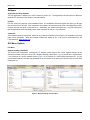
Register Configuration
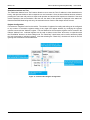
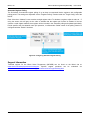
First select the “Registers” tab from the tab list. The number of registers for reading and writing can be configured
to any number of successive registers starting at any legal 8-bit register address, by modifying the registers
up/down counter and the “Address” register. The start address for the successive registers can be entered in the
leftmost “Address” box. Individual registers can be read or written via the “Data” text boxes, in conjunction with
the “Read/Write” buttons or in direct editing mode. The “Read Only” check boxes can be used to selectively inhibit
the write commands to individual registers. Note that selecting the “Read Only” checkbox will result in the GUI
ignoring write commands to those addresses.
Figure 17. Communication Register Configuration
June 4, 2014
13
Revision 1.0