1
sinkcmp
Chapter 10.02
9.12.3
Flip the EMPTY toggle switch back to CLOSE.
9.12.4
Flip the FILL toggle switch to OPEN to fill the tank with D. I. H2O or mix SC1 cleaning
solution as appendix A for the megasonic bath.
9.12.5
When the LCD panel displays Hyper-Clean ready to run Process # 01, put cassette
with wafer in megasonic bath with D. I. H2O or SC1. (Note: If display is not in ready to
run mode, press F2 key, PROG key & enter 01 or ALT key until the correct message
display is on.)
9.12.6
Press green START button on the sinkcmp control panel. Megasonic clean will start a
10 minute cleaning cycle and at 100% power.
9.12.7
When process is finish, a message will display HYPER CLEAN PROCESS
COMPPLETE, WAFERS ARE CLEAN, PRESS STOP TO STOP ALARM. Press the
red STOP button on the sinkcmp control panel.
9.12.8
Pull the cassette of wafer out. Place it in the QDR tank and rinse it for 2 cycles.
9.12.9
Spin dry as the instruction on option A or piranha clean as option C.
9.13 Option C – Piranha clean
9.13.1
Prepare a container with enough water to cover the wafer.
Note:
Prepare ahead of time so the slurry on the wafer will not get dry on the wafer.
9.13.2
Clean the wafer as steps 9.2 to 9.7 or 9.11.
9.13.3
Put wafer in the water container and bring it up to the Microlab.
9.13.4
Clean the wafer with the standard piranha cleaning procedure in sink8.
Note:
Refer to Chapter 2.8 for details.
1 0 .0 T ro ub l es ho ot i ng G u id e l in es
10.1 Alarm is sounding
10.1.1
Press STOP button to silence alarm on the megasonic bath.
10.1.2
Press RESET button to silence alarm for QDR bath.
10.1.3
Press big red emergency button to silence alarm for the sink.
1 1 .0 F igu re s & Sc he mat ics
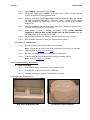
QDR Tank and Megasonic Bath
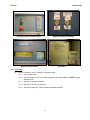
PVA Sponge in Water Container
-3-