1
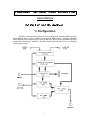
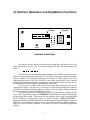
One sees that this device accomplishes three purposes; it controls the Oberheim 4Voice synthesizer (through the "4-Voice Control Logic"), acts as a powerful MIDI effects
generator & interpreter by merging its own commands (generated via the "MIDI SEND
Logic" and "Sweep Effects Logic") with the incoming MIDI stream (through the "MIDI
XMIT Logic"), and enables MIDI control over a stereo audio signal
("Tone/Volume/Balance Processor"). The 4-Voice Control logic is configured in the MIDI
MODE, 4-VOICE SET-UP, and AUTO PORTAMENTO menus. The Send and Xmit logic
are configured in the SET MIDI OUT menu. The Sweep Effects are configured in the
AUTO BEND and AUTO TRILL menus. The audio processor is adjusted in the TONEVOL-BAL menu. The detailed function of these various menus, and the means by which
they are edited, are explained in the succeeding chapters of this manual.
Rear panel Interface jacks include standard MIDI in/out/thru, a -inch "Bend out"
phone jack, a -inch "VCF Ctl." phone jack, two -inch "Audio in" & two -inch
"Audio out" jacks, and a 25-pin mini DIN connector (used typically in RS-232 devices).
This DIN connector links the unit with the 4-Voice. It is not a typical RS-232 standard,
however, so standard RS-232 cables may not work (since they do not connect to all of the
pins in the connector). A cable must be used that connects all 25 pins (and is preferably
shielded). This cable can probably be made as long as needed; since all signals are
differentially driven, cable length should not be too critical. The pitch-bend and filtercontrol analog voltages are also routed through a balanced pair in the DIN connector. In
case this causes problems (ie. injection of "digital" noise into the 4-Voice oscillators and/or
filters), the bend voltage (and/or filter voltage) can be run through a standard "guitar cord"
cable; merely plug into the corresponding " jack on the rear of the Interface unit, and run
this into the appropriately labeled " jack added to the rear of the 4-Voice. Inserting a "
jack into the 4-Voice in this fashion automatically cuts off the pitch bend feed (or filter feed)
included with the DIN cable. This feature can be used to externally inject a bend voltage
(or filter voltage) into the 4-Voice (as with the alternate cable mentioned above), or to mute
the bend (filter) entirely (use an unconnected " jack to disengage the bend (filter) feed).
The " jacks added to the 4-Voice (bend, filter inputs) are actually a 3-connector balanced
jacks, while the " jacks on the rear of the Interface (bend, filter outputs) are 2-connector
unbalanced jacks. For the most part, this doesn't matter; a standard unbalanced guitar cord
should be adequate to connect between 4-Voice and Interface. In all tests, however, the
connections through the DIN cable seemed to work fine, so these additional cables will
probably not be needed.
When the DIN cable is not connected between the 4-Voice and Interface, the
supervisory logic added to the 4-Voice is held in a reset mode. This enables the 4-Voice to
work as it always has; the additional logic supervising its operation will have no effect.
Upon power-up, or whenever the button added to the 4-Voice front panel is depressed, the
4-Voice supervisory logic will also be reset. If the 4-Voice has received a valid command
from the Interface unit (other than a reset), the red LED added to the 4-Voice (next to the
reset button) will be illuminated. This indicates that the 4-Voice may be in a commanded
mode; any switch changes on the programmer or keyboard control modules may have
unpredictable effect. If one desires to work directly with the switches on these 4-Voice
modules, the supervisory logic should be reset first (as detailed above).
In addition, a "MIDI Control" toggle switch has been added to the 4-Voice panel (to
the right of the above-mentioned LED). If this switch is up, the green LED nearby is
illuminated, and the 4-Voice will not respond to incoming MIDI note commands (it will,
however, still be programmed and configured under MIDI/Interface control; only note
on/off's are inhibited).
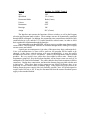
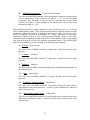
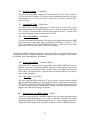
In order to run the 4-Voice under external Interface control, a subset of switches on
the Keyboard module should be set to the positions listed below:
›
›
›
›
›
›
›
›
›
›
2