1
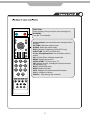
STANDBY
FUNCTION
PICTURE
FUNCTION
Press to display the input source menu.(see page 14)
STANDBY
Turn the TV on/standby.
EPG
SUBTITLE
SOUND
OK
MENU
VOL
PROG
+
+
QUICK START
EXIT
MUTE
FAV
INFO
1
2
3
4
5
6
7
8
9
0
TEXT
HOLD
ANGLE
AUDIO
SETUP
RECALL
SLEEP
ZOOM
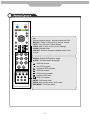
Colour buttons: short cuts-follow the coloured links in
the text.
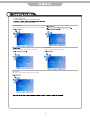
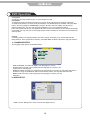
PICTURE: Select the picture mode.
SOUND: Select the sound mode.
EPG: Electronic Programme Guide (DTV only).
SUBTITLES: For DTV and DVD only.
Cursor left/right/up/down: Cursor buttons used in
menus.
OK: Confirm Button / Display channel list.
MENU: System setup menu.
QUICK START: To tune in your TV.
FAV: Means favorite, to display the favorite channel
list defined by you.
EXIT: Exit the OSD menu.
MUTE: Mutes the Audio.
INFO: Displays now and next brief information.
VOL+/-: Adjust the volume.
PROG+/-: Skip through the channels.
ASPECT
DVD-MENU
5