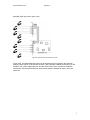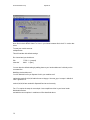
1
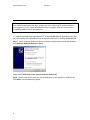
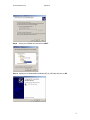
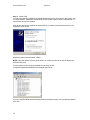
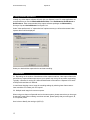
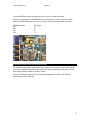
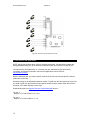
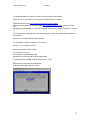
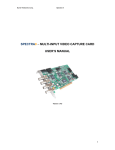
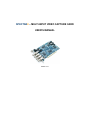
SPECTRA8 – MULTI-INPUT VIDEO CAPTURE CARD USER’S MANUAL Version 1.3.1 Ituner Networks Corp. 3071 Southwycke Terrace, Fremont, CA 94536 Tel: 1-800-97TUNER; Outside US: 510-550-4464 Fax: 510-795-8855; Email: [email protected] 2 Introducing Spectra8 - Multi-input video capture card. Thank you for your purchase of the Spectra8 video capture card. Spectra8 video capture card allows you to simultaneously capture video from 4 independent video sources at 30 fps, producing a total of 120 fps with the application of your choice and with resolutions up to 768x576 (full broadcast resolution) Product Specifications Single standard PCI card Plug and Play, four channel video capture card BT878 video capture chipset, low latency DMA access. Video capture size up to 768x576 On-board video inputs: 4 BNC Connector External PCI bracket expansion card with 4 additional BNC inputs Power consumption: <5W Board size 96mmx157mm General features Supports NTSC/PAL/SECAM video with resolutions up to 768x576 Supports complex video clipping of video source Zero wait state PCI burst writes Multiple YCrCb and RGB pixel formats Supports planar YUV data format Windows 95/98/Me, 2000, and NT support Linux 2.2, 2.4 and 2.6 support via BTTV driver Works with any major encoder application 1. Pre-Installation 1.2 System Requirements: Pentium class computer with an available PCI slot. Windows 98 or later. Additionally, we recommend having Microsoft™ DirectX8.0 or higher version installed in Windows™ 98/ME/2000/XP system. 2. Hardware Installation Proceed with the following instructions to install your Spectra8 card on your computer. Note: Leave the Spectra8 card in its static-resistant bag until you are ready to install it. Ituner Networks Corp. Spectra 8 Caution! Static electricity discharge may permanently damage your system. In order to avoid possible static electricity discharge during installation procedures, please follow the guidelines bellow: 4 Discharge any static electricity build up in your body by touching a large grounded metal surface or the computers’ case (if plugged in) for few seconds. During installation procedures, avoid any contact with metal parts. Handle cards only by their edges. Ituner Networks Corp. Spectra 8 2.1 Install the Spectra8 video capture card. Step 1. Turn off the power to your computer. Step 2. Open the casing. Step 3. Remove the slot bracket by unscrewing the holding screw and sliding it out (Fig 2.1.1) Fig. 2.1.1 – Removing the Slot Bracket Step 4. Insert the Spectra8 onto the available PCI slot and fasten the screws tightly (Fig 2.1.2) Fig.2.1.2 – Installing the Spectra8 video capture card Step 5. Close the casing Step 6. Turn on the main power. 5 Ituner Networks Corp. Spectra 8 2.2. Spectra8 Video Input Card Layout Fig.2.3 – Spectra8 video input card layout Four analog inputs can be simultaneously connected to the Spectra8. Capturing frame rate is 30 fps per each channel. With a properly installed device driver you will be able to see 4 video capture devices. (see Driver installation instructions). 6 Ituner Networks Corp. Spectra 8 Spectra8 Video Input Card Layout (cont) Fig. 2.4 – Spectra8 card with extension bracket In this mode, 8 multiplexed analog inputs can be simultaneously connected to the Spectra8. Capturing frame rate is 15Fps per each channel. With a properly installed device driver you will be able to see 4 video capture devices, but each device has 2 ports. (see Driver installation instructions). Only special software can automatically switch in between all inputs, at a lower frame rate. 7 Ituner Networks Corp. Spectra 8 3. Windows Driver Installation Note: Before installing Spectra8 driver, please check if you have the BT878 driver installed on your computer. If you do, please uninstall BT878 driver completely. Otherwise it could have a compatibility problem with the Spectra8 driver. 3.1 Install the Spectra8 driver under Microsoft™ Windows 98/ME/2000/XP Spectra8 is a plug and play video capture card. Spectra8 card can be detected by Microsoft™ Windows 98/ME/2000/XP. Step 1. When re-starting Windows for the first time after the Spectra8 board has been installed, the Found New Hardware Wizard will appear. Please select Install from a list or specific location, (Advanced). Step2. Please insert the CD driver into your CD-ROM drive (In this example we used drive D). Click NEXT. A second window will appear. 8 Ituner Networks Corp. Spectra 8 Step3. Select your CDROM drive and click on NEXT. Step 4. Specify the D:\Windows\Driver\Win98_ME_2K_XP folder and click on OK. 9 Ituner Networks Corp. Spectra 8 Step 5. Select finish. You will notice that the installation will repeat itself 4 times for the video drivers. Don't panic, this is normal behavior. Spectra8 is equipped with 4 BT878 video capture devices. Repeat step 1-5 until all video drivers are installed. After all four devices are installed, the system will try to install the audio devices as well, to be repeated 4 times as well. Repeat the same process another 4 times. NOTE: This card doesn't have any audio inputs, as a result you will not be able to capture any audio with this card. To ensure that your drivers were installed OK, please go to "My computer/Properties/Hardware/Device Manager and look for: If you see 8 BT878 WDM Audio and Video without exclamation signs, you successfully installed your card. 10 Ituner Networks Corp. Spectra 8 11 Ituner Networks Corp. Spectra 8 4. Using Software applications Virtually any video capture software will work with your Spectra 8 card. For most applications we recommend that you use the WindowsMedia Encoder or the RealNetworks RealProducer or HelixProducer. Other recommended video capture software packages are Webcam32 by Surveyor Corp and ActiveWebcam from Pysoft.Com. Under "video preferences" or "capture devices" options screens you will see that several video capture devices will be displayed: Select your desired video capture device and start encoding. 5. Performance 5.1. Depending on the number of simultaneous video capture sessions, video capture frame size and number of captured frames per second, your system may or may not encounter overloading. Typically, a Pentium IV running at 2.4Ghz should be able to encode from 2 Spectra 8 PCI cards at 30Fps with resolutions of 320x240. In case frame dropping occurs, lower the encoding settings by selecting lower frame rates or lower resolution or increase your CPU speed. 5.2. Multiple cards usage in the same computer. When using more than one Spectra8 card on the same system, please ensure that you have type A and type B cards. When ordering more than one card, please specify that you need type A, B, C or D (mixed) cards. Here is how to identify the card type (A,B,C,D): 12 Ituner Networks Corp. Spectra 8 Locate the EEPROM chip in the upper left corner of your PCI card (see below). When the number shown on the EEPROM is C01 the card is an “A” type. When the number shown on the EEPROM is D01 the card is a “B” type. For all card types, please see below: EEPROM Number C01 D01 F01 F05 Card Type A B C D 6. Spectra8 expansion slot (for developers only) The Spectra8 video capture card has four video capture devices. However, each video capture device has 2 software selectable inputs. Not all video capture software has the ability to select from multiple inputs in a static or dynamic manner. If you are a developer, please look into the Spectra8 application and driver CD under the windows\ap_source_code folder. 13 Ituner Networks Corp. Spectra 8 Fig. 2.4 – Spectra8 card with extension bracket 7. Linux drivers and applications. NOTE: Always get the latest driver form the address listed below. Constant driver updates are being published making our driver distribution obsolete by the time the driver CD gets to you! Linux drivers are not supported by us. However they are maintained by the open source community. An extensive collection of drivers and applications can be found at http://bytesex.org/bttv/ With the Spectra8 card, you need to specify card=42,42,42,42 tuner=4 as bttv option in order to enable the correct card. Advanced usage for the Spectra8 expansion module. To grab from the other 4 devices (input 4-8) you need to grab from the same device but specify another channel number. Each device has 4 channels, out of which Spectra 8 uses only 2. Download bttvgrab from http://ich.bin.kein.hoschi.de/bttvgrab and run: For port 4 bttvgrab -Q -G /dev/video0 -S 0 -o X or For port 8 bttvgrab -Q -G /dev/video0 -S 1 -o X 14 Ituner Networks Corp. Spectra 8 The setup described is for bttv-0.8.x or bttv-0.9.x series with V4L2 interface. NOTE: bttv 0.7.x is included on 2.4.x kernels as default with V4L1 interface. Download bttv-0.9.x from http://bytesex.org/bttvhttp://bytesex.org/bttv Download kernel patch for 2.4.x kernel from http://bytesex.org/patches/2.4/. Usually you need only: http://bytesex.org/patches/2.4/01_videodev-2.4.x.diff where x is your kernel version like in ‘uname –r’. You might need to download some other small patches from that dir. Please check the page for more details. Patch your kernel with videodev patch by doing: cd /usr/src/linux (or where your kernel sources are) patch -p1 < 01_videodev-2.4.x.diff Decompress the bttv kernel module: tar -xzvf bttv-0.9.3.tar.gz and compile the module doing: make and install it on your kernel dir by doing make install The module will be installed in /lib/modules/`uname -r`/v4l2 Make sure that your kernel is compiled with: Video for Linux support and I2C support 15 Ituner Networks Corp. Spectra 8 Note: Don't include BT848 Video For Linux in your kernel because this is the 0.7.x version bttv driver. To start your module execute: modprobe bttv This will load bttv with default settings Do a lsmod and you should see: ... bttv 77760 0 (unused) video-buf 9200 0 [bttv] ... You can alter the default setting by adding them to your /etc/modules.conf or directly on the command line. Modifying /etc/modules.conf You can add this line for you Spectra Card in your modules.conf. options bttv card=42,42,42,42 radio=0 tuner=4 sloppy=1 chroma_agc=1 mmap=1 vbibufs=4 v4l2=1 gbuffers=16 card=42,42,42,42 are needed for Spectra8 Card to work correctly. For 0.7.x version the setup is more simple. Just compile bttv driver in your kernel under Multimedia Devices and add the correct options in modules.conf like described above. 16 Ituner Networks Corp. Spectra 8 8. Quick Troubleshooting Guide Note: Software updates can be found at http://www.ituner.com/updates.htm If you have technical questions, please send email to [email protected] Note: Before installing Spectra8 driver, please check if you have the BT878 driver installed on your computer. If you do, please uninstall BT878 driver completely. Otherwise it could have a compatibility problem with the Spectra8 driver. Problem: There is some latency when all four inputs are being used and the system is overloaded. The latency issues are not from the card, they are from the encoders you are using. Regarding system load: Keep in mind that you are processing 4 live streams at the same time and that can generate a lot of PCI bandwidth. If frame dropping occurs, lower the encoding settings by selecting lower frame rates or lower resolution or increase your CPU speed. Problem: I've installed my Spectra8 and it's not working. • • • • Verify that the board is completely seated in the 16-bit or 32-bit (E)ISA slot inside your PC. These slots are usually black or brown. The board should be level and attached to the chassis using the mounting screw. Verify that all of the cables are connected securely to the proper board. Verify that there is no other video capture card installed on the computer. If there is, remove the other card. Reboot your computer after installation. Problem: I'm not getting a video display (black screen). What do I do? • • Verify that your video source is properly connected to the Spectra8 board and powered up. Make sure the physical jack used for the connection is the same as the one selected on the Video Control panel. Composite selects the RCA jack, S-Video selects the 4-pin mini-DIN, and MXC selects the multimedia extension connector. 17 Ituner Networks Corp. Spectra 8 Problem: My video is "scrambled." What do I do? If your video display is scrambled or video is displayed in the Video Control Panel but not in the application window, try the following: • • • • Verify that your NTSC/PAL setting is correct for the type of video source you have Verify that your video capture format is compatible with the applications; see the documentation for the application. Verify the recommended image sizes and capture formats from your application Restart the application. Important! Always make sure you have the latest up-to-date drivers from the Ituner.com site. If you didn’t see your question answered or you have other technical questions, please send an email to [email protected]. 18 Ituner Networks Corp. Spectra 8 19