1
Elnec s. r. o.
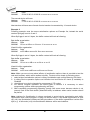
F5
F6
F7
F8
F9
F10
F11
F12
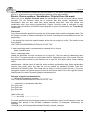
Arrow keys
Home/End
PgUp/PgDn
Ctrl+PgUp/PgDn
Ctrl+Home/End
Shift+Home/End
Backspace
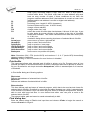
swap bytes command swaps a high- and low- order of byte pairs in
current buffer block. This block must start on even address and must
have an even number of bytes. If these conditions do not fulfill, the
program modifies addresses itself (start address is moved on lower even
address and/or end address is moved on higher odd address).
print buffer
find string (max. length 16 ASCII characters)
find and replace string (max. 16 ASCII chars.)
change current address
change mode view / edit
switch the mode of buffer data view between 8 bit and 16 bit view. It can
be also doing by mouse clicking on the button to the right of View/Edit
mode buffer indicator. This button indicates actual data view mode (8 bit
or 16 bit), too.
checksum dialog allows counting checksum of selected block of buffer
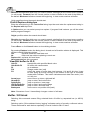
move cursor up, down, right and left
jump on start / end current line
jump on previous / next page
jump on start / end current page
jump on start / end current device
jump on start / end current buffer
move cursor one position left (back)
Note: Characters 20H - FFH (mode ASCII) and numbers 0...9, A...F (mode HEX) immediately
changes content of edit area.
Warning: Editing of ASCII characters for word devices is disabled.
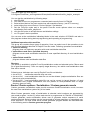
Print buffer
This command allows write selected part of buffer to printer or to file. Program uses at it an
external text editor in which selected block of buffer is displayed and can be printed or saved to
file, too. By default is set simple text editor Notepad.exe, which is standard part of all versions
of Windows.
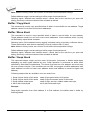
In Print buffer dialog are following options:
Block start
Defines start address of selected block in buffer.
Block end
Defines end address of selected block in buffer.
External editor
This item defines path and name of external program, which has to be used as text viewer for
selected block of buffer. By default is set simple text editor Notepad.exe, which is standard part
of all versions of Windows. User can define any text editor for example wordpad.exe, which is
able to work with large text files. In user defined text editor user can print or save to file
selected block of buffer.
The external editor path and name is saved automatically to disk.
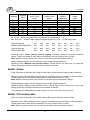
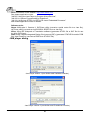
Find dialog box
Enter the search string to Find to text input box and choose <Find> to begin the search or
choose <Cancel> to forget it.
68