1
Tip 20: Record a test flow in two scripts to pinpoint dynamic session parameters
OpenScript provides powerful and intuitive debugging assistance features to help users identify where in the script
correlations may be missing. However, because OpenScript compares request headers between recorded and
playback based on the traffic captured into the script, it has a limitation in identifying which of them are truly dynamic
over different sessions, iterations, or with data parameterization.
For example, a post data request recorded into a script may have two parameter-value pairs, Param1 and Param2.
During the recording, OpenScript applies auto correlation to the navigation parameters based on the correlation
rules defined in the library. As a result, in this example, a correlation was added to Param1, but Param2 was left
uncorrelated, as OpenScript assumed the parameter is static.
» Param1=”{{myVar_param1, 12345}}”
» Param2 =”default”
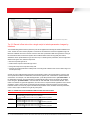
Playback the navigation above and go to the Comparison Tab, select request header comparison and find Param1.
The difference between the recorded and playback values are highlighted as shown in Table 16 below. This is the
expected result as Param1 was correlated, and used dynamic value “09876” for the playback.
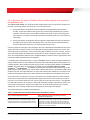
TABLE 16: REQUEST HEADER COMPARISON
Recorded
Postdata:
Param1=12345
&Param2=default
Playback
Postdata:
Param1=09876
&Param2=default
On the other hand, the value of the second parameter, Param2 has the same value “default” for both recorded and
playback. This result is also expected as the parameter is hard-coded into the script, meaning the playback will send
the same parameter value every time the script is executed. But then how can we make sure that Param2 is not
dynamic? Be aware that the current comparison feature that OpenScript has cannot determine whether the
parameters are actually dynamic or not, if not already correlated in the script.
What Table 16 is comparing for Param2 is the request sent by the browser for one session and the request
sent during playback using the recorded parameter. Both recording and playback request sends the value
“default” for the Param2 parameter.
What really needed to be compared is the request sent by the browser for one session and the request sent by
the browser for another session. This is the only way to determine whether the parameter has a different value
when requested in a different session.
To verify whether a parameter is dynamic or not, a user can correlate the value in the script and playback to validate
whether the value actually changes over sessions or not. However, there may be hundreds of parameters in the
script, and correlating every single parameter is not only tedious and time consuming, but also unnecessary.
Excessive correlation can cause agent performance to degrade.
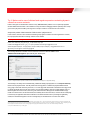
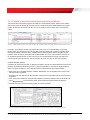
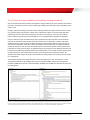
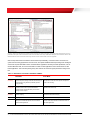
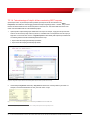
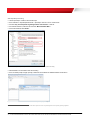
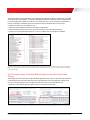
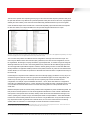
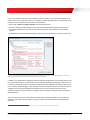
An alternative and quicker option is to create a new script and record the same test flow, and arrange the two scripts
side by side. Expand the navigations and compare the list of post data parameters between the scripts. This way,
users can visually identify which parameters are dynamic in two different sessions. See Figure 47 in the next page
for the screenshot.
37 | 25 TIPS FOR CREATING EFFECTIVE LOAD TEST SCRIPTS USING ORACLE LOAD TESTING FOR E-BUSINESS SUITE AND FUSION APPLICATIONS