1
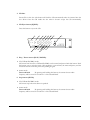
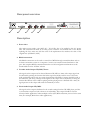
7. Tuning down / CD-Mp3 Track selection down ( ): CD, USB & SD/MMC mode: In CD or USB & SD/MMC mode, the playing track can be selected with this button. Press and hold: By pressing and holding this button, you can scan back the track which is currently playing. After the desired section of the track is found, just release the button and it will resume play from this point. Press short term: By pressing this button for a short term, you can go back to the previous track. Tuner mode: In tuner mode, the desired radio station can be selected with this button. Press and hold: By pressing and holding this button, the mode will be set to manual seek mode and will return to automatic seek mode after three seconds. Press short term: By pressing this button for a short term, the frequency will decrease one step in manual seek mode, or will switch to the previous radio station in automatic seek mode. 8. Tuning up / CD-Mp3 Track selection up ( ): CD, USB & SD/MMC mode: In CD or USB & SD/MMC mode, the playing track can be selected with this button. Press and hold: By pressing and holding this button, you can scan forward the track which is currently playing. After the desired section of the track is found, just release the button and it will resume play from this point. Press short term: By pressing this button for a short term, you can proceed to the next track. Tuner mode: In tuner mode, the desired radio station can be selected with this button. Press and hold: By pressing and holding this button, the mode will be set to manual seek mode and will return to automatic seek mode after three seconds. Press short term: By pressing this button for a short term, the frequency will increase one step in manual seek mode, or will switch to the next radio station in automatic seek mode. 9. Repeat (REP): CD, USB & SD/MMC mode: With this button, the repeat mode can be selected between Repeat All, Repeat one, Repeat folder. Press this button to toggle between the different repeat modes. Tuner mode: Press and hold: By pressing and holding this button, the current chosen radio frequency will be stored on ‘Position 3’ of the selected Band. 8