1
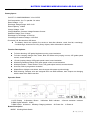
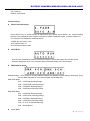
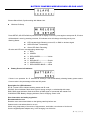
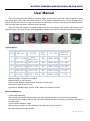
BATTERY POWERED WIRELESS DMX LED PAR LIGHT SETUP:LCD Cursor Moving Key, Flashing Position is the parameter to be revised UP:Data Up DOWN:Data Down Function Setup Built-in Function Setup Press SETUP key to switch among all sub-function key, speed, sound button, etc. Cursor flashing position is the parameter to be revised. Press UP or DOWN to adjust the data. It can be master unit. For example: LCD displays"4.FADE S010 A:N" 4.FADE: NO.4 function, Fade S010: Speed value 10 A:N: Sound Activation closed AUTO RUN Auto Run the combination function of all sub-functions, it can be the master unit, set the Sound Activation parameter to be "N" to close the Sound Activation Mode of the sub-function. DMX Address Setup: Address Range: 1-512, Press UP to setup address upward and DOWN to setup address downward. There are two DMX channels for your choices: DMX 4CH & DMX 6CH DMX 4CH Mode CH1:0-255 Red Dimming Range CH2:0-255 Green Dimming Range CH3:0-255 Blue Dimming Range CH4:0-255 White Dimming Range DMX 6CH Mode: CH1:0-255 Red Dimming Range CH2:0-255 Green Dimming Range CH3:0-255 Blue Dimming Range CH4:0-255 White Dimming Range CH5:R, G, B, W General Dimming CH6:Strobe Speed Slave Mode 第 3 页 共 5 页