1
ENG
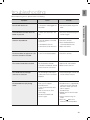
troubleshooting
Before requesting service, please review the following.
Symptom
Remedy
The unit will not turn on.
• Is the power cord plugged into
the outlet?
• Connect the power plug to the
outlet.
A function does not work when the
button is pressed.
• Is there static electricity in the
air?
• Disconnect the power plug and
connect it again.
Sound is not produced.
• Is the unit properly connected
to your TV?
• Connect it correctly.
• Is the Mute function on?
• Press the Mute button to
cancel the Mute function.
• Is the volume set to minimum?
• Adjust the volume.
The Picture does not appear on a TV
when the function is selected.
• Is the TV connected properly?
• Connect it correctly.
The remote control does not work.
• Are the batteries drained?
• Replace with new batteries.
• Is the distance between remote
control and main unit too far?
• Move closer to the unit.
The sound from the left/right
channels are reversed.
• Are the left/right audio output
cables from the TV connected
properly?
• Check the left/right channel and
connect it/them correctly.
The SoundConnect (TV pairing)
failed.
• Does your TV support
SoundConnect?
• SoundConnect is supported by
some Samsung TVs released
after 2012. Check your TV to
see if it supports
SoundConnect.
• Is your TV firmware the latest
version?
• Does an error occur when
connecting?
• Reset the TV MODE and
connect again.
• Update your TV with the latest
firmware.
• Contact the Samsung call
center.
• Press the
button for 5
seconds to reset the product.
23
● TROUBLESHOOTING
Check