1
Basic Tool Support for
Requirements Engineering
Anders Friis
S042404
Kongens Lyngby 2012
Technical University of Denmark
Informatics and Mathematical Modelling
Building 321, DK-2800 Kongens Lyngby, Denmark
Phone +45 45253351, Fax +45 45882673
[email protected]
www.imm.dtu.dk
Abstract
The goal of this thesis is to create a set of editors for capturing artifacts that
occur in requirements engineering, such as goals, stakeholders, acceptance test
cases and so on. This tool is intended to be used in course 02264 (Requirements
Engineering), and will focus on the elements taught in the course.
While the functionality of this tool may be basic only, it will have to provide
superior usability and stability since it is intended to be used in the classroom.
Also as the development of this tool shall continue after this particular project
has ended, it will have to provide a software architecture that is extensible,
changeable, and robust. In order to ensure these objectives, the LMS (Library
Management System) case study from course 02264 will be used to demonstrate
the tool’s capabilities. This demonstration will be evaluated to assess quality
attributes such as stability, performance and functional coverage of the tool.
ii
Preface
This thesis was prepared at the department of Informatics and Mathematical
Modelling (IMM) at the Technical University of Denmark (DTU) in partial
fulfillment of the requirements for acquiring a master degree of Science in Digital
Media Engineering.
This thesis deals with requirements specification. The main focus is to design
and create a tool for student use in the course 02264 - Requirements Engineering,
taught at DTU.
The 30 ECTS worth project was started on 1. of September 2011 and finished
on the 27. of February 2012. Supervisor of the project was Prof. Dr. Harald
Harald Störrle.
IMM, DTU, February 27th 2012.
Anders Friis, s042404
iv
Acknowledgements
I would like to thank Jakob Kragelund whom without this project would
never have been this good. You have been a great partner in the last six month
and I have learned much and more from you and our cooperation. Thank you for
having patience and being able to motivate me, it has been a pleasure working
with you.
I also want to thank my friends and family, especially Mette Hermann Kamstrup who has supported me and helped me throughout the project. You have
been an invaluable support to me in both good and bad times during this thesis.
Finally, I would like to thank my supervisor Prof. Dr. Harald Störrle for his
great interest in the project, constructive criticism, valuable advice, for pushing
me to produce even better results and for always taking time to supervise me. It
is my hope that the work made will bring much value to you and future students
of your course.
vi
Acknowledgements
Contents
Abstract
i
Preface
iii
Acknowledgements
v
1 Introduction
1.1 Approach . . . . . . . . . . . . . . . . . . . . . . . . . . . . . . .
1.2 Goals . . . . . . . . . . . . . . . . . . . . . . . . . . . . . . . . .
1
2
2
2 Analysis
2.1 Course participants . . . . . .
2.2 Teacher . . . . . . . . . . . .
2.3 Author - personal experience
2.4 The Market . . . . . . . . . .
2.4.1 Market Development .
2.4.2 Comparing Tools . . .
2.4.3 Evaluation . . . . . .
2.4.4 Summary . . . . . . .
2.5 Conclusion . . . . . . . . . .
2.5.1 Scope . . . . . . . . .
2.5.2 Features . . . . . . . .
2.5.3 Features Not Included
.
.
.
.
.
.
.
.
.
.
.
.
.
.
.
.
.
.
.
.
.
.
.
.
.
.
.
.
.
.
.
.
.
.
.
.
.
.
.
.
.
.
.
.
.
.
.
.
.
.
.
.
.
.
.
.
.
.
.
.
.
.
.
.
.
.
.
.
.
.
.
.
.
.
.
.
.
.
.
.
.
.
.
.
.
.
.
.
.
.
.
.
.
.
.
.
.
.
.
.
.
.
.
.
.
.
.
.
.
.
.
.
.
.
.
.
.
.
.
.
.
.
.
.
.
.
.
.
.
.
.
.
.
.
.
.
.
.
.
.
.
.
.
.
.
.
.
.
.
.
.
.
.
.
.
.
.
.
.
.
.
.
.
.
.
.
.
.
.
.
.
.
.
.
.
.
.
.
.
.
.
.
.
.
.
.
.
.
.
.
.
.
.
.
.
.
.
.
.
.
.
.
.
.
5
5
8
9
11
12
12
14
16
17
17
18
18
3 Design
3.1 Technology . . . . . . . . . . . . . .
3.1.1 Model View Controller . . . .
3.1.2 Eclipse Modeling Framework
3.1.3 The Meta-model . . . . . . .
.
.
.
.
.
.
.
.
.
.
.
.
.
.
.
.
.
.
.
.
.
.
.
.
.
.
.
.
.
.
.
.
.
.
.
.
.
.
.
.
.
.
.
.
.
.
.
.
.
.
.
.
.
.
.
.
.
.
.
.
.
.
.
.
21
22
22
22
23
.
.
.
.
.
.
.
.
.
.
.
.
.
.
.
.
.
.
.
.
.
.
.
.
.
.
.
.
.
.
.
.
.
.
.
.
viii
CONTENTS
3.2
3.3
3.4
3.5
3.6
3.7
3.8
3.9
3.1.4 Stand-alone vs Eclipse extension
3.1.5 Commands vs. Actions . . . . .
3.1.6 Layout . . . . . . . . . . . . . . .
Architecture . . . . . . . . . . . . . . . .
3.2.1 Plug-ins . . . . . . . . . . . . . .
3.2.2 Package Structure . . . . . . . .
3.2.3 Abstraction . . . . . . . . . . . .
Save and Load . . . . . . . . . . . . . .
3.3.1 Mapping of Artifacts . . . . . . .
3.3.2 Handling . . . . . . . . . . . . .
The Application . . . . . . . . . . . . .
3.4.1 Layout . . . . . . . . . . . . . . .
3.4.2 The Status bar . . . . . . . . . .
3.4.3 Menus . . . . . . . . . . . . . . .
3.4.4 The Toolbar . . . . . . . . . . .
3.4.5 Icons . . . . . . . . . . . . . . . .
Editors . . . . . . . . . . . . . . . . . . .
3.5.1 Vision . . . . . . . . . . . . . . .
3.5.2 Persona . . . . . . . . . . . . . .
3.5.3 Stakeholder . . . . . . . . . . . .
3.5.4 Goal . . . . . . . . . . . . . . . .
3.5.5 Requirement . . . . . . . . . . .
3.5.6 Glossary Entry . . . . . . . . . .
3.5.7 Document . . . . . . . . . . . . .
3.5.8 Project . . . . . . . . . . . . . .
3.5.9 Management and Tracing . . . .
3.5.10 Rich Text Editor . . . . . . . . .
Views . . . . . . . . . . . . . . . . . . .
3.6.1 Element Explorer . . . . . . . . .
3.6.2 Glossary View . . . . . . . . . .
3.6.3 Comments View . . . . . . . . .
3.6.4 Associations View . . . . . . . .
3.6.5 The Search View . . . . . . . . .
Navigation . . . . . . . . . . . . . . . . .
3.7.1 Sorting and Filtering . . . . . . .
3.7.2 Relationship Between Elements .
3.7.3 Glossary Entry References . . . .
Reporting . . . . . . . . . . . . . . . . .
3.8.1 Output Structure . . . . . . . . .
3.8.2 Format . . . . . . . . . . . . . .
3.8.3 Handling Images . . . . . . . . .
Help . . . . . . . . . . . . . . . . . . . .
3.9.1 Application Help . . . . . . . . .
3.9.2 Content Help . . . . . . . . . . .
.
.
.
.
.
.
.
.
.
.
.
.
.
.
.
.
.
.
.
.
.
.
.
.
.
.
.
.
.
.
.
.
.
.
.
.
.
.
.
.
.
.
.
.
.
.
.
.
.
.
.
.
.
.
.
.
.
.
.
.
.
.
.
.
.
.
.
.
.
.
.
.
.
.
.
.
.
.
.
.
.
.
.
.
.
.
.
.
.
.
.
.
.
.
.
.
.
.
.
.
.
.
.
.
.
.
.
.
.
.
.
.
.
.
.
.
.
.
.
.
.
.
.
.
.
.
.
.
.
.
.
.
.
.
.
.
.
.
.
.
.
.
.
.
.
.
.
.
.
.
.
.
.
.
.
.
.
.
.
.
.
.
.
.
.
.
.
.
.
.
.
.
.
.
.
.
.
.
.
.
.
.
.
.
.
.
.
.
.
.
.
.
.
.
.
.
.
.
.
.
.
.
.
.
.
.
.
.
.
.
.
.
.
.
.
.
.
.
.
.
.
.
.
.
.
.
.
.
.
.
.
.
.
.
.
.
.
.
.
.
.
.
.
.
.
.
.
.
.
.
.
.
.
.
.
.
.
.
.
.
.
.
.
.
.
.
.
.
.
.
.
.
.
.
.
.
.
.
.
.
.
.
.
.
.
.
.
.
.
.
.
.
.
.
.
.
.
.
.
.
.
.
.
.
.
.
.
.
.
.
.
.
.
.
.
.
.
.
.
.
.
.
.
.
.
.
.
.
.
.
.
.
.
.
.
.
.
.
.
.
.
.
.
.
.
.
.
.
.
.
.
.
.
.
.
.
.
.
.
.
.
.
.
.
.
.
.
.
.
.
.
.
.
.
.
.
.
.
.
.
.
.
.
.
.
.
.
.
.
.
.
.
.
.
.
.
.
.
.
.
.
.
.
.
.
.
.
.
.
.
.
.
.
.
.
.
.
.
.
.
.
.
.
.
.
.
.
.
.
.
.
.
.
.
.
.
.
.
.
.
.
.
.
.
.
.
.
.
.
.
.
.
.
.
.
.
.
.
.
.
.
.
.
.
.
.
.
.
.
.
.
.
.
.
.
.
.
.
.
.
.
.
.
.
.
.
.
.
.
.
.
.
.
.
.
.
.
.
.
.
.
.
.
.
.
.
.
.
.
.
.
.
.
.
.
.
.
.
.
.
.
.
.
.
.
.
.
.
.
.
.
.
.
.
.
.
.
.
.
.
.
.
.
.
.
.
.
.
.
.
.
.
.
.
.
.
.
.
.
.
.
.
.
.
.
.
.
.
.
.
.
.
.
.
.
.
.
.
.
.
.
.
.
.
.
.
.
.
.
.
.
.
.
.
.
.
.
.
.
.
.
.
.
.
.
.
.
.
.
.
.
.
.
.
.
.
25
26
26
27
27
29
29
30
30
31
32
33
34
34
35
35
36
36
36
39
41
41
42
43
45
45
46
48
49
49
50
51
51
52
52
53
54
54
55
56
58
58
58
59
CONTENTS
ix
4 Implementation
4.1 Organizing Models and Code Generation .
4.2 Package Structure . . . . . . . . . . . . .
4.3 plugin.xml . . . . . . . . . . . . . . . . . .
4.3.1 Extension Points . . . . . . . . . .
4.4 Moving Elements in the Tree-View . . . .
4.5 Implementation of the Rich Text Editor .
4.6 Deployment . . . . . . . . . . . . . . . . .
4.7 Installation Procedure . . . . . . . . . . .
4.7.1 End Users . . . . . . . . . . . . . .
4.7.2 Developers . . . . . . . . . . . . .
.
.
.
.
.
.
.
.
.
.
.
.
.
.
.
.
.
.
.
.
.
.
.
.
.
.
.
.
.
.
.
.
.
.
.
.
.
.
.
.
.
.
.
.
.
.
.
.
.
.
.
.
.
.
.
.
.
.
.
.
.
.
.
.
.
.
.
.
.
.
.
.
.
.
.
.
.
.
.
.
.
.
.
.
.
.
.
.
.
.
.
.
.
.
.
.
.
.
.
.
.
.
.
.
.
.
.
.
.
.
.
.
.
.
.
.
.
.
.
.
.
.
.
.
.
.
.
.
.
.
61
61
62
65
65
66
67
67
68
68
68
5 Evaluation
5.1 Case Study . . . . . .
5.1.1 Setup . . . . .
5.1.2 Findings . . . .
5.2 Feedback . . . . . . .
5.2.1 Editors . . . .
5.2.2 Views . . . . .
5.2.3 Other Findings
5.3 Conclusion . . . . . .
.
.
.
.
.
.
.
.
.
.
.
.
.
.
.
.
.
.
.
.
.
.
.
.
.
.
.
.
.
.
.
.
.
.
.
.
.
.
.
.
.
.
.
.
.
.
.
.
.
.
.
.
.
.
.
.
.
.
.
.
.
.
.
.
.
.
.
.
.
.
.
.
.
.
.
.
.
.
.
.
.
.
.
.
.
.
.
.
.
.
.
.
.
.
.
.
.
.
.
.
.
.
.
.
.
.
.
.
.
.
.
.
.
.
.
.
.
.
.
.
.
.
.
.
.
.
.
.
.
.
.
.
.
.
.
.
.
.
.
.
.
.
.
.
.
.
.
.
.
.
.
.
71
71
72
73
76
76
77
78
78
6 Future Work
6.1 Locking Elements . . . . . . . . .
6.2 Auto-Save . . . . . . . . . . . . .
6.3 Version Control . . . . . . . . . .
6.4 Spell check . . . . . . . . . . . .
6.5 Browsing . . . . . . . . . . . . .
6.6 Visual Editors . . . . . . . . . . .
6.6.1 Visual Glossary Editor . .
6.6.2 Visual Goal Folder Editor
6.7 Other . . . . . . . . . . . . . . .
.
.
.
.
.
.
.
.
.
.
.
.
.
.
.
.
.
.
.
.
.
.
.
.
.
.
.
.
.
.
.
.
.
.
.
.
.
.
.
.
.
.
.
.
.
.
.
.
.
.
.
.
.
.
.
.
.
.
.
.
.
.
.
.
.
.
.
.
.
.
.
.
.
.
.
.
.
.
.
.
.
.
.
.
.
.
.
.
.
.
.
.
.
.
.
.
.
.
.
.
.
.
.
.
.
.
.
.
.
.
.
.
.
.
.
.
.
.
.
.
.
.
.
.
.
.
.
.
.
.
.
.
.
.
.
.
.
.
.
.
.
.
.
.
.
.
.
.
.
.
.
.
.
.
.
.
.
.
.
.
.
.
81
81
82
82
82
82
83
83
83
83
.
.
.
.
.
.
.
.
.
.
.
.
.
.
.
.
.
.
.
.
.
.
.
.
.
.
.
.
.
.
.
.
.
.
.
.
.
.
.
.
7 Conclusion
85
A Tool Requirements
89
B List of changes
93
x
CONTENTS
Chapter
1
Introduction
Once you’ve tried a requirements management tool, you’ll never go back to plain
paper again. Wiegers (1999)
This thesis describes the work of designing and implementing an application for
the requirement specification phase of software development. It is the purpose
of this thesis to create an application that provides tool support for creating a
requirements specification and provides a stable foundation for future development in other thesis’.
The course 02264 - Requirements Engineering taught at the Technical University
of Denmark (DTU) is the background for the development of this tool called
Requirements Engineering eDitor (RED). The course is in need of a tool that
supports the students in creating requirements specifications. Existing market
tools have flaws such as cost, lack of features, usability and they are not able
to cover the course syllabus. The goal of this thesis is to solve this problem by
creating a requirements specification tool which focuses on the course syllabus
and the needs of the course participants and teacher.
This thesis will focus on a tool that makes it possible to create basic artifacts of
requirements engineering and provides superior usability, stability and reporting
functionality for creating a simple requirements specification report. The basic
artifacts: vision, personas, stakeholders, goals and requirements are all elements
2
Introduction
from the first part of the course syllabus. This thesis will create editors to
capture the textual part of these elements.
1.1
Approach
The approach to the tools creation is grouped into three main parts: analysis,
creation of the tool and evaluation.
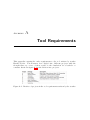
Analysis – Initial features and requirements to a tool, shown in Appendix A,
were given by the supervisor. In order to get a more thorough understanding
of the needs to a tool an analysis is conducted. Different sources are used to
create the analysis. The main stakeholders are analysed in order to derive their
requirements to a tool. The market is analysed in order to gain an insight to
the currently available tools and if they could be used to cover the stakeholders’
needs.
Creation of the tool – When creating the tool, the architecture is designed
with focus on extendability and stability. The design of the graphical user
interface (gui) is created with focus on usability. The functionality of the tool
is designed to cover the course syllabus.
Evaluation – When the implementation of the initial design has finished, an
evaluation of the result is conducted. In order to make a thorough evaluation,
a proof of concept is conducted by recreating the running case study, part of
the syllabus of course 02264. Feedback from the teachers experience with the
tool is also used in the evaluation. All findings discovered in the case study
and from feedback is rated according to importance and as many as possible is
implemented in the tool.
1.2
Goals
The goal is to create a requirements engineering tool that can be used in the
course 02264 by students. The tool should provide a foundation for future MSc
theses in order for them to expand it with more functionality and improve upon
the current.
To summarize this thesis will:
1.2 Goals
3
• Analyse different sources to derive requirements for the tool.
• Create a tool that provides superior usability and editors for capturing
basic artifacts of requirements engineering such as vision, personas, stakeholders, goals and requirements.
• Conduct a proof of concept with a recreation of a case study and implement
necessary changes found.
In the following chapters the goals will be elaborated into further subgoals.
Chapter 2 seeks to analyse the different sources such as stakeholders and market
competitors in order to derive requirements and establish why a tool should
be developed instead of using one of the many available on the market. In
Chapter 3 the chosen design decisions are covered. In Chapter 4 various low level
implementation details are explained. In Chapter 5 the application is evaluated
by recreating a case study in the tool, and feedback recieved from teacher Harald
Störrle which resulted in major changes are elaborated. In chapter 6 the future
work that needs to be done is discussed and examples for increasing usability
and functionality are given. Chapter 7 concludes the thesis and the work made.
4
Introduction
Chapter
2
Analysis
This chapter analyses the needs that stakeholders of the course Requirements
Engineering (RE) have to a requirements management tool. The analysis is
based on four sources, three of them are the most important stakeholders and
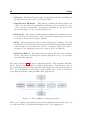
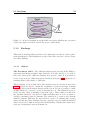
the last is the market. Figure 2.1 shows a picture of the sources that is drawn
upon when creating the analysis. The goal of analysing the stakeholders is to
find high-level requirements to the tool. The goal of analysing the market is to
clarify the need for developing a tool tailored for the course.
Teacher, course participants and author are all stakeholders used to derive requirements. Different market competitors are used to create an analysis of the
market and the tools available. The last part of the chapter concludes the analysis, sets a scope for the thesis and lists the high-level requirements found. A
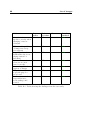
summary of four important findings from each of the sources used in the analysis
are shown in Table 2.1.
2.1
Course participants
In the course 02264 - Requirements Engineering at the Technical University of
Denmark (DTU), lecturer Harald Störrle teaches course participants about requirements engineering. The students are taught about the theory and methods
6
Analysis
Sources
Findings
Course Participants
• The course participants need a high level of usability
in the tool
• The tool should be platform independant
• Installation of the tool must be easy
• Using the tool must not require any programming experience
Teacher
• The tool should cover the course syllabus
• An enhanced way of giving feedback to students is
needed
• Future developers should be able to understand and
extend the tool
• The tool should provide a way of gaining insight and
overview of the students’ work
Author
• The tool should provide management functionality
• Report generation from work made in the tool should
be possible
• Editors in the tool must be tailored to the elements
of the course syllabus
• The tool should provide a way of acquiring help to
the editors and the course syllabus relative to them
Table 2.1: Four important findings derived from each of the sources
2.1 Course participants
7
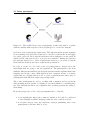
Figure 2.1: The stakeholders course participants, teacher and author, together
with the market makes up the sources drawn upon to create the analysis
used in modern requirements engineering. Through presentations and examples
from a running case study they learn how to use theory and methods and apply
it to their own work. In groups the students work as analysts on a case study in
which real life customer needs to a project are resembled. During the semester
the students learn how to derive requirements and how to properly document
them and the methods used in a requirement specification.
In order to create a tool for the course it is important to analyse upon the
individuals that are going to use the application. The participants come from
multiple different nationalities but all speak and understand english which is the
language used in the course. Although most have computer science or software
engineering as a background it is not a course requirement and there may be
participants with different engineering backgrounds.
The course participants are used to working with computers and are proficient
when learning new programs or adapting to products similar to something they
use. The students use their own computers and operating systems according to
their liking.
From the perspective of the course participants the tool should
• be in english since this is the common foundation. It could be considered
to have multiple available languages that the user could chose from.
• not require users to have any experience with programming, since some
participants could have little to none.
8
Analysis
• have a high level of usability, since the students are proficient computers
users that have high demands regarding the tool’s graphical user interface
and functionality.
• be platform independent in order to function on different operating systems.
• be easy to install and require a minimum of disk space in order to make
it easy to acquire.
2.2
Teacher
The teacher of course 02264 and supervisor to this thesis, Harald Störrle (HS),
has recognized the need for a tool to support future course participants. As
responsible for the course HS is a major stakeholder in the creation of the tool
and have several wishes and needs to the tool.
From a teaching perspective it is important that the tool is easy to learn. This
makes students able to focus and spend more time on the course syllabus than
on learning how to use the tool. It is important that students gain insight to
requirements engineering not just in the classroom but also when applying the
theory and methods on their case study in a tool.
The course participants are given feedback on their presentations, reports and
at the exam. But it can be hard to figure out how they have derived a certain
requirement or how the different elements in a report are connected to each
other. An easier way of gaining insight and overview of the students work
is needed. This would help figuring out what needs to be adressed in future
lectures and help give better feedback to students, than currently possible from
reading reports and watching presentations.
A lot of different requirements regarding such a tool were written down by the
teacher, these are listed in Appendix A. These requirements were written in an
early stage but gains insight to the many wishes the teacher has to a tool. Many
of the requirements written are too specific to be included in this analysis which
focuses on the greater needs to a tool and as such they are not listed here but
in the appendix.
To summarize the requirements the teacher has, the tool should:
• support the course syllabus
2.3 Author - personal experience
9
• provide an enhanced way of giving feedback to students in order to make
them better at requirements engineering
• gain insight and overview of the students’ work, in order to better understand where they go wrong and what subject in the course syllabus that
needs more focus.
• make creation of relations between elements possible, making it easier to
establish where a particular requirement is derived from or understand
how elements are related.
• be future proof, in the way that the tool is possible to use for years ahead
despite changing operation systems and upgrades to Java etc.
• be easy to understand and extend for future developers in order to avoid
having the developers spend unnecessary long time with learning the program or make big architectural changes in order to make a small extension.
• provide an easy way to make changes to the help part, making it easy for
the teacher to change help according to changes in the course syllabus.
• be free of charge, the students can not be required to pay for a tool and
it is the wish that as many students as possible will use it
2.3
Author - personal experience
The author took the course 02264 - Requirements Engineering in the fall of
2010. As developer of the tool and former course participant the competencies
and experience gathered are used to derive needs to a tool seen from a students
perspective.
To assist in creating the requirements specification the Open Source Requirement Management Tool (OSRMT) was introduced. The tool provided ways of
creating and editing requirements, creating dependencies (relations), reporting
the work made and more. But the tool was not intuitive, took a long time
to learn and proved difficult to use. The result was that none of the participants used it, but prefered other programs instead. OSRMT is included in the
comparison of tools made in the market analysis later in this chapter.
In order to create a well written and worked through requirements specification
there was a need to divide the work between the group members in order to
get all work done. When creating the report most groups used Word and Excel
or similar text editors. The author’s group used different applications and it
10
Analysis
proved difficult to evaluate and edit the work of others and gather it in the
report. It also proved hard to get an overview of the requirements specification
report and its elements.
During the creation of the report much time was spend on version control and
dividing work. Dates were not always set for when the work should be completed
or the dates were forgotten and not held. In the end the group had to find dates
where all were able to meet and work together instead of seperately.
In lectures new material and methods were learned, e.g. how a persona is written
and how it contributes to the specification. In the lecture, time was set aside to
work on creating personas (etc.) based on the case study. Often it resulted in
only a fraction of what was needed in the report. The rest had to be done at
a later point. This proved hard since lecture details and information had to be
found in the slides etc. in order to conduct the work correctly. It proved time
consuming and sometimes resulted in parts that needed further editing or had
to be remade.
To summarize the requirements derived from personal experience, the tool
should
• be easy to learn and use or else it loses value and interest to the participants
and in worst case it will be discarded.
• provide an overview of a project and its elements making it easy and fast
to see what has been made.
• provide a way of managing elements relative to groupwork in order to
reduce misunderstandings and time wasted.
• make it possible to comment on elements in order to review the work of
others
• include version control to allow several users to work on the same part
without causing harm to the project.
• provide a way of creating a report of work made.
• make it unnecessary to use other applications by providing all needed
functionality to create a requirements specification.
• have editors tailored to the different elements of the course syllabus.
• provide a way for users to acquire help from the editors which include
material relevant to the editors from which it is acquired.
2.4 The Market
2.4
11
The Market
This section looks closer at the market for requirements management (rm) tools.
High end tools are analysed and compared with the tools students currently
use and what might be developed. The objective is to analyse if there is a
need for developing a tool relative to using an already existing one. Section
2.4.1 analyses the development of the market and requirements management
in general. In Section 2.4.2 is a comparison of tools. There are a lot of tools
currently available on the market. The selected tools to be included in the
analysis is based on their appearance in articles that evaluates and compares
rm tools. The following lists the articles used in the analysis:
Abma (2009); Beatty (2007); Bokhari and Siddiqui (2010); Cant et al. (2006);
Clark (2006); Heinonen (2006); Lam and Achrafi; Larsson and Steen; Sud and
Arthur (2002); Uspenskiy (2004); Wiegers (1999); Young (2002)
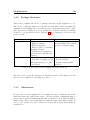
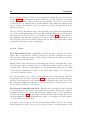
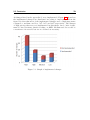
In figure 2.2 is a graph showing how many times different tools appear in the
mentioned articles. It was chosen that the top two tools mentioned would be
included in the comparison together with the OSRMT tool that was introduced
to students, Excel and RED.
Figure 2.2: A graph showing the most mentioned tools in the 12 articles used
in the comparison of tools analysis
12
2.4.1
Analysis
Market Development
Modern software development has an increased focus on the requirement phase
and a lot of research has commenced to generate quality requirements. There
are numerous different software requirement tools available and tools are now
developed to reach a broader audience than just a single company.
The increased focus is clearly a positive thing. The price for high end tools
are falling, new methods for gathering requirements are found and in the end
it all leads to better software development. The problem is that requirements
engineering is still a relatively new science and is handled in a lot of different
ways. It results in tools that are very different from each other and solves
different needs. This makes it hard to determine good from bad since it comes
down to the individual needs and expectations of the user.
2.4.2
Comparing Tools
Before creating a new tool, it is examined if the course needs can be met by an
available tools. This would make this thesis redundant and save a lot of time
and effort.
In Section 2.4.1 which analyses the markets development it is determined that
there are many different tools available. A complete master thesis could and
have been made about the different tools (see Abma (2009)). It is not the scope
of this thesis to do a complete market analysis. The focus is to compare some
of the high end tools, which in different comparative studies are given good
evaluations, the OSRMT mentioned in Section 2.3 currently used tools and the
tool to be developed in this thesis.
Two high end tools are selected. They are chosen based on their appearance in
numerous articles on their evaluation in these and because they are considered
relevant for course use. Price was not considered since the goal was to find ”the
best” possible tool for the course based on content. The following tools are
chosen:
DOORS
,,There are many commercial software packages that offer requirements management functionality; Telelogic DOORS is one of the market leaders.” (Cant
et al., 2006)
2.4 The Market
13
The DOORS tool (Dynamic Object Oriented Requirements System) appear in
several articles and seems like the obvious choice when comparing requirements
management tools.
,,DOORS is mentioned in several papers and is often referred to as very capable
requirements management tool” (Abma, 2009)
The tool is developed by Telelogic Inc, now IBM, and is an Information Management and Traceability (IMT) tool. Telelogic offer a collection of tools that
supports the lifecycle of software development. DOORS is marketed for companies or organizations which have multiple people working on requirements at
the same time.
R Rational
R DOORS
R software is the market leading requirements man,,IBM
agement application” (Lam and Achrafi)
DOORS is chosen since it seems to be the market leader that has been around
for many years and it is used in many comperative studies.
RequisitePro
,,The IBM Rational RequisitePro solution is a widely used and familiar Microsoft word tool” (Bokhari and Siddiqui, 2010)
Developed by IBM this tool is part of IBM’s Rational Suite. Like DOORS,
RequisitePro appears in several articles and is a well known requirements management tool for software development teams. The tool has a tight integration
with Microsoft Word which makes it more intuitive for users familiar with Word.
The tool was the second most mentioned in the articles 2.2 and because of the
tight integration with Word which would prove beneficial for course participants
it was chosen.
OSRMT
Open Source Requirements Management Tool is a platform independent javabased open source tool. The tool is not mentioned in any of the found articles.
A review of the tool was found online Castellow but the author and the website
are not known. It is the only article on the site and hence the article is not
deemed trustworthy. The evaluation of this tool is therefore based on personal
experience.
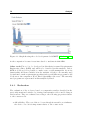
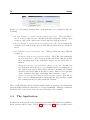
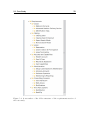
The last update of the tool was done four years ago as Figure 2.3 shows.
Even though the development of OSRMT seems to have stopped it is included
14
Analysis
Figure 2.3: Graph showing the code development for OSRMT, (ohloh.net, 2012)
in the comparison because it was introduced to students in 02264E10.
Other tools The tool to be developed in this thesis is named Requirements
Engineering eDitor (RED) and will not be described in this analysis. Before
RED is developed it is possible to make some overall assumptions about its
functionality and hence include it in the analysis. Of the tools currently used
by students to make requirements specifications several different programs could
be chosen to the comparison; Word, Excel, OpenOffice editors etc. The currently
used programs are represented in this analysis by Excel.
2.4.3
Evaluation
The evaluation of the tools are based on comparative studies described in the
previously mentioned articles, by viewing demonstration videos and looking at
trial versions. They are evaluated according to the following properties relative
to the courses needs.
• Affordability – The cost of the tool, even though it was said to not influence
the choice of tools it is important relative to the course needs
2.4 The Market
15
• Coverage – How well does the tool cover the taught material
• Traceability – the ability to make relations between artifacts explicit, e.g.
trace where requirements are derived from
• Glossary – The ability to create and maintain a glossary and use it actively
with artifacts in the tool
• Effort – The learning effort for students
• Documentation – The ability to create a report from the work done
• Cross-platform – The tools platform independence
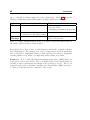
The scale used to evaluate the tools are shown in Table 2.2.
****
***
**
*
??
Very Good
Good
Bad
Very Bad
Not Known
Table 2.2: The ratings used for rating the requirements management tools’
properties
Table 2.3 contains a list of five different tools chosen to represent the different
tools which were studied in this analysis. The last tool is the tool to be developed
in this thesis called Requirements Engineering eDitor (RED).
Property
Cost
Coverage
Traceability
Glossary
Effort
Documentation
Cross-platform
Requisite Pro
*
**
***
**
***
****
*
DOORS
*
**
****
***
**
****
***
OSRMT
****
**
****
*
**
****
****
Excel
***
**
**
***
****
****
****
Table 2.3: Comparison of requirement engineering tools
Here follows an elaboration of the evaluation of the different tools.
RED
****
****
****
****
??
****
****
16
Analysis
• RequisitePro – The tool is expensive, does not cover various parts from
the course syllabus and it is not cross platform compatible. The tool has
different usability issues but should be rather easy to use because of its
tight integration with Microsoft Word.
• DOORS – The tool that comes closest to the course needs, of the high
end tools. However, it is expensive and does not cover all of the course
syllabus. The tool is not easy to use and has a steep learning curve,
however when that challenge is passed it is a very good tool.
• OSRMT – It is clear why the tool was chosen to be used in the course. It
is free of charge, platform independent, traceability is a focus point and
the documentation possibilities are also good. The tool did however prove
to require effort for students to learn and not all of the taught material
were covered. It is also noteworthy that the development of the tool has
seized.
• Excel – So far students have used Excel and Word to create requirements
specification, hence Excel is represented. They are however not tools developed for requirements management and does not cover e.g. the modelling part of a specification. Excel and Word does have a cost but almost
similar tools like OpenOffice can be found for free.
• RED – This tool will be tailored for the course and hence fulfill many if
not all of its needs, it is however not possible to say anything about how
much effort it would take for the students to learn it. It should be focused
on keeping the effort needed to a minimum.
2.4.4
Summary
Looking for a tool that would be usable in the course proved problematic. The
market is a jungle of different tools and it is very hard to find usable reviews or
analysis since the needs of users/companies differ.
Having to pay for a well known and praised tool is not a guarentee that it meets
the course needs and demands. These tools usually have a steep learning curve
and may not be able to be adapted to the taught material.
Considering that the tool has to be free of charge, the ones left often lack
functionality crucial to the needs, making it a question of which compromises to
make. Table 2.3 shows that it can be beneficial to create a tool that is tailored
to the needs of the requirements engineering course. It proves to be a better
solution than both the tools found and the tools currently used.
2.5 Conclusion
2.5
17
Conclusion
A tool designed specifically for course 02264 should be created. Needed is a tool
which helps students throughout the creation of a requirements specification.
The tool should provide a way of documenting the work and give an overview
of a project. It should be tailored for managing requirements and cover the
material taught.
Such a tool would differ from Word or other similar text editors by enhancing
the students knowledge about requirements engineering and by being designed
to create the elements needed in a requirements specification. It should make
use of external programs unnecessary.
In this section it is described what the scope of this thesis will be. The needs
found in the subconclusions are gathered in a section that describes the tools
different high-level functional and non-functional requirements.
2.5.1
Scope
Creating a tool which covers all of the teachings in the course and at the same
time provides superior usability is too large a scope for one master thesis. It
would include a stable and good looking gui, editors for the textual based elements and for the modelling part and much more. The work required to make
the tool has to be split between different master and/or bachelor thesis’ each of
them adding new functionality and/or improving on old ones.
This adds new requirements to the tool which should be able to be expanded
and changed in an easy and understandable way.
As this is the first thesis in the creation of the RED tool, the goal is to provide
the basis for a tool that
• provides basic functionality for creating and reporting a simple requirements specification
• can create, edit and delete textual based elements of a requirement specification according to the syllabus of course 02264.
• is a foundation that can be improved upon through future projects by
students
18
Analysis
The tool needs a strong foundation, hence it is chosen to focus on the first part
of the course material, because it teaches students the basic theory and methods
of requirements engineering.
2.5.2
Features
In the course students are taught different methods to derive requirements and
how to conduct a requirement specification. While some methods are commonly
used in requirements engineering others are unique, e.g. personas. With basis
in the scope of the thesis in Section 2.5.1 this section looks closer at the requirements to the tool, both functional (F) and non-functional (NF). The high-level
requirements can be broken down to several sub requirements. Table 2.4 provides an overview of the most important features.
2.5.3
Features Not Included
The following is a list of the major features that is considered to be out of scope
of this thesis. This list could be very long but is kept to a minimum taking
some of the larger parts which would be important to include in coming future
projects. Chapter 6 goes into further detail with future improvements.
• Visual Modelling – One of the most important things for a future project
is to include the ability to model the system. This would cover most of
the course syllabus that is not included in this thesis.
• Consistency checking – In order to create reports of a high quality it is
needed to be able to check for spelling and grammar errors. Controlled
Language check could also be included in more advanced versions of the
tool. Another important feature is the ability to check if entries in a
glossary are unused in a project, in order to avoid having entries which
does not provide value to the project.
• Version Control – An important thing to make group work efficient but
requires a lot of work and is not considered a basic thing, hence it is not
included in this thesis.
2.5 Conclusion
ID
1.
Feature
Coverage
2.
Reporting
3.
Navigation
4.
Commenting
5.
Save/load
6.
Glossary
7.
Management
8.
9.
Platform
Usability
10.
11.
12.
Cost
Stand-alone
Future proof
19
Description
The tool covers the following parts of the
course syllabus and rich text based editors
for the elements are created : Stakeholder,
persona, goal and requirement
From chosen elements a report can be generated in a format that allows for further
editing in a standard text editor.
A relationship between elements can be made.
Views are created to enhance the user experience and provide an overview of the work
made by showing relevant information
An element is commentable. Making it possible for students and teachers to comment
on work made
Work made in the tool can be saved to files
on the desk and loaded into the program
The user is able to create a glossary and
entries can be created in a rich text based
editor.
The tool provides functionality for management of an element in its editor.
The tool is platform independent.
Tool does not require any programming knowledge. Help functionality is provided for
the application and the course syllabus
covered.
The tool is free of charge
The tool is a stand-alone application
The architecture used in ensures the ability
to change large parts of the tool and it is
extendible without having to perform changes
to existing parts. The code follows Suns
code convention for java Microsystems (1997)
The package structure of the tool’s code is
logically build with relevant names for
packages, classes, methods etc.
Type
F
F
F
F
F
F
NF
NF
NF
NF
NF
Table 2.4: High-level requirements to the tool. (F = functional, NF = nonfunctional)
20
Analysis
Chapter
3
Design
In this chapter the design choices made when developing the RED tool are described. Section 3.1 looks closer at the use of Model-View-Controller (MVC) and
Eclipse Modeling Framework (EMF) and the design of the meta-model. Section 3.2 describes the plug-ins, the plug-in structure and the package structure.
Handling and mapping of save/load are described in the Section 3.3.
The Sections 3.4, 3.5 and 3.6 explains design choices regarding the GUI and
elements herein. Section 3.7 explains the design choices involved with different
usability aspects such as creating relationships between elements, sorting and
filtering. In the Section 3.8 the two different ways of reporting implemented in
this tool are described. The last Section 3.9 looks closer at the design of the
help functionality.
This chapter is tightly linked with the evaluation chapter 5 which includes a
case study and feedback from the lecturer and where the needs for changing
and adding different editors and views are found. It is chosen to describe the
design of the changes and additions in this chapter together with the original
design and the reason for adding the changes and additions are explained in the
evaluation chapter.
22
Design
3.1
Technology
The tool is implemented in Java with Eclipse Rich Client Platform (RCP) as
the target platform. The choice is to have a model-driven development. This
section looks closer at the used technology and the design of the meta-model.
3.1.1
Model View Controller
As an overall design-paradigm Model-View-Controller (MVC) is used as the
architecture in the development of the tool. Using the MVC pattern makes
it possible to seperate the different aspects of the application, interface, input
and functionality and provides a loose coupling between these. Eclipse RCP
adjoins with the MVC pattern making this architecture the obvious choice.
The advantage with MVC is the seperation between the model and the view.
It facilitates making changes in the tool since one part can be changed without
affecting the other. This is also important in relation to future projects and the
additions and changes they will bring to the tool.
3.1.2
Eclipse Modeling Framework
This section explains the advantages of using Eclipse Modeling Framework
(EMF). EMF is a modeling framework and code generation facility for building
tools and applications based on a structured data model. There are several
reason for using EMF in this thesis:
• Developed by Eclipse – When the target platform is Eclipse, EMF is the
traditional way of creating models.
• Stable standard – EMF is a stable standard for many different modeling
technologies including MVC.
• Free functionality – An example hereof is default serialization which makes
it possible to load and save instances of the model as XMI. This will be
needed when the save/load functionality of the tool is implemented.
• Model driven development – In EMF a model can be created and defined
in the Ecore format. Ecore is basically a sub-set of UML Class diagrams.
From the Ecore model, Java code can be generated. Being able to auto
generate code from the model makes it possible to focus on the conceptual
development instead of spending time on manual implementation.
3.1 Technology
23
• Personal experience – One of the common disregards to EMF is that it
is complicated and hard to learn. Because of personal experience, time
will not be spend on learning how to use EMF and focus can be on the
development.
EMF is chosen based on the above advantages. In the next section the design
of the model created in EMF is described.
3.1.3
The Meta-model
In this section the design of the meta-model is explained. The model is created
to make use of the MVC-principle described in section 3.1.1. When creating the
model, focus is on having as few limitations in the model as possible. Limitations
should be made outside the model either in the view or the control part. This
is done in order to ensure that future work is not afflicted by earlier choices in
the model.
The analysis showed the need for different elements, vision, persona, stakeholder
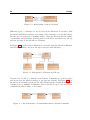
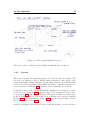
etc. The tool should also provide a way of structuring them. Figure 3.1 shows
the relationship between Element and Group. From the figure it is evident that
Group is an element, with the ability to contain multiple other elements, since
all the features of Element might also be needed in Group, if not in this thesis
then in future.
Figure 3.1: Relationship between Element and Group
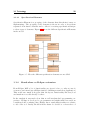
An important part of the tool is the ability to create relationships between
elements in order to create a reference or a link from one element to another.
Figure 3.2 shows the design of the relationships between elements in the model.
At first a reference might seem to be ”‘one-way”’, in the sense that it is directed
from one element (a) to another (b). But the referenced element (b) is aware
of the reference. A relationship is therefore ”‘two-ways”’, but with a direction.
In order to have two elements which both refers to each other, two references
are needed. The need of a ”‘two-way”’ relationship is evident when referenced
elements are moved or deleted. This would cause references to be broken. Since
the referenced element (b) is aware of the reference it is able to warn (a) about
any changes that may occur.
24
Design
Figure 3.2: Relationship between elements
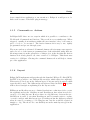
Different types of elements are needed and hence Element is extended with
Specification Elements which is a grouping of the elements covered in this thesis.
Another need is a glossary containing entries. Since the Glossary has the ability
of containing other elements, glossary entries, it should be an extension to Group
whereas an entry is an extension to Element.
In Figure 3.3 it is shown how Element is extended with Specification Element
and Glossary Entries, and how Group is extended with Glossary.
Figure 3.3: Extensions to Element and Group
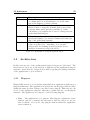
Users need to be able to comment on an element. Comments are created, edited
and shown in a list which is unique to the specific element. In Figure 3.4 it is
shown how it is handled in the model. Here Element has a Comment List which
contains none or multiple Comments, since it should be up to the user if any
comments should be made or how many.
Figure 3.4: An element has a CommentList which contains Comments
3.1 Technology
3.1.3.1
25
Specification Elements
Specification Element is a grouping of the elements that this thesis focuses on
implementing. The grouping of the elements is chosen in order to keep them
separated from future elements and to allow for creating specifications unique
to these types of elements. Figure 3.5 shows the different Specification Elements
in the model.
Figure 3.5: How the different specification elements are modelled
3.1.4
Stand-alone vs Eclipse extension
From Eclipse RCP a lot of functionality are given for free, so why not use it
even more and extend upon Eclipse instead of making a stand-alone application?
This would save much work given that the layout, functionality like save/load
and much more would already be there.
In the analysis it was made clear that not all students had programming experience. Eclipse is developed to programmers and might strike new users as
complicated and confusing, since Eclipse has so much functionality not relative
to use of the tool. Lastly, should it in the future be decided to convert the tool
26
Design
from a stand-alone application to an extension to Eclipse it would prove to be
little work because of the RCP plug-in strategy.
3.1.5
Commands vs. Actions
In Eclipse RCP there are two ways in which it is possible to contribute to the
Workbench: Commands and Actions. They work in a very similar way. When
triggered, usually from artifacts within the user interface, they both cause a
piece of code to be executed. The Action framework is easy to use, tightly
programmed and proven through years.
The newer and more advanced Command framework is in many ways superior
and solve a lot of the issues programmers have dealt with while using Actions.
Most important, from the perspective of this project, is the fact that the Action
framework is slowly phased out, since version 3.3 of Eclipse. This thesis uses
version 3.6 of Eclipse. Chosing the command framework would help to future
proof the application.
3.1.6
Layout
Eclipse RCP implements widgets through the Standard Widget Toolkit (SWT).
In SWT it is possible to use different layout styles, which varies in complexity.
This section looks closer at the different types of layouts and it is argued which
types should be used. The different layout styles are listed in Table 3.1 together
with a short description explaining how the layout works.
FillLayout and RowLayout are too limited in relation to what is needed to create
the applications layouts. GridLayout and FormLayout have what is needed to
create good looking layouts. However there is a big difference between the two.
GridLayout is easier to use than FormLayout and it is much easier to replace
or create a widget with this layout type. FormLayout has the highest potential
when it comes to creating good looking layouts, but the workload required is
simply too big. The choice is to use GridLayout as the main layout type in the
application.
3.2 Architecture
Name
FillLayout
RowLayout
GridLayout
FormLayout
27
Description
Forces all components to be placed in the same row
or column and forces all elements to be in the same
size as the highest or widest element.
Works much like FillLayout, but with the difference
that it is able to wrap the elements if they exceed the
rows size limit, and it has the possibility to define
a RowData object which can be used to change the size
of the individual widgets.
Places widgets in a grid with the possibility to
specify the number of rows and columns and define the
size of the individual elements.
When a widget is added it has four sides and is given
a size, it is placed by ”‘attaching”’ it to another
widgets side and defining how far from the chosen
attached element the widget should be.
Table 3.1: Description of layout types in SWT
3.2
Architecture
In this section some of the architectural design decisions are elaborated. The
first section looks closer at the division of plug-ins and the applications plug-in
structure. After that the design choices made regarding the package structure
of the applications code is described.
3.2.1
Plug-ins
Eclipse RCP is used to create feature-rich stand-alone applications built upon a
plug-in architecture. The application is divided into the largest possible modules
within the same problem domain, a module being a plug-in. This section looks
closer on the application plug-ins, what they contain and the overall plug-in
structure. The application is composed of the following plug-ins:
• Core – The application’s core plug-in. This plug-in contains the views:
element explorer, comment and association, and the editors for project
and document. Core is the only plug-in without which the application
can not function.
28
Design
• Glossary – Includes all functionality regarding the glossary including the
glossary view and an editor for glossary entries.
• Specification Elements – This plug-in contains the functionality and
editors for the different specification elements; vision, stakeholder, persona, goal and requirement. Specification elements are grouped in the
model and makes for an obvious plug-in choice.
• Reporting – Reporting contains all functionality and templates in order
to create a report. Reporting could be extended in future projects and it
is chosen to keep it in a seperate plug-in.
• Help – The help plug-in is based on the help system of Eclipse. The help
system uses a browser based presentation and includes search functionality,
context help, keyword index and a table of contents. Help is provided to
all parts of the application and is also placed in its own plug-in.
• Rich Text Editor – The plug-in that provides a rich text editor which is
used by all editors. It is kept in a separate plug-in in order to be accessible
from all other plug-ins.
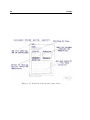
The image in figure 3.6 shows the plug-ins structure. The structure has three
layers. At the top layer is the Core plug-in which has no dependencies to any of
the contributing plug-ins. The plug-ins in the middle layer are all depending on
Core. No dependencies are found across the middle layer. In the bottom layer
is the Rich Text Editor plug-in which other plug-ins use.
Figure 3.6: The applications plug-in structure
This loose coupling in the structure means that plug-ins in the middle layer can
be added and removed without affecting the rest of the application.
3.2 Architecture
3.2.2
29
Package Structure
This section explains the choice of package structure in the application code.
The choice of package structure is another relevant factor when designing the
application, and making the code written easy to understand and easy to navigate. The first possibility is to group packages by features. Another possibility
would be to group them by layer. In table 3.2 is a description of the pros and
cons for both.
Method
Group by Feature
Group by Layer
Pro
- High cohesion
- High modularity
- Easier navigation
- Better control of visibility
(package private)
- Still has some separation
between layers (in different
classes)
- Increase reuse
- Less risk of package cycles
(all dependencies go to the
lower layer)
Con
- Lower layers get designed to
suit the higher layers when
grouped by functionality
- Low cohesion
- Low modularity
- Requires many public
methods
Table 3.2: Pros and Cons for package structure methods
The choice is to group the packages by features because of the many pros and
the few cons compared to grouping it by layer.
3.2.3
Abstraction
It is a goal to keep the application code simple and easy to maintain and at the
same time make sure that the size of the code base is kept to a minimum. Important to any program is limiting the amount of repeated code in different classes.
Many of the editors, views and wizard contain the same basic functionality. In
order to not repeat code, base classes are created where basic functionality is
abstracted to.
30
Design
3.3
Save and Load
The analysis showed the need for students to save and load their work made.
EMF features a rich XML serialization function usable for implementing a
save/load functionality. The considerations and approaches on how to design
the save/load using EMF is described in this section.
3.3.1
Mapping of Artifacts
A requirements project contains many artifacts; personas, goals, requirements
etc., which are structured by the use of folders in the application. When designing the save/load it has to be chosen how this is saved on the computer disk.
Two approaches are considered:
• 1-1 Mapping of Artifacts - The approach is to have a 1-1 mapping of
artifacts to files and folders in the application to folders on the disk, e.g.
the same way Eclipse handles Java-projects. Meaning that when a folder
is created in the application, a folder is also created on the desk etc..
The problem with this solution is that the application needs to stay synchronized with the files on the disk, handling deletes and creation of new
files. It also enables the user to modify the project structure outside of the
project, which risks corrupting the files, breaking relationships between elements etc.
• Root Nodes to Files - In this approach a root node of a project tree, e.g.
a single element or a folder containing multiple other artifacts, is mapped
to a single file on the disk. This approach keeps all artifacts of a project
(requirements, folders, etc. ) in the same EMF resource, which maps to
the same file on the disk.
The problem here is that it breaks with the EMFs standard way of doing
things, which means that use of auto generated editors ”out of the box”,
is not possible. Some users might also expect a 1-1 mapping, especially
those with knowledge of Eclipse. Another problem could be the size of a
project, since all the artifacts is saved to a single .xml file it might become
very big.
The second approach, root nodes to files, was chosen because it lessens the risk
of breaking links between elements due to user interaction. It keeps a project
consistent, while still allowing exporting of individual or groups of elements for
3.3 Save and Load
31
sharing. The mentioned size problem when mapping all project artifacts to a file
was disproved later. The .xml file containing the recreated case study project
(see the evaluation in chapter 5) had the size of only 1.16 MB, quite small
considering the more than 270 different artifacts it contains. The application
has no need of auto-generated editors so this has no influence on the decision
either.
3.3.2
Handling
This section looks at the handling of save and the design choices made. Pressing
save results in the currently active element shown in its editor being saved.
Pressing save all should then save all editors containing unsaved changes. A
problem arises when multiple elements contain unsaved changes and all exists
within the same project, and the user only wants to save the changes made to
a single element. How should the application handle this?
The chosen solution is to use an EMF ResourceSet for each project (each root
element). Each element then has its own resource which is given an URI in the
following form:
file:/path-to-saved-xml/filename.xml//fragmentID
The fragmentID is unique for each element. Keeping a resource for each element
and giving it a specific location in the file, makes it possible to edit and save
the element without affecting any other elements in the file.
3.3.2.1
Marking an Editor ”Dirty”
This section explains how the user is made aware of unsaved changes in the
application. If an element is ”dirty”, meaning that changes has been made
since the last save, it is marked by a star in the tab of the element. An example
of this can be seen in the screenshot of the application in Figure 3.7. All open
editors with unsaved changes will be marked with a star as dirty.
3.3.2.2
Sub-Problems
There are other small sub-problems that has to be considered regarding save.
In the following, some of the problems and how they are handled are listed:
32
Design
Figure 3.7: Screenshot showing three open elements, one of which is dirty (librarians)
• A new element is created outside existing root nodes - The user has to
choose a save location for the .xml file that will contain the element, upon
creation a file on the disk is also created and the element is saved.
• A new element is created inside an existing root node - Upon creation the
element, its location in the project and what is written in the wizard is
saved.
• An element is moved in the tree view - This problem has three different
scenarios:
– Being moved from one project to another - The URI of the element(s)
moved, is saved to a new location in the xml along with the newest
save. Meaning that if any elements being moved are dirty, they remain so.
– Being moved from a project and becoming a root node - In this case
the element is, after the move, not contained inside an existing file on
the disk and the user is asked where the file containing the element
should be saved and what it should be called. This is done regardless
of the element being dirty, containing dirty elements, or not.
– Being a root node and being moved to another project - The file for
the root node will afterwards be empty and the projects file to which
the element was moved will contain the element.
The overall principle followed is that changes made in views are saved instantly
whereas changes made in editors have to be saved manually. This way comments,
which are also created in a view, are saved directly to the .xml file.
3.4
The Application
In this section the layout of the application and smaller GUI parts are explained.
Later sections will look into editors (3.5) and views (3.6) where as this section
3.4 The Application
33
Figure 3.8: The original application layout
will focus on the overall layout and smaller details like bars, menus etc.
3.4.1
Layout
The focus regarding the application layout is to keep it clear and simple. The
layout is very similar to that of Eclipse which is intended, since many of the
course participants will know Eclipse. Another important factor is that this type
of layout is a rather standard design which will help to reach the satisfaction of
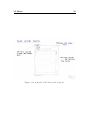
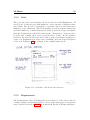
a broad audience. In Figure 3.8 a drawing of the original layout is shown.
To the left is a tree-view of the elements in the application, creating an overview
for the user (see Section 3.6.1). In the center of the application is the editor
view (Section 3.5). All editors designed will appear in this view when used.
In the top right corner is a view shared in a tabular way between comments
(Section 3.6.3) and associations (Section 3.6.4). In the bottom right corner is
the glossary view (Section 3.6.2).
Besides containing views and editors the overall layout has to provide the user
34
Design
with access to functionality and information, the coming subsections focuses on
the parts in the overall layout that gives exactly that.
3.4.2
The Status bar
The status bar provides the user with information about the currently activated
editor and is placed at the bottom of the application. The information is retrieved from the ”Management and Tracing” page, described later in Section
3.5.9, that is included in all editors. From this page the statusbar shows the
name of the author, the person responsible for this element, the element’s status
(e.g. draft, review, complete, etc.) and the last time the element was saved.
3.4.3
Menus
In order to increase the usability of the program the user is able to access
commands in multiple ways e.g. through the main-menu, the toolbar or rightclicking in the tree-view.
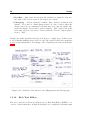
The main menu – At the top of Figure 3.9 is the main menu. The Core plug-in
contributes with File, Edit, Search and Window while Reporting and Help both
come from the plug-ins of the same name. The different commands available
from the main menu will not be elaborated.
Figure 3.9: A screenshot of the main menu and the toolbar
3.4 The Application
35
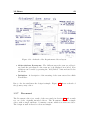
The context menu – In the tree-view is a context menu, also known as a
popup-menu, which is displayed when the user right clicks either in the view or
on an element in the view. In figure 3.10 is a screenshot of the context menu.
Figure 3.10: A screenshot of the context menu
The context menu enables the user to make element specific commands like
opening elements saved on the disk, cut and copy selected elements, paste them
anywhere in the tree-view, create, rename or delete elements. All these commands are also available from the main menu.
3.4.4
The Toolbar
The toolbar is located just below the main menu as can be seen in the screenshot
in figure 3.9. It provides the user with a selection of commands from the main
menu and the context menu. All commands are displayed with a graphical icon
symbolizing what they do.
3.4.5
Icons
Icons are chosen for all elements and for some actions. An element’s icon is
shown in the tree-view, in the top of an open editor (the tab part), and all the
places where the creation of the element is possible. Each element has its own
unique icon.
Some icons that appear in the application come for free when using Eclipse
RCP. The icons for project, folder, glossary, glossary entry, vision, document
36
Design
and generate report are found online 1 . The icons for stakeholder, persona and
requirement are also from the site but modified to fit the application better.
The goal icon is created in an image editor.
3.5
Editors
This section contains the design choices made regarding all editors in the application, their layout, and attributes. Common for all editors is the help button
placed in the upper right corner. The editors are multi-page editors and each
have a page called Management and Tracing. Since this page exists in all editors
it is described in its own Section 3.5.9.
3.5.1
Vision
Vision is a simple editor which consist of a title text field and a rich text editor.
The layout is kept simple, because of the few attributes. A drawing of the
original sketch is shown in Figure 3.11.
3.5.2
Persona
A persona is a unique technique used in course 02264 to derive requirements
through describing a realistic persona and his or hers interactions with the
system in question.
The attributes of the persona and how they are used in the editor is listed below:
• Name, Age, Occupation – Are all textboxes in which the info about the
persona is entered. Limitations are made to the length of the textboxes
and in Age it is only possible to enter numbers.
• Image – A canvas made for containing an image of the personas.
• Description – A rich text editor for the elaborative description of a persona.
1 Icons
3.5 Editors
37
Figure 3.11: A sketch of the Vision editors layout.
38
Design
The draft to the original layout can be seen in Figure 3.12. Besides the main
page in the editor there is also a storyboard page (see more in Section 3.5.2.1.
Figure 3.12: A sketch of the Persona editors layout, made before the case study.
The persona editor went through some changes during the case study. In Section 5.1.2.1 there is a detailed description and argumentation to the changes.
Description and Issues does not require much space since they should be kept
rather short. In narrative a short story is written about the persona. Narrative requires more space than the other two and is given its own page in the
multipage editor in order not to display too much on a single page.
3.5.2.1
Storyboard
The Storyboard is a new addition to the teachings in course 02264. It is basically
a sequence of pictures or drawings that describe a story, an action etc.. The
Storyboard is part of the persona editor and has its own page. The design of the
Storyboard editor is based on the book Sketching User Experiences (Buxton,
2007) which has a chapter called ”The Narrative Storyboard”. The chapter
describes the benefits of using five frames:
3.5 Editors
39
,,Using only five sketches for the storyboard, however, has the benefit of limiting
the interaction shown in the storyboard to one particular scenario” (Buxton,
2007)
In Figure 3.13 it is shown how the storyline is supposed to develop over the five
sketches used.
Figure 3.13: The development of the storyline when using five sketches. (Buxton, 2007)
The storyboard page has two other attributes, which are both rich text editors. The first is placed at the beginning of the scenario and used to make an
introduction and the second is placed at the end and used for a conclusion.
3.5.3
Stakeholder
The stakeholder editor provides a way of creating a small analysis of a specific
stakeholder. The stakeholder attributes are:
• Stakeholder – The stakeholder in question, this attribute is a textbox in
the editor.
• Type – A combo box where it is possible to select if the type of the
stakeholder is internal or external.
• Exposure, Power, Urgency – These attributes are used to evaluate, on
scales from one to three, upon the stakeholder, concluding in the Importance of the stakeholder. Importance is a label showing the average of
Exposure, Power and Urgency from which combo boxes is used to assess
the stakeholder value in the three categories.
• Description, Stake and Engagement - Used to describe the stakeholder
these attributes are all rich text editors.
The original drawn layout of the stakeholder editor is shown in Figure 3.14.
40
Design
Figure 3.14: A sketch of the Stakeholder editors layout.
3.5 Editors
3.5.4
41
Goal
The goal editor has four attributes; Id, Goal, Goal level and Explanation. Id
and goal are both textboxes with limitation on the amount of characters they
can contain. The Id text box is meant to represent a short id and hence has a
limitation of five characters. The Goal attribute is a short sentence that is the
goal and is limited to contain 70 characters. If the goal needs a longer description
than the 70 characters it should be made in the ”‘Description”’ rich text editor
provided and a fitting short version goal should be found. In the attribute
goal level, the user can chose the level of the goal from predefined settings in a
combo-box. Explanation provides a way of making a more thorough description
of the goal. In Figure 3.15 is a sketch of the original drawn layout.
Figure 3.15: A sketch of the Goal editors layout.
3.5.5
Requirement
The Requirements editor is perhaps the most advanced of the editors, since it
consists of numerous attributes divided over two pages and a page for acceptance
tests, described in Section 3.5.5.1. A requirement has the following attributes:
42
Design
• Description, Elaboration, Remarks – These are all Rich Text Editors
• Requirement – A short sentence describing this requirement. Because
of the length it does not need a Rich Text Editor, but only a text box.
The same goes for Id
• Type, Level – Both attributes are constrained to be a certain setting
which can be chosen from combo-boxes.
• Derived from – A list of other requirements which this one is derived
from. The user is able to add requirements to the list by pushing the ”‘Add
Requirements”’ button which opens a wizard from which a requirement
can be chosen. The ”Remove” button removes the selected requirements
in the list.
• Rationale – This attribute is similar to Derived from. It is a list and
have buttons for adding and removing, in this case, goals. Rationale also
has a textbox for a small description.
The attributes are divided on two pages, the editors main page called ”Overview”
and a page called ”Details”. The ”Details” page includes the rich text editors
for Elaboration and Remarks. The rest of the attributes are placed in the
”Overview” page. Figure 3.16 shows the original drawn design of the requirements editors layout.
3.5.5.1
Acceptance Tests
Acceptance tests can not exist with out a requirement and hence an editor has
not been made specifically for acceptance tests. Instead it is a page in the
Requirements editor. The page consists of a table with four columns; Case ID,
Precondition, Action and Postcondition. As a default no rows are created. A
user can create a new row with the ”New Row” button and delete one or several
by marking them and using the ”Delete” button, both are placed below the
table.
3.5.6
Glossary Entry
The Glossary Entry editor is a small editor with four different attributes:
• Term - the word(s) that is the entry entered in a text-box.
3.5 Editors
43
Figure 3.16: A sketch of the Requirement editors layout.
• Abbreviations, Synonyms - The different ways the term are abbreviated and the synonyms for the term are both displayed in a label. New
additions can be made by pressing the ”Add/Delete”-buttons found below
the labels.
• Definition - A description of the meaning of the term entered in a Rich
Text Editor.
Due to the few attributes the design is simple. Figure 3.17 shows a sketch of
the glossary entry editor.
3.5.7
Document
The Document editor is a result of the case study in Section 5.1 and as such
not one of the originally intended editors. The Document editor is a simple
editor with a single attribute, document content, which is a rich text editor.
The design as such is therefore clear and simple.
44
Design
Figure 3.17: A sketch of the glossary entry editor
3.5 Editors
3.5.8
45
Project
A project is a special folder element that is given its own editor. As the Document editor the project editor is a later addition to the application. The project
editor is a result of the feedback that was given by the teacher. The project
editor has the following attributes:
• Title – A textbox in which the projects title can be written.
• Group members – This is a list that has the following columns: Name,
Study number, Email, Phone, Skype and Comment. It is a place where
members of the group and their contact info can be listed.
• Important dates – Also a list. This list has a column for dates and a
column for comments.
• Info – A Rich Text Editor for entering more information either about the
project or about the group.
In the project editor the attributes are divided into two different pages. The
first page called ”Overview” contains the title and the two lists. The second
page is called ”info” and contains the Rich Text Editor.
3.5.9
Management and Tracing
”Management and Tracing” is a page that exists for all editors, it is as such
not an editor by itself but its description is limited to this section. The page is
meant as a management tool to a user or a group of users. The current selection
in the editor view has information from the ”Management and Tracing” page
shown in the statusbar (Section 3.4.2). The attributes of the page are:
• Author, Responsible user, Work package, Version – All of these
attributes are textboxes. From here the user can name the author of this
element, who is responsible for it, what work package it is in, and the
current version.
• State, Priority – Both are combo-boxes used respectively to choose the
state of the element and what priority it has.
• Creation Date, Last Save – These attributes are labels and the content
is autogenerated when the element is created and whenever it is saved.
46
Design
• Deadline – Only dates chosen from the calendar by using the button to
the right of the text-box can be the text-box’s content.
• Changelog – A table with the columns: Date, Version, Comment and
Author. It is used to mark changes made by date, version when the
change was done, a comment about what was done, and the author who
made the change. Rows can be added with the ”Add” button below the
table and selected rows can be deleted with the ”Delete” button placed
next to ”Add”.
Despite the many attributes the layout is kept to a single page. This is done
to avoid having multiple pages added to the editors and because the attributes
do not require much space. A drawing of the original layout is shown in Figure
3.18.
Figure 3.18: A sketch of the layout to the Management and Tracing page
3.5.10
Rich Text Editor
The above described editors are all in need of a Rich Text Editor (RTE) to one
or more of their attributes. A Rich Text Editor is a complicated but important
3.5 Editors
47
part of the application. Since the implementation of a RTE from scratch would
prove very time consuming and most likely also very challenging, it was chosen
to search for a one that could be plugged in and used in the application. This
section looks closer at the possible options and explains the choice made.
For a Rich Text Editor to be considered for use in the application it should meet
the following demands:
• Free of charge – According to the requirements the application should
not cost anything.
• Availability to the RTE’s source code – The editor should be maintainable and if anything needed to be changed or added it should be possible to do so.
• Contain basic functionality – The user should be able to do basic
things that one would expect from a Rich Text Editor, e.g. change the
size and font of the text, make it bold, italic or underlined, create lists,
tables etc.
• Have a simple layout – Since the RTE is to be used as a part of an
editor its layout should not dominate and should usability-wise meet a
certain standard.
• Stability – Since the Rich Text Editor is crucial to the other editors and
hence to the program, stability is essential.
There is no standard solution of how to implement a Rich Text Editor in Eclipse
RCP. There is however different ways to how it can be done, all with different
pros and cons. Table 3.3 attempts to give an overview of the most relevant
solution types. Information on the advantages and disadvantages are found
here 2 .
Within these different types of solution numerous Rich Text Editors have been
created. The SWT StyledText seemed like the best solution except from the
serialization part. But the problem was that a SWT RTE that met our needs,
e.g. with available source code and being free of charge could not be found. The
OpenOffice solution was deemed to advanced for this application and it would
also increase the size of the application a lot. The choice was to use a HTML
and Java-Script based editor, more specifically the EPF Rich Text Editor. This
solution seemed the most promising in regard to the needs and demands.
2 HendrikRTE
48
Design
Method
HTML and
JavaScript
SWT StyledText
OpenOffice
Pro
- The HTML features are extensive and can easily be used
- Serialization to HTML
- Simple use of fonts, as the
application has no need to
load fonts
- Better platform independence than the HTML solution.
- Content assist and spell
checker can be included.
- Flexibel and good performance
- Very rich on functionality
Con
- The solution is affected by
the browser used and as such
it is platform-dependent
- Difficult to include editable
tables
- Serialization of style elements
does not come for free like in
the HTML solution
- Perhaps a bit too advanced for
the needs of this application.
- Huge amount of code in the
Plug-in
Table 3.3: Pros and Cons for the different SWT RTE solutions found here Ebel
3.5.10.1
Modifications
One of the reasons for choosing the EPF Rich Text Editor plugin was the available source code. Having the source code allows for making modifications of the
RTE in order to make the layout and available commands more fitting to the
application. The need for creating references (relationships) between elements
and also references to entries in the glossary is one of the more important modifications. A button for each functionality is added in the RTE. The screenshot
in Figure 3.19 shows the Rich Text Editor plugin from EPF and the two added
buttons, which are given their own icons.
Besides the addition of the two buttons for creating references, some buttons
were removed, e.g. different buttons for layout, in order to simplify the Rich
Text Editor.
3.6
Views
This section describes the design choices regarding all views in the program and
the functionality they contain.
3.6 Views
49
Figure 3.19: The Rich Text Editor from EPF modified with buttons for creating
references
3.6.1
Element Explorer
Element Explorer is placed in the left side of the application and is a tree-view
representation of all open elements. The original layout of the Element Explorer
View contained the tree-view and nothing else. In the case study in Section 5.1
the need for being able to sort and filter the tree was discovered (more on sorting
and filtering in Section 3.7.1). A checkbox is placed at the top of the view and
from this the user can switch the alphabetic sorting on and off. A text-box is
placed next to the checkbox. In the text-box the user can enter a string which
is used to filter the tree. The filtering runs simultaneously with the entering of
the string.
3.6.2
Glossary View
The Glossary View is placed in the bottom right corner of the application. The
purpose of the view is to present a glossary entry to the user, and provide a way
to browse through the entries of a glossary. Browsing in a glossary is an easy and
fast way of finding and reading about an entry. The need of this functionality
was discovered during the case study in Section 5.1.2.2. The glossary views
placement makes it possible to have an editor open and use the comments view
or associations view, while looking at entries.
The original layout of the Glossary View contained very little functionality. As
said the purpose was to show an entry’s information: the term, its abbreviations
and synonyms and its description. A button, ”Edit Entry”, was placed next
to the shown entry and provided the ability to edit the entry by opening the
glossary entry editor described in Section 3.5.6.
50
Design
The layout created to include the browse functionality is more advanced. At
the top of the view a button makes it possible to browse to the previous entry
and the button in the bottom is used to browse to the next entry. The layout
provides a sneak peak at the previous and the next entry by showing the term
of each in the buttons. Since it is possible to have multiple glossaries in one or
several projects, the user is informed with the name of the active glossary, that
is the glossary that contains the shown entry. Figure 3.20 shows a screenshot of
the Glossary View.
Figure 3.20: Screenshot of the Glossary View
3.6.3
Comments View
The Comments View makes it possible to comment on an active element. Commenting on work made is a useful way of reviewing and providing feedback,
which is needed in group work where the workload is often divided between the
group members. It could also prove useful for a teacher or teaching assistant
when reviewing the students work.
The Comments View is placed in the upper right corner of the application in a
tabular order with Associations View 3.6.4. The view contains a table in which
the comments are placed and edited. A comment consists of:
• Date - An autogenerated time stamp of when the comment was created
3.6 Views
51
• Author - A textfield in which an author can be assigned to the comment
• Comment - The text that makes up the comment
• Status - The status of the comment, which can be set to: Unresolved,
Resolved, Obsolete and Notice
The table has a column for each of the listed items. A row can be added with the
”Add Comment” button and comments selected are deleted with the ”Delete”
button. In the top of the view the currently active element is written.
3.6.4
Associations View
The Associations View is meant to provide an overview of all the associations
an active element has to other elements. In the orignal design associations was
a part of the persona editor, described in Section 3.5.2. In the case study the
need for being able to have a list of associations in all editors was discovered.
The choice was to create a view to show all associations of the currently active element in the editorview. The associations view has a list with the three
columns. The first column displays the icon for the type of element the association belongs to. The second is the elements name, the same that is displayed
in the tree-view in Element Explorer described in section 3.6.1. The last is a
field to enter any remarks regarding the association to the element. Double
clicking on an element in the table opens the respective element’s editor, for
easy navigation.
The Associations View is placed together with the Comments View, described
in 3.6.3. This is chosen since the two views are similar in the aspect that all
elements are able to use them and the user does not depend on having both
active at the same time. In the top of the view the currently active element is
written.
3.6.5
The Search View
From the case study the need to be able to search for a word or term and get a
list of results appeared. When searching for a word a list of result is generated.
The search view is responsible for displaying the list of results. The list is
displayed in a tree structure similar to the one in Element Explorer described
in Section 3.6.1. Double clicking on one of the search results in the view opens
the editor for the element containing the result and marks the result.
52
Design
The search view is as a standard not visible in the application. When searching
for something the view will open in the lower right corner as a tab together with
the glossary view (Section 3.6.2) and display the results.
3.7
Navigation
Navigation is one of the key factors of the application, relative to usability.
Relationships between elements are a powerful functionality that separates this
application from many other requirements engineering tools. This section looks
closer at the design choices regarding sorting and filtering of elements in the
tree-view and the handling of relationships.
3.7.1
Sorting and Filtering
In Element Explorer, described in Section 3.6.1 folders and elements are shown
in a tree structure. Eclipse has a similar tree structure in which all elements
are sorted in an alphabetical order, according to their layer structure. The
sorting takes place upon creation, removal or deletion of an element. The sorting
method is very standard for tree-structures.
Sorting the layers alphabetically is a strong way of increasing the ability to
navigate, but being able to choose your own structuring might be prefered.
Hence the user is able to turn alphabetic sort on and off. The structure chosen
by the user, not the alphabetically sorted, is the one saved in the .xml file.
The ability to choose the structure will later prove beneficial when generating
a report.
Being able to filter folders and elements according to a string entered would
also be very beneficial. Doing the filtering simultaneously with the entering of
a search string is not only a useful feature but also something users grow more
and more accustomed, especially through Apples newer OS, Windows 7 etc.
This functionality would become handy when the amount of projects, folders
and elements increases.
3.7 Navigation
3.7.2
53
Relationship Between Elements
The different elements that make up a requirements specification are often
tightly linked with each other. E.g. could the need to show the relationship
between two personas be important in the description of one of them. This
section looks closer at the handling of relationships.
3.7.2.1
Creating an Element Reference
A reference to another element is created in the Rich Text Editor by selecting
a string of text and pressing the ”Create an element reference” button (Section
3.5.10.1). The reference is only usable if it is possible to see that it exists,
otherwise any word could potentially be a reference to an element. Visualising
a reference can be done in numerous ways, e.g. changing font or color. The
choice is to visualize that a reference exists by underlining it and coloring it
blue, which gives it the look of a html link. This is a standard way of marking
something to be a link and encourages users to explore the association to the
other element. Creating a reference from an element, (A), to another element,
(B), also triggers the Association View to show that there is an association
to (B) by creating a row in the list with (B)’s name and icon, given that the
association does not already exist in the list.
3.7.2.2
Deleting
When an element is deleted all the relationships it might have to other elements
are broken. It is important that the application handles the broken relationships
or else other elements could contain empty references.
In the design of the model, described in Section 3.1.3, it was shown how a
relationship is ”two-ways”. This means that an element, (A), which is referred
to by another element, (B), is aware of (B)’s reference. If (B) is deleted, nothing
happens since (B) contains the reference and the deletion does not concern (A).
However if (A) is deleted, (B) would contain an empty reference. This is solved
by letting the deleted element inform all elements which has a reference to it, to
remove those references and remove the element from the list in the Associations
view.
In the Rich Text Editor, the string that is the reference should not be deleted
since this could change the meaning in the text. Instead the html link should
be changed back to a common string.
54
Design
3.7.3
Glossary Entry References
The possibility of creating references to glossary entries in the Rich Text Editor
is another way of increasing the usability. The design of Glossary Entry References are similar to the design of Relationship between Elements as described
in Section 3.7.2 regarding creating and deleting. The only difference is that
pressing an element reference opens the editor for that element and pressing a
glossary reference displays the entry in the glossary view, described in 3.6.2.
3.8
Reporting
The analysis showed the need for being able to create a report from the work
made. Without this functionality it would be of little use to the students who
would not be able to hand in a report. A generated report of all elements in the
application or chosen parts, has to meet certain criteria:
• The output should be in a known file format in order to open it and print
it since printing from the application is not possible.
• The report should have a layout suitable for printing
• It should be possible to edit from a text editor like Word or OpenOffice,
since spellcheck is not possible in this version of the application.
To solve this task Java Emitter Templates (JET) is a good choice. JET is a
model-to-text language, and provides a way of generating a report as a separate
file based on chosen elements in the application. There are several solutions to
how a report can be generated. JET was chosen since it is:
• based on existing and established technologies
• easy to setup
• strongly supported by tools integrated in the Eclipse IDE such as EMF
which is used for this application (see Section 3.1.2)
The next sections focus on the output structure and format of the report and
how images are handled.
3.8 Reporting
3.8.1
55
Output Structure
The most user friendly way to design the layout of the report, would be to let
the user decide everything from a wizard. The decisions would include, what
folders/elements to include, the order in which they appear, name of chapters
and sections etc..
Creating a wizard from which the user can choose all the layout settings, would
require a lot of work and time. Instead two different templates was created to
suit the basic user needs, a simple layout and a folder structure layout.
3.8.1.1
Simple Layout
The Simple Layout report form is not very flexible, since the layout is predefined
to have the following structure:
• Simple Report
– Vision - Visions
– Chapter 1 - Stakeholders – all elements of type Stakeholder
– Chapter 2 - Goals – all elements of type Goal
– Chapter 3 - Personas – all elements of type Persona
– Chapter 4 - Requirements – all elements of type Requirement
– Glossary - Glossary entries – all elements of type Glossary Entry
– Appendix - Documents – all elements of type Document
When generating a report the user first picks a folder or an element. If a folder
is chosen all elements within the folder are placed in the different chapters
according to their type. The layout is made according to the layout of a usual
requirement specification report in course 02264. The thing to notice is the
appendix part where elements of type Document are placed. This is done in
order not to lose any work made when generating a report.
3.8.1.2
Folder Structure Layout
This report layout has the advantage that it allows the user to define the structure of the report based on the folder structure used. An example can be seen
56
Design
in Figure 3.21. The example shows that a folder marks the beginning of a new
section. If a folder is found within another, it is a subsection of its parent and
so forth. The names of chapters, sections and subsections etc. are the names
of the corresponding folders and elements. The example also shows that the
structure is kept when opened in Word.
Figure 3.21: The image to the left is a print screen from the application, to the
right is how a generated report of these folders and elements look like in Word
2010’s Navigation view.
Folder Structure Layout makes it possible to use documents as a way of adding
text between folders and/or elements. E.g. an introduction to the Requirements
section explaining how it is divided can be made, or text can be added between
stakeholders explaining how they differ. The Folder Structure Layout disregards
the alphabetic sorting in the Element Explorer, described in Section 3.7.1, in
order for the user to decide the structure, regarding both folders and elements.
There is however a restriction regarding the Glossary and its entries. Glossary or
glossaries are placed as the last section of the report and each glossary’s entries
are sorted alphabetically. This has been decided based on what is normally
required of a glossary.
3.8.2
Format
JET is not limited to any specific output format, as it simply outputs plain
text. The format is therefore up to the templates created. Several different
output formats may be implemented. Of those, the most relevant for this thesis are: .txt, .rtf and .html. This section looks closer at the advantages and
disadvantages of the different output types.
3.8 Reporting
57
• .txt - The simplest format and easy to generate, but .txt fails when it
comes to including several of the needed things like different fonts, styles,
lists, tables, images etc.
• .rtf - The advantage with the .rtf file format is that it would be intuitive,
for the user, to continue working with the report in programs like Word,
OpenOffice etc., since these are the programs that usually per default is
set to open .rtf. The disadvantage is the high degree of work needed in the
templates, in order to create a somewhat useable layout. Another problem
is the Rich Text Editor which generates html, and there is currently no
easy way to convert html to rtf. Solutions to this could be:
– to add a version of OpenOffice to the application, since a solution
exists but requires the applications user to have OpenOffice. However, this solution would work against some of the goals concerning
size of the application and force the users to make an installation of
OpenOffice.
– to use java api to make the conversions. This solution is not sufficient,
since several commands are not supported, some of these being as
basic as understanding line change <br>.
– to use XSLT since it was possible to find a stylesheet which apparently
transforms HTML to RTF. This could prove to be a very difficult
and hard solution to implement and as a result take a lot of time,
eventhough it might prove to be the best for the program.
– to buy a solution, since there exists multiple different solutions that
all cost money, but this is not an option according to the requirements
to the application.
• .html - The format is code wise very simple to set up and is known to
most people. When opened in word or OpenOffice it has the advantage
that it knows about chapters, headers and sections. The format would also
allow for text in the Rich Text Editor to be correctly reproduced since it
uses html. The disadvantage is that .html files are opened in browsers. It
might not seem intuitive to users to open the generated file in a text editor
and printing directly from a browser would not result in a nice layout of
the report.
A .pdf solution was also possible though not with JET, but it would require for
a report to be completed and ready to print since .pdf is not easily editable. It
is necessary for the user to be able to edit the layout and make changes. Using
editors like Word, OpenOffice etc. would make that possible and would also
give the advantage of using the spellcheck provided in these programs.
58
Design
The .html format is the chosen format based on the advantages that comes
when using it in other editors, and the advantage concerning the Rich Text
Editor. Of the other formats the most promising was the .rtf format where
an xsl stylesheet would be chosen to make the convertion between .html and
.rtf. But since creating the xsl stylesheet would require a lot of effort the .html
solution was chosen.
3.8.3
Handling Images
Images such as those used in Persona (Section 3.5.2) and in Storyboard (Section
3.5.2.1) are converted to .html code when a report is generated. This creates a
problem when opening the .html file in programs like Word and OpenOffice. A
way to handle this is by saving all images in separate files and create references
to them in the .html file. The user is able to choose if the report should be
generated as a single .html file or as several files.
3.9
Help
The Eclipse help system is used to add help support to the application. The
advantage is that the plug-ins that comprise the Eclipse help system can be
added with a modest amount of effort and it contains a lot of useful functionality.
The Help system has a table of contents and also includes a search function to
help users find information about specific things. The only things that need to
be added is the content. This section looks closer at the content added to the
help system.
The help content is divided into two categories; Help regarding the application
and Help regarding the content. Every editor is provided with a help button
which opens a wizard with the content regarding that specific editor. The same
thing applies to all the views. The difference is that an editors help page includes
both categories and the help page for a view only includes help regarding the
application.
3.9.1
Application Help
Application help is basically a user’s manual to how the application works and
should be used. It describes what buttons do, what is visible when in the
3.9 Help
59
different views, how to create, edit and delete elements and how to save and
create reports, etc.
3.9.2
Content Help
Content Help is based on the course material provided in course 02264. It is
provided to further enhance the link between the application and the course, and
to help the users generate better reports by being able to quickly find material
about what an element should contain, why it is needed, what to avoid, and
how to do it using the application.
60
Design
Chapter
4
Implementation
This chapter describes different low level technical solutions. First the organization of the models and the code generation is explained. Section 4.2 explains
the package structure through two examples. In Section 4.3 the use of extension
points in the plugin.xml is explained. How the movement of elements in the
tree-view is implemented is explained in Section 4.4. Deployment of the application is described in Section 4.6. The last Section 4.7 explains the installation
procedure of the application and how to set up a developers environment.
4.1
Organizing Models and Code Generation
This section describes how the meta-models are implemented and organized and
how the model code is generated.
EMF is used to create the model of the application. Models similar to the ones
show in Section 3.1.3 are created in Ecore Diagrams. When an .ecorediag file
is created so is a corresponding .ecore file. While editing the .ecorediag file the
.ecore file will be kept in synch. The .ecore file is the main EMF domain file
and hence editing can also be made here.
62
Implementation
In order to generate the model source code a generator model is created based
on the ecore model. When creating the generator model it is possible to specify
several models and which to reference from other generator models. Three
projects, which are also plugins, are generated. The models are organized in
these projects in the following way:
• core – dk.dtu.imm.red.core contains the models for core, group and
relationship
• glossary – dk.dtu.imm.red.glossary contains the model for glossary and
has a reference to core
• specificationelement – dk.dtu.imm.red.specificationelement contains
the model for specificationelement og has a reference to core
In figure 4.1 is a screenshot of the dk.dtu.imm.red.model project which contains the models created in the Ecore Diagrams, the corresponding domain file
and the generated Genmodel file.
After creating the models based on the early design of the meta models, future
changes and additions, e.g. adding a new attribute to a specification element,
was done in the .ecore file. Making changes in the .ecore file was faster and
proved more manageable than in Ecore Diagrams. The last step to generate
the model code was done by right-clicking in the generator model and chosing
”Generate Model Code”. In Section 4.5 the implementation of the Rich Text
Editor is explained.
4.2
Package Structure
In this section the use of package structure for elements and when creating
editors and views are explained with an example based on the comment view.
The package structure of Comment and its view is shown in Figure 4.2. The
figure shows all interfaces and classes for comment and which are hand-written
and auto generated. Comment lives up to the MVC-principle being divided into
a modelled part (Comment, CommentCategory and CommentList), a graphical
(CommentView) and a functional (CommentViewPresenter).
4.2 Package Structure
Figure 4.1: The dk.dtu.imm.red.models project
63
64
Implementation
Figure 4.2: The package structure of comment
4.3 plugin.xml
4.3
65
plugin.xml
This section describes how plugin.xml have been used in the implementation of
the application and how extension points have been used to prevent dependencies between plug-ins.
The Eclipse extension manifest is called plugin.xml. It is used for defining
and using Eclipse extension points which are the fundamental way that Eclipse
plug-ins are tied together. The plugin.xml is used to create UI elements, such
as menus, commands etc. declaratively. In Figure 4.3 is an example of a view
created in the plugin.xml.
Figure 4.3: Creation of the comment view and element explorer view in the
plugin.xml of Core
The declarative creation of elements is especially used to create menu contributions across the plug-ins.
4.3.1
Extension Points
The Core plug-in contains the view Element Explorer, described in Section
3.6.1, which has a tree-view showing elements. When an element in the tree is
doubleclicked an editor is opened, given an editor exist for that element type.
The Core plug-in has no dependencies to the other plug-ins and is not aware
which editor to use for opening the element.
The first step to a solution is to create an extension point in Core with the
ID dk.dtu.imm.red.core.element. The definition for the extension point,
requires that a plug-in extending to this point does so through a class which implements the interface IElementExtensionPoint. This is done to ensure that
the functionality to open, delete and restore elements are provided. When an
66
Implementation
element is doubleclicked ElementExplorerImpl, containing the listener, calls
elementDoubleClicked upon its presenter. The method uses
getExtensionRegistry() to look at all the plug-ins extending dk.dtu.imm.red.core.element.
A for-loop runs through the extending plug-ins and calls openElement(). If an
extending plug-in contains a method to open the element type that is doubleclicked an editor is opened. This ensures that Core has no dependencies to
contributing plug-ins.
4.4
Moving Elements in the Tree-View
This section describes how moving elements in the tree-view placed in the Element Explorer view is implemented.
From the users perspective a selection of elements to be moved are made, the
elements are dragged to the wished location and dropped. Drag and drop is a
part of the SWT framework and below is a description of how it is implemented.
Drag – In the class ElementDragListener the method dragStart saves the
elements selected from the tree-view in a list. dragSetData is called and uses
createDraggableResource to create a pseudo folder that the elements from the
list is placed in. The folder is added to an EMF resource, similar to when saving.
The resource is serialized to xml and saved in a string. The convertion to xml
is done because it is enforced by the SWT framework to use a known format to
transfer the data from drag to drop. The framework uses the underlying operating system mechanism which allows data transfer across applications in order
to have the best possible system integration. The TextTransfer class provides
a text transfer type which has a platform specific mechanism for converting
plain text represented as a Java string to a platform specific representation of
the data. With the convertion to xml the selected elements are ready to be
dropped.
Drop – The class ElementDropListener, performDrop recieves the data from
the OS as a string containing the xml. The framework provides the methods
getCurrentLocation() and getCurrentTarget() to get the targetted element
for the drop and if the location of the drop is before, after or on the target. At
this point the list of selected elements to be moved is just a copy of the real
elements. A list of the real element is created by using the unique id of the
elements to find the real elements. While the list is made a check is performed
to see if any of the real elements is a group and if the target is a child to
the element. If this is true that element is not included in the list, since it is
considered to be an illegal act to drag a parent element into a descendant.
4.5 Implementation of the Rich Text Editor
67
The action is handled by MoveElementsHandler which calls
MoveElementsOperation which performs the operation. This is done in order
to make the operation undoable.
4.5
Implementation of the Rich Text Editor
The Rich Text Editor is a part of the Eclipse Process Framework Project (EPF).
The implementation is done by exporting all packages used by the Rich Text
Editor part of the EPF and placing them in a plug-in.
The RTE is modified to the needs of the application, among other things two
buttons are added which gives the functionality of creating an element reference
and a glossary entry reference.
4.6
Deployment
This section explains how the tool is deployed to a stand-alone application.
According to the analysis ?? the tool should be a stand-alone application, hence
it must be deployed from Eclipse. A product configuration with basic settings
is created. It is crucial to add all plug-ins and fragments that constitute the
application in the product configurations dependencies tab.
The RED icon shown on the .exe file, in the corner of the application and the
taskline of the OS are set via the product configuration along with the splash
screen displayed at application start up.
Each plug-in has its own build configuration properties from which the files and
folders to be included in the binary build are chosen and special build properties
can be set. In all plug-ins the following is included:
• META-INF - Contains the plug-ins manifest MANIFEST.MF
• bin - All the compiled classes
• icons - All images associated with the plug-in, e.g. editor icons.
• plugin.xml - The extension manifest.
68
Implementation
The Rich Text Editor plug-in is forced to use JavaSE-1.6 as a compilation profile,
since it, for unknown reasons, tries to use JavaSE-1.5.
The source code is not deployed since the application is not meant for programmers, but for usage by course participants.
4.7
Installation Procedure
In this section it is described how the tool is installed for end users who wish
to use RED and for developers who wish to extend upon the codebase of the
application.
4.7.1
End Users
The installation procedure for end users is quite simple since no installation tools
are required. The tool is build using a standard build procedure for Eclipse and
the plugin development environment as described in section 4.6. The result of
the build procedure is a folder containing an executable file, all the required
plugins and configuration elements. In order to install the application the user
has to acquire the folder, which is easily distributed, unpack the folder and run
the executable file. There is as such no installation procedure required from the
user.
4.7.2
Developers
In this section it is described how to setup a development environment in order
to extend the functionality of the tool. A suitable environment has to be set
up due to the use of core Eclipse-plugins and plugins used for the development
such EMF for modelling and code generation. This section will not provide a
step by step guide on how to set up the development environment but provide
an overview of the needed plug-ins and where to get them.
The developer as a starting point need the Eclipse IDE for RCP and RAP
developers. This IDE contains the plugins for building RCP applications. RAP
stands for Rich Ajax Platform and is used to create Ajax-enabled rich Internet
applications which is not relevant for this thesis. Other than the IDE and the
plugins gained from it the following plugins are needed:
4.7 Installation Procedure
69
• Agile Grid (org.agilemore.agilegrid) – The plugin provides 3rd party widgets used various places in the program, fx. associations view, comment
view, project editor etc.. The version used in this thesis is 1.2.0 and can
be downloaded from http://agilegrid.sourceforge.net/
• Eclipse Modeling Framework Runtime and Tools (org.eclipse.emf) – Runtime provides the underlying EMF functionality and EMF Tools are used
for creating the metamodel. The version used in this thesis is 2.7.1 and
can be downloaded from http://eclipse.org/model/emf/
70
Implementation
Chapter
5
Evaluation
This chapter describes the evaluation of the application and how the findings
affect the application. The goal of the evaluation phase is to discover flaws in
the design or the functionality implemented or find needs not yet thought of.
The impact that the changes and additions have to the previous chapters, 3 and
4, are described in those.
While developing the application, evaluations were made on smaller parts. When
all the main parts of the application were implemented and a somewhat finished
result could be produced, the evaluation phase began.
The evaluation includes a proof of concept, by recreating a case study as described in Section 5.1. An evaluation is also made by teacher Harald Störrle.
The findings from this evaluation is described in Section 5.2. Table 5.1 shows
the contributors to the findings and a selection of the most important findings,
which are described in this chapter.
5.1
Case Study
The case study is a proof of concept of the applications functionality and usability. The case study is based on the Library Management System (LMS),
72
Evaluation
Editors
Views
Other
Findings
Author
– New editor called Document
– Associations for all elements
– A view for a search functionality
– Small changes listed in
Appendix B
Teacher
– New editor called Document
– New editor called Project
– Changing description in persona
– Associations for all elements
– A new feature called storyboard
Table 5.1: Table showing the contributors to the evaluation and a selection of
important findings.
which is part of the course material and is used as a running example in the
lectures. The case study is developed by the teacher and is close to a complete
requirements specification.
The goal of the case study is to use RED to recreate as much of the requirements
specification as possible. In this process any flaws, wants and weaknesses are
noted and the application’s usefulness is tested. The findings should then be
used to improve further on the program or be written down and described in
the Future Work chapter.
In this section the conduction of the case study evaluation is described along
with the findings.
5.1.1
Setup
The case study was conducted in mid-November to the start of December where
the application had the original functionality and GUI implemented. The LMS
requirements specification is written in Microsoft Word and from the .doc format
it is recreated manually into the RED application.
If parts of the case study are not able to be recreated in the application it is
assessed if it meant to be possible, and thereby part of the scope of the thesis, or
if it is outside scope. An example of something outside scope could be a model
like the one showed in Figure 5.1 which is found in a requirement in the LMS
case study.
5.1 Case Study
73
Figure 5.1: A model example from the LMS case study which in the recreation
of the case study is deemed outside the scope of this thesis
5.1.2
Findings
This section describes what was discovered during the recreation of the requirement specification. The findings are grouped into three sections: editors, views,
and other findings
5.1.2.1
Editors
The Document editor - The different chapters and sections in the LMS requirement specification include introductions. It is also needed to be able to
have text between the different elements in a section. Since it is possible to
create a report in two different ways as described in Section 3.8, it is needed to
examine them both relative to this issue.
When creating a report with the folder structure layout, described in Section
3.8.1.2, folders are used to mark the beginning of sections and any elements
within a folder is then written directly in the report. It is not possible to make
an introduction to a section or add a description to it. The initial idea was to
create a folder editor containing a rich text editor. This solution would solve
the problem described, but allow for little flexibility since it is not possible to
describe something between elements. The solution is to create a new element
called Document. This way the user is able to create a document, place it anywhere and use the folder structure layout to generate a report with text included
where it is needed. This would provide the flexibility of adding introductions to
sections, descriptions between elements etc.
74
Evaluation
Should the user chose to create a report using the Simple Layout, described in
Section 3.8.1.1 the Document element would not solve the problem, but neither
would a Folder editor, since this layout is less flexible. In order to secure that
work made in a document editor is still available when using the simple layout
report format, all elements of type document are added as appendices in the
generated report.
The need for the Document editor was especially clear during the implementation of the requirements part of the case study which is split into several sections
and subsections each in need of a description. In Figure 5.2 is a screenshot of
the application showing the extensive recreation of the requirements part. Note
that only the folder level is shown. This is chosen since the folders all together
contain 186 elements of type requirement.
5.1.2.2
Views
The Associations View - Originally the Persona editor was the only editor
with a list of associations. When a reference to another element was created
the associations list was updated. The referenced element was added to the list,
given it was not already there.
Having a list of associations is not something associated to just elements of type
Persona and would be useful to have for all elements. One solution could be to
copy the list to all editors and make it a common attribute in the model. This
would involve changing the design of all editors and adding a lot of identical
code in the different editors.
The chosen solution is to create a view with the list of associations. Like the
Comments View, described in Section 3.6.3, the Associations View should show
the list of associations for the currently active element in the editor view. The
list is meant as further information to the user about the element, hence a view
is a preferable addition to the editors.
The Search Command and View - Early in the case study it was clear that
a search function was needed, especially when glossary entries were entered.
Creating references to entries and elements, which is key to the navigation,
described in Section 3.7, is hard and trivial work when all elements have to be
checked manually for words matching an entry or an element; and the chances
of overlooking a word are there.
A solution could be just to use the search function that comes for free in the
Rich Text Editor. But it does not solve the problems. A search phrase would
5.1 Case Study
75
Figure 5.2: A screenshot of the folder structure of the requirements section of
the case study
76
Evaluation
have to be entered in all rich text editors in all elements, meaning that only some
of the work load would be lessened and the chance of overlooking a word would
be removed. This solution would limit the search to the Rich Text Editors,
but it could also be needed to replace a certain word placed in a textbox in an
element.
A solution where the user is able to search through all elements and folders,
and retrieve a result, is needed. The user needs an overview of where the search
results are located, and a way of quickly gaining access to them. The solution
is a dialog for entering a search phrase and a view to present the result to the
user. The results are presented in a tree structure. Double clicking a result
will then open an editor for the element containing the result and the result is
highlighted.
5.1.2.3
Other Findings
Besides the changes and additions mentioned in the two sections above there
were numerous small changes to both editors, views, wizards, functionality and
the overall layout. Most of the changes were GUI-based. An example could
be that the statusbar did not update correctly when changing between active
editors. These small changes are not elaborated in this thesis because it would
be too extensive. An overview of the changes can be found in Appendix B. The
appendix is a list of changes conducted during the case study.
5.2
Feedback
During the thesis, there was running feedback from Harald Störrle, who was
updated whenever new functionality was implemented. This was done to ensure
that the functionality lived up to the expectations, or if it needed to be changed.
It could also serve to give inspiration to other needs. Many small changes and
additions to the tool were found this way. This section focuses on the larger
discovered needs and wants.
5.2.1
Editors
The Project editor – The case study showed the need for being able to mark
something as a project. Another need was to add functionality which could
5.2 Feedback
77
further improve the cooperation between group members. The functionality
thought of was:
• List of group members – The reports that are handed in, includes a list of
all the contributors with their name and study number. From a group’s
perspective it is needed to make a contact list that further includes emailadress’, telephone numbers and perhaps Skype contact info. A way of
creating such a list in the tool was needed.
• Important project dates – In order to have a good cooperation in a group
and create a good result, it is important to set deadlines, dates for agreed
meetings etc. It should be possible to add dates to a list of all important
dates relative to the group and the project.
• Group agreements – For a group to function well it is a good idea to make
a common agreement on the group rules and the goals for the project.
This is also known as a vision paper and should be possible to create in
the tool.
It was chosen to create a special folder type called Project. This folder should
have an editor with the above needs as some of its attributes, in order to gather
some important project and group needs.
The Persona editor - In order to get the students to focus more on the issues that can be derived from the description of a persona, the persona editors
description attribute was divided into three parts; description, issues, and narrative. The description attribute was kept as an introduction to the persona.
The issues attribute is to highlight the requirements that can be derived from
this persona and make the students focus on this part. The narrative attribute
is meant as a way of telling a story about the persona and their interaction that
causes the issues.
5.2.2
Views
The Glossary View – The original idea with the glossary view was to provide
a simple way to see glossary entries while reading or editing an element in
the editor view. Looking at the recreation of the case study it was discovered
that browsing through entries, in the glossary, without having to manually open
entries from the element explorer would be a valuable feature. Since the glossary
view was kept simple and had no real functionality other than being a display
it was chosen to expand upon the existing view instead of creating a new.
78
Evaluation
5.2.3
Other Findings
Storyboard
The course participants are encouraged to be inventive in their way of presenting
requirements specifications, usually through group presentations. In the course
held in the E11 the participants showed very creative skills and amongst other
things they made an addition to how a Persona could be presented. The concept
is a series of images made to demonstrate a specific situation involving the
Personas interaction with the system. The images are presented in a cartoonlike setup. The concept was described in Buxton (2007) and found to be an
important addition to the tool. It was chosen to extend the Persona editor with
a Storyboard as described in Section 3.5.2.1.
5.3
Conclusion
The case study proved to be very effective in finding ways to improve upon the
existing application, be that bug fixing, functionality improvement or addition
of new things. During the case study the list of changes, fixes and additions
grew very long. Not included was the feedback received from the supervisor
which increased the amount of findings further.
Due to the limited amount of time left on the thesis, at the end of the case
study, a priority between the items on the list had to be made. To assess what
to focus on implementing two categories were created. An assessment was made
of the time it would take to implement the change and another assessment of
the importance relative to usability and the scope of the thesis. Both were
evaluated on a scale from 1 to 3 stars according to Table 5.2. A cost-benefit
analysis were conducted and due to the lack of time it was chosen to implement
as many changes as possible.
*
**
***
Importance
High (Need to have)
Medium (Somewhat needed)
Low (Nice to have)
Estimated amount of time
Large (Several days)
Medium (A day)
Short (A couple of hours or less)
Table 5.2: Assessment of the importance of a change and the time it would take
to implement
In Appendix B the list is shown. All the major improvements described in this
chapter, which implicitly were of high importance, were implemented. Of the
5.3 Conclusion
79
40 changes listed in the appendix 25 were implemented. Figure 5.3 shows how
the implemented changes are distributed according to importance. From the
figure it is clear that most of the implemented changes were of high importance
compared to medium, and low, 56%, 16% and 28% respectively. The changes
of high priority that were not implemented in this thesis, due to lack of time,
must be fixed in future thesis’s working on RED. Medium and low would be
convenient to fix as well, but are not deemed as necessary.
Figure 5.3: Graph of implemented changes
80
Evaluation
Chapter
6
Future Work
The analysis concluded that creating a tool which covered all of the course
syllabus would be too big a task for a single master thesis. A lot is covered in
the application, but far from all, hence the foundation is laid for future projects.
One of the most important task for future projects is to provide editors for
modelling. A large part of the course syllabus would be covered with such
editors.
This chapter will not focus on the course syllabus that was not covered. Instead
the focus is on describing ideas to future features and improvements based on
the experience gathered when using the application and from the findings in the
evaluation chapter. The future improvements are briefly described and it is not
the intention to provide ways to how they should be implemented.
6.1
Locking Elements
In the current application there is no limitation to read/write abilities on elements. Considering that the tool is used by students working in a group it
would prove useful to include the ability to lock elements by providing specific
rights and prevent further editing. This could also be a useful feature seen from
a teachers perspective who could use the tool to deploy case studies.
82
6.2
Future Work
Auto-Save
If the application or the computer from which it is run, should somehow fail
or crash it would cause loss of data, unless the user has saved just before the
crash. In order not to base loss of data on luck, an auto-save function should be
implemented. Auto-save has become common in most programs and users would
expect to have it. Auto-save should have a high priority in future projects.
6.3
Version Control
Version control as used in software development would enhance the application
further. Implementing version control would ensure that users working in a
group could track and thus manage the process of making alterations to the
projects files. It would also work well with locking elements 6.1 when a user is
making changes to an element.
6.4
Spell check
Adding a spell checker to the tool would increase the usability and further improve on the independence of the application. Currently users have to generate
a report that is able to be opened in e.g. Word in order to conduct a spell check
of the work made.
6.5
Browsing
The navigation in the program could be further enhanced by implementing
a browsing feature for elements, similar to back and forth in a Web-browser.
This functionality would need a history of elements opened and buttons and/or
keyboard shortcuts for going back and forth in the history. This would provide
a very strong feature for navigating. The user would no longer have to click on
tabs or reopen elements from the tree-view.
6.6 Visual Editors
6.6
83
Visual Editors
The editors created for the application in this thesis are text-based with the
occational addition of pictures as in Storyboard (Section 3.5.2.1) and allows the
user to edit a single element. Visual Editors would allow for editing of multiple
elements of the same type and at the same time provide an overview for the
users. Two examples of how visual editors could be and how the users would
benefit from them are given in this section.
6.6.1
Visual Glossary Editor
The idea is to have an editor for a glossary. This editor shows all entries in the
glossary in a tabular form, hence providing an overview of entries. It is possible
for the user to edit the individual entry by marking and entering text in any
given field and creating new entries in the table.
6.6.2
Visual Goal Folder Editor
The Goal Folder is a special element of type group. Like the glossary editor the
goal Like the Glossary which only contains glossary entries the goal folder only
contains elements of type goal.
The goal editor provides an overview of all the goals and their level of hierarchy
by giving a layout of the goals. From the editor it is possible to create, delete
and move goals.
6.7
Other
Of the changes listed in Chapter 5 many were not implemented. It should have
high priority for a future project to implement these changes. The changes are
listed in Appendix B.
84
Future Work
Chapter
7
Conclusion
This thesis had three main goals: analysing the needs for a tool, create a tool
based on the found needs useable for the requirements engineering course and
conduct a recreation of a case study in the tool in order to make proof of concept
and improve the tool.
Analysis – In the analysis some of the existing tools on the market were compared in order to figure out if there was a need to develop a tool from scratch.
The market analysis only scratched the surface of the available tools but making a more thorough analysis was out of scope of this thesis. The brief analysis
showed the need to create a tool tailored for the course.
From the stakeholder analysis and the list of requirements provided by the
teacher, a list of features needed in the tool were derived. Limitations to the
scope of the thesis were set in order to have reachable goals.
The Tool – The tables 7.1 and ?? shows the list of features from the analysis
and justifies the coverage of the features. In the column, ”covered”, the feature
a level of coverage is set, Yes if covered, Partial if not completly covered and
No if not covered at all. In the column, ”justification”, it is described why the
feature has the chosen coverage level.
Evaluation – The recreation of the case study and the feedback showed that
86
Conclusion
ID
1.
Feature
Coverage
Covered
Yes
2.
Reporting
Partial
3.
Navigation
Yes
4.
Commenting
Yes
5.
Save/load
Yes
6.
Glossary
Yes
7.
Management
Yes
8.
Platform
Yes
Justification
The tool includes editors tailored for the
elements stakeholder, persona, goal and
The editor document was added which
provides further coverage of the course
syllabus
The goal has been reached regarding this
feature since it is possible to generate a
report from chosen elements that can be
opened in a standard text editor such as
Microsoft Word. However the .html format
that is generated is not very intuitive,
the layout of the report should be further
improved and images have to be saved seperately. Due to these inconveniences this
feature is only partially covered.
It is possible to create relationships between elements either in the associtions view
or directly in a rich text editor by marking
text. It could be further improved by making
it possible to create links in textboxes and
not just RTE’s. But this was not part of the
scope
The element explorer view provides an overview of the elements in the application.
Glossary-, comment- and association view
provides the user with information about the
elements and what it contains.
An element can be commented in the comment
view.
The work made can be saved in an .xml file
format and loaded into the program as well.
A glossary can be created and a tailored
editor for creating entries have been
implemented.
A management and tracing page that provides
functionality for managing elements are provided as a part of all the multi-page
editors created.
All measures are made to ensure the tools
platform independence.
Table 7.1: Justification for the coverage of High-level requirements to the tool
87
ID
9.
Feature
Usability
Covered
Partial
10.
Cost
Yes
11.
Stand-alone
Yes
12.
Future
proof
Yes
Justification
The tool does not require any programming
knowledge and help functionality have been
implemented to cover all editors and view.
However of the 40 found changes in the evaluation only 25 were implemented. This means
that there are some issues to the usability
of the application that will undoubtedly be
of annoyance to students when they come
across them. It is mainly issues with the
Rich Text Editor that causes the problems.
It is possible to create an entire report
and not come across the issues and as such
the usability feature is partly covered.
All measures have been made to ensure that
the tool is free of charge.
The tool has been deployed as a stand-alone
application
The model-driven development and the structure of the plug-ins ensures that the application is easy to extend upon without being
affected or having to affect other parts of
the application. Group by feature was chosen
as the codes package structure and ensures
high cohesion, high modelarity, easy navigation and control of visibility. Suns code
convention for java was followed and packages,
classes and methods were all given relevant
names. The tool is ready to be extended in an
easy way in future projects and hence future
proof.
Table 7.2: Justification for the coverage of High-level requirements to the tool
88
Conclusion
the tool should be further improved before deployment. Table 7.3 shows the
changes of high importance that resulted in large additions to the tool.
Editors
Views
Other
Findings
Author
– Document editor
– Associations view
– Search view and functionality
Teacher
– Document editor
– Project editor
– Changing description in persona
– Associations view
– Addition to the persona
editor - storyboard
Table 7.3: Large additions made in the tool based on the case study made by
the author and feedback from the teacher
Regretably due to lack of time, not all changes found in the evaluation chapter
were implemented. The changes were rated on importance and how much time
they would take to implement. Based on this a priority were made to implement
as many changes as possible of as high importance rating as possible.
Summary – A tool called Requirements Engineering eDitor (RED) has been
developed for the course 02264. The tool includes the needed functionality for
creating a basic requirements specification and generate a report. The tool is
designed with focus on stability, usability and extendability. RED is ready to
be deployed and introduced to students of the course.
Appendix
A
Tool Requirements
This appendix contains the early requirements to the tool written by teacher
Harald Störrle. The Features were divided into different projects with the
thought that one or two of these would be the foundation for a bachelor or
a master thesis. In figure A.1 is the division into projects.
Figure A.1: Division of projects in the tool requirements written by the teacher
90
Tool Requirements
91
92
Tool Requirements
Appendix
B
List of changes
This appendix contains all the findings from the evaluation chapter 5.
94
List of changes
Uncategorized
Undo of creation of an
element using crtl-z
cannot be redone with
crtl-y
Feature: to be able to
search through elements
for specific words
Folder / glossary
editors
Elements are able to
have the same name
Undo in normal text
boxes is not possible
Shortcut commands
should be written
beside their menu
representation
Goal
Not clear where to
write that a goal
obstructs another
Feature: Link to
higher level goal
Element Explorer
Alphabetic sorting
of the elements
Filtering of elements
Rename-functionality
Importance
**
Estimated time
*(*)
Comment
Implemented
No
*
*
Yes
***
*
Usable e.g. when finding
words that are similar
to a glossary
Special editors for
managing large amounts
of folders and entries
**
***
No
*
**
No
***
*
Yes
**
*
Yes
***
***
No
*
**(*)
Yes
*
*
*(*)
***
Yes
Yes
Table B.1: Table showing the findings from the case study.
No
95
Rich Text Editor
The Undo/Redo stack
in the RTE is not
the same as in the
rest of the tool
Font size is not
are not in a known
unit
Removal of link in
the RTE without
deleting the text
Feature: keyboard
shortcuts for
creating references
When creating element/
glossary references
the word refered
should show in the
wizard
Feature: automatic
creation of references to all instances
of a marked word
Clear difference for
words being marked
as element or
glossary reference
Right clicking
marked text and
creating a reference
The ability to search
for a specific glossary entry when
creating a reference
When pressing ALT
or SHIFT the
editor is marked
dirty
Importance
*
Estimated time
*
***
**
No
*
**
Yes
***
**
No
**
*
No
*
*
No
*
Comment
Implemented
No
No
***
**(*)
No
**
**
No
***
**
No
Table B.2: Table showing the findings from the case study.
96
List of changes
Glossary
Create glossary
reference: When a
glossary is chosen
and ”new entry” is
pressed, the chosen
glossary is not
chosen in the wizard
A glossary must be
limited to only
contain entries
Glossary entries
should be limited
to only be created
in a glossary
Abbreviations and
synonyms must be
remade
Associations
Grouping/sorting of
relations relative
to the elements type
Glossary references
must also be shown
as associations
Importance
**
Estimated time
***
*
***
Yes
*
***
Yes
**
***
Yes
***
*(*)
Yes
***
Comment
Implemented
Yes
Yes
Table B.3: Table showing the findings from the case study.
97
Requirement
Limitation to the
length of ID
Word-wrap on acceptance test table
is missing
Not possible to
refer from one
acceptance test to
another
Focus is lost from
the table if
ALT-tabbing
Requirements scrollbar behaves strangely
Importance
**
Estimated time
***
Comment
Implemented
Yes
*
*
Yes
*
***
Yes
**
**
No
***
***
Yes
Table B.4: Table showing the findings from the case study.
98
List of changes
Other
Statusbar does not
update correctly when
changing between
elements
When undoing adding
of images an exception appears
Pressing tab in the
RTE makes the focus
change instead of
indenting
Buttons in associations are not activated correctly
A max length to the
caption of images
Help does not show
a specific page for
storyboard
Limitation to author,
responsible user,
work package and
version
Importance
*
Estimated time
***
Comment
Implemented
Yes
*
***
Yes
***
***
Yes
*
***
Yes
***
***
Yes
*
***
Yes
***
***
Yes
Table B.5: Table showing the findings from the case study.
Bibliography
B.J.M. Abma. Evaluation of requirements management tools with support
for traceability-base change impact analysis. Master’s thesis, University of
Twente, 2009.
Joy Beatty.
Seilevel’s requirements management tool selection.
http://requirements.seilevel.com/blog/2007/07/seilevels-managementtool-selection.html, 2007.
Mohammad Ubaidullah Bokhari and Shams Tabrez Siddiqui. A comparative
study of software requirements tools for secure software development. BVICAMs International Journal of Information Technology, 2, 2010.
Bill Buxton. Sketching User Experiences: Getting the Design Right and the
Right Design. Morgan Kaufmann, first edition, March 2007.
Tony. Cant, Jim. McCarthy, Robyn. Stanley, Defence Science, and Technology Organisation (Australia). Tools for requirements management: a
comparison of Telelogic DOORS and the HIVE. DSTO, Edinburgh, S.
Aust., 2006. URL http://pandora.nla.gov.au/apps/PandasDelivery/
WebObjects/PandasDelivery.woa/wa/tep?pi=52839.
Rob Castellow. Review of osrmt. http://software-configuration.com/review-ofosrmt.
Eric D. Clark. Analysis and comparison of various requirements management
tools for use in the shipbuilding industry. Master’s thesis, NPS, Monterey,
California, 2006.
Hendrik Ebel.
Lösungen für einen swt rich text editor.
http://www.ludwigscity.de/agilesWissen/wordpress/2008/12/17/losungenfur-einen-swt-rich-text-editor/.
100
BIBLIOGRAPHY
Samuli Heinonen. Requirements management tool support for software engineering in collaboration. Master’s thesis, University of Oulu, 2006.
Dora
Lam
and
Rabi
Achrafi.
http://www.volere.co.uk/tools.htm.
Requirements
tools.
Anders Larsson and Odd Steen. Tool support for requirements management
quality from a user perspective.
Inc. Sun Microsystems.
Code Conventions for the Java Programming
Language, 1997.
URL http://www.oracle.com/technetwork/java/
codeconventions-150003.pdf.
ohloh.net. Code analysis of osrmt. http://www.ohloh.net/p/3482, 2012.
Rajat R. Sud and James D. Arthur. Requirements management tools a qualitative assessment, 2002.
Dennis Uspenskiy. Requirements management (rm) tools. 2004.
Karl E. Wiegers. Automating requirements management. Software Development Magazine, 7(7), July 1999. URL http://www.processimpact.com/
articles/rm_tools.html.
Ralph Young. Requirements tools trade study. 2002.