1
SIPLUS CMS4000 X-Tools - User Manual - 03 - Main Management System
SIPLUS CMS
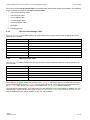
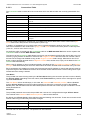
The following specific context menu item is provided:
Context Menu Item
Description
Set to Default
sets the text of the control to “Default”
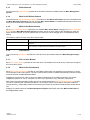
Stop Date
This time picker can be used in order to configure the stop date of the current time period of interest.
Via the context menu, the value of this control can be set to “Default” (context menu item Set to Default). In this
case, the System Log Viewer automatically displays all entries until the end of the currently chosen System
Log File (as long as these entries are not cut out by any of the other filters).
The following specific context menu item is provided:
Context Menu Item
Description
Set to Default
sets the text of the control to “Default”
Enabled Execution IDs
This edit box can be used in order to specify which execution IDs are of interest at the moment. The single execution IDs have to be separated via a semicolon (‘;’) from each other.
Each started Configuration File (e.g. a Main Profile, an Interface Profile, a Device Profile, an Analyzing Model,
an Analyzing Script or a Storage Profile) receives a unique execution ID at the moment when it is being started.
Via the execution ID, the present log entries can be filtered easily so that only the log entries which are related
to the Configuration Files of interest are being displayed.
Via the context menu, the value of this control can be set to “All” (context menu item Enable All). In this case,
the System Log Viewer displays the entries of all execution IDs (as long as they are not cut out by one of the
other filters).
The following specific context menu item is provided:
Context Menu Item
Description
Enable All
sets the text of the control to “All”
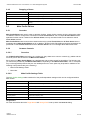
2.4.3
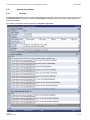
System Log Entries Table
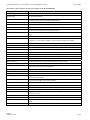
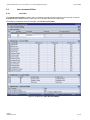
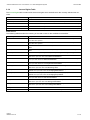
The System Log Entries table contains all of the events which apply to the selected source, System Log File
and filters:
Column
Description
No.
contains the row number
Date and Time
contains the date and time of the entry
Entry
contains the text of the entry
Priority Class
contains the priority class of the entry
Module Name
contains the name of the module which has caused this entry
Target Name
contains the name of the client or server which has caused this entry
Execution ID
contains the execution ID of the entry
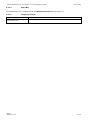
2.4.4
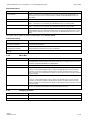
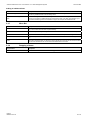
Menu Bar
Menu Button
Description
Apply
This button has to be pressed after any changes within the System Log Settings table in order to
take over the made changes.
Clear Log Entries
This button removes all entries from the System Log Entries table.
Open…
This button opens the Open dialog where the user is able to select the file which shall be opened.
Close
This button closes the viewer.
English
Release 2011-09
23 / 28