1
Getting Started
Getting Started
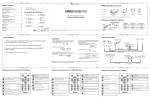
Location of Main Unit Controls
Location of Remote Controls
1
2
3
1
4
2
3
4
10
5
11
6
7
8
12
SOUND
9
CS P K 52ii
1. Remote Control Transmitter
2. STANDBY/ON button
3. MENU button
4. iPod MENU button
5. ENTER button
6. SKIP
button
7. PLAY/PAUSE / button
8. SOUND button
9. VOLUME - button
10.iPod MENU button
11. SKIP button
12.VOLUME + button
Using The Remote Control
FM ANT.
5
1.
2.
3.
4.
5.
6.
7.
POWER ON/OFF/PLAY/PAUSE button
POWER indicator
Universal dock for iPhone/iPod devices
VOLUME -/+ button
FM ANT.
DC IN jack
AUX-IN jack
DC I N 8 .5V
6
AUX I N
7
The 3V CR2032 Lithium battery is already installed in the remote control. Pull
out the small plastic tab as shown in the illustration to begin using the remote
control.
To use the remote control, point the remote control transmitter
toward the remote control receiver on the front panel of the
docking station and press the desired button. The effective
range of the remote control is approximately 20 feet. Please
note that bright sunlight or artificial light may interfere with the
proper operation of the remote control.
Battery Replacement
When the remote operation becomes weak or intermittent, it is
time to replace the remote control battery. Pull out the battery
holder, remove the old battery and install a new 3V CR2032
Lithium battery in the holder as shown in the illustration. Slide the
holder back into the remote control.
Note: If the battery is installed incorrectly
the remote control will not work.
Page 8
Page 9