1
DriveStation Utility Installation
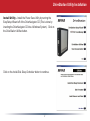
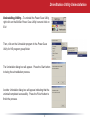
Install Utility – Install the Power Save Utility by running the
EasySetup Wizard off of the DriveNavigator CD (This is done by
inserting the DriveNavigator CD into a Windows System). Click on
the DriveStation Utilities button.
Click on the Install Disk Sleep Scheduler button to continue.