1
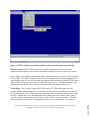
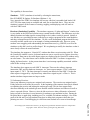
Figure 4. TUTE’s initial screen shown with the serial connection menu items selected.
Window Layout - When TUTE is opened, the window will present the user with a blue
workspace in the upper part of the screen and white workspace in the lower part of the screen.
Figure 4 shows the opening screen with the menu selections necessary to open a serial connection
to the EVBU. The white workspace is divided into 12 separate pages selected using tabs at the
top; the pages allow the user to control the environment and communicate with the EVBU board.
Only 4 of the 12 pages are used and each will be discussed in turn. The blue workspace is the
edit portion of the system with a yellow cursor and red line indicating the end of text.
Text Editing - The first three menus (File Edit Search) of TUTE provide menu items for
creating, editing, and searching files. If more than one file is open, each will have its own tab at
the top of the page. The Cut and Paste menu items under Edit work using stream or block mode
selection. Stream mode is the standard method for selecting text with a mouse where what is
selected represents some portion of the stream or flow of text as one would read it. The block
mode allows the user to cut out a rectangular block of any size from the text. It is handy for
Page 7.166.7
Proceedings of the 2002 American Society for Engineering Education Annual Conference & Exposition
Copyright Ó 2002, American Society for Engineering Education