1
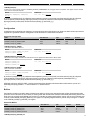
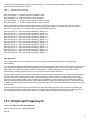
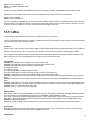
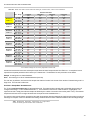
Function dependant on selected feature index.
Names
Addresses
DIO0_EF_VALUE_A, DIO1_EF_VALUE_A,
DIO2_EF_VALUE_A, Show All
44300, 44302, 44304, Show All
DIO#(0:22)_EF_VALUE_B
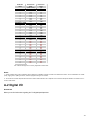
Function dependant on selected feature index.
Names
Addresses
DIO0_EF_VALUE_B, DIO1_EF_VALUE_B,
DIO2_EF_VALUE_B, Show All
44400, 44402, 44404, Show All
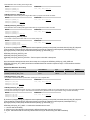
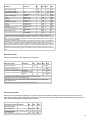
DIO#(0:22)_EF_VALUE_C
Function dependant on selected feature index.
Names
Addresses
DIO0_EF_VALUE_C, DIO1_EF_VALUE_C,
DIO2_EF_VALUE_C, Show All
44500, 44502, 44504, Show All
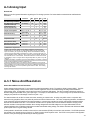
DIO#(0:22)_EF_VALUE_D
Function dependant on selected feature index.
Names
Addresses
DIO0_EF_VALUE_D, DIO1_EF_VALUE_D,
DIO2_EF_VALUE_D, Show All
44600, 44602, 44604, Show All
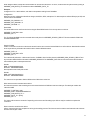
DIO#(0:22)_EF_READ_A
Reads an unsigned integer value. The meaning of the integer is dependant on selected feature index.
Names
Addresses
DIO0_EF_READ_A, DIO1_EF_READ_A,
DIO2_EF_READ_A, Show All
3000, 3002, 3004, Show All
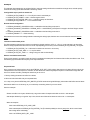
DIO#(0:22)_EF_READ_A_AND_RESET
Reads the same value as DIO#(0:22)_EF_READ_A and forces a reset.
Names
Addresses
DIO0_EF_READ_A_AND_RESET,
DIO1_EF_READ_A_AND_RESET,
DIO2_EF_READ_A_AND_RESET, Show All
3100, 3102, 3104, Show All
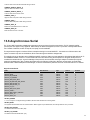
DIO#(0:22)_EF_READ_B
Reads an unsigned integer value. The meaning of the integer is dependant on selected feature index.
Names
Addresses
DIO0_EF_READ_B, DIO1_EF_READ_B,
DIO2_EF_READ_B, Show All
3200, 3202, 3204, Show All
$( document ).ready(function() { $('.collapsed-content-expander').closest('.content').find('.sometimes-shown').hide(); $('.collapsedcontent-expander').click(function(e) { $(e.target).closest('.content').find('.collapsed-content-expander').fadeOut(function () {
$(e.target).closest('.content').find('.sometimes-shown').fadeIn(); }); return false; }); });
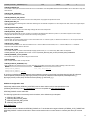
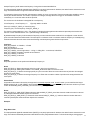
How-To: Use a digital extended feature
1.
2.
3.
4.
5.
6.
Disable features on the DIO using ..._EF_ENABLE
Select a feature, and assign the corresponding type index to ..._EF_INDEX
Write to ..._EF_OPTIONS (if necessary)
Write to ..._EF_VALUE_A, ..._EF_VALUE_B, ..._EF_VALUE_C, ..._EF_VALUE_D (if necessary)
Enable feature on the DIO using ..._EF_ENABLE
Read results using ..._EF_READ_A, ..._EF_READ_B, or ..._EF_READ_A_AND_RESET
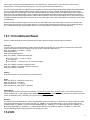
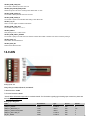
13.1.1 EF Clock Source
The ClockSources produce the reference frequencies used to generate output waveforms and measure input waveforms. ClockSource
settings control output frequency, PWM resolution, maximum measurable period, and measurement resolution.
Clock#Frequency = CoreFrequency / DIO_EF_CLOCK#_DIVISOR
//typically 80M/Divisor
CoreFrequency is always 80 MHz at this time, but in the future some low-power operational modes might result in different core
frequencies. The valid values for DIO_EF_CLOCK#_DIVISOR are 1, 2, 4, 8, 16, 32, 64, or 256, and a value of 0 (default) equates to
38