1
Table of Contents
Characteristic Functions
1
Important Safety Instructions
2
Technical Specifications
5
The Technical Specifications for Final Product
5
Technical Specifications for TV
6
VGA Display Mode
6
Power Management
6
Packing Listing
6
Installation & Connection
7
Antenna Connection
7
Power Connection
8
Computer Connection
8
HDMI digital port Connection
8
AV1 Video Signal Connection
9
AV2 Video Signal Connection
10
YPbPr/YCbCr Input Connection
11
Position of Control Keys
12
Remote Control
13
Basic Operation Instruction
15
Power On
15
Standby
15
Signal Source Selection
15
Menu Operation Instruction
15
PICTURE
16
SOUND
17
OSD
17
ADVANCE
18
TV
18
PIP
21
Simple Troubleshooting
22
Characteristic Functions
1. LCD panel with no glint and low radiation can ease eyes' fatigue and protect
eyes.
2. High-quality LCD panel is adopted with high brightness, high contrast, wide
viewing angle, and super fast response time. Super fast response time can
greatly eliminate the shadow of moving images.
3. TV/Monitor with two in one and multiple input ports can easily switch among the
Modes.
4. De-interlacing image disposal is adopted. Today's most advanced technique for
movement compensation, can completely improve the saw tooth and vague
edges of the athletic picture.
5. There are four smart sound modes and four smart image modes.
6. Dynamic contrast technology can obviously improve the definition and contrast
of the picture
7. Tuner for frequency synthesis can support full auto search and manual search.
8. With perfect timing function, you can set time to turn off. It will be turned off in
state of no signals, too.
9. Auto Adjustment can help you to setup the image into the best performance in a
few seconds instead of complicated adjustment in PC mode.
10. Auto color balance adjustment technology can make the machine to reach the
best color setting in PC mode.
11. Support hi-definitionYPbPr and double HDMI.
12. All functions can be realized with remote control, which is really a convenient
operation.
13. Power is designed to save energy. The standby power consumption is less
than1.5W.
14. Input ports include VGA, YPbPr, HDMI, S-Video, CVBS, USB and TV.
15. Output ports include AV and Earphone.
16. Support USB interface, you can look through picture of JPG format and play
music files of Mp3 format.
17. With PIP function.
1
Important Safety Instructions
Thank you to choose the LCD TV made by our company, a valuable product with
excellent quality and multiple functions. This machine will bring you more
audiovisual enjoyment. Its design can insure user s safety. All machine are strictly
tested before leaving factory. But incorrect use can lead to electric shock or fire. In
order to insure safety and extend its life, please read below regulations carefully
before using it and comply with the following safety instructions.
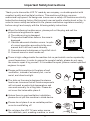
When the following troubles occur, please pull out the plug and call the
professional engineers to repair.
A. The cable or plug is damaged.
B. The product was fallen down or the case is
damaged.
C. Obvious abnormal situation occurs. In spite
of correct operation according to the user
manual but it still can't work normally.
D. Some abnormal substances or liquid fall into it.
E. Unusual sound or smell sends out.
There is high voltage inside the machine but no parts which can be repaired by
users themselves. In order to assure the people's safety, please do not open
the case to repair it by yourself. If it is needed to repair, please contact qualified
engineer to repair.
Please put this machine in the place of well
ventilation, instead of extremely hot, cool or
moist, and direct sunlight.
The slots on the case is designed to release
heat so as to assure that all inside components
will not reach an extra high temperature and
can work normally for a long time. Please do
not cover the holes while place it.
Unless there is good ventilation installation,
please do not put this machine in inlaid device.
Please do not place it on an unstable position
so as to avoid falling off.
Do not place the LCD TV near water source,
like a bathtub, pool, washing machine, or moist
2
Important Safety Instructions
cellar and similar environment.
During a thunder rain weather, do not touch
the power cord and antenna cable. Please
pull out the power line and aerial plugs for
preventing thunder and lightning damage to
this machine.
All cables can be connected or pull out only after power supply is turned off.
The power cord must be taken off before you
clean the machine. Do not use the liquid
cleanser or aerosol cleanser. It is
recommended to use a wet soft cloth to clean
the machine. Do not use the alcohol,
impregnant or ammoniac liquid to wipe the
screen.
If you will not use the machine for a long time, please pull out the power cord.
Do not keep the sleeping mode for too long time.
Read the manual and marking label before using the machine, and keep the
user manual for later use.
Don't use the attachments which are not recommended by the machine
manufacturer as they may cause hazards.
The power cord must be placed correctly so as to avoid be trample or crush.
Please do not make the power socket overloaded or the power cord extended.
Otherwise it will cause fire or electrical shock.
The LCD panel is fragile and expensive. The surface of the panel is easy to be
scratched. Please do not use the hard thing to knock, press, score the panel.
Otherwise it will be harmful for the panel. The exchange cost is very high.
All technical specification on this instruction book and outer package are
subject to change without notice. If the instruction book has slight difference
with actual operation, please take the actual operation as standard.
3
Important Safety Instructions
When the MAINS plug or an appliance coupler is used as the disconnect device,
the disconnect device shall remain readily operable.
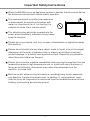
The machine should not suffer from waterdrop
or watersplash, do not place the vessel with
water (or other liquids) on it, for like this it is
possibly to cause fire or electric shock.
The attaching plug should be inserted into the
power point completely, otherwise it may cause
spark to bring fire.
Please do not put candle, ash-tray, incense, inflammables or explosive nearby
this machine.
Please do not stretch into any sharp object, metal or liquid, or touch the signal
attachment or the inner of radiation hole, in order to avoid short circuit and
product damage, or possibly causing electric shock. Especially pay attention
when there are children on the spot.
Please do not use the machine immediately when moving the machine from low
temperature place to high temperature one, or install and use at the place of
facing air conditioning, otherwise it may cause the condensation in the
machine, to cause fault.
Must be careful when moving this machine, avoiding being struck, especially
pay attention to protect the screen part. In addition, if using handcart, must
note the injury as the product is overturned from the handcart because of hard
braking, overexerting and uneven ground.
4
Technical Specifications
The Technical Specifications for Final Product
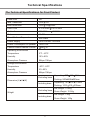
Panel size
32
Max. Resolution
1366
768
Best Resolution
1360
768@60Hz
Pixel Pitch
0.51075mm
Active Area
697.6845mm
Color
16.7M
Panel Surface Disposal
Anti Glare
Power Supply
100V-240VAC 60/50Hz
Power Consumption of Speaker
10W+10W
Control Area of Remote Control
0.51075mm
392.256mm
300
8M
Operating Environment
Temperature
50C ~ 40 0C
Humidity
10%~85%
Atmosphere Pressure
86kpa-104kpa
Storage Environment:
Temperature
-200C ~550C
Humidity
5%~95%
Atmosphere Pressure
86kpa-104kpa
Excluding base
Dimension (L
H
W)
Including base
Unpacking: 787
Packing: 900
494
660
Unpacking: 787
Packing: 1015
200mm
555
610
Net Weight: 10.5Kg
Excluding base
Weight
Gross Weight: 12.5Kg
Net Weight: 12Kg
Including base
5
Gross Weight: 14Kg
101mm
101mm
200mm:
Technical Specifications
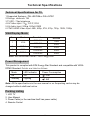
Technical Specifications for TV
1.Supported Systems PAL+SECAM or PAL+NTSC
2.Storage channels: 199
3.TV(RF): 75 Imbalance
4.AV Video-Input: 75 ,1VP-P, RCA
5.AV Audio-Input: 20K , 500mV RMS
6.YPbPr/HDMI Video Input: 480i, 480p, 576i, 576p, 720p, 1080i, 1080p
VGA Display Mode
No.
Mode
Resolution
Refresh
1
VGA
720X400
70Hz
640X480
60Hz
2
SVGA
800X600
60Hz
3
XGA
1024X768
60Hz
4
WXGA
1360X768
60Hz
Note: Recommended mode:1360X768@60Hz
Power Management
This product is complied with EPA Energy Star Standard and compatible with VESA
DPMS Standard. Details are listed as follows:
Mode
LED Indicator
On
Off
170W
Standby
Lighting
1.5W
Power Consumption
Note: All the specifications in the user manual or on the packing carton may be
changed without additional notice.
Packing Listing
1.
2.
3.
4.
LCD TV
User Manual
Power Cable (or the machine itself has power cable)
Remote Control
6
Installation & Connection
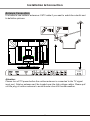
Antenna Connection
It is better to use outdoor antenna or CATV cable if you want to watch the colorful and
hi-definition pictures.
Attention:
Please turn off TV power before the outdoor antenna is connected to the TV signal
input port. Outdoor antenna can't be located near the high voltage cables. Please pull
out the plug of outdoor antenna to avoid thunder shock in thunder weather.
7
Installation & Connection
Power Connection
Notes:
1.This machine uses AC 100-240V, 60/50Hz.
2.If a long time at leisure, please disconnect
it from power supply.
Computer Connection
Please connect one end of VGA cord with the output port of the computer (available
for both desktop or laptop computer), and another end of VGA cord with the input
port of the VGA on its rear cover.
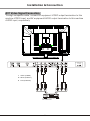
HDMI digital port Connection
Connect external HDMI high signal source to
HDMI digital input port of this machine through
HDMI digital connector cable; push"SOURCE"
button to select "HDMI" signal source.
Audio/Video machine with HDMI interfaces
8
Installation & Connection
AV1 Video Signal Connection
Through composite cable, connect AV equipment VIDEO output termination to this
machine VIDEO input, and AV equipment AUDIO output termination to this machine
AUDIO input, respectively.
Y
Y
W
R
Yellow (VIDEO)
W White (AUDIO-L)
R
Red (AUDIO-R)
CVBS, DVD Player or other machine
with CVBS/S-Video.
9
W
R
Installation & Connection
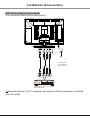
AV2 Video Signal Connection
The connection method is the same as AV1.
R
W
Y
Y Yellow (VIDEO)
W White (AUDIO-L)
R Red (AUDIO-R)
CVBS, DVD Player or other machine
with CVBS/S-Video.
Earphone Socket: The TV speakers will be shut off when earphone is inserted
into this socket.
10
Installation & Connection
YPbPr/YCbCr Input Connection
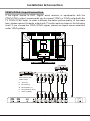
If the signal source is DVD, Digital wired receiver or equipments with the
YPbPr/YCbCr output, recommends you to connect YPbPr or YCbCr output with the
TV YPbPr/YCbCr input. In order to obtains the better picture quality, at the same
time, please connect its audio output with TV audio input as shown in the following
chart. If you choose the YPbPr/YCbCr signal, please set signal source selection
under YPbPr pattern.
AV machine
CVBS, DVD Player or
other machine with
YPbPr/YCbCr.
G
Green (Y)
B
Blue (Pb/Cb)
W
White(AUDIO-L )
R
Red (AUDIO-R, Pr/Cr)
Y
Yellow (VIDEO)
G
B
R
11
W
R
Y
W
R
Position of Control Keys
Front Panel Control Keys
3
4
5
6
7
1 2
1) Power Indicator.
2) Remote Receiving Sensor.
3) SOURCE: Press this key to enter the menu of signal source and choose signal
source.
4) CH+/CH-: Press these two keys to select the channel, and adjust the options you
need under OSD operation.
5) VOL+/VOL-: Press these two keys to add or reduce volume, and adjust the analog
value under OSD operation.
6) MENU: Press this key to enter main menu.
7) Power switch .
Note: There are some apparent differences between modes, please according to
practicality.
12
Remote Control
POWER
MUTE
Power
Mute
Numerical key
F1
Program list
Freeze picture
SMART S
SMART P
Smart sound
Smart image
OK
OK
Cursor Key
Menu
MENU
Volume
VOL
CH
Channel
SOURCE
Source
Info
Time
16:9
INFO
Zoom
Return
COLOR
Color
P/N
AUDIO
Color system
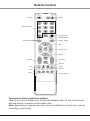
Telecontrol battery installation method
Take off the cover of battery box, fix two AAA batteries with 1.5 volt, and conform
with the polarity of remote control battery box.
Note: Appearance of the remote control may be different from this picture, please
according to practicality.
13
Remote Control
Remote Control Key Instruction
Key
POWER
MUTE
Numerical key
F1
Program list
MENU
SMART S
SMART P
SOURCE
Cursor key
VOL+/VOLCH+/CHINFO
Time
Return
16:9
Color
P/N
AUDIO
OK
Function
Turn on or standby
Eliminate sound
Number input button
Freeze picture
Look through or edit Program list
Press this button to display menu
Intelligent sound mode selection: STANDARD, NEWS, MUSIC, PERSONAL
Intelligent image mode selection: STANDARD, DYNAMIC, SOFT, PERSONAL
Press this button to display signal source selection menu
Up or Down cursor button: function select
Left or right cursor button: analog add or reduce
Sound volume add or reduce button
Select channel Number
System information display switch
Timer setting button, press this key can set time of turning down.
45 60
30
15
120
OFF
Press this button to return to last watching channel
"FULL", "MOVIE", "CAPTION", "4:3", "PANORAMA"
Color temperature mode selection button: Normal, Warm, Cool
Color system mode selection button: PAL, NTSC(SECAM), Auto
Optional
Confirm operation
Precautions for use of remote control:
1. When using remote control you should point it to the remote-control inductive
window. The goods between remote control and inductive window may hinder
normal operation.
2. Do not cause the remote control to receive fierce vibration. In addition, do not
set or place the remote control under direct sunlight, for the thermal energy will
cause the distortion of remote control.
3. When remote-control inductive window of main machine is under direct sunlight
or intense illumination, the remote control may malfunction, by now, please
change the angle of illumination or this machine, or approach the inductive
window to operate the remote control.
4. When the battery voltage is insufficiency it influences the remote control
distance, you should replace with new battery; when not to use the remote
control for long or the battery is exhausted, please take out the battery, in order
to avoid bringing the battery leakage to corrode the remote control and thus
cause it out of commission.
5. Do not use different batteries. The mix use of new and old batteries is not
allowed, you should use battery pair.
6. Do not throw battery into fire, charge or disassembly, especially do not charge,
assemble and disassemble, heat or burn to the used battery. Please observe the
related environmental protection stipulation on wasted battery.
14
Basic Operation Instruction
Power On
Plug power cord into the electrical socket and press '' '' key on the front panel, then
press '' '' key on the remote control to turn on the TV.
Standby
Press ''Power''key on the remote control. TV will be in standby.
Special Attention:
1.TV set will automatically turn to standby if there is no signal input for 5 minutes
when TV turns on.
2.TV set will automatically turn to standby when the preset time of turning off
reaches.
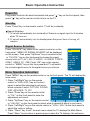
Signal Source Selection
Press ''SOURCE'' key either on the remote control or on the
front panel. ''MENU OF SIGNAL SOURCE'' will be displayed
on the screen. Then press ''Up/Down'' key on remote control
or "CH+/CH-" key on the front panel to choose the signal
source such as TV, AV1, AV2, S-VIDEO1, S-VIDEO2, YPBPR,
HDMI1, HDMI2, PC, USB. Press ''OK'' key on the remote
control or ''MENU" key on the front panel and TV will switch
the current signal source to the signal source you choose.
TV
AV 1
AV 2
S-VIDEO1
S-VIDEO2
YPBPR
HDMI1
HDMI2
PC
USB
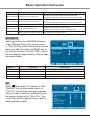
Menu Operation Instruction
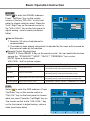
Press ''MENU'' key on the remote control or on the front panel. The TV will display the
main menu.
1. Press ''Left/Right'' key on the remote
control or ''VOL+/VOL-''key on the front
PICTURE
panel to select the adjustment sort menu,
50
CONTRAST
which includes 6 sorts: PICTURE, SOUND,
BRIGHTNESS
50
HUE
50
OSD, ADVANCE, TV, PIP.
S A T U R AT I O N
50
SHARPNESS
50
2. Press ''Down''key on the remote control
PICTURE MODE
STANDARD
SCALE
FULL
or ''CH-'' on the front panel to enter the
COLOR TONE
NORMAL
3D NR
MIDDLE
adjustment sort menu.
SEL
ADJ
MENU E X I T
3. Press ''Up/Down'' key on the remote control
or ''CH+/CH-'' on the front panel to select what is needed to adjust in sort menu.
4. Press ''Left/Right'' key on the remote control or ''VOL+/ VOL-''on the front panel to
adjust the value or setting.
5. Press ''Menu'' key to exit the main menu when the TV displays the Main Menu;
Press ''Menu'' key to return to previous menu when the TV displays the submenu;
15
Basic Operation Instruction
Press ''Source''key to display the signal source menu or exit signal source menu.
6. During the operation, the selections which can not be adjusted at current mode will
be hidden automatically and the color of the selections will be changed into gray.
7. Menu Operation Instruction in this manual is explained according to TV mode. The
operations in other modes are similar to the one in TV mode. Users can take it as
reference.
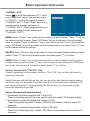
PICTURE
Select
to enter the PICTURE submenu.
Press "Up/Down" key on the remote control or
"CH+/CH-" key on the front panel to choose
what you need. Press the "Left/Right" key on
the remote control or the "VOL+/VOL-" key
on the front panel to adjust analog value or
state (see below table).
PICTURE
CONTRAST
BRIGHTNESS
HUE
S A T U R AT I O N
SHARPNESS
PICTURE MODE
SCALE
COLOR TONE
3D NR
50
50
50
50
50
STANDARD
FULL
NORMAL
MIDDLE
Special Attention
SEL
ADJ
MENU E X I T
1. The Hue function is available only for
NTSC system.
2. The value adjusted by user, such as Contrast, Brightness, Saturation, Hue, and
Sharpness will be saved automatically by the machine as personal mode.
Remote Control Shortcut Keys
SMART P: Press SMART P key on the remote control. You can switch the function
among the "STANDARD", "DYNAMIC", "SOFT", "PERSONAL" four modes .
16:9: Press 16:9 key on the remote control, you can switch the mode among the
"FULL", "MOVIE", "CAPTION", "4:3", "PANORAMA" five modes.
Option
CONTRAST
BRIGHTNESS
HUE
SATURATION
SHARPNESS
Description
Function
Adjust the contrast of whole
picture
Adjust brightness and blackness
of whole picture
Adjust the hue of whole picture
Adjust the saturation of whole
picture
Adjust the sharpness of whole
picture
PICTURE MODE Select picture mode
Increasing analog value increases Contrast;
Decreasing analog value decreases Contrast(0-100).
Increasing analog value increases brightness;
Decreasing analog value decreases brightness(0-100).
Increasing analog value increases green;
Decreasing analog value increases purple(0-100).
Increasing analog value increases color;
Decreasing analog value decreases color (0-100).
Increasing analog value increases definition;
Decreasing analog value decreases definition (0-100).
"STANDARD", "DYNAMIC", "SOFT", "PERSONAL" four modes.
SCALE
Select picture scale
"FULL", "MOVIE", "CAPTION", "4:3", "PANORAMA",
COLOR TONE
Select color temperature mode
of the picture
3D NR
Select model of 3D NR
There are three Color Temperature modes,
"NORMAL", "WARM", "COOL ".
"MIDDLE", "STRONG", "WEAK", "OFF".
16
Basic Operation Instruction
SOUND
Select
to enter the SOUND submenu.
Press " Up/Down " key on the remote
control or the key "CH+/CH-" on the front
panel to choose what you need. Press the
"Left / Right" key on the remote control or
the "VOL+/VOL-" key on the front panel to
adjust analog value or state (see below
table).
SOUND
50
50
50
BASS
TREBLE
BALANCE
SOUND MODE
STANDARD
SEL
ADJ
MENU
EXIT
Special Attention
1. Normally, 50 value of adjustment is
recommended;
2. The treble or bass analog value which is adjusted by the users will be saved as
the personal mode by the machine
Remote Control Shortcut Keys
SMART S: Press SMART S key on the remote control. You can switch the function
among the , "STANDARD","NEWS", "MUSIC", "PERSONAL" four modes.
MUTE: Open or close sound.
VOL+/VOL-: Add or reduce volume.
Option
Function
Description
BASS
Adjust bass value
Increasing analog value increases bass;
Decreasing analog value decreases bass (0-100).
TREBLE
Adjust treble value
Increasing analog value increases treble;
Decreasing analog value decreases treble (0-100).
BALANCE
Adjust balance of left or right sound
Increasing analog value decreasing left volume;
Decreasing analog value decreases right volume(0-100).
SOUND MODE
Adjust audio effect mode
"STANDARD", "NEWS", "MUSIC", "PERSONAL" four modes.
OSD
Select
to enter the OSD submenu. Press
"Up/Down" key on the remote control or
"CH+/CH-" key on the front panel to choose
what you need. Press the "Left/Right" key on
the remote control or the "VOL+/VOL-" key
on the front panel to adjust analog value or
state (see below table).
OSD
OSD
OSD
OSD
OSD
OSD
SEL
17
50
50
15
100
- H POSITION
- V POSITION
- DURATION
- HALFTONE
- LANGUAGE
ENGLISH
ADJ
MENU
EXIT
Basic Operation Instruction
Option
Function
OSD-H POSITION Adjust H-position of OSD menu
OSD-V POSITION Adjust V-position of OSD menu
OSD-DURATION
Adjust duration of OSD menu
OSD-HALFTONE
Adjust halftone of OSD menu
Description
Increasing analog value, OSD menu move toward right;
Decreasing analog value, OSD menu move toward left (0-100).
Increasing analog value, OSD menu move toward down;
Decreasing analog value, OSD menu move toward up(0-100).
Increasing analog value, extend duration time of OSD menu(5-60).
Increasing analog value increases halftone;
Decreasing analog value decreases halftone(0-100).
OSD LANGUAGE Choose OSD menu display language There are many languages to select
ADVANCE
Select
to enter the ADVANCE submenu.
Press "Up/Down"key on the remote control
or "CH+/CH-"key on the front panel to choose
what you need. Press the "Left/Right" key on
the remote control or the"VOL+/VOL-" key on
the front panel to adjust analog value or state
(see below table).
ADVANCE
SLEEP - TIMER
DCC
BLUE SCREEN
RESETTING
SEL
Option
Function
OFF
OFF
ON
ADJ
MENU
EXIT
Description
SLEEP - TIMER
Set sleep time of the machine
" Off, 15M, 30M, 45M, 60M, 120M ", unit: minute.
DCC
Open or close DCC
"ON/OFF", two states.
BLUE SCREEN
Open or close BLUE SCREEN
"ON/OFF", two states.
RESETTING
Resume to setting of factory
Reset all values to setting of factory.
TV
Select
to enter the TV submenu. Press
"Up/Down" key on the remote control or
"CH+/CH-" key on the front panel to choose
what you need. Press the "Left/Right"key on
the remote control or the "VOL+/VOL-" key
on the front panel to adjust analog value or
state (see below table).
T V
SEL
18
AUTO
M
MONO
OFF
COLOR SYSTEM
SOUND SYSTEM
MTS
SKIP
AUTO SCAN
MANUAL SEARCH
FINE TUNING
CHANNEL EDIT
ADJ
MENU
EXIT
Basic Operation Instruction
Option
Function
Description
COLOR SYSTEM
Select color system
"PAL, NTSC, AUTO" three modes.
SOUND SYSTEM
Select sound system
"I, D/K, M, AUTO, B/G" five modes.
MTS
Select MTS modes
"STEREO, MONO, DUAL , DUAL
SKIP
Select skip or not
"ON/OFF" two states.
AUTO SCAN
Select auto scan
Please refer to "AUTO SCAN"
MANUAL SEARCH
Select manul search
Please refer to " MANUAL SEARCH"
FINE TUNING
Select fine tuning
Please refer to " FINE TUNING"
CHANNEL EDIT
Select channel edit
Please refer to " CHANNEL EDIT"
" four modes.
AUTO SCAN
Select
to enter the submenu of TV. Then
CH
5 3 . 0 0 MHZ
2
press ''Up/Down'' key on the remote control
or ''CH+/CH-'' on the front panel to select
''AUTO SCAN''. The machine perform search after pressing ''Right ''key on the
remote control or ''VOL+''on the front panel. (In the process of searching the channel
automatically, press the key of ''MENU'' on the remote control to stop searching).
Meanwhile, it will show Current Channel, Frequency. All of the TV programs will be
saved automatically.
MANUAL SEARCH
2
CHANNEL
Select
to enter the submenu of TV. Then
4 5 . 2 5 MHZ
SEARCH
press ''Up/Down'' key on the remote control
or ''CH+/ CH-''on the front panel to select ''MANUAL SEARCH''. Then press the key
of ''Right'' on the remote control or ''VOL+'' on the front panel to enter submenu of
MANUAL SEARCH. Press ''Left/Right'' key on the remote control or ''VOL+/VOL-'' on
the front panel to select channel No.. Press ''Up/Down'' key on the remote control to
select ''SEARCH '', press ''Left/Right'' key on the remote control again, the machine
begin searching toward low frequency or high frequency. (In the process of searching
the channel automatically, press the key of ''MENU'' on the remote control to stop
searching).
FINE TUNING
Select
to enter the submenu of TV. Then
FINE TUNING
5 5 . 2 5 MHZ
press ''Up /Down'' key on the remote control
or ''CH+/ CH-'' on the front panel to select ''FINE TUNING''. Press ''Right'' key on the
remote control to enter submenu of ''FINE TUNING''. Press ''Left/Right'' key on the
remote control to adjust from low frequency or high frequency.
19
Basic Operation Instruction
CHANNEL EDIT
Select
to enter the submenu of TV. Then
press ''Up/Down'' key on the remote control
or ''CH+/CH-'' on the front panel to select
''CHANNEL EDIT''. Press ''Right'' key on the
remote control to enter submenu of
''CHANNEL EDIT'' (Press program list key on
the remote control to enter submenu of
''CHANNEL EDIT'').
0
0
0
0
0
0
0
0
0
0
0
0
0
0
0
0
0
0
0
1
1
2
3
4
5
6
7
8
9
0
1 NAME
0
0
0
0
0
0
0
0
0
0
1
1
1
1
1
1
1
1
1
2
2 DELETE
1
2
3
4
5
6
7
8
9
0
0
0
0
0
0
0
0
0
0
0
3 SWAP
2
2
2
2
2
2
2
2
2
3
1
2
3
4
5
6
7
8
9
0
MENU E X I T
NAME: Press ''Cursor'' key on the remote control to select channel. Press ''1'' key on
the remote control to name. Press ''UP/Down'' key on the remote Control to select
letter or number. Press ''Left/Right '' key on the remote control to move digit and then
press ''UP/Down'' key on the remote control to select letter or number. Press ''1'' key
on the remote control to confirm.
DELETE: Press ''Cursor'' key on the remote control to select channel which you wish
delete. Press ''2'' key on the remote control, and then press ''1'' to confirm.
SWAP: Press ''Cursor'' key on the remote control to select channel which you wish
change name's position, press ''3'' key on the remote control, then press ''UP/Down''
key on the remote control to select channel, press ''1'' to confirm.
Select Channels with "CH+/CH-" Key
Press Program key on the remote control or "CH+/ CH-" key on the front panel to
select the channels.
Select channels with the Return key you can go to the last channel when pressing
the Return key. For example, if the last channel is 10 and the current channel is 20,
you will go to channel 10 when pressing the Return key. You can switch the two
favourite channels as you like.
Select Channels with Numeric Keys
1. Operations to select channels with 1 digit (0-9):
Press the number keys (0-9)on the remote control to select TV channel directly.
2. Operations to select channels with 2 digits (10-99):
Press the number keys with 2 digits (10-99) on the remote control to select TV
channels.
3. Operations to select channels with 3 digits (100-199):
Press the number keys with 3 digits (100-199) on the remote control to select TV
channels.
20
Basic Operation Instruction
PIP
Select
to enter the PIP submenu. Press
"Up/Down" key on the remote control or
"CH+/CH-" key on the front panel to choose
what you need. Press the "Left/Right"key on
the remote control or the "VOL+/VOL-" key
on the front panel to adjust analog value or
state (see below table).
PIP
MULTI WINDOW
SUB SOURCE
SIZE
PIP-POSITION
BORDER COLOR
SOUND SOURCE
SWAP WINDOWS
ADJ
SEL
Option
Function
POP FULL
PC
SMALL
BOTTOM L
RED
MAIN
MENU
EXIT
Description
MULTI WINDOW
Select PIP modes
"PIP, POP FULL, POP 4:3, OFF" four modes.
SUB SOURCE
Select sub source
There are many signal sources which you can select.
SIZE
Select sub source picture size
"LARGE, SMALL, MID" three modes.
PIP-POSITION
Select PIP position
"TOP L, TOP R, BOTTOM L, BOTTOM R" four modes.
BORDER COLOR
Select PIP border color
"RED, BLUE" two colors.
SOUND SOURCE
Switch sound of the signal source
"MAIN, SUB" two sources.
SWAP WINDOWS
Swap windows of the signal source
Note: PIP function only can be operated when the MULTI WINDOW is on PIP mode
Note : With the mode of AV1, AV2, S-VIDEO1, S-VIDEO2, YPBPR, HDMI1,
HDMI2, PC all functions and adjustments are similar with TV. User can
check it at convenience. HDMI connector can realize DVI connector
function with external HDMI/DVI commutator.
USB signal source operation
please insert USB memory card into USB interface of TV, press "source" key on the
remote control or front panel to select USB signal source (if you don't insert the USB
memory card into USB interface of TV, operation is invalid), press "OK" key to enter.
Note: The USB interface only support mobile U disk, can't connect mobile hard disk,
also can't connect to the computer USB interface. Some mobile U disk may not be
compatible, please replace the mobile U disk.
21
Simple Troubleshooting
Factor
Solution
Snowflake speckle and
sound noise.
1.Antenna cable connector is loose,
cable is damaged.
2.Channel setting is incorrect.
3.Antenna cable type is not matching.
4.Direction or position of antenna
cable is incorrect.
5.Signal is weak.
1.Check the antenna cable connector plug whether or
not loose, cable whether or not perfect.
2.Refer to channel setting method, resetting again.
3.Check antenna cable type(VHF/UHF)
4.Adjust direction or position of antenna cable .
5.Attempt to use signal amplifier.
TV image is better, but has
noise.
TV system setting is incorrect.
Enter to "TV" menu, reset sound system again .
No image. No sound.
Power plug is loose, power cord
don't connect well.
1.Check power cord whether or not connect well.
2.Check if " " on the front panel is on.
3.Press " " on the remote control.
Symptom
TV image have stripe.
TV image have shadow.
No color.
Signal is exposed to disturb,
such as car, neon light, electric
blower etc.
1.TV signal is reflected by valley
or building.
2.Toward direction of antenna
cable is incorrect.
1.Color saturation is too low.
2.Color system is incorrect .
Don't use electric blower around machine, adjust
antenna cable direction to reduce disturb.
1.Use high directional antenna cable. Use FINE
TUNING of "TV".
2.Adjust toward direction of antenna cable.
1.Enter "PICTURE" to add up color saturation.
2.Enter "TV" to change color system.
TV no sound.
1.Volume setting is too low.
2.Sound is muted.
3.Sound system is incorrect.
1.Adjust volume to proper value.
2.Press "MUTE" button on remote control to
eliminate mute.
3.Enter "TV" to change sound system.
Computer no display,and
prompt no signal input,red
indicator LED twinkling.
Signal cable is loose or fall off.
Check signal cable whether or not loose, fall off,
reconnect well again.
Remote control distance is
short, lose control.
1.Receive window of remote
continue was covered by
objects.
2.The battery energy of remote
control is to low.
1.Remove objects, avoiding cover the receive
window of remote control.
2.Change battery.
Computer display faintly.
1.Adjustment is incorrect.
2.Display mode is incorrect.
1.Use auto-adjustment function.
2.Use commend mode.
Computer display image
excursion, not full screen,
over screen.
1.Adjustment is incorrect.
2.Display mode is incorrect.
1.Use auto-adjustment function.
2.Enter "GEOMETRY" to adjust horizontal or
vertical position.
3.Use recommended mode.
Noise Signals at turning off. Electrical release at turning off.
Can not operate this
machine.
Exterior influence, for example
lightning, static electricity and so
on, which are possibly to disturb
the normal operation of this
machine.
It is normal.
Press " " button to turn off electrical source,
then press " " button to turn on the TV again
after 1-2 minutes.
CAUTION: Don't let your machine display the same picture for a long time, please set up a screen protection
procedure. If a high contrast picture remains for along time, this picture will bring a 'leave shadow' in screen.
Usually the 'leave shadow' will disappear gradually when you turn off the machine power. However, this trouble
can't be repaired, Which isn't in range of warranty.
22