1
Optelec
-
Compact 5 HD
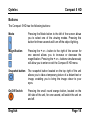
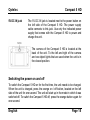
Use the magnification buttons located to the right side of the screen to
change the magnification of the displayed image.
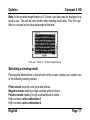
Press the Mode button to change the viewing mode.
Press the snapshot button again to unfreeze the image. It is now
possible to take a new snapshot.
Note: if the snapshot button is released prior to giving the two beeps, no
snapshot will be taken and the Compact 5 HD will revert back to its original
magnification level and viewing mode (those that were set before the snapshot
button was pressed).
English
Page 19