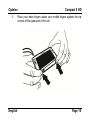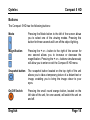
1
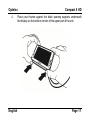
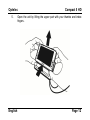
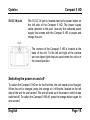
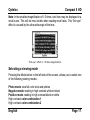
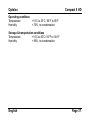
Optelec Compact 5 HD WEEE Notice The directive on Waste Electrical and Electronic Equipment (WEEE), w hich entered into force as European law on 13th February 2003, resulted in a major change in the treatment of electrical equipment at end-of-life. The purpose of this Directive is, as a first pr iority, the prevention of WEEE, and in addition, to promote the reuse, recycling and other for ms of recovery of such w astes so as to reduce disposal. The WEEE logo (show n at the left) on the product or its box indicates that this product must not be disposed of or dumped w ith your other household w aste. You are liable to dispose of all your electronic or electrical w aste equipment by r eloc ating over to the s pecified collection point for recycling of such hazardous w aste. Isolated collection and proper recovery of your electronic and electrical w aste equipment at the time of disposal w ill allow us to help conserving natural resources. Moreover, proper recycling of the electronic and electr ical w aste equipment w ill ensure safety of human health and environment. For more infor mation about electronic and electrical w aste equipment disposal, rec overy, and collection points, please contact your local city centre, household w aste disposal service, shop from w here you purchased the equipment, or manufacturer of the equipment. English Page 1 Optelec Compact 5 HD Compact 5 HD User Manual OPN: UDC-02101 Version 1.2 © 2011 Optelec, the Netherlands All rights reserved Optelec P.O. Box 399 2990 AJ Barendrecht The Netherlands Phone: +31 (0)88 678 34 44 E-mail: [email protected] Internet: www.optelec.com English Page 2 Optelec Compact 5 HD Contents 1. Introduction About this manual What‟s in the box? 2. Getting started Using the Compact 5 HD in the closed or open position Cleaning the camera lens and mirror Buttons Switching the power on and off Adjusting the magnification Selecting a viewing mode Using the snapshot button 3. Charging the battery Charging the Compact 5 HD Standby and Auto Power Off Battery warning 4. The Compact 5 HD Menu Activating the menu Navigating the menu Exiting the menu Menu: Information English 5 6 6 7 7 13 14 15 16 17 18 20 20 21 21 22 23 23 23 24 Page 3 Optelec Menu: Brightness Menu: Power Menu: Sound Menu: Light Menu: Color Menu: Reset Appendix A: Safety Appendix B: Technical information Appendix C: Warranty Conditions English Compact 5 HD 25 26 31 32 33 34 35 36 38 Page 4 Optelec Compact 5 HD 1. Introduction Congratulations on choosing the Compact 5 HD! Optelec‟s unique auto focus electronic video magnifier enables you to view and magnify printed text and images in high resolution HD quality in full color or one of the high contrast modes. The Compact 5 HD 5-inch display, combined with its low magnification of 1.5 times, gives you maximum overview, while providing up to 18 times magnification for those who need a higher zoom level. With its multifunctional design, unique lighting concept, distance view and integrated reading stand, the Compact 5 HD can be used for reading, viewing images, price tags, displays and much more while at home or on the go. English Page 5 Optelec Compact 5 HD If you have questions or suggestions concerning the use of this product, please contact your distributor or the Optelec headquarters using the contact information on the last page of this manual. Your feedback is greatly appreciated. We hope you enjoy working with your Compact 5 HD! About this manual This manual will familiarize you with the features and basic operation of the Compact 5 HD. Please read this manual carefully before using your device. What’s in the box? The Compact 5 HD packaging contains the following: The Compact 5 HD video magnifier A protective pouch A power supply 4 country specific power plugs (EU, US, UK and AU), of which one is already mounted onto the power supply A screen cleaning cloth A user manual If any items are missing from your package, please contact your distributor. English Page 6 Optelec Compact 5 HD 2. Getting started The Compact 5 HD is placed correctly in front of you when the screen is facing up and the Optelec logo is in the centre at the bottom of the screen. Compact 5 HD closed Compact 5 HD open Using the Compact 5 HD in the closed or open position The Compact 5 HD can be used in two ways: in the closed and in the open position. In the closed position, hold the unit in your hand and point the camera (located at the back of the unit) to the object or text you wish to view or read. English Page 7 Optelec Compact 5 HD The closed position is ideal for distance viewing and to quickly scan and view objects or documents. In the open position, the screen will be set in an ergonomic angle for reading and the camera will point downwards. The open position enables you to read longer texts, thanks to the integrated reading stand. To open the unit, follow these steps: 1. English To use the Compact 5 HD in the open position, place the wrist strap around your right wrist and set the unit on a flat surface, such as a desk. Page 8 Optelec 2. English Compact 5 HD Place your middle fingers against the black opening support located on the top corners of the lower part of the unit. Page 9 Optelec 3. English Compact 5 HD Place your index fingers above your middle fingers against the top corners of the upper part of the unit. Page 10 Optelec 4. English Compact 5 HD Place your thumbs against the black opening supports underneath the display on the bottom corners of the upper part of the unit. Page 11 Optelec 5. English Compact 5 HD Open the unit by lifting the upper part with your thumbs and index fingers. Page 12 Optelec Compact 5 HD Cleaning the camera lens and mirror For an optimal quality image, it is recommended to ensure that the camera lens and object light mirror are kept clean. A dirty lens will result in a fuzzy image and may cause the auto focus camera to incorrectly focus. A clean object light mirror is important for preventing dark or light spots and to ensure an equally lighted image. To clean the camera lens and mirror, use the included cleaning cloth or another soft lens cleaning cloth. Note: Do not use water or a cleaning agent to clean the lens and mirror. English Page 13 Optelec Compact 5 HD Buttons The Compact 5 HD has the following buttons: Mode Pressing the Mode button to the left of the screen allows you to select one of the viewing modes. Pressing this button for three seconds will turn off the object lighting. Magnification Pressing the + or – button to the right of the screen for one second allows you to increase or decrease the magnification. Pressing the + or – buttons simultaneously will allow you to enter or exit the Compact 5 HD menu. Snapshot button The snapshot button located on the top right of the unit allows you to take a temporary picture of a distant text or image, enabling you to bring the image closer to your eyes. On/Off Switch Pressing the small round orange button, located on the left side of the unit, for one second, will switch the unit on and off. English Page 14 Optelec 5V DC IN jack Compact 5 HD The 5V DC IN jack is located next to the power button on the left side of the Compact 5 HD. The power supply cable connects to this jack. Use only the indicated power supply that comes with the Compact 5 HD to power and charge the unit. The camera of the Compact 5 HD is located at the back of the unit. To the left and right of the camera are two object lights that are used when the unit is in the closed position. Switching the power on and off To switch the Compact 5 HD on for the first time, the unit needs to be charged. When the unit is charged, press the orange on / off button, located on the left side of the unit for one second. The unit will start up in the mode in which it was switched off. To switch the Compact 5 HD off, press the orange button again for one second. English Page 15 Optelec Compact 5 HD When switching the Compact 5 HD on, it will take approximately 3 seconds before an image is displayed on the screen. The unit can also be switched on by opening the unit as described earlier (this is a default setting). Closing the unit will not automatically turn it off. To do this, the on / off switch needs to be pressed for one second or the „turn off on closing‟ function needs to be enabled in the menu. These default settings can be enabled or disabled in the Compact 5 HD menu. Please refer to chapter 4 for more information on how to change these settings. Adjusting the magnification To change the magnification settings of the unit, simply press the + or – buttons located on the right side of the screen. Press the + button to increase or the – button to decrease the magnification. In the open position when placed on a document, the magnification range starts at 1.5 times magnification and can be increased to 18 times magnification. The Compact 5 HD is equipped with an auto-focus camera. This allows you to use the unit while holding it in your hands in the closed position. This will provide you with more overview, but will decrease the minimum and maximum magnification. English Page 16 Optelec Compact 5 HD Note: in the smallest magnification of 1.5 times, text lines may be displayed in a small curve. This will be most visible when reading small texts. This “fish eye” effect is caused by the ultra wide angle of the lens. “Fish-eye” effect in 1.5 times magnification Selecting a viewing mode Pressing the Mode button to the left side of the screen, allows you to select one of the following viewing modes: Photo mode: view full color texts and photos Negative mode: reading in high contrast white on black Positive mode: reading in high contrast black on white High contrast color combination 1 High contrast color combination 2 English Page 17 Optelec Compact 5 HD Pressing the Mode button for 3 seconds will toggle the object lighting on or off. Switching modes will automatically turn the object lighting back on. Using the snapshot button The snapshot button allows you to take a temporary picture of a text or an image. - Hold or place the Compact 5 HD over the text or image you wish to display. - Press and hold the snapshot button located on the top right side of the unit. o You will hear a beep when pressing the snapshot button. o Keep the snapshot button pressed. o The Compact 5 HD will zoom out, focus, take a snapshot and give two beeps. o Release the snapshot button. o The Compact 5 HD will zoom back to the original position and zoom level. - The image will be temporarily stored inside the Compact 5 HD memory. Bringing the Compact 5 HD closer to your eyes will enable you to view the object or text closely. English Page 18 Optelec - Compact 5 HD Use the magnification buttons located to the right side of the screen to change the magnification of the displayed image. Press the Mode button to change the viewing mode. Press the snapshot button again to unfreeze the image. It is now possible to take a new snapshot. Note: if the snapshot button is released prior to giving the two beeps, no snapshot will be taken and the Compact 5 HD will revert back to its original magnification level and viewing mode (those that were set before the snapshot button was pressed). English Page 19 Optelec Compact 5 HD 3. Charging the battery Charging the Compact 5 HD The Compact 5 HD is delivered with a power supply and four country-specific power plugs, of which one is already mounted to the power supply. The power plugs are available in EU, US, UK and AU versions. Select the power plug appropriate to your country and mount this onto the power supply. To charge the Compact 5 HD, connect the power supply to the 5V DC IN jack, located at the left side of the unit. Plug the other side of the power supply into a power outlet. The orange LED indicator next to the 5V DC IN jack will glow continuously while the Compact 5 HD is charging. When the unit is fully charged, the LED indicator will turn green. If the LED indicator flashes, there is a charging problem. In this case, disconnect the power supply and try again. Charging the Compact 5 HD takes approximately 3,5 hours. A fully charged Compact 5 HD can operate for an average time of 3 hours, depending on the power settings. Please note that, for safety reasons, only the power supply that was delivered with the Compact 5 HD can be used to charge the unit‟s battery. English Page 20 Optelec Compact 5 HD Standby and Auto Power Off The Compact 5 HD will automatically go into standby mode after two minutes if no button is pressed or image change is detected. Pressing any button will wake the unit up again. Four minutes after the Compact 5 HD goes into standby mode, the unit will automatically switch off. Pressing the orange button on the right side of the unit will switch it back on again. The standby time and power off time can be changed or disabled in the Compact 5 HD menu. Please refer to the next chapter on how to change these settings. Battery warning When the battery charge is below 5% of its total capacity, a battery warning will be issued every minute by displaying the battery empty icon for 2 seconds and sounding a beep. When this occurs, be sure to charge your unit as soon as possible. When the battery is empty, the unit will automatically switch off. If a unit does not turn on, please make sure it is charged. English Page 21 Optelec Compact 5 HD 4. The Compact 5 HD Menu Shows the battery status and firmware version. Allows you to adjust the screen brightness. q Allows you to configure the power settings. Allows you to switch the sound on or off. Allows you to enable or disable the object lighting settings. Allows you change the colors of the 4 high contrast modes. Allows you to reset all factory settings to default. English Page 22 Optelec Compact 5 HD Activating the menu To enter the menu, press the + and – buttons simultaneously for one second. Navigating the menu Use the + or – buttons to navigate between the menu items. The Mode button located to the left of the screen will activate the chosen menu item or confirm the selection. To change a selection, use the + or – buttons. Exiting the menu To exit the menu, press the + and – buttons simultaneously for one second. English Page 23 Optelec Compact 5 HD Menu: Information This menu item shows the battery status and the current firmware version of the unit. In this menu, it is not possible to make any changes. - Activate the menu by pressing the + and – buttons simultaneously for one second. The first option in the menu is Information. To exit the menu, press the Mode button or the + and – buttons simultaneously for one second. English Page 24 Optelec Compact 5 HD Menu: Brightness This menu item allows you to adjust the brightness of the display. - Activate the menu by pressing the + and – buttons simultaneously for one second. Use the + button to move up and the – button to move down within the menu. Select the menu option Brightness and activate this menu by pressing the Mode button. Select the brightness level by using the + button to increase and the – button to decrease the brightness level. There are 5 brightness levels to choose from. The default brightness level is 5. Press the Mode button to confirm your choice and exit the menu. English Page 25 Optelec Compact 5 HD Menu: Power This menu item contains four sub-menu‟s: Power off Sets the time before the Compact 5 HD is automatically switched off. By default, the power off time is set to 4 minutes. These 4 minutes are activated after the default standby time of 2 minutes. By default, the unit is therefore automatically switched off after 6 minutes. Standby Sets the time before the Compact 5 HD goes into standby mode to conserve power. Pressing any button will take the unit out of standby mode. By default, the standby time is set to 2 minutes. power off standby English Page 26 Optelec Compact 5 HD Open Enables or disables automatic power on upon opening the Compact 5 HD. By default, the Compact 5 HD will power on upon opening the unit. Close Enables or disables automatic power off upon closing the Compact 5 HD. By default, the Compact 5 HD will not power off upon closing the unit. open close English Page 27 Optelec Compact 5 HD Sub-menu Power off To activate the Compact 5 HD power off time: - Activate the menu by pressing the + and – buttons simultaneously for one second. - Use the + button to move up and the – button to move down within the menu. Select the menu option Power and activate this menu by pressing the Mode button. - Select the Power off option by using the + and – buttons to scroll through the options. Press the Mode button to confirm your choice. - Select the time before the unit will power off by using the + button to increase and the – button to decrease the time. Press the Mode button to confirm your choice. Selecting NO ACTION will disable the automatic power off function. - Press the Mode button to confirm your choice and exit the menu. Sub-menu Standby By default, the standby time is set to 2 minutes. To adjust the standby time of the Compact 5 HD: - Activate the menu by pressing the + and – buttons simultaneously for one second. - Use the + button to move up and the – button to move down within the menu. Select the menu option Power and activate this menu by pressing the Mode button. English Page 28 Optelec - - Compact 5 HD Select the Standby option by using the + and – buttons to scroll through the options. Press the Mode button to confirm your choice. Select the time before the unit will go into standby by using the + button to increase and the – button to decrease the time. Press the Mode button to confirm your choice. Selecting NO ACTION will disable the automatic standby function. Press the Mode button to confirm your choice and exit the menu. Sub-menu Open To enable or disable the power on upon opening the Compact 5 HD: - Activate the menu by pressing the + and – buttons simultaneously for one second. - Use the + button to move up and the – button to move down within the menu. Select the menu option Power and activate this menu by pressing the Mode button. - Select the Open option by using the + and – buttons to scroll through the options. Press the Mode button to confirm your choice. - To enable the power on function upon opening the unit, select the value ENABLE by using the + and – buttons. Press the Mode button to confirm your choice. Selecting NO ACTION will disable the power on function upon opening. - Press the Mode button to confirm your choice and exit the menu. English Page 29 Optelec Compact 5 HD Sub-menu Close To enable or disable the power off upon closing the Compact 5 HD: - Activate the menu by pressing the + and – buttons simultaneously for one second. - Use the + button to move up and the – button to move down within the menu. Select the menu option Power and activate this menu by pressing the Mode button. - Select the Close option by using the + and – buttons to scroll through the options. Press the Mode button to confirm your choice. - To enable the power off function upon closing the unit, select the value POWER OFF by using the + and – buttons. Press the Mode button to confirm your choice. Selecting NO ACTION will disable the power off function upon closing. - Press the Mode button to confirm your choice and exit the menu. English Page 30 Optelec Compact 5 HD Menu: Sound This menu item allows you to enable or disable the sounds (feedback tones). By default, the tones are enabled. - Activate the menu by pressing the + and – buttons simultaneously for one second. Use the + button to move up and the – button to move down within the menu. Select the menu option Sound and activate this menu by pressing the Mode button. To enable the sounds, select the value ON by using the + and – buttons. Press the Mode button to confirm your choice. Selecting OFF will disable the sounds. Press the Mode button to confirm your choice and exit the menu. English Page 31 Optelec Compact 5 HD Menu: Light This menu item allows you to enable or disable the object lights - located to the left and right of the camera - for distant viewing. By default, the object lights are enabled. - Activate the menu by pressing the + and – buttons simultaneously for one second. Use the + button to move up and the – button to move down within the menu. Select the menu option Light and activate this menu by pressing the Mode button. To enable the object lights, select the value ON by using the + and – buttons. Press the Mode button to confirm your choice. Selecting OFF will disable the object lights. Press the Mode button to confirm your choice and exit the menu. English Page 32 Optelec Compact 5 HD Menu: Color The Compact 5 HD supports four high contrast modes. For each of these four modes, the foreground and background colors can be selected. Three of the high contrast modes can be disabled if just one high contrast mode is required. - - Activate the menu by pressing the + and – buttons simultaneously. Use the + button to move up and the – button to move down within the menu. Select the menu option Color and activate this menu by pressing the Mode button. Select the high contrast mode with the + button to move up and the – button to move down in the submenu Color. Press the Mode button to confirm your choice. To select a new high contrast color for the foreground and background, use the + button to move up and the – button to move down in the list of color combinations. Select a color combination by pressing the Mode button. High contrast modes 2, 3 and 4 can be disabled by selecting the OFF value. Press the Mode button to confirm your choice and exit the menu. English Page 33 Optelec Compact 5 HD Menu: Reset The Compact 5 HD can be reset to the factory default settings. Any settings that have been adjusted, will be restored to the factory defaults. - Activate the menu by pressing the + and – buttons simultaneously for one second. Use the + button to move up and the – button to move down within the menu. Select the menu option Reset and activate this menu by pressing the Mode button. To restore the factory defaults, select YES by using the + and – buttons. Choosing NO will leave all settings as they were. Press the Mode button to confirm your choice and exit the menu. English Page 34 Optelec Compact 5 HD Appendix A: Safety Do not expose the Compact 5 HD to excessive heat or direct sunlight to avoid the risk of fire. Do not remove any parts of the Compact 5 HD. Contact an Optelec authorized service organisation in your area. To avoid risk of electrical damage, keep your Compact 5 HD away from fluids and chemicals. Handle the Compact 5 HD with care. Rough handling will damage the internal components. Do not use the Compact 5 HD near inadequately shielded medical devices. Do not try to open the battery compartment or try to remove the battery. Contact your dealer to service this equipment if necessary. Do not disassemble your unit as it will void the warranty. Always unplug the system before cleaning. Use a soft damp cloth to clean the exterior. Do not use cleaning agents or abrasive materials as they will damage your unit. Use of the Compact 5 HD other than described in this manual will exclude it from warranty conditions. English Page 35 Optelec Compact 5 HD Appendix B: Technical information Magnification Viewing modes 1.5x - 18x Full color photo mode High contrast white on black High contrast black on white High contrast color combination 1 High contrast color combination 2 Focus Auto-focus High contrast ratio 500:1 High brightness screen 350 cd/m2 Screen 5” TFT Screen resolution 800 x 480 Dimensions 137 x 88 x 23 mm / 5.4 x 3.5 x 0.9 inches Battery average 3 hours continuous use 3,5 hours charging time Li-ion battery rechargeable, 3.7V 2800mAh Weight 294 grams / 10.4 ounces Power supply type 5 V / 2A Net frequency 50-60 Hz English Page 36 Optelec Compact 5 HD Operating conditions Temperature +10°C to 35°C / 50°F to 95°F Humidity < 70%, no condensation Storage & transportation conditions Temperature +10°C to 40°C / 50°F to 104°F Humidity < 95%, no condensation English Page 37 Optelec Compact 5 HD Appendix C: Warranty Conditions Optelec warrants the Compact 5 HD, effective from the date of delivery, to be free of any defects in material and workmanship. The warranty is not transferable and does not apply to groups, multi-users and agencies. The Compact 5 HD was designed for the individual purchaser to be used at home and on-the-go. Optelec reserves the right to repair or replace any purchased Compact 5 HD with a similar or improved product. In no event shall Optelec or its suppliers be held liable for any indirect or consequential damages. The original user‟s remedies are limited to replacement of the Compact 5 HD. This warranty is valid only when serviced in the country of original purchase, and with intact seals. For additional warranty claims or service during or after warranty period, please contact your Optelec distributor. Optelec is not responsible for any uses of this device other than those described in this manual. Use of the Compact 5 HD other than described in this manual will exclude it from warranty conditions. English Page 38 Optelec Compact 5 HD RoHS Compliance This product is in compliance with Directive 2002/95/EC of the European Parliament and of the Council of 27 January 2003, on the restriction of the use of certain hazardous substances in electrical and electronic equipment (RoHS) and its amendments. European Union Notice Products with CE marking comply with the EMC Directive (2004/108/EC), and the Low Voltage Directive (2006/95/EC) issued by the Commission of the European Community. Compliance with these directives implies conformity to the following international standards: EMC EN 50081-1 EN 55022 EN 55024 English C-Tick CISPR 22 FCC FCC part 15 Class B Safety UL 60950 Page 39 Optelec Compact 5 HD WARNING: The use of accessories, transducers and cables, with the exception of transducers and cables sold by the manufacturer of the Compact 5 HD as replacement parts for components, may result in increased emissions or decreased immunity of the Compact 5 HD. This device bears the CE and FCC approval mark English Federal Communications Commission (FCC) Statement: This Equipment has been tested and found to comply with the limits for a Class B digital device, pursuant to Part 15 of the FCC rules. These limits are designed to provide reasonable protection against harmful interference in a residential installation. This equipment generates, uses and can radiate radio frequency energy and, if not installed and used in accordance with the instructions, may cause harmful interference to radio communications. However, there is no guarantee that interference will not occur in a particular installation. If this equipment does cause harmful interference to radio or television reception, which can be determined by turning the equipment off and on, Page 40 Optelec the user is encouraged to try to correct the interference by one or more of the following measures: - Reorient or relocate the receiving antenna. - Increase the separation between the equipment and receiver. - Connect the equipment into an outlet on a circuit different from that to which the receiver is connected. - Consult the dealer or an experienced radio/TV technician for help. WARNING: You are cautioned that changes or modifications not expressly approved by the party responsible for compliance could void your authority to operate the equipment. English Compact 5 HD This device complies with Part 15 of the FCC Rules. Operation is subject to the following two conditions: (1) This device may not cause harmful interference, and (2) This device must accept any interference received; including interference that may cause undesired operation. WARNING: Risk of explosion if the battery is replaced by an incorrect type. Please dispose of used batteries according to the disposal and recycling regulations that are applicable in your country or region! Page 41 Optelec Offices Worldwide Optelec U.S. Ltd 3030 Enterprise Court, Ste C Vista, CA 92081 U.S.A. T: +1 (800) 826-4200 w ww.optelec.com Optelec Canada 1832 Marie-Victorin Longueuil, QC J4G 1Y9 Canada T: +1 (450) 677-1171 w ww.optelec.com Optelec Nederland BV Breslau 4 2993 LT Barendrecht The Netherlands T: +31 (0)88 678 3555 w ww.optelec.nl Optelec Lim ited 2 Millfield House Woodshots Meadow Croxley Business Park Watford WD18 8YX United Kingdom T: +44 1923 23 13 13 w ww.optelec.co.uk Optelec NV Baron Ruzettelaan 29 8310 Brugge Belgium Optelec Gm bH Fritzlarer Strasse 25 34613 Schw almstadt Germany T: +32 (0)50 35 75 55 w ww.optelec.be T: +49 669 196 170 w ww.optelec.de Optelec Corporate Headquarters Breslau 4 – 2993 LT Barendrecht – The Netherlands – T: +31 (0)88 678 3444 – www.optelec.com