1
Demonstration functional description
UM1906
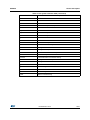
is required to adapt this file at first. This file sets variables used by the file MakeMovie.bat,
they are listed in Table 16.
.
Table 16. Variables description
Variable
Description
%OUTPUT%
Destination folder for the JPEG files.
Will be cleared automatically when starting the conversion with
MakeMovie.bat.
%FFMPEG%
Access variable for the FFmpeg tool.
Should contain the complete path required to call FFmpeg.exe.
%JPEG2MOVIE%
Access variable for the JPEG2MOVIE tool.
Should contain the complete path required to call JPEG2Movie.exe.
%DEFAULT_SIZE%
Default movie resolution to be used.
Can be ignored if one of the <X-SIZE>x<Y-SIZE>.bat files are used.
%DEFAULT_QUALITY%
Default quality to be used by FFmpeg.exe for creating the JPEG files.
The lower the number the better the quality. Value 1 indicates that a
very good quality should be achieved, value 31 indicates the worst
quality.
For more details please refer to the FFmpeg documentation.
Frame rate in frames/second to be used by FFmpeg.
It defines the number of JPEG files to be generated by FFmpeg.exe
%DEFAULT_FRAMERATE%
for each second of the movie.
For more details please refer to the FFmpeg documentation.
MakeMovie.bat
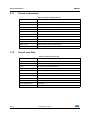
This is the main batch file used for the conversion process. Normally it is not required to
change this file, but it is required to adapt Prep.bat first. It can be called with the parameters
listed in Table 17:
Table 17. Parameters description
Parameter
%1
Description
Movie file to be converted
%2 (optional)
Size to be used.
If not given %DEFAULT_SIZE% of Prep.bat is used.
%3 (optional)
Quality to be used.
If not given %DEFAULT_QUALITY% of Prep.bat is used.
%4 (optional)
Frame rate to be used.
If not given %DEFAULT_FRAMERATE% of Prep.bat is used.
Since the FFmpeg output can differ strongly from the output of previous actions, the
MakeMovie.bat deletes all output files in the first place. The output folder is defined by the
environmental variable %OUTPUT% in Prep.bat. After that it uses FFmpeg.exe to create
the required JPEG files for each frame. Afterwards it calls JPEG2Movie to create a single
EMF file which can be used by STemWin directly. After the conversion operation the result
62/67
DocID027941 Rev 2