1
User’s Manual
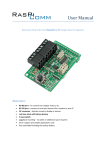
Connection of the RS485 Board seen from top:
TX
RS 232
RX
GND
RS 485
B (Data +) A (Data -)
Power
GND
+5V
GND
3 INSTALLATION
3.1
Ethernet LAN
Before connecting the Kara BACnet Gateway to your target LAN you have to configure the Network
Configuration of the device by connecting the device to an install network see Step 1.
Step 1:
Connect the gateway with an Ethernet cable direct to a Workstation and set the workstation IP number to
192.168.2.1.
Step 2:
Kara BACnet Gateway
Page 8