1
BLAST® Help
BLAST Command Line Applications User Manual
Christiam Camacho
[email protected]
Thomas Madden
[email protected]
George Coulouris
[email protected]
Ning Ma
[email protected]
BLAST® Help
Tao Tao
[email protected]
Richa Agarwala
HYPERLINK "mailto:[email protected]" [email protected]
Aleksandr Morgulis
[email protected]
BLAST® Help
NCBI
NCBI
NCBI
NCBI
NCBI
NCBI
NCBI
1. Introduction
BLAST® Help
Sequence similarity searching is one of the more important bioinformatics activities and often
provides the first evidence for the function of a newly sequenced gene or piece of sequence.
Basic Local Alignment Search Tool (BLAST) is probably the most popular similarity search
tool. The National Center For Biotechnology Information (NCBI) first introduced BLAST in
1989. The NCBI has continued to maintain and update BLAST since the first version. In 2009,
the NCBI introduced a new version of the stand-alone BLAST applications (BLAST+). The
BLAST+ applications have a number of improvements that allow faster searches as well as
more flexibility in output formats and in the search input. These improvements include:
splitting of longer queries so as to reduce the memory usage and to take advantage of modern
CPU architectures; use of a database index to dramatically speed up the search; the ability to
save a “search strategy” that can be used later to start a new search; and greater flexibility in
the formatting of tabular results.
The functionality of the BLAST+ applications is organized by search type. As an example,
there is a “blastp” application that compares proteins queries to protein databases. The “blastx”
application translates a nucleotide query in six frames and searches it against a protein database.
This organization is different from that of the applications first released in 1997 (e.g., blastall)
that supported all types of searches with one application, but it resembles that of the NCBI
BLAST web site. An advantage of this design is that each application has only the options
relevant to the searches it performs. Additionally, each application can compare a query to a
set of FASTA sequences in a file, bypassing the need to create a BLAST databases for small
Page 2
and infrequently searched sets. Finally, a “remote” option permits each application to send off
a search to the NCBI servers.
BLAST® Help
This manual has several sections. It provides brief installation instructions, a QuickStart, a
section describing BLAST+ features in more depth, a “Cook Book” section on how to perform
a number of tasks, as well as three appendices. The first appendix discusses tools to help with
the transition from the older applications (e.g., blastall) to the BLAST+ applications. The
second appendix documents exit codes from the BLAST+ applications. The third appendix is
a table of BLAST options, the type of input required, and the default values for each application
An introduction to BLAST is outside the scope of this manual, more information on this subject
can be found on http://blast.ncbi.nlm.nih.gov/Blast.cgi?
CMD=Web&PAGE_TYPE=BlastDocs.
Please feel free to contact us with any questions, feedback, or bug reports at [email protected].
BLAST® Help
2. Installation
Entries in the BLAST Help manual provide installation instructions for Windows and LINUX/
UNIX. This section provides instructions for a few cases not covered by those entries.
The BLAST+ applications are distributed both as an executable and as source code. For the
executable formats we provide installers as well as tarballs; the source code is only provided
as a tarball. These are freely available at ftp://ftp.ncbi.nlm.nih.gov/blast/executables/blast+/.
Please be sure to use the most recent available version; this will be indicated in the file name
(for instance, in the sections below, version 2.2.18 is listed, but this should be replaced
accordingly).
2.1 Windows
BLAST® Help
Please see http://www.ncbi.nlm.nih.gov/books/NBK52637/
2.2 MacOSX
For users without administrator privileges: follow the procedure described in http://
www.ncbi.nlm.nih.gov/books/NBK52640/
For users with administrator privileges and machines MacOSX version 10.5 or higher:
Download the ncbi-blast-2.2.18+.dmg installer and double click on it. Double click the newly
mounted ncbi-blast-2.2.18+ volume, double click on ncbi-blast-2.2.18+.pkg and follow the
instructions in the installer. By default the BLAST+ applications are installed in /usr/local/
ncbi/blast, overwriting its previous contents (an uninstaller is provided and it is recommended
when upgrading a BLAST+ installation).
BLAST® Help
2.3 RedHat Linux
Download the appropriate *.rpm file for your platform and either install or upgrade the ncbiblast+ package as appropriate using the commands:
Install:
rpm -ivh ncbi-blast-2.2.18-1.x86_64.rpm
Upgrade:
rpm -Uvh ncbi-blast-2.2.18-1.x86_64.rpm
BLAST Command Line Applications User Manual
Page 3
Note: one must have root privileges to run these commands. If you do not have root privileges,
please use the procedure described in http://www.ncbi.nlm.nih.gov/books/NBK52640/
2.4 Other Unix platforms
BLAST® Help
Please see http://www.ncbi.nlm.nih.gov/books/NBK52640/
2.5 Source tarball
Use this approach to build the BLAST+ applications yourself. Download the tarball, expand
it, cd to the newly created directory, and type the following commands:
cd c++
./configure --without-debug --with-strip --with-mt --with-buildroot=ReleaseMT
cd ReleaseMT/build
make all_r
BLAST® Help
The compiled executables will be found in c++/ReleaseMT/bin.
In Windows, extract the tarball and open the appropriate MSVC solution or project file (e.g.:
c++\compilers\msvc800_prj\static\build), build the -CONFIGURE- project, click on “Reload”
when prompted by the development environment, and then build the -BUILD-ALL- project.
The compiled executables will be found in the directory corresponding to the build
configuration selected (e.g.: c++\compilers\msvc800_prj\static\bin\debugdll).
Information on using and compiling the NCBI C++ toolkit is available at http://
www.ncbi.nlm.nih.gov/books/NBK7160/. Please send questions about compiling the NCBI C
++ toolkit to [email protected]
BLAST® Help
3. Quick start
A BLAST search against a database requires at least a –query and –db option. The command:
blastn –db nt –query nt.fsa –out results.out
will run a search of nt.fsa (a nucleotide sequence in FASTA format) against the nt database,
printing results to the file results.out. If “-out results.out” had been left off, the results would
have been printed to stdout (i.e., the screen). The blastn application searches a nucleotide query
against a nucleotide database.
BLAST® Help
The BLAST+ applications print documentation when invoked with the –h or –help option. The
–h option provides abbreviated help, and the –help flag provides more extensive
documentation.
The BLAST databases are required to run BLAST locally and to support automatic resolution
of sequence identifiers. Documentation about these identifiers can be found at http://
www.ncbi.nlm.nih.gov/books/NBK7183/table/ch_demo.T5/. The databases may be retrieved
automatically with the update_blastdb.pl PERL script, which is included as part of this
distribution. This script will download multiple tar files for each BLAST database volume if
necessary, without having to designate each volume. For example:
./update_blastdb.pl htgs
will download all the relevant HTGs tar files (htgs.00.tar.gz, …, htgs.N.tar.gz)
BLAST Command Line Applications User Manual
Page 4
The script can also compare your local copy of the database tar file(s) and only download tar
files if the date stamp has changed reflecting a newer version of the database. This will allow
the script run on a schedule and only download tar files when needed. Documentation for the
update_blastdb.pl script can be obtained by running the script without any arguments (perl is
required).
BLAST® Help
RPS-BLAST ready databases are available at ftp://ftp.ncbi.nih.gov/pub/mmdb/cdd/
4. User manual
4.1 Functionality offered by BLAST+ applications
The functionality offered by the BLAST+ applications has been organized by program type,
as to more closely resemble Web BLAST.
BLAST® Help
As an example, to run a search of a nucleotide query (translated “on the fly” by BLAST) against
a protein database one would use the blastx application. The blastx application will also work
in “Blast2Sequences” mode (i.e.: accept FASTA sequences instead of a BLAST database as
targets) and can also send BLAST searches over the network to the public NCBI server if
desired.
The BLAST+ package offers three categories of applications: 1.) search tools, 2.) BLAST
database tools, and 3.) sequence filtering tools. The blastn, blastp, blastx, tblastx, tblastn,
psiblast, rpsblast, and rpstblastn are considered search applications, as they execute a BLAST
search, whereas makeblastdb, blastdb_aliastool, makeprofiledb, and blastdbcmd are
considered BLAST database applications, as they either create or examine BLAST databases.
There is also a new set of sequence filtering applications described in the section Sequence
filtering applications and an application to build database indices that greatly speed up
megablast in some cases (see section titled Megablast indexed searches).
BLAST® Help
4.2 BLAST+ features
4.2.1 Tasks
The blastn and blastp applications have a –task option. This option sets the parameters (e.g.,
word-size or gap values) to typical values for a specific type of search. For example, the
“megablast” task is optimized for intraspecies comparison as it uses a large word-size, whereas
“blastn” is better suited for interspecies comparisons with a shorter word-size. These tasks
resemble the “Program Selection” section of the BLAST web pages and do not preclude the
user from setting other options to override those specified by the task. See Appendix C for
documentation on parameter values for different tasks. The following tasks are currently
available:
BLAST® Help
Program
Task Name
Description
blastp
blastp
Traditional BLASTP to compare a protein query to a protein database
blastp-short
BLASTP optimized for queries shorter than 30 residues
blastn
Traditional BLASTN requiring an exact match of 11
blastn-short
BLASTN program optimized for sequences shorter than 50 bases
megablast
Traditional megablast used to find very similar (e.g., intraspecies or closely related species) sequences
dc-megablast
Discontiguous megablast used to find more distant (e.g., interspecies) sequences
blastn
BLAST Command Line Applications User Manual
Page 5
4.2.2 Megablast indexed searches
Indexing provides an alternative way to search for initial matches in nucleotide-nucleotide
searches (blastn and megablast) by pre-indexing the N-mer locations in a special data structure,
called a database index.
BLAST® Help
Using an index can improve search times significantly under certain conditions. It is most
beneficial when the queries are much shorter than the database and works best for queries under
1 Mbases long. The advantage comes from the fact that the whole database does not have to
be scanned during the search.
Indices can capture masking information, thereby enabling search against databases masked
for repeats, low complexity, etc.
There are, however, limitations to using indexed search in blast:
BLAST® Help
•
Index files are about four times larger than the blast databases. If an index does not fit
into computer operating memory, then the advantage of using it is eliminated.
•
Word size must be set to 16 or more in order to use an indexed search.
•
Discontiguous search is not supported.
Reference: Morgulis A, Coulouris G, Raytselis Y, Madden TL, Agarwala R, Schäffer AA.
Database Indexing for Production MegaBLAST Searches. Bioinformatics 2008, 24(16):
1757-64. PMID:18567917
4.2.3 BLAST search strategies
BLAST search strategies are files that encode the inputs necessary to perform a BLAST search.
The purpose of these files is to be able to seamlessly reproduce a BLAST search in various
environments (Web BLAST, command line applications, etc).
4.2.5.1 Exporting search strategies on the Web BLAST
BLAST® Help
Click on "download" next to the RID/saved strategy in the "Recent Results" or "Saved
Strategies" tabs.
4.2.5.2 Exporting search strategies with BLAST+ applications
Add the -export_search_strategy along with a file name to the command line options.
4.2.5.3 Importing search strategies on Web BLAST
Go to the "Saved Strategies" tab, click on "Browse" to select your search strategy file, then
click on "View" to load it into the submission page.
BLAST® Help
4.2.5.4 Importing search strategies with BLAST+ applications
Add the -import_search_strategy along with a file name containing the search strategy file.
Note that if provided, the –query, -db, -use_index, and –index_name command line options
will override the specifications of the search strategy file provided (no other command line
options will override the contents of the search strategy file).
4.2.6 Negative GI lists
Search applications support negative GI lists. This feature provides a means to exclude GIs
from a BLAST database search. The expect values in the BLAST results are based upon the
BLAST Command Line Applications User Manual
Page 6
sequences actually searched and not on the underlying database. For an example, see the
cookbook.
4.2.7 Masking in BLAST databases
BLAST® Help
It is now possible to create BLAST databases that contain filtered sequences (also known as
masking information or masks). This filtering information can be used as soft masking for the
subject sequences. For instructions on creating masked BLAST databases, please see the
cookbook.
4.2.8 Custom output formats for BLAST searches
The BLAST+ search command line applications support custom output formats for the tabular
and comma-separated value output formats. For more details see “outfmt” in Appendix C as
well as the cookbook.
4.2.9 Custom output formats to extract BLAST database data
BLAST® Help
blastdbcmd supports custom output formats to extract data from BLAST databases via the outfmt command line option. For more details see the blastdbcmd options in Appendix C as
well as the cookbook.
4.2.10 Improved software installation packages
The BLAST+ applications are available via Windows and MacOSX installers as well as RPMs
(source and binary) and unix tarballs. For more details about these, refer to the installation
section.
4.2.11 Sequence filtering applications
BLAST® Help
The BLAST+ applications include a new set of sequence filtering applications, namely
segmasker, dustmasker, and windowmasker. Segmasker is an application that identifies and
masks low complexity regions of protein sequences. The dustmasker application provides a
similar functionality for nucleotide sequences. Windowmasker uses a genome to identify
sequences represented too often to be of interest to most users. See ftp://ftp.ncbi.nlm.nih.gov/
pub/agarwala/dustmasker/README.dustmasker and ftp://ftp.ncbi.nlm.nih.gov/pub/
agarwala/windowmasker/README.windowmasker for more information.
4.2.12 Best-Hits filtering algorithm
BLAST® Help
The Best-Hit filtering algorithm is designed for use in applications that are searching for only
the best matches for each query region reporting matches. Its -best_hit_overhang parameter,
H, controls when an HSP is considered short enough to be filtered due to presence of another
HSP. For each HSP A that is filtered, there exists another HSP B such that the query region of
HSP A extends each end of the query region of HSP B by at most H times the length of the
query region for B.
Additional requirements that must also be met in order to filter A on account of B are:
i
evalue(A) >= evalue(B)
ii
score(A)/length(A) < (1.0 – score_edge) * score(B)/length(B)
We consider 0.1 to 0.25 to be an acceptable range for the -best_hit_overhang parameter and
0.05 to 0.25 to be an acceptable range for the -best_hit_score_edge parameter. Increasing the
value of the overhang parameter eliminates a higher number of matches, but increases the
running time; increasing the score_edge parameter removes smaller number of hits.
BLAST Command Line Applications User Manual
Page 7
4.2.13 Automatic resolution of sequence identifiers
BLAST® Help
The BLAST+ search applications support automatic resolution of query and subject sequence
identifiers specified as GIs or accessions (see the cookbook section for an example). This
feature enables the user to specify one or more sequence identifiers (GIs and/or accessions,
one per line) in a file as the input to the -query and -subject command line options.
Upon encountering this type of input, by default the BLAST+ search applications will try to
resolve these sequence identifiers in locally available BLAST databases first, then in the
BLAST databases at NCBI, and finally in Genbank (the latter two data sources require a
properly configured internet connection). These data sources can be configured via the
DATA_LOADERS configuration option and the BLAST databases to search can be configured
via the BLASTDB_PROT_DATA_LOADER and BLASTDB_NUCL_DATA_LOADER
configuration options (see the section on Configuring BLAST).
4.2.14 BLAST-WindowMasker integration in BLAST+ search applications
BLAST® Help
The BLAST+ search applications support integration with the windowmasker files via the window_masker_taxid and the WINDOW_MASKER_PATH configuration parameter (see
Configuring BLAST) or via the -window_masker_db command line option.
In the first case, the WINDOW_MASKER_PATH configuration parameter should refer to a
directory which contains subdirectories named after NCBI taxonomy IDs (e.g.: 9606 for
human, 10090 for mouse), where the windowmasker unit counts data files should be placed
with the following naming convention: wmasker.obinary (for files generated with the obinary
format) and/or wmasker.oascii (for files generated with the oascii format). For an example on
how to create these files, please see the Cookbook. Once these windowmasker files and the
configuration file are in place, this feature can be invoked by providing the taxonomy ID to
the -window_masker_taxid command line option.
BLAST® Help
Alternatively, this feature can also be invoked by providing the path to the windowmasker unit
counts data file via the -window_masker_db.
Please see the Cookbook for a usage example of this feature.
4.2.15 DELTA-BLAST: A tool for sensitive protein sequence search
DELTA-BLAST uses RPS-BLAST to search for conserved domains matching to a query,
constructs a PSSM from the sequences associated with the matching domains, and searches a
sequence database. Its sensitivity is comparable to PSI-BLAST and does not require several
iterations of searches against a large sequence database. See section 5.18 for more information.
4.3 Configuring BLAST
BLAST® Help
The BLAST+ search applications can be configured by means of a configuration file
named .ncbirc (on Unix-like platforms) or ncbi.ini (on Windows). This is a plain text file that
contains sections and key-value pairs to specify configuration parameters. Lines starting with
a semi-colon are considered comments. The application will search for the file in the following
order and locations:
1
Current working directory
2
User's HOME directory
3
Directory specified by the NCBI environment variable
The search for this file will stop at the first location where it is found and the configurations
settings from that file will be applied. If the configuration file is not found, default values will
BLAST Command Line Applications User Manual
Page 8
apply. The following are the possible configuration parameters that impact the BLAST+
applications:
BLAST® Help
BLAST® Help
Configuration Parameter
Specifies
Default value
BLASTDB
Path to BLAST databases.
Current working directory
DATA_LOADERS
Data loaders to use for automatic sequence identifier resolution. This is a
comma separated list of the following keywords: blastdb, genbank, and none.
The none keyword disables this feature and takes precedence over any other
keywords specified.
blastdb,genbank
BLASTDB_PROT_DATA_LOADER
Locally available BLAST database name to search when resolving protein
sequences using BLAST databases. Ignored if DATA_LOADERS does not
include the blastdb keyword.
nr
BLASTDB_NUCL_DATA_LOADER
Locally available BLAST database name to search when resolving nucleotide
sequences using BLAST databases. Ignored if DATA_LOADERS does not
include the blastdb keyword.
nt
GENE_INFO_PATH
Path to gene information files (NCBI only).
Current working directory
WINDOW_MASKER_PATH
Path to windowmasker directory hierarchy.
Current working directory
The following is an example with comments describing the available parameters for
configuration:
; Start the section for BLAST configuration
[BLAST]
; Specifies the path where BLAST databases are installed
BLASTDB=/home/guest/blast/db
; Specifies the data sources to use for automatic resolution
; for sequence identifiers
BLAST® Help
DATA_LOADERS=blastdb
; Specifies the BLAST database to use resolve protein sequences
BLASTDB_PROT_DATA_LOADER=custom_protein_database
; Specifies the BLAST database to use resolve protein sequences
BLASTDB_NUCL_DATA_LOADER=/home/some_user/my_nucleotide_db
; Windowmasker settings
[WINDOW_MASKER]
WINDOW_MASKER_PATH=/home/guest/blast/db/windowmasker
; end of file
BLAST® Help
4.3.1 Controlling concatenation of queries
BLAST+ works more efficiently by scanning the database once for multiple queries. This
feature is knows as concatenation and speeds up MegaBLAST searches the most as they spend
little time on tasks that consume CPU and most of the time streaming through the database.
BLASTN and discontiguous MegaBLAST searches also run faster with concatenation, though
the effect is less pronounced. Unfortunately, for some searches the concatenation values are
not optimal, too many queries are searched at once, and the process can consume too much
memory. This is most often a sign that the query or database has not been masked for
interspersed repeats and that should be done. Windowmasker and repeatmasker are two options
for masking. The concatenation values have been adjusted lower for the 2.2.27 release. For
that release, the following values are used for the blastn application: megaBLAST task: 5
BLAST Command Line Applications User Manual
Page 9
million bases, discontiguous megaBLAST task: 500,000 bases, BLASTN task: 100,000 bases.
It is possible to control these values by setting the BATCH_SIZE environment variable. Setting
the value too low will degrade performance dramatically, so this environment variable should
be used with caution. NCBI staff are working on improvements to prevent memory exhaustion
in future releases of the software.
BLAST® Help
Query concatenation also means that BLAST will produce no output until the first set of
concatenated queries have been processed. Some users find this disconcerting, but it is not a
problem. The new lower concatenation values mean that BLAST will start to produce output
sooner.
4.3.2 Memory usage
The BLAST search programs can exhaust all memory on a machine if the input is too large or
if there are too many hits to the BLAST database. If this is the case, please see your operating
system documentation to limit the memory used by a program (e.g.: ulimit on Unix-like
platforms). Setting the BATCH_SIZE environment variable as described above may help.
BLAST® Help
4.4 Input formats to BLAST
4.4.1 Multiple sequence alignment
The -in_msa psiblast option provides a way to jump start psiblast from a master-slave multiple
sequence alignment computed outside psiblast. The multiple sequence alignment must contain
the query sequence as one of its sequences, but it need not be the first sequence. The multiple
sequence alignment must be specified in a format that is derived from Clustal, but without
some headers and trailers (see example below).
BLAST® Help
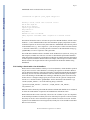
The rules are also described by the following words. Suppose the multiple sequence alignment
has N sequences. It may be presented in one or more blocks, where each block presents a range
of columns from the multiple sequence alignment. E.g., the first block might have columns
1-60, the second block might have columns 61-95, the third block might have columns 96-128.
Each block should have N rows, one row per sequence. The sequences should be in the same
order in every block. Blocks are separated by one or more black lines. Within a block there are
no blank lines, and each line consists of one sequence identifier followed by some whitespace
followed by characters (and gaps) for that sequence in the multiple sequence alignment. In
each column, all letters must be in upper case, or all letters must be in lower case.
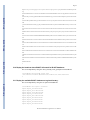
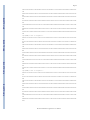
# Example multiple sequence alignment file
align1
-----26SPS9_Hs IHAAEEKDWKTAYSYFYEAFEGYdsidspkaitslkymllckimlntpedvqalvsgkla
F57B9_Ce LHAADEKDFKTAFSYFYEAFEGYdsvdekvsaltalkymllckvmldlpdevnsllsakl
BLAST® Help
YDL097c_Sc ILHCEDKDYKTAFSYFFESFESYhnltthnsyekacqvlkymllskimlnliddvkniln
YMJ5_Ce LYSAEERDYKTSFSYFYEAFEGFasigdkinatsalkymilckimlneteqlagllaake
FUS6_ARATH KNYIRTRDYCTTTKHIIHMCMNAilvsiemgqfthvtsyvnkaeqnpetlepmvnaklrc
COS41.8_Ci SLDYKLKTYLTIARLYLEDEDPVqaemyinrasllqnetadeqlqihykvcyarvldyrr
644879 KCYSRARDYCTSAKHVINMCLNVikvsvylqnwshvlsyvskaestpeiaeqrgerdsqt
YPR108w_Sc IHCLAVRNFKEAAKLLVDSLATFtsieltsyesiatyasvtglftlertdlkskvidspe
eif-3p110_Hs SKAMKMGDWKTCHSFIINEKMNGkvw---------------------------------T23D8.4_Ce SKAMLNGDWKKCQDYIVNDKMNQkvw---------------------------------YD95_Sp IYLMSIRNFSGAADLLLDCMSTFsstellpyydvvryavisgaisldrvdvktkivdspe
KIAA0107_Hs LYCVAIRDFKQAAELFLDTVSTFtsyelmdyktfvtytvyvsmialerpdlrekvikgae
F49C12.8_Hs LYRMSVRDFAGAADLFLEAVPTFgsyelmtyenlilytvitttfaldrpdlrtkvircne
BLAST Command Line Applications User Manual
Page 10
Int-6_Mm KFQYECGNYSGAAEYLYFFRVLVpatdrnalsslwgklaseilmqnwdaamedltrlket
26SPS9_Hs lryagrqtealkcvaqasknrsladfekaltdy---------------------------
BLAST® Help
F57B9_Ce alkyngsdldamkaiaaaaqkrslkdfqvafgsf-------------------------YDL097c_Sc akytketyqsrgidamkavaeaynnrslldfntalkqy---------------------YMJ5_Ce ivayqkspriiairsmadafrkrslkdfvkalaeh------------------------FUS6_ARATH asglahlelkkyklaarkfldvnpelgnsyneviapqdiatygglcalasfdrselkqkv
COS41.8_Ci kfleaaqrynelsyksaiheteqtkalekalncailapagqqrsrmlatlfkdercqllp
644879 qailtklkcaaglaelaarkykqaakclllasfdhcdfpellspsnvaiygglcalatfd
YPR108w_Sc llslisttaalqsissltislyasdyasyfpyllety----------------------eif-3p110_Hs -----------------------------------------------------------T23D8.4_Ce -----------------------------------------------------------YD95_Sp vlavlpqnesmssleacinslylcdysgffrtladve----------------------KIAA0107_Hs ilevlhslpavrqylfslyecrysvffqslavv--------------------------F49C12.8_Hs vqeqltggglngtlipvreylesyydchydrffiqlaale--------------------
BLAST® Help
Int-6_Mm idnnsvssplqslqqrtwlihwslfvffnhpkgrdniidlflyqpqylnaiqtmcphilr
26SPS9_Hs -----------------------------------------------------------F57B9_Ce -----------------------------------------------------------YDL097c_Sc -----------------------------------------------------------YMJ5_Ce -----------------------------------------------------------FUS6_ARATH idninfrnflelvpdvrelindfyssryascleylasl---------------------COS41.8_Ci sfgilekmfldriiksdemeefar-----------------------------------644879 rqelqrnvissssfklflelepqvrdiifkfyeskyasclkmldem-------------YPR108w_Sc -----------------------------------------------------------eif-3p110_Hs ------------------------------------------------------------
BLAST® Help
T23D8.4_Ce -----------------------------------------------------------YD95_Sp -----------------------------------------------------------KIAA0107_Hs -----------------------------------------------------------F49C12.8_Hs -----------------------------------------------------------Int-6_Mm ylttavitnkdvrkrrqvlkdlvkviqqesytykdpitefveclyvnfdfdgaqkklrec
26SPS9_Hs RAELRDDPIISTHLAKLYDNLLEQNLIRVIEPFSRVQIEHISSLIKLSKADVERKLSQMI
F57B9_Ce PQELQMDPVVRKHFHSLSERMLEKDLCRIIEPYSFVQIEHVAQQIGIDRSKVEKKLSQMI
YDL097c_Sc EKELMGDELTRSHFNALYDTLLESNLCKIIEPFECVEISHISKIIGLDTQQVEGKLSQMI
YMJ5_Ce KIELVEDKVVAVHSQNLERNMLEKEISRVIEPYSEIELSYIARVIGMTVPPVERAIARMI
FUS6_ARATH KSNLLLDIHLHDHVDTLYDQIRKKALIQYTLPFVSVDLSRMADAFKTSVSGLEKELEALI
BLAST® Help
COS41.8_Ci QLMPHQKAITADGSNILHRAVTEHNLLSASKLYNNIRFTELGALLEIPHQMAEKVASQMI
644879 KDNLLLDMYLAPHVRTLYTQIRNRALIQYFSPYVSADMHRMAAAFNTTVAALEDELTQLI
YPR108w_Sc ANVLIPCKYLNRHADFFVREMRRKVYAQLLESYKTLSLKSMASAFGVSVAFLDNDLGKFI
eif-3p110_Hs DLFPEADKVRTMLVRKIQEESLRTYLFTYSSVYDSISMETLSDMFELDLPTVHSIISKMI
T23D8.4_Ce NLFHNAETVKGMVVRRIQEESLRTYLLTYSTVYATVSLKKLADLFELSKKDVHSIISKMI
YD95_Sp VNHLKCDQFLVAHYRYYVREMRRRAYAQLLESYRALSIDSMAASFGVSVDYIDRDLASFI
KIAA0107_Hs EQEMKKDWLFAPHYRYYVREMRIHAYSQLLESYRSLTLGYMAEAFGVGVEFIDQELSRFI
F49C12.8_Hs SERFKFDRYLSPHFNYYSRGMRHRAYEQFLTPYKTVRIDMMAKDFGVSRAFIDRELHRLI
Int-6_Mm ESVLVNDFFLVACLEDFIENARLFIFETFCRIHQCISINMLADKLNMTPEEAERWIVNLI
BLAST Command Line Applications User Manual
Page 11
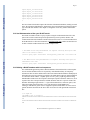
26SPS9_Hs LDKKFHGILDQGEGVLIIFDEPP
F57B9_Ce LDQKLSGSLDQGEGMLIVFEIAV
YDL097c_Sc LDKIFYGVLDQGNGWLYVYETPN
YMJ5_Ce LDKKLMGSIDQHGDTVVVYPKAD
BLAST® Help
FUS6_ARATH TDNQIQARIDSHNKILYARHADQ
COS41.8_Ci CESRMKGHIDQIDGIVFFERRET
644879 LEGLISARVDSHSKILYARDVDQ
YPR108w_Sc PNKQLNCVIDRVNGIVETNRPDN
eif-3p110_Hs INEELMASLDQPTQTVVMHRTEP
T23D8.4_Ce IQEELSATLDEPTDCLIMHRVEP
YD95_Sp PDNKLNCVIDRVNGVVFTNRPDE
KIAA0107_Hs AAGRLHCKIDKVNEIVETNRPDS
F49C12.8_Hs ATGQLQCRIDAVNGVIEVNHRDS
Int-6_Mm RNARLDAKIDSKLGHVVMGNNAV
BLAST® Help
5. Cookbook
5.1 Query a BLAST database with a GI, but exclude that GI from the results
Extract a GI from the ecoli database:
$ blastdbcmd -entry all -db ecoli -dbtype nucl -outfmt %g | head -1 | \
tee exclude_me
1786181
Run the restricted database search, which shows there are no self-hits:
$ blastn -db ecoli -negative_gilist exclude_me -show_gis -num_alignments 0 \
-query exclude_me | grep `cat exclude_me`
Query= gi|1786181|gb|AE000111.1|AE000111
BLAST® Help
$
5.2 Create a masked BLAST database
Creating a masked BLAST database is a two step process:
a
Generate the masking data using a sequence filtering utility like windowmasker or
dustmasker
b
Generate the actual BLAST database using makeblastdb
For both steps, the input file can be a text file containing sequences in FASTA format, or an
existing BLAST database created using makeblastdb. We will provide examples for both
scenarios.
BLAST® Help
5.2.1 Collect mask information files
For nucleotide sequence data in FASTA files or BLAST database format, we can generate the
mask information files using windowmasker or dustmasker. Windowmasker masks the overrepresented sequence data and it can also mask the low complexity sequence data using the
built-in dust algorithm (through the -dust option). To mask low-complexity sequences only,
we will need to use dustmasker.
For protein sequence data in FASTA files or BLAST database format, we need to use
segmasker to generate the mask information file.
BLAST Command Line Applications User Manual
Page 12
The following examples assume that BLAST databases, listed in 5.2.3, are available in the
current working directory. Note that you should use the sequence id parsing consistently. In
all our examples, we enable this function by including the “-parse_seqids” in the command
line arguments.
BLAST® Help
5.2.1.1 Create masking information using dustmasker
We can generate the masking information with dustmasker using a single command line:
$ dustmasker -in hs_chr -infmt blastdb -parse_seqids \
-outfmt maskinfo_asn1_bin -out hs_chr_dust.asnb
BLAST® Help
Here we specify the input is a BLAST database named hs_chr (-in hs_chr -infmt blastdb),
enable the sequence id parsing (-parse_seqids), request the mask data in binary asn.1 format
(-outfmt maskinfo_asn1_bin), and name the output file as hs_chr_dust.asnb (-out
hs_chr_dust.asnb).
If the input format is the original FASTA file, hs_chr.fa, we need to change input to -in and infmt options as follows:
$ dustmasker -in hs_chr.fa -infmt fasta -parse_seqids \
-outfmt maskinfo_asn1_bin -out hs_chr_dust.asnb
5.2.1.2 Create masking information using windowmasker
BLAST® Help
To generate the masking information using windowmasker from the BLAST database hs_chr,
we first need to generate a counts file:
$ windowmasker -in hs_chr -infmt blastdb -mk_counts \
-parse_seqids -out hs_chr_mask.counts
Here we specify the input BLAST database (-in hs_chr -infmt blastdb), request it to generate
the counts (-mk_counts) with sequence id parsing (-parse_seqids), and save the output to a file
named hs_chr_mask.counts (-out hs_chr_mask.counts).
To use the FASTA file hs_chr.fa to generate the counts, we need to change the input file name
and format:
$ windowmasker -in hs_chr.fa -infmt fasta -mk_counts \
BLAST® Help
-parse_seqids -out hs_chr_mask.counts
With the counts file we can then proceed to create the file containing the masking information
as follows:
$ windowmasker -in hs_chr -infmt blastdb -ustat hs_chr_mask.count \
-outfmt maskinfo_asn1_bin -parse_seqids -out hs_chr_mask.asnb
Here we need to use the same input (-in hs_chr -infmt blastdb) and the output of step 1 (-ustat
hs_chr_mask.counts). We set the mask file format to binary asn.1 (-outfmt
BLAST Command Line Applications User Manual
Page 13
maskinfo_asn1_bin), enable the sequence ids parsing (-parse_seqids), and save the masking
data to hs_chr_mask.asnb (-out hs_chr_mask.asnb).
To use the FASTA file hs_chr.fa, we change the input file name and file type:
BLAST® Help
$ windowmasker -in hs_chr.fa -infmt fasta -ustat hs_chr.counts \
-outfmt maskinfo_asn1_bin -parse_seqids -out hs_chr_mask.asnb
5.2.1.3 Create masking information using segmasker
We can generate the masking information with segmasker using a single command line:
$ segmasker -in refseq_protein -infmt blastdb -parse_seqids \
-outfmt maskinfo_asn1_bin -out refseq_seg.asnb
Here we specify the refseq_protein BLAST database (-in refseq_protein -infmt blastdb), enable
sequence ids parsing (-parse_seqids), request the mask data in binary asn.1 format (-outfmt
maskinfo_asn1_bin), and name the out file as refseq_seg.asnb (-out refseq_seg.asnb).
BLAST® Help
If the input format is the FASTA file, we need to change the command line to specify the input
format:
$ segmasker -in refseq_protein.fa -infmt fasta -parse_seqids \
-outfmt maskinfo_asn1_bin -out refseq_seg.asnb
5.2.1.4 Extract masking information from FASTA sequences with lowercase
masking
We can also extract the masking information from a FASTA sequence file with lowercase
masking (generated by various means) using convert2blastmask utility. An example command
line follows:
BLAST® Help
$ convert2blastmask -in hs_chr.mfa -parse_seqids -masking_algorithm repeat \
-masking_options "repeatmasker, default" -outfmt maskinfo_asn1_bin \
-out hs_chr_mfa.asnb
Here the input is hs_chr.mfa (-in hs_chr.mfa), enable parsing of sequence ids, specify the
masking algorithm name (-masking_algorithm repeat) and its parameter (-masking_options
“repeatmasker, default”), and ask for asn.1 output (-outfmt maskinfo_asn1_bin) to be saved in
specified file (-out hs_chr_mfa.asnb).
5.2.2 Create BLAST database with the masking information
BLAST® Help
Using the masking information data files generated in steps 5.2.1.1, 5.2.1.2, 5.2.1.3, and 5.2.1.4,
we can create BLAST database with masking information incorporated.
Note: we should use “-parse_seqids” in a consistent manner – either use it in both steps or not
use it at all.
5.2.2.1 Create BLAST database with masking information using an existing
BLAST database or FASTA sequence file as input
For example, we can use the following command line to apply the masking information, created
in step 5.2.1.2, to the existing BLAST database generated in 5.2.3:
BLAST Command Line Applications User Manual
Page 14
$ makeblastdb -in hs_chr –input_type blastdb -dbtype nucl -parse_seqids \
-mask_data hs_chr_mask.asnb -out hs_chr -title \
"Human Chromosome, Ref B37.1"
BLAST® Help
Here, we use the existing BLAST database as input file (-in hs_chr), specify its type (-dbtype
nucl), enable parsing of sequence ids (-parse_seqids), provide the masking data from step
5.2.1.2 (-mask_data hs_chr_mask.asnb), and name the output database with the same base
name (-out hs_chr) overwriting the existing one.
To use the original FASTA sequence file (hs_chr.fa) as the input, we need to use “-in hs_chr.fa”
to instruct makeblastdb to use that FASTA file instead.
We can check the “re-created” database to find out if the masking information was added
properly, using blastdbcmd with the following command line:
$ blastdbcmd -db hs_chr -info
BLAST® Help
This command prints out a summary of the target database:
Database: human chromosomes, Ref B37.1
24 sequences; 3,095,677,412 total bases
Date: Aug 13, 2009 3:02 PM Longest sequence: 249,250,621 bases
Available filtering algorithms applied to database sequences:
BLAST® Help
Algorithm ID Algorithm name Algorithm options
30 windowmasker
Volumes:
/export/home/tao/blast_test/hs_chr
Extra lines under the “Available filtering algorithms …” describe the masking algorithms
available. The “Algorithm ID” field, 30 in our case, is what we need to use if we want to invoke
database soft masking during an actual search through the “-db_soft_mask” parameter.
BLAST® Help
We can apply additional masking data to an existing BLAST database with one type of masking
information already added. For example, we can apply the dust masking, generated in step
5.2.1.1, to the database generated in step 5.2.2.1, we can use this command line:
$ makeblastdb -in hs_chr –input_type blastdb -dbtype nucl -parse_seqids \
-mask_data hs_chr_dust.asnb -out hs_chr -title "Human Chromosome, Ref B37.1"
Here, we use the existing database as input file (-in hs_chr), specify its input and molecule type
(-input_type blastdb -dbtype nucl), enable parsing of sequence ids (-parse_seqids), provide the
masking data from step 5.2.1.1 (-mask_data hs_chr_dust.asnb), naming the database with the
same based name (-out hs_chr) overwriting the existing one.
Checking the “re-generated” database with blastdbcmd:
BLAST Command Line Applications User Manual
Page 15
$ blastdbcmd -db hs_chr -info
we can see that both sets of masking information are available:
Database: Human Chromosome, Ref B37.1
BLAST® Help
24 sequences; 3,095,677,412 total bases
Date: Aug 25, 2009 4:43 PM Longest sequence: 249,250,621 bases
Available filtering algorithms applied to database sequences:
Algorithm ID Algorithm name Algorithm options
11 dust window=64; level=20; linker=1
30 windowmasker
BLAST® Help
Volumes:
/net/gizmo4/export/home/tao/blast_test/hs_chr
A more straightforward approach to apply multiple sets of masking information in a single
makeblastdb run by providing multiple set of masking data files in a comma delimited list:
$ makeblastdb -in hs_chr –input_type blastdb -dbtype nucl -parse_seqids \
-mask_data hs_chr_dust.asnb, hs_chr_mask.asnb -out hs_chr
5.2.2.2 Create a protein BLAST database with masking information
BLAST® Help
We can use the masking data file generated in step 5.2.1.3 to create a protein BLAST database:
$ makeblastdb -in refseq_protein –input_type blastdb -dbtype prot parse_seqids \
-mask_data refseq_seg.asnb -out refseq_protein -title \
"RefSeq Protein Database"
Using blastdbcmd, we can check the database thus generated:
$ blastdbcmd -db refseq_protein -info
BLAST® Help
This produces the following summary, which includes the masking information:
Database: RefSeq Protein Database
7,044,477 sequences; 2,469,203,411 total residues
Date: Sep 1, 2009 10:50 AM Longest sequence: 36,805 residues
Available filtering algorithms applied to database sequences:
BLAST Command Line Applications User Manual
Page 16
Algorithm ID Algorithm name Algorithm options
21 seg window=12; locut=2.2; hicut=2.5
BLAST® Help
Volumes:
/export/home/tao/blast_test/refseq_protein2.00
/export/home/tao/blast_test/refseq_protein2.01
/export/home/tao/blast_test/refseq_protein2.02
5.2.2.3 Create a nucleotide BLAST database using the masking information
extracted from lower case masked FASTA file
We use the following command line, which is very similar to that given in 5.2.2.1.
$ makeblastdb -in hs_chr.mfa -dbtype nucl -parse_seqids \
-mask_data hs_chr_mfa.asnb -out hs_chr_mfa -title "Human chromosomes (mfa)"
BLAST® Help
Here we use the lowercase masked FASTA sequence file as input (-in hs_chr.mfa), its file type
(-input_type fasta), specify the database as nucleotide (-dbtype nucl), enable parsing of
sequence ids (-parse_seqids), provide the masking data (-mask_data hs_chr_mfa.asnb), and
name the resulting database as hs_chr_mfa (-out hs_chr_mfa).
Checking the database thus generated using blastdbcmd, we have:
Database: Human chromosomes (mfa)
24 sequences; 3,095,677,412 total bases
Date: Aug 26, 2009 11:41 AM Longest sequence: 249,250,621 bases
BLAST® Help
Available filtering algorithms applied to database sequences:
Algorithm ID Algorithm name Algorithm options
40 repeat repeatmasker lowercase
Volumes:
/export/home/tao/hs_chr_mfa
BLAST® Help
The algorithm name and algorithm options are the values we provided in step 5.2.1.4.
5.2.3 Obtaining Sample data for this cookbook entry
For input nucleotide sequences, we use the BLAST database generated from a FASTA input
file hs_chr.fa, containing complete human chromosomes from BUILD37.1, generated by
inflating and combining the hs_ref_*.fa.gz files located at:
ftp.ncbi.nlm.nih.gov/genomes/H_sapiens/Assembled_chromosomes/
We use this command line to create the BLAST database from the input nucleotide sequences:
BLAST Command Line Applications User Manual
Page 17
$ makeblastdb -in hs_chr.fa -dbtype nucl -parse_seqids \
-out hs_chr -title "Human chromosomes, Ref B37.1"
BLAST® Help
For input nucleotide sequences with lowercase masking, we use the FASTA file hs_chr.mfa,
containing the complete human chromosomes from BUILD37.1, generated by inflating and
combining the hs_ref_*.mfa.gz files located in the same ftp directory.
For input protein sequences, we use the preformatted refseq_protein database from the NCBI
blast/db/ ftp directory:
ftp.ncbi.nlm.nih.gov/blast/db/refseq_protein.00.tar.gz
ftp.ncbi.nlm.nih.gov/blast/db/refseq_protein.01.tar.gz
ftp.ncbi.nlm.nih.gov/blast/db/refseq_protein.02.tar.gz
5.3 Search the database with database soft masking information
BLAST® Help
To enable the database masking during a BLAST search, we need to get the Algorithm ID
using the -info parameter of blastdbcmd. For the database generated in step 5.2.2.2, we can use
the following command line to activate one of the database soft masking created by
windowmasker:
$ blastn -query HTT_gene -task megablast -db hs_chr -db_soft_mask 30 \
-outfmt 7 -out HTT_megablast_mask.out -num_threads 4
BLAST® Help
Here, we use the blastn program to search a nucleotide query HTT_gene* (-query HTT_gene)
with megablast algorithm (-task megablast) against the database created in step 5.2.2.1 (-db
hs_chr). We invoke the soft database masking (-db_soft_mask 30), set the result format to
tabular output (-outfmt 7), and save the result to a file named HTT_megablast_mask.tab (-out
HTT_megablast_mask.tab). We also activated the multi-thread feature of blastn to speed up
the search by using 4 CPUs$ (-num_threads 4).
*This is a genomic fragment containing the HTT gene from human, including 5 kb up- and
down-stream of the transcribed region. It is represented by NG_009378.
$
The number to use under in your run will depend on the number of CPUs your system has.
In a test run under a 64-bits Linux machine, the above search takes 9.828 seconds real time,
while the same run without database soft masking invoked takes 31 minutes 44.651 seconds.
5.4 Extract all human sequences from the nr database
BLAST® Help
Although one cannot select GIs by taxonomy from a database, a combination of unix command
line tools will accomplish this:
$ blastdbcmd -db nr -entry all -outfmt "%g %T" | \
awk ' { if ($2 == 9606) { print $1 } } ' | \
blastdbcmd -db nr -entry_batch - -out human_sequences.txt
The first blastdbcmd invocation produces 2 entries per sequence (GI and taxonomy ID), the
awk command selects from the output of that command those sequences which have a
taxonomy ID of 9606 (human) and prints its GIs, and finally the second blastdbcmd invocation
uses those GIs to print the sequence data for the human sequences in the nr database.
BLAST Command Line Applications User Manual
Page 18
5.5 Custom data extraction and formatting from a BLAST database
The following examples show how to extract selected information from a BLAST database
and how to format it:
BLAST® Help
Extract the accession, sequence length,
and masked locations for GI 71022837:
$ blastdbcmd -entry 71022837 -db Test/mask-data-db -outfmt "%a %l %m"
XP_761648.1 1292 119-139;140-144;147-152;154-160;161-216;
5.6 Display BLAST search results with custom output format
The –outfmt option permits formatting arbitrary fields from the BLAST tabular format. Use
the –help option on the command-line application (e.g., blastn) to see the supported fields. The
max_target_seqs option should be used with any tabular output to control the number of
matches reported.
BLAST® Help
5.6.1 Example of custom output format
The following example shows how to display the results of a BLAST search using a custom
output format. The tabular output format with comments is used, but only the query accession,
subject accession, evalue, query start, query stop, subject start, and subject stop are requested.
For brevity, only the first 10 lines of output are shown:
$ echo 1786181 | ./blastn -db ecoli -outfmt "7 qacc sacc evalue
qstart qend sstart send"
# BLASTN 2.2.18+
# Query: gi|1786181|gb|AE000111.1|AE000111
# Database: ecoli
BLAST® Help
# Fields: query acc., subject acc., evalue, q. start, q. end, s.
start, s. end
# 85 hits found
AE000111 AE000111 0.0 1 10596 1 10596
AE000111 AE000174 8e-30 5565 5671 6928 6821
AE000111 AE000394 1e-27 5587 5671 135 219
AE000111 AE000425 6e-26 5587 5671 8552 8468
AE000111 AE000171 3e-24 5587 5671 2214 2130
$
5.6.2 Trace-back operations (BTOP)
BLAST® Help
The “Blast trace-back operations” (BTOP) string describes the alignment produced by BLAST.
This string is similar to the CIGAR string produced in SAM format, but there are important
differences. BTOP is a more flexible format that lists not only the aligned region but also
matches and mismatches. BTOP operations consist of 1.) a number with a count of matching
letters, 2.) two letters showing a mismatch (e.g., “AG” means A was replaced by G), or 3.) a
dash (“-“) and a letter showing a gap. The box below shows a blastn run first with BTOP output
and then the same run with the BLAST report showing the alignments.
$ blastn -query test_q.fa -subject test_s.fa -dust no -outfmt "6
qseqid sseqid btop" -parse_deflines
BLAST Command Line Applications User Manual
Page 19
query1 q_multi 7AG39
query1 q_multi 7A-39
query1 q_multi 6-G-A41
$ blastn -query test_q.fa -subject test_s.fa -dust no -parse_deflines
BLAST® Help
BLASTN 2.2.24+
Query= query1
Length=47
Subject=
Length=142
Score = 82.4 bits (44), Expect = 9e-22
BLAST® Help
Identities = 46/47 (97%), Gaps = 0/47 (0%)
Strand=Plus/Plus
Query 1 ACGTCCGAGACGCGAGCAGCGAGCAGCAGAGCGACGAGCAGCGACGA 47
||||||| |||||||||||||||||||||||||||||||||||||||
Sbjct 47 ACGTCCGGGACGCGAGCAGCGAGCAGCAGAGCGACGAGCAGCGACGA 93
Score = 80.5 bits (43), Expect = 3e-21
BLAST® Help
Identities = 46/47 (97%), Gaps = 1/47 (2%)
Strand=Plus/Plus
Query 1 ACGTCCGAGACGCGAGCAGCGAGCAGCAGAGCGACGAGCAGCGACGA 47
||||||| |||||||||||||||||||||||||||||||||||||||
Sbjct 1 ACGTCCG-GACGCGAGCAGCGAGCAGCAGAGCGACGAGCAGCGACGA 46
Score = 78.7 bits (42), Expect = 1e-20
BLAST® Help
Identities = 47/49 (95%), Gaps = 2/49 (4%)
Strand=Plus/Plus
Query 1 ACGTCC--GAGACGCGAGCAGCGAGCAGCAGAGCGACGAGCAGCGACGA 47
|||||| |||||||||||||||||||||||||||||||||||||||||
Sbjct 94 ACGTCCGAGAGACGCGAGCAGCGAGCAGCAGAGCGACGAGCAGCGACGA 142
5.7 Use blastdb_aliastool to manage the BLAST databases
Often we need to search multiple databases together or wish to search a specific subset of
sequences within an existing database. At the BLAST search level, we can provide multiple
BLAST Command Line Applications User Manual
Page 20
database names to the “-db” parameter, or to provide a GI file specifying the desired subset to
the “-gilist” parameter. However for these types of searches, a more convenient way to conduct
them is by creating virtual BLAST databases for these. Note: When combining BLAST
databases, all the databases must be of the same molecule type. The following examples assume
that the two databases as well as the GI file are in the current working directory.
BLAST® Help
5.7.1 Aggregate existing BLAST databases
To combine the two nematode nucleotide databases, named “nematode_mrna” and
“nematode_genomic", we use the following command line:
$ blastdb_aliastool -dblist "nematode_mrna nematode_genomic" -dbtype nucl \
-out nematode_all -title "Nematode RefSeq mRNA + Genomic"
5.7.2 Create a subset of a BLAST database
BLAST® Help
The nematode_mrna database contains RefSeq mRNAs for several species of round worms.
The best subset is from C. elegance. In most cases, we want to search this subset instead of the
complete collection. Since the database entries are from NCBI nucleotide databases and the
database is formatted with ”-parse_seqids”, we can use the “-gilist c_elegance_mrna.gi”
parameter/value pair to limit the search to the subset of interest, alternatively, we can create a
subset of the nematode_mrna database as follows:
$ blastdb_aliastool -db nematode_mrna -gilist c_elegance_mrna.gi -dbtype \
nucl -out c_elegance_mrna -title "C. elegans refseq mRNA entries"
Note: one can also specify multiple databases using the -db parameter of blastdb_aliastool.
5.8 Reformat BLAST reports with blast_formatter
BLAST® Help
BLAST® Help
It may be helpful to view the same BLAST results in different formats. A user may first parse
the tabular format looking for matches meeting a certain criteria, then go back and examine
the relevant alignments in the full BLAST report. He may also first look at pair-wise
alignments, then decide to use a query-anchored view. Viewing a BLAST report in different
formats has been possible on the NCBI BLAST web site since 2000, but has not been possible
with stand-alone BLAST runs. The blast_formatter allows this, if the original search produced
blast archive format using the –outfmt 11 switch. The query sequence, the BLAST options,
the masking information, the name of the database, and the alignment are written out as ASN.
1 (a structured format similar to XML). The –max_target_seqs option should be used to control
the number of matches recorded in the alignment. The blast_formatter reads this information
and formats a report. The BLAST database used for the original search must be available, or
the sequences need to be fetched from the NCBI, assuming the database contains sequences
in the public dataset. The box below illustrates the procedure. A blastn run first produces the
BLAST archive format, and the blast_fomatter then reads the file and produces tabular output.
Blast_formatter will format stand-alone searches performed with an earlier version of a
database if both the search and formatting databases are prepared so that fetching by sequence
ID is possible. To enable fetching by sequence ID use the –parse_seqids flag when running
makeblastdb, or (if available) download preformatted BLAST databases from ftp://
ftp.ncbi.nlm.nih.gov/blast/db/ using update_blastdb.pl (provided as part of the BLAST+
package). Currently the blast archive format and blast_formatter do not work with database
free searches (i.e., -subject rather than –db was used for the original search).
$ echo 1786181 | blastn -db ecoli -outfmt 11 -out out.1786181.asn
$ blast_formatter -archive out.1786181.asn -outfmt "7 qacc sacc evalue
BLAST Command Line Applications User Manual
Page 21
qstart qend sstart send"
# BLASTN 2.2.24+
# Query: gi|1786181|gb|AE000111.1|AE000111 Escherichia coli K-12 MG1655
section 1 of 400
BLAST® Help
# Database: ecoli
# Fields: query acc., subject acc., evalue, q. start, q. end,
s. start, s. end
# 85 hits found
AE000111 AE000111 0.0 1 10596 1 10596
AE000111 AE000174 8e-30 5565 5671 6928 6821
AE000111 AE000394 1e-27 5587 5671 135 219
AE000111 AE000425 6e-26 5587 5671 8552 8468
AE000111 AE000171 3e-24 5587 5671 2214 2130
AE000111 AE000171 1e-23 5587 5670 10559 10642
AE000111 AE000376 1e-22 5587 5675 129 42
AE000111 AE000268 1e-22 5587 5671 6174 6090
BLAST® Help
AE000111 AE000112 1e-22 10539 10596 1 58
AE000111 AE000447 5e-22 5587 5670 681 598
AE000111 AE000344 6e-21 5587 5671 4112 4196
AE000111 AE000490 2e-20 5584 5671 4921 4835
AE000111 AE000280 2e-20 5587 5670 12930 12847
5.9 Extract lowercase masked FASTA from a BLAST database with masking information
If a BLAST database contains masking information, this can be extracted using the blastdbcmd
options –db_mask and –mask_sequence as follows:
$ blastdbcmd -info -db mask-data-db
Database: Mask data test
BLAST® Help
10 sequences; 12,609 total residues
Date: Feb 17, 2009 5:10 PM Longest sequence: 1,694 residues
Available filtering algorithms applied to database sequences:
Algorithm ID Algorithm name Algorithm options
20 seg default options used
40 repeat -species Desmodus_rotundus
BLAST® Help
Volumes:
mask-data-db
$ blastdbcmd -db mask-data-db -mask_sequence_with 20 -entry 71022837
>gi|71022837|ref|XP_761648.1| hypothetical protein UM05501.1 [Ustilago maydis
521]
MPPSARHSAHPSHHPHAGGRDLHHAAGGPPPQGGPGMPPGPGNGPMHHPHSSYAQSMPPPPGLPPHAMNGINGPPPS
THG
GPPPRMVMADGPGGAGGPPPPPPPHIPRSSSAQSRIMEAaggpagpppagppastspavQklslANEaawvsIGsaa
etm
BLAST Command Line Applications User Manual
Page 22
EdydralsayeaalrhnpysvpalsaiagvhrtldnfekavdyfqrvlnivpengdTWGSMGHCYLMMDDLQRAYTA
YQQ
ALYHLPNPKEPKLWYGIGILYDRYGSLEHAEEAFASVVRMDPNYEKANEIYFRLGIIYKQQNKFPASLECFRYILDN
PPR
BLAST® Help
PLTEIDIWFQIGHVYEQQKEFNAAKEAYERVLAENPNHAKVLQQLGWLYHLSNAGFNNQERAIQFLTKSLESDPNDA
QSW
YLLGRAYMAGQNYNKAYEAYQQAVYRDGKNPTFWCSIGVLYYQINQYRDALDAYSRAIRLNPYISEVWFDLGSLYEA
CNN
QISDAIHAYERAADLDPDNPQIQQRLQLLRNAEAKGGELPEAPVPQDVHPTAYANNNGMAPGPPTQIGGGPGPSYPP
PLV
GPQLAGNGGGRGDLSDRDLPGPGHLGSSHSPPPFRGPPGTDDRGARGPPHGALAPMVGGPGGPEPLGRGGFSHSRGP
SPG
PPRMDPYGRRLGSPPRRSPPPPLRSDVHDGHGAPPHVHGQGHGQGHGQGHGQGHGQGHGQSHGHSHGGEFRGPPPLA
AAG
PGGPPPPLDHYGRPMGGPMSEREREMEWEREREREREREQAARGYPASGRITPKNEPGYARSQHGGSNAPSPAFGRP
PVY
BLAST® Help
GRDEGRDYYNNSHPGSGPGGPRGGYERGPGAPHAPAPGMRHDERGPPPAPFEHERGPPPPHQAGDLRYDSYSDGRDG
PFR
GPPPGLGRPTPDWERTRAGEYGPPSLHDGAEGRNAGGSASKSRRGPKAKDELEAAPAPPSPVPSSAGKKGKTTSSRA
GSP
WSAKGGVAAPGKNGKASTPFGTGVGAPVAAAGVGGGVGSKKGAAISLRPQEDQPDSRPGSPQSRRDASPASSDGSNE
PLA
ARAPSSRMVDEDYDEGAADALMGLAGAASASSASVATAAPAPVSPVATSDRASSAEKRAESSLGKRPYAEEERAVDE
PED
SYKRAKSGSAAEIEADATSGGRLNGVSVSAKPEATAAEGTEQPKETRTETPPLAVAQATSPEAINGKAESESAVQPM
DVD
GREPSKAPSESATAMKDSPSTANPVVAAKASEPSPTAAPPATSMATSEAQPAKADSCEKNNNDEDEREEEEGQIHED
PID
BLAST® Help
APAKRADEDGAK
$
5.10 Display the locations where BLAST will search for BLAST databases
This is accomplished by using the -show_blastdb_search_path option in blastdbcmd:
$ blastdbcmd -show_blastdb_search_path
:/net/nabl000/vol/blast/db/blast1:/net/nabl000/vol/blast/db/blast2:
$
5.11 Display the available BLAST databases at a given directory:
This is accomplished by using the -list option in blastdbcmd:
BLAST® Help
$ blastdbcmd -list repeat -recursive
repeat/repeat_3055 Nucleotide
repeat/repeat_31032 Nucleotide
repeat/repeat_35128 Nucleotide
repeat/repeat_3702 Nucleotide
repeat/repeat_40674 Nucleotide
repeat/repeat_4530 Nucleotide
repeat/repeat_4751 Nucleotide
repeat/repeat_6238 Nucleotide
repeat/repeat_6239 Nucleotide
BLAST Command Line Applications User Manual
Page 23
repeat/repeat_7165 Nucleotide
repeat/repeat_7227 Nucleotide
repeat/repeat_7719 Nucleotide
repeat/repeat_7955 Nucleotide
BLAST® Help
repeat/repeat_9606 Nucleotide
repeat/repeat_9989 Nucleotide
$
The first column of the default output is the file name of the BLAST database (usually provided
as the –db argument to other BLAST+ applications), the second column represents the molecule
type of the BLAST database. This output is configurable via the list_outfmt command line
option.
5.12 Use Windowmasker to filter your BLAST search
BLAST® Help
The blastn executable can filter a query sequence using the windowmasker data files. This
option can be used to mask interspersed repeats that may lead to spurious matches. The
windowmasker data files should be created as discussed in section 5.2.12 or downloaded from
the NCBI FTP site. Follow the instructions in Configuring BLAST to make sure BLAST will
be able to find the windowmasker files in the examples below.
1. Run BLAST search using Windowmasker for sequence filtering based upon taxid
(9606 is the taxid for human).
$ blastn -query input -db database -window_masker_taxid 9606 -out results.txt
2. Run BLAST search using Windowmasker for sequence filtering based upon the
BLAST® Help
windowmasker file name.
$ blastn –query input –db database –window_masker_db 9606/wmasker.obinary
5.13 Building a BLAST database with local sequences
BLAST® Help
The makeblastdb application produces BLAST databases from FASTA files. In the simplest
case the FASTA definition lines are not parsed by makeblastdb and may be completely
unstructured. The text in the definition line will be stored in the BLAST database and displayed
in the BLAST report, but it will not be possible to fetch individual sequences using blastdbcmd
or to limit the search with the –seqidlist option. Use the –parse_seqids flag when invoking
makeblastdb to enable retrieval of sequences based upon sequence identifiers. In this case, each
sequence must have a unique identifier, and that identifier must have a specific format. The
identifier should begin right after the “>” sign on the definition line, contain no spaces, and
follow the formats described in http://www.ncbi.nlm.nih.gov/books/NBK7183/?
rendertype=table&id=ch_demo.T5 User supplied sequences should make use of the local or
general identifiers described in the above table. A FASTA file with general IDs would look
like:
$ cat mydb.fsa
>gnl|MYDB|1 this is sequence 1
GAATTCCCGCTACAGGGGGGGCCTGAGGCACTGCAGAAAGTGGGCCTGAGCCTCGAGGATGACGGTGCTGCAGGAAC
CCG
TCCAGGCTGCTATATGGCAAGCACTAAACCACTATGCTTACCGAGATGCGGTTTTCCTCGCAGAACGCCTTTATGCA
GAA
BLAST Command Line Applications User Manual
Page 24
GTACACTCAGAAGAAGCCTTGTTTTTACTGGCAACCTGTTATTACCGCTCAGGAAAGGCATATAAAGCATATAGACT
CTT
GAAAGGACACAGTTGTACTACACCGCAATGCAAATACCTGCTTGCAAAATGTTGTGTTGATCTCAGCAAGCTTGCAG
AAG
BLAST® Help
GGGAACAAATCTTATCTGGTGGAGTGTTTAATAAGCAGAAAAGCCATGATGATATTGTTACTGAGTTTGGTGATTCA
GCT
TGCTTTACTCTTTCATTGTTGGGACATGTATATTGCAAGACAGATCGGCTTGCCAAAGGATCAGAATGTTACCAAAA
GAG
CCTTAGTTTAAATCCTTTCCTCTGGTCTCCCTTTGAATCATTATGTGAAATAGGTGAAAAGCCAGATCCTGACCAAA
CAT
TTAAATTCACATCTTTACAGAACTTTAGCAACTGTCTGCCCAACTCTTGCACAACACAAGTACCTAATCATAGTTTA
TCT
CACAGACAGCCTGAGACAGTTCTTACGGAAACACCCCAGGACACAATTGAATTAAACAGATTGAATTTAGAATCTTC
CAA
>gnl|MYDB|2 this is sequence 2
GAATTCCCGCTACAGGGGGGGCCTGAGGCACTGCAGAAAGTGGGCCTGAGCCTCGAGGATGACGGTGCTGCAGGAAC
BLAST® Help
CCG
TCCAGGCTGCTATATGGCAAGCACTAAACCACTATGCTTACCGAGATGCGGTTTTCCTCGCAGAACGCCTTTATGCA
GAA
GTACACTCAGAAGAAGCCTTGTTTTTACTGGCAACCTGTTATTACCGCTCAGGAAAGGCATATAAAGCATATAGACT
CTT
GAAAGGACACAGTTGTACTACACCGCAATGCAAATACCTGCTTGCAAAATGTTGTGTTGATCTCAGCAAGCTTGCAG
AAG
GGGAACAAATCTTATCTGGTGGAGTGTTTAATAAGCAGAAAAGCCATGATGATATTGTTACTGAGTTTGGTGATTCA
GCT
TGCTTTACTCTTTCATTGTTGGGACATGTATATTGCAAGACAGATCGGCTTGCCAAAGGATCAGAATGTTACCAAAA
GAG
CCTTAGTTTAAATCCTTTCCTCTGGTCTCCCTTTGAATCATTATGTGAAATAGGTGAAAAGCCAGATCCTGACCAAA
BLAST® Help
CAT
TTAAATTCACATCTTTACAGAACTTTAGCAACTGTCTGCCCAACTCTTGCACAACACAAGTACCTAATCATAGTTTA
TCT
CACAGACAGCCTGAGACAGTTCTTACGGAAACACCCCAGGACACAATTGAATTAAACAGATTGAATTTAGAATCTTC
CAA
>gnl|MYDB|3 this is sequence 3
GAATTCCCGCTACAGGGGGGGCCTGAGGCACTGCAGAAAGTGGGCCTGAGCCTCGAGGATGACGGTGCTGCAGGAAC
CCG
TCCAGGCTGCTATATGGCAAGCACTAAACCACTATGCTTACCGAGATGCGGTTTTCCTCGCAGAACGCCTTTATGCA
GAA
GTACACTCAGAAGAAGCCTTGTTTTTACTGGCAACCTGTTATTACCGCTCAGGAAAGGCATATAAAGCATATAGACT
CTT
BLAST® Help
GAAAGGACACAGTTGTACTACACCGCAATGCAAATACCTGCTTGCAAAATGTTGTGTTGATCTCAGCAAGCTTGCAG
AAG
GGGAACAAATCTTATCTGGTGGAGTGTTTAATAAGCAGAAAAGCCATGATGATATTGTTACTGAGTTTGGTGATTCA
GCT
TGCTTTACTCTTTCATTGTTGGGACATGTATATTGCAAGACAGATCGGCTTGCCAAAGGATCAGAATGTTACCAAAA
GAG
CCTTAGTTTAAATCCTTTCCTCTGGTCTCCCTTTGAATCATTATGTGAAATAGGTGAAAAGCCAGATCCTGACCAAA
CAT
TTAAATTCACATCTTTACAGAACTTTAGCAACTGTCTGCCCAACTCTTGCACAACACAAGTACCTAATCATAGTTTA
TCT$
BLAST Command Line Applications User Manual
Page 25
Makeblastdb can be invoked for this file as below.
BLAST® Help
$ makeblastdb -in mydb.fsa -parse_seqids -dbtype nucl
Building a new DB, current time: 01/28/2011 13:39:37
New DB name: mydb.fsa
New DB title: mydb.fsa
Sequence type: Nucleotide
Keep Linkouts: T
Keep MBits: T
Maximum file size: 1073741824B
Adding sequences from FASTA; added 3 sequences in 0.00206995 seconds.
$
BLAST® Help
The FASTA file has three entries. All entries are part of the “MYDB” database, with the entries
numbers 1, 2, and 3. Makeblastdb will store this information properly and produce an index,
so that the sequences can be retrieved by these identifiers. Makeblastdb stores the title portion
of the definition line (e.g., “this is sequence 1”), but will not parse it. If the first token after the
“>” does not contain a bar (“|”) it will be parsed as a local ID. Use the full identifier string (e.g.,
“gnl|MYDB|2”) to retrieve sequences with a general ID
BLAST® Help
The NCBI makes databases that are searchable on the NCBI web site (such as nr, refseq_rna,
and swissprot) available on its FTP site. It is better to download the preformatted databases
rather than starting with FASTA. The databases on the FTP site contain taxonomic information
for each sequence, include the identifier indices for lookups, and can be up to four times smaller
than the FASTA. The original FASTA can be generated from the BLAST database using
blastdbcmd.
5.14 Limiting a Search with a List of Identifiers
BLAST can now limit a database search by a list of text identifiers, which should be specified
one per line in a text file. These identifiers, referencing the sequences to include in BLAST
search, should not contain any whitespace and must be resolvable through the BLAST database
ID lookup. In some cases this means that the entire bar-delimited format (specified in http://
www.ncbi.nlm.nih.gov/books/NBK7183/?rendertype=table&id=ch_demo.T5) must be used.
In other cases it is enough to simply specify an accession. For the “general” example from
section 5.13 a valid ID would be “gnl|MYDB|2”. On the other hand, if the identifier is “gi|
15674171|ref|NP_268346.1”, one of the following string is sufficient:
BLAST® Help
“gi|15674171|ref|NP_268346.1”, “15674171”, “ref|NP_268346”, “NP_268346”,
“NP_268346.1”, etc.
When the search is limited by a list of IDs the statistics of the BLAST database are re-calculated
to reflect the actual number of sequences and residuals/base included in search.
BLAST has been able to limit a search by a list of GI’s for a number of years. It is important
to note that the performance of a binary list of GI’s will always be superior to a list of text IDs.
The binary list of GI’s can be formatted to require minimal conversion at run time. If all the
sequences in the database have been assigned a GI, a binary list of GI’s should be used rather
than a list of accessions.
BLAST Command Line Applications User Manual
Page 26
5.15 Multiple databases vs. spaces in filenames and paths
BLAST® Help
BLAST has been able to search multiple databases since 1997. The databases can be listed
after the “-db” argument or in an alias file (see section on blastdb_aliastool), separated by
spaces. Many operating systems now allow spaces in filenames and directory paths, so some
care is required. Basically, one should always have two sets of quotes for any path containing
a space. Blastdbcmd is used as an example below, but the same rules apply to makeblastdb as
well as the search programs like blastn or blastp.
To access a BLAST database containing spaces under Microsoft Windows it is necessary to
use two sets of double-quotes, escaping the innermost quotes with a backslash. For example,
Users\joeuser\My Documents\Downloads would be accessed by:
blastdbcmd -db "\"Users\joeuser\My Documents\Downloads\mydb\"" -info
The first backslash escapes the beginning inner quote, and the backslash following “mydb”
escapes the ending inner quote.
BLAST® Help
A second database can be added to this command by including it within the outer pair of quotes:
blastdbcmd -db "\"Users\joeuser\My Documents\Downloads\mydb\" myotherdb" -info
If the second database had contained a space, it would have been necessary to surround it by
quotes escaped by a backslash.
Under UNIX systems (including LINUX and Mac OS X) it is preferable to use a single quote
(‘) in place of the escaped double quote:
blastdbcmd -db ‘ "path with spaces/mydb" ’ -info
BLAST® Help
Multiple databases can also be listed within the single quotes, similar to the procedure described
for Microsoft Windows.
5.16 Specifying a sequence as the multiple sequence alignment master in psiblast
The -in_msa psiblast option, unlike blastpgp, does not support the specification of a master
sequence via the -query option, so if one wants to specify a sequence (other than the first one)
in the multiple sequence alignment file to be the master sequence, this has to be specified via
the -msa_master_idx option. For instance, in the example below, the third sequence in the
multiple sequence alignment would be used as the master sequence:
psiblast -in_msa align1 -db pataa -msa_master_idx 3
BLAST® Help
5.17 Ignoring the consensus sequence in the multiple sequence alignment in psiblast
Often a consensus sequence is added to a multiple sequence alignment to be used as the master
sequence in a PSI-BLAST search. The consensus sequence provides a good option to display
the query-subject alignment in the output and to define which MSA columns are to be converted
to PSSM. At the same time adding the consensus sequence changes the statistical properties
of the original alignment. To avoid this, the -ignore_msa_master option can be used:
psiblast -in_msa align1 -db pataa -ignore_msa_master
In this case the master sequence is displayed in the output but ignored when the PSSM scores
are calculated.
BLAST Command Line Applications User Manual
Page 27
5.18 Performing a DELTA-BLAST search
DELTA-BLAST searches a protein sequence database using a PSSM constructed from
conserved domains matching a query. It first searches the NCBI CDD database to construct
the PSSM.
BLAST® Help
5.18.1 Download the cdd_delta database
Obtain this database from ftp://ftp.ncbi.nlm.nih.gov/blast/db using the update_blastdb.pl tool
(provided as part of the BLAST+ package). Note that the cdd_delta database must be
downloaded and installed to the standard BLAST database directory (see Configuring
BLAST) or in the current working directory.
5.18.2 Execute the deltablast search
$ deltablast –query query.fsa –db pataa
Appendix A. Conversion from C toolkit applications
BLAST® Help
The functionality offered by the BLAST+ applications has been organized by program type.
The following graph depicts a correspondence between the NCBI C Toolkit BLAST command
line applications and the BLAST+ applications:
BLAST® Help
The easiest way to get started using the BLAST+ command line applications is by means of
the legacy_blast.pl PERL script which is bundled along with the BLAST+ applications. To
utilize this script, simply prefix it to the invocation of the C toolkit BLAST command line
application and append the --path option pointing to the installation directory of the BLAST+
applications. For example, instead of using
blastall -i query -d nr -o blast.out
use
legacy_blast.pl blastall -i query -d nr -o blast.out
BLAST® Help
--path /opt/blast/bin
The purpose of the legacy_blast.pl PERL script is to help users make the transition from the
C Toolkit BLAST command line applications to the BLAST+ applications. This script
produces its own documentation by invoking it without any arguments.
The legacy_blast.pl script supports two modes of operation, one in which the C Toolkit BLAST
command line invocation is converted and executed on behalf of the user and another which
solely displays the BLAST+ application equivalent to what was provided, without executing
the command.
BLAST Command Line Applications User Manual
Page 28
The first mode of operation is achieved by specifying the C Toolkit BLAST command line
application invocation and optionally providing the --path argument after the command line to
convert if the installation path for the BLAST+ applications differs from the default (available
by invoking the script without arguments). See example in the first section of the Quick start.
BLAST® Help
The second mode of operation is achieved by specifying the C Toolkit BLAST command line
application invocation and appending the --print_only command line option as follows:
$ ./legacy_blast.pl megablast -i query.fsa -d nt -o mb.out --print_only
/opt/ncbi/blast/bin/blastn -query query.fsa -db "nt" -out mb.out
$
Appendix B. Exit codes
All BLAST+ applications have consistent exit codes to signify the exit status of the application.
The possible exit codes along with their meaning are detailed in the table below:
BLAST® Help
Exit Code
Meaning
0
Success
1
Error in query sequence(s) or BLAST options
2
Error in BLAST database
3
Error in BLAST engine
4
Out of memory
255
Unknown error
BLAST® Help
In the case of BLAST+ database applications, the possible exit codes are 0 (indicating success)
and 1 (indicating failure).
Appendix C. Options for the command-line applications.
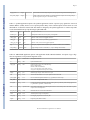
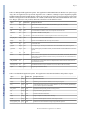
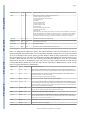
This appendix consists of several tables that list option names, types, default values, and a short
description of the option. These tables were first published as an appendix to an article in BMC
Bioinformatics (BLAST+: architecture and applications). They have been updated for this
manual.
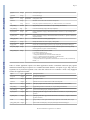
Table C1: Options common to all BLAST+ search applications. An option of type “flag” takes no argument, but if
present is true. Some options are valid only for a local search (“remote” option not used), others are valid only for
a remote search (“remote” option used).
BLAST® Help
option
type
default value
description and notes
db
string
none
BLAST database name.
query
string
stdin
Query file name.
query_loc
string
none
Location on the query sequence (Format: start-stop)
out
string
stdout
Output file name
evalue
real
10.0
Expect value (E) for saving hits
subject
string
none
File with subject sequence(s) to search.
subject_loc
string
none
Location on the subject sequence (Format: start-stop).
BLAST Command Line Applications User Manual
Page 29
BLAST® Help
BLAST® Help
show_gis
flag
N/A
Show NCBI GIs in report.
num_descriptions
integer
500
Show one-line descriptions for this number of database sequences.
num_alignments
integer
250
Show alignments for this number of database sequences.
max_target_seqs
Integer
500
Number of aligned sequences to keep. Use with report formats that do not have separate
definition line and alignment sections such as tabular (all outfmt > 4). Not compatible with
num_descriptions or num_alignments.
html
flag
N/A
Produce HTML output
gilist
string
none
Restrict search of database to GI’s listed in this file. Local searches only.
negative_gilist
string
none
Restrict search of database to everything except the GI’s listed in this file. Local searches only.
entrez_query
string
none
Restrict search with the given Entrez query. Remote searches only.
culling_limit
integer
none
Delete a hit that is enveloped by at least this many higher-scoring hits.
best_hit_overhang
real
none
Best Hit algorithm overhang value (recommended value: 0.1)
best_hit_score_edge
real
none
Best Hit algorithm score edge value (recommended value: 0.1)
dbsize
integer
none
Effective size of the database
searchsp
integer
none
Effective length of the search space
import_search_strategy
string
none
Search strategy file to read.
export_search_strategy
string
none
Record search strategy to this file.
parse_deflines
flag
N/A
Parse query and subject bar delimited sequence identifiers (e.g., gi|129295).
num_threads
integer
1
Number of threads (CPUs) to use in blast search.
remote
flag
N/A
Execute search on NCBI servers?
BLAST® Help
BLAST® Help
BLAST Command Line Applications User Manual
Page 30
oufmt
string
0
BLAST® Help
BLAST® Help
BLAST® Help
alignment view options:
0 = pairwise,
1 = query-anchored showing identities,
2 = query-anchored no identities,
3 = flat query-anchored, show identities,
4 = flat query-anchored, no identities,
5 = XML Blast output,
6 = tabular,
7 = tabular with comment lines,
8 = Text ASN.1,
9 = Binary ASN.1
10 = Comma-separated values
11 = BLAST archive format (ASN.1)
Options 6, 7, and 10 can be additionally configured to produce a custom format specified by
space delimited format specifiers.
The supported format specifiers are:
qseqid means Query Seq-id
qgi means Query GI
qacc means Query accesion
sseqid means Subject Seq-id
sallseqid means All subject Seq-id(s), separated by a ';'
sgi means Subject GI
sallgi means All subject GIs
sacc means Subject accession
sallacc means All subject accessions
qstart means Start of alignment in query
qend means End of alignment in query
sstart means Start of alignment in subject
send means End of alignment in subject
qseq means Aligned part of query sequence
sseq means Aligned part of subject sequence
evalue means Expect value
bitscore means Bit score
score means Raw score
length means Alignment length
pident means Percentage of identical matches
nident means Number of identical matches
mismatch means Number of mismatches
positive means Number of positive-scoring matches
gapopen means Number of gap openings
gaps means Total number of gap
ppos means Percentage of positive-scoring matches
frames means Query and subject frames separated by a '/'
qframe means Query frame
sframe means Subject frame
When not provided, the default value is:
'qseqid sseqid pident length mismatch gapopen qstart qend sstart send evalue bitscore', which
is equivalent to the keyword 'std'
BLAST® Help
Table C2: blastn application options. The blastn application searches a nucleotide query against nucleotide subject
sequences or a nucleotide database. An option of type “flag” takes no arguments, but if present the argument is true.
Four different tasks are supported: 1.) “megablast”, for very similar sequences (e.g, sequencing errors), 2.) “dcmegablast”, typically used for inter-species comparisons, 3.) “blastn”, the traditional program used for inter-species
comparisons, 4.) “blastn-short”, optimized for sequences less than 30 nucleotides.
option
task(s)
type
default value
description and notes
word_size
megablast
integer
28
Length of initial exact match.
word_size
dc-megablast
integer
11
Number of matching nucleotides in initial match. dcmegablast allows non-consecutive letters to match.
word_size
blastn
integer
11
Length of initial exact match.
BLAST Command Line Applications User Manual
Page 31
BLAST® Help
BLAST® Help
BLAST® Help
BLAST® Help
word_size
blastn-short
integer
7
Length of initial exact match.
gapopen
megablast
integer
0
Cost to open a gap.
gapextend
megablast
integer
none
Cost to extend a gap. This default is a function of reward/
penalty value.
gapopen
blastn, blastn-short, dc-megablast
integer
5
Cost to open a gap.
gapextend
blastn, blastn-short, dc-megablast
integer
2
Cost to extend a gap.
reward
megablast
integer
1
Reward for a nucleotide match.
penalty
megablast
integer
-2
Penalty for a nucleotide mismatch.
reward
blastn, dc-megablast
integer
2
Reward for a nucleotide match.
penalty
blastn, dc-megablast
integer
-3
Penalty for a nucleotide mismatch.
reward
blastn-short
integer
1
Reward for a nucleotide match.
penalty
blastn-short
integer
-3
Penalty for a nucleotide mismatch.
strand
all
string
both
Query strand(s) to search against database/subject.
Choice of both, minus, or plus.
dust
all
string
20 64 1
Filter query sequence with dust.
filtering_db
all
string
none
Mask query using the sequences in this database.
window_masker_taxid
all
integer
none
Enable WindowMasker filtering using a Taxonomic
ID.
window_masker_db
all
string
none
Enable WindowMasker filtering using this file.
soft_masking
all
boolean
true
Apply filtering locations as soft masks (i.e., only for
finding initial matches).
lcase_masking
all
flag
N/A
Use lower case filtering in query and subject sequence
(s).
db_soft_mask
all
integer
none
Filtering algorithm ID to apply to the BLAST database
as soft mask (i.e., only for finding initial matches).
db_hard_mask
all
integer
none
Filtering algorithm ID to apply to the BLAST database
as hard mask (i.e., sequence is masked for all phases of
search).
perc_identity
all
integer
0
Percent identity cutoff.
template_type
dc-megablast
string
coding
Discontiguous MegaBLAST template type. Allowed
values are coding, optimal and coding_and_optimal.
template_length
dc-megablast
integer
18
Discontiguous MegaBLAST template length.
use_index
megablast
boolean
false
Use MegaBLAST database index. Indices may be
created with the makembindex application.
index_name
megablast
string
none
MegaBLAST database index name.
xdrop_ungap
all
real
20
Heuristic value (in bits) for ungapped extensions.
xdrop_gap
all
real
30
Heuristic value (in bits) for preliminary gapped
extensions.
xdrop_gap_final
all
real
100
Heuristic value (in bits) for final gapped alignment.
no_greedy
megablast
flag
N/A
Use non-greedy dynamic programming extension.
BLAST Command Line Applications User Manual
Page 32
BLAST® Help
min_raw_gapped_score
all
integer
none
Minimum raw gapped score to keep an alignment in the
preliminary gapped and trace-back stages. Normally set
based upon expect value.
ungapped
all
flag
N/A
Perform ungapped alignment.
window_size
dc-megablast
integer
40
Multiple hits window size, use 0 to specify 1-hit
algorithm
Table C3: blastp application options. The blastp application searches a protein sequence against protein subject
sequences or a protein database. An option of type “flag” takes no arguments, but if present the argument is true.
Two different tasks are supported: 1.) “blastp”, for standard protein-protein comparisons, 2.) “blastp-short”,
optimized for query sequences shorter than 30 residues. This table reflects the 2.2.27 BLAST+ release.
BLAST® Help
BLAST® Help
BLAST® Help
option
task
type
default value
description and notes
word_size
blastp
integer
3
Word size of initial match.
word_size
blastp-short
integer
2
Word size of initial match.
gapopen
blastp
integer
11
Cost to open a gap.
gapextend
blastp
integer
1
Cost to extend a gap.
gapopen
blastp-short
integer
9
Cost to open a gap.
gapextend
blastp-short
integer
1
Cost to extend a gap.
matrix
blastp
string
BLOSUM62
Scoring matrix name.
matrix
blastp-short
string
PAM30
Scoring matrix name.
threshold
blastp
integer
11
Minimum score to add a word to the BLAST lookup table.
threshold
blastp-short
integer
16
Minimum score to add a word to the BLAST lookup table.
comp_based_stats
blastp
string
2
Use composition-based statistics:
D or d: default (equivalent to 2)
0 or F or f: no composition-based statistics
1: Composition-based statistics as in NAR 29:2994-3005, 2001
2 or T or t : Composition-based score adjustment as in Bioinformatics
21:902-911, 2005, conditioned on sequence properties
3: Composition-based score adjustment as in Bioinformatics 21:902-911, 2005,
unconditionally
comp_based_stats
blastp-short
string
0
Use composition-based statistics :
D or d: default (equivalent to 2)
0 or F or f: no composition-based statistics
1: Composition-based statistics as in NAR 29:2994-3005, 2001
2 or T or t : Composition-based score adjustment as in Bioinformatics
21:902-911, 2005, conditioned on sequence properties
3: Composition-based score adjustment as in Bioinformatics 21:902-911, 2005,
unconditionally
seg
all
string
no
Filter query sequence with SEG (Format: 'yes', 'window locut hicut', or 'no' to
disable).
soft_masking
blastp
boolean
false
Apply filtering locations as soft masks (i.e., only for finding initial matches).
lcase_masking
all
flag
N/A
Use lower case filtering in query and subject sequence(s).
db_soft_mask
all
integer
none
Filtering algorithm ID to apply to the BLAST database as soft mask (i.e., only for
finding initial matches).
db_hard_mask
all
integer
none
Filtering algorithm ID to apply to the BLAST database as hard mask (i.e., sequence
is masked for all phases of search).
BLAST Command Line Applications User Manual
Page 33
BLAST® Help
xdrop_gap_final
all
real
25
Heuristic value (in bits) for final gapped alignment/
window_size
blastp
integer
40
Multiple hits window size, use 0 to specify 1-hit algorithm.
window_size
blastp-short
integer
15
Multiple hits window size, use 0 to specify 1-hit algorithm.
use_sw_tback
all
flag
N/A
Compute locally optimal Smith-Waterman alignments?
Table C4: blastx application options. The blastx application translates a nucleotide query and searches it against
protein subject sequences or a protein database.
BLAST® Help
BLAST® Help
BLAST® Help
option
type
default value
description and notes
word_size
integer
3
Word size for initial match.
gapopen
integer
11
Cost to open a gap.
gapextend
integer
1
Cost to extend a gap.
matrix
string
BLOSUM62
Scoring matrix name.
threshold
integer
12
Minimum score to add a word to the BLAST lookup table.
seg
string
12 2.2 2.5
Filter query sequence with SEG (Format: 'yes', 'window locut hicut', or 'no' to disable).
soft_masking
boolean
false
Apply filtering locations as soft masks (i.e., only for finding initial matches).
lcase_masking
flag
N/A
Use lower case filtering in query and subject sequence(s).
db_soft_mask
integer
none
Filtering algorithm ID to apply to the BLAST database as soft mask (i.e., only for finding initial
matches).
db_hard_mask
integer
none
Filtering algorithm ID to apply to the BLAST database as hard mask (i.e., sequence is masked for
all phases of search).
xdrop_gap_final
real
25
Heuristic value (in bits) for final gapped alignment.
window_size
integer
40
Multiple hits window size, use 0 to specify 1-hit algorithm.
strand
string
both
Query strand(s) to search against database/subject. Choice of both, minus, or plus.
query_genetic_code
integer
1
Genetic code to translate query, see ftp://ftp.ncbi.nih.gov/entrez/misc/data/gc.prt
max_intron_length
integer
0
Length of the largest intron allowed in a translated nucleotide sequence when linking multiple
distinct alignments (a negative value disables linking).
comp_based_stats
integer
2
Use composition-based statistics for blastx:
D or d: default (equivalent to 2)
0 or F or f: no composition-based statistics
1: Composition-based statistics as in NAR 29:2994-3005, 2001
2 or T or t : Composition-based score adjustment as in Bioinformatics
21:902-911, 2005, conditioned on sequence properties
3: Composition-based score adjustment as in Bioinformatics 21:902-911, 2005, unconditionally
Default = `2'
Table C5: tblastn application options. The tblastn application searches a protein query against nucleotide subject
sequences or a nucleotide database translated at search time.
option
type
default value
description and notes
word_size
integer
3
Word size for initial match.
BLAST Command Line Applications User Manual
Page 34
BLAST® Help
BLAST® Help
gapopen
integer
11
Cost to open a gap.
gapextend
integer
1
Cost to extend a gap.
matrix
string
BLOSUM62
Scoring matrix name.
threshold
integer
13
Minimum score to add a word to the BLAST lookup table.
seg
string
12 2.2 2.5
Filter query sequence with SEG (Format: 'yes', 'window locut hicut', or 'no' to disable).
soft_masking
boolean
false
Apply filtering locations as soft masks (i.e., only for finding initial matches).
lcase_masking
flag
N/A
Use lower case filtering in query and subject sequence(s).
db_soft_mask
integer
none
Filtering algorithm ID to apply to the BLAST database as soft mask (i.e., only for finding initial
matches).
db_hard_mask
integer
none
Filtering algorithm ID to apply to the BLAST database as hard mask (i.e., sequence is masked for
all phases of search).
xdrop_gap_final
real
25
Heuristic value (in bits) for final gapped alignment.
window_size
integer
40
Multiple hits window size, use 0 to specify 1-hit algorithm.
db_gen_code
integer
1
Genetic code to translate subject sequences, see ftp://ftp.ncbi.nih.gov/entrez/misc/data/gc.prt
max_intron_length
integer
0
Length of the largest intron allowed in a translated nucleotide sequence when linking multiple
distinct alignments (a negative value disables linking).
comp_based_stats
string
2
Use composition-based statistics for tblastn:
D or d: default (equivalent to 2)
0 or F or f: no composition-based statistics
1: Composition-based statistics as in NAR 29:2994-3005, 2001
2 or T or t : Composition-based score adjustment as in Bioinformatics
21:902-911, 2005, conditioned on sequence properties
3: Composition-based score adjustment as in Bioinformatics 21:902-911, 2005, unconditionally
Default = `2'
BLAST® Help
Table C6: tblastx application options. The tblastx application searches a translated nucleotide query against
translated nucleotide subject sequences or a translated nucleotide database. An option of type “flag” takes no
arguments, but if present the argument is true. This table reflects the 2.2.27 BLAST+ release. Only ungapped
searches are supported for tblastx.
BLAST® Help
option
type
default value
description and notes
word_size
integer
3
Word size for initial match.
matrix
string
BLOSUM62
Scoring matrix name.
threshold
integer
13
Minimum word score to add the word to the BLAST lookup table.
seg
string
12 2.2 2.5
Filter query sequence with SEG (Format: 'yes', 'window locut hicut', or 'no' to disable).
soft_masking
boolean
false
Apply filtering locations as soft masks (i.e., only for finding initial matches).
lcase_masking
flag
N/A
Use lower case filtering in query and subject sequence(s).
db_soft_mask
integer
none
Filtering algorithm ID to apply to the BLAST database as soft mask (i.e., only for finding initial
matches).
db_hard_mask
integer
none
Filtering algorithm ID to apply to the BLAST database as hard mask (i.e., sequence is masked for
all phases of search).
strand
string
both
Query strand(s) to search against database subject sequences. Choice of both, minus, or plus.
query_genetic_code
integer
1
Genetic code to translate query, see ftp://ftp.ncbi.nih.gov/entrez/misc/data/gc.prt
BLAST Command Line Applications User Manual
Page 35
db_gen_code
integer
1
Genetic code to translate subject sequences, see ftp://ftp.ncbi.nih.gov/entrez/misc/data/gc.prt
max_intron_length
integer
0
Length of the largest intron allowed in a translated nucleotide sequence when linking multiple
distinct alignments (a negative value disables linking)
BLAST® Help
Table C7: rpsblast application options. The rpsblast application searches a protein query against the conserved
domain database (CDD), which is a set of protein profiles. Many of the common options such as matrix or word
threshold are set when the CDD is built and cannot be changed by the rpsblast application. A search ready CDD
can be downloaded from ftp://ftp.ncbi.nih.gov/pub/mmdb/cdd/
BLAST® Help
Option
Type
Default value
Description and notes
window_size
integer
40
Multiple hits window size, use 0 to specify 1-hit algorithm.
xdrop_ungap
real
15
Heuristic value (in bits) for ungapped extensions
xdrop_gap
real
25
Heuristic value (in bits) for preliminary gapped extensions.
xdrop_gap_final
real
40
Heuristic value (in bits) for final gapped alignment.
seg
string
12 2.2 2.5
Filter query sequence with SEG (Format: 'yes', 'window locut hicut', or 'no' to disable).
soft_masking
boolean
false
Apply filtering locations as soft masks (i.e., only for finding initial matches).
Table C8: Makeblastdb application options. This application builds a BLAST database. An option of type “flag”
takes no arguments, but if present the argument is true.
BLAST® Help
BLAST® Help
option
type
default value
Description and notes
in
string
stdin
Input file/database name
input_type
string
fasta
Input file type, it may be any of the following:
fasta: for FASTA file(s)
blastdb: for BLAST database(s)
asn1_txt: for Seq-entries in text ASN.1 format
asn1_bin: for Seq-entries in binary ASN.1 format
dbtype
string
prot
Molecule type of input, values can be nucl or prot.
title
string
none
Title for BLAST database. If not set, the input file name will be used.
parse_seqids
flag
N/A
Parse bar delimited sequence identifiers (e.g., gi|129295) in FASTA input.
hash_index
flag
N/A
Create index of sequence hash values.
mask_data
string
none
Comma-separated list of input files containing masking data as produced by NCBI masking applications
(e.g. dustmasker, segmasker, windowmasker).
out
string
input file name
Name of BLAST database to be created. Input file name is used if none provided. This field is required
if input consists of multiple files.
max_file_size
string
1GB
Maximum file size to use for BLAST database.
taxid
integer
none
Taxonomy ID to assign to all sequences.
taxid_map
string
none
File mapping sequence IDs to taxonomy IDs.
logfile
string
none
Program log file (default is stderr).
BLAST Command Line Applications User Manual
Page 36
BLAST® Help
Table C9: Makeprofiledb application options. This application builds an RPS-BLAST database. An option of type
“flag” takes no arguments, but if present the argument is true. COBALT (a multiple sequence alignment program)
and DELTA-BLAST both use RPS-BLAST searches as part of their processing, but use specialized versions of the
database. This application can build databases for COBALT, DELTA-BLAST, and a standard RPS-BLAST search.
The “dbtype” option (see entry in table) determines which flavor of the database is built.
BLAST® Help
BLAST® Help
option
type
default value
Description and notes
in
string
stdin
Input file that contains a list of scoremat files (delimited by space, tab, or newline)
binary
flag
N/A
The scoremat files are binary ASN.1
title
string
none
Title for RPS-BLAST database. If not set, the input file name will be used.
threshold
real
9.82
Threshold for RPSBLAST lookup table.
out
string
input file name
Name of BLAST database to be created. Input file name is used if none provided.
max_file_size
string
1GB
Maximum file size to use for BLAST database.
dbtype
string
rps
Specifies use for RPSBLAST db. One of rps, cobalt, or delta.
index
flag
N/A
Creates index files.
gapopen
integer
none
Cost to open a gap. Used only if scoremat files do not contain PSSM scores, otherwise ignored.
gapextend
integer
none
Cost to extend a gap by one residue. Used only if scoremat files do not contain PSSM scores, otherwise
ignored.
scale
real
100
PSSM scale factor.
matrix
string
BLOSUM62
Matrix to use in constructing PSSM. One of BLOSUM45, BLOSUM50, BLOSUM62, BLOSUM80,
BLOSUM90, PAM250, PAM30 or PAM70. Used only if scoremat files do not contain PSSM scores,
otherwise ignored.
obsr_threshold
real
6
Exclude domains with maximum number of independent observations below this value (for use in
DELTA-BLAST searches).
exclude_invalid
real
true
Exclude domains that do not pass validation test (for use in DELTA-BLAST searches).
logfile
string
none
Program log file (default is stderr).
Table C10: Blastdbcmd application options. This application reads a BLAST database and produces reports.
BLAST® Help
option
type
default value
description and notes
db
string
nr
BLAST database name.
dbtype
string
guess
Molecule type stored in BLAST database, one of nucl, prot, or guess.
entry
string
none
Comma-delimited search string(s) of sequence identifiers: e.g.: 555, AC147927, 'gnl|dbname|tag',
or 'all' to select all sequences in the database
entry_batch
string
none
Input file for batch processing (Format: one entry per line)
pig
integer
none
PIG (protein identity group) to retrieve.
info
flag
N/A
Print BLAST database information.
range
string
none
Range of sequence to extract (Format: start-stop).
strand
string
plus
Strand of nucleotide sequence to extract. Choice of plus or minus.
mask_sequence_with
string
none
Produce lower-case masked FASTA using the algorithm IDs specified.
BLAST Command Line Applications User Manual
Page 37
string
stdout
Output file name.
outfmt
string
%f
Output format, where the available format specifiers are:
%f means sequence in FASTA format
%s means sequence data (without defline)
%a means accession
%g means gi
%o means ordinal id (OID)
%t means sequence title
%l means sequence length
%T means taxid
%L means common taxonomic name
%S means scientific name
%P means PIG
%mX means sequence masking data, where X is an optional comma-separated list of integers to
specify the algorithm ID(s) to display (or all masks if absent or invalid specification). Masking
data will be displayed as a series of 'N-M' values separated by ';' or the word 'none' if none are
available. For every format except '%f', each line of output will correspond to a sequence.
target_only
flag
N/A
Definition line should contain target GI only.
get_dups
flag
N/A
Retrieve duplicate accessions.
line_length
integer
80
Line length for output.
ctrl_a
flag
N/A
Use Ctrl-A as the non-redundant definition line separator.
BLAST® Help
out
BLAST® Help
BLAST® Help
Table C11: Makembindex application options. The indexed databases created by makembindex are used by
production MegaBLAST software and by a new srsearch utility designed to quickly search for nearly exact matches
(up to one mismatch) of short queries against a genomic database. When a FASTA formatted file is used as the
input, then masking by lower case letters is incorporated in the index. Makembindex can currently build two types
of indices, called “old style” and “new style” indexing. The NCBI offers full support for the new style and has
deprecated the old style. A MegaBLAST search with a new style index requires that both the index and the
corresponding BLAST database be present. The index structure is described in PMID:18567917. Please cite this
paper in any publication that uses makembindex.
BLAST® Help
option
type
default value
Description and notes
input
string
stdin
Input file name or BLAST database name, depending on the value of the iformat parameter. For
FASTA formatted input, this parameter is optional and defaults to the program's standard input stream.
output
string
none
The resulting index name. The index itself can consist of multiple files, called volumes, called
<index_name>.00.idx, <index_name>.01.idx,...
This option should not be used with new style indices.
iformat
string
fasta
The input format selector. Possible values are 'fasta' and 'blastdb'.
old_style_format
boolean
true
If set to 'false' the new style index is created. New style indices require a BLAST database as input
(use -iformat blastdb), which can be downloaded from the NCBI FTP site or created with makeblastdb.
The option -output is ignored for a new style index. New style indices are always created at the same
location as the corresponding BLAST database.
legacy
boolean
true
This is a compatibility feature to support current production MegaBLAST. If true, then -stride, -nmer,
and -ws_hint are ignored. The legacy format must be used for BLAST.
nmer
integer
12
N-mer size to use. Ignored if –legacy is specified
ws_hint
integer
28
This is an optimization hint for makembindex that indicates an expected minimum match size in
searches that use the index. If n is the value of -nmer parameter and s is the value of –stride parameter,
then the value of -ws_hint must be at least n + s - 1.
stride
integer
5
makembindex will index every stride-th N-mer of the database.
volsize
integer
1536
Target index volume size in megabytes.
BLAST Command Line Applications User Manual